Incremental forever backup has become essential for protecting virtual machines (VMs) in modern enterprise environments. This method backs up only data that changes after an initial full backup. As a result, organizations gain continuous protection while reducing storage needs and network load. With large VMware deployments growing rapidly, efficient backup strategies like incremental forever help businesses control costs and meet compliance demands without straining infrastructure resources. According to VMware’s Data Protection Best Practices, leveraging change tracking technologies is critical for optimizing both performance and storage efficiency.
Why Incremental Forever Backup Matters in Enterprise Environments?
Efficient data protection is vital for enterprises managing many VMs. Incremental forever backup addresses this need by minimizing redundant data transfers and storage use.
● Reduced Storage Consumption
Incremental forever backup stores only new or changed data blocks after the first full backup. This approach prevents unnecessary duplication of VM images across multiple restore points. Over time, it leads to significant savings on disk space compared to traditional methods that require frequent full backups.
● Shorter Backup Windows
By transferring only changed blocks instead of entire VMs during each cycle, incremental forever reduces the time needed for daily or hourly backups. This minimizes disruption to production workloads and allows IT teams to schedule backups more flexibly—even during business hours if needed.
● Lower Network Bandwidth Usage
Because less data moves across the network during each incremental job, organizations avoid bottlenecks that can slow down other critical operations. This benefit becomes even more pronounced in distributed environments where bandwidth may be limited between sites or branches.
● More Frequent Restore Points
With reduced resource requirements per backup job, IT teams can increase how often they capture restore points—improving their ability to recover from recent incidents like ransomware attacks or accidental deletions.
● Cost Control Over Time
Storing fewer full copies of VM data means lower long-term expenses for primary storage arrays or cloud repositories. Many organizations also see savings on secondary infrastructure such as offsite replication targets or tape archives.
● Data Integrity Through Synthetic Full Backups
While relying on chains of incrementals could risk longer recovery times if one link fails, most enterprise solutions create periodic synthetic full backups by merging incrementals into a new baseline without re-transferring all source data. This maintains fast restores while keeping storage growth in check.
Given these benefits, selecting a solution that supports true incremental forever workflows is crucial for balancing operational efficiency with regulatory requirements.
How To Choose The Best VMware Backup Solution for Incremental Forever Backup?
Choosing an effective VMware backup tool involves evaluating several core features designed to maximize efficiency while safeguarding your environment.
Start by confirming support for true incremental forever backup powered by robust change tracking mechanisms such as VMware’s native Changed Block Tracking (CBT). CBT enables the software to identify exactly which parts of a VM have changed since the last snapshot—ensuring only necessary blocks are captured during each run. Without this feature enabled at both hypervisor and guest levels, achieving efficient incremental forever workflows becomes difficult or impossible.
Scalability should be another top consideration when reviewing potential solutions. As your virtual environment grows—from dozens to hundreds or thousands of VMs—the chosen tool must maintain performance without introducing delays or management complexity. Look for platforms proven in large-scale deployments where rapid expansion does not degrade reliability or speed.
Policy flexibility is also important so you can tailor retention schedules according to business needs or compliance mandates (such as GDPR or HIPAA). The best tools allow granular configuration of how long restore points are kept before automatic deletion—helping you balance recovery readiness against available storage capacity.
For further optimization of space usage and security posture:
Deduplication capabilities ensure that identical blocks across multiple VMs—or within different versions of the same VM—are stored just once on disk. When combined with compression algorithms, deduplication can shrink total repository size dramatically over time . Encryption at rest protects sensitive information from unauthorized access even if physical drives are lost or stolen—a key requirement under many industry regulations today.
Finally, consider ease-of-use factors like centralized dashboards for monitoring jobs; automated alerting; integration with existing authentication systems; and comprehensive reporting tools that simplify audits or troubleshooting efforts when issues arise.
Vinchin Backup & Recovery: Enterprise-Grade Protection for VMware
When seeking robust protection for VMware environments, Vinchin Backup & Recovery offers professional-grade virtual machine backup tailored to enterprise needs. Supporting over 15 mainstream virtualization platforms—including leading options like VMware, Hyper-V, Proxmox, oVirt, OLVM, RHV, XCP-ng, XenServer, OpenStack, ZStack and others—it delivers broad compatibility across diverse infrastructures found in modern businesses and institutions alike.
Key features include incremental forever backup powered by Changed Block Tracking (CBT), instant recovery capabilities (for all but Hyper-V), advanced deduplication and compression technology, LAN-free backup support on VMware environments for optimized speed and efficiency, plus granular restore functionality ensuring precise recovery options at any scale—all designed to maximize uptime while minimizing resource consumption.
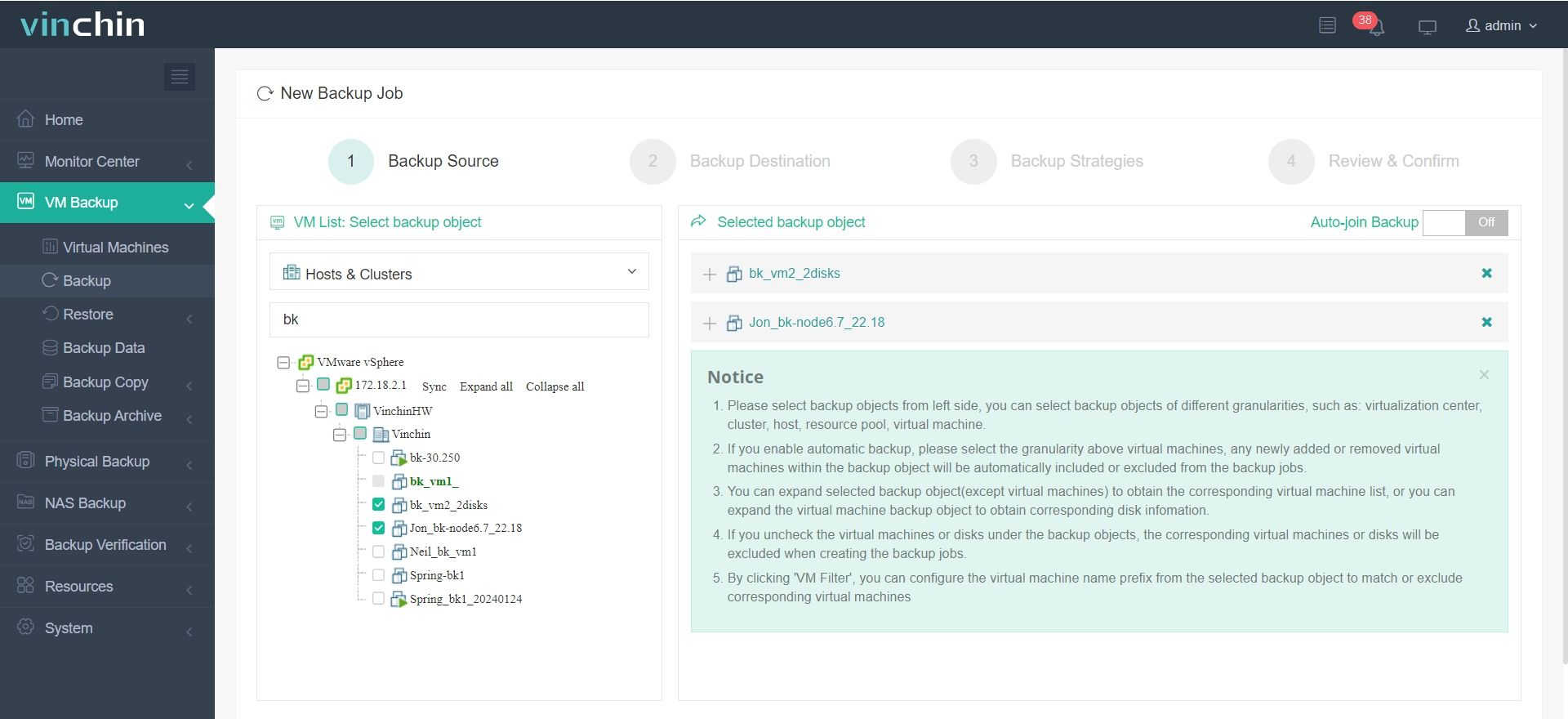
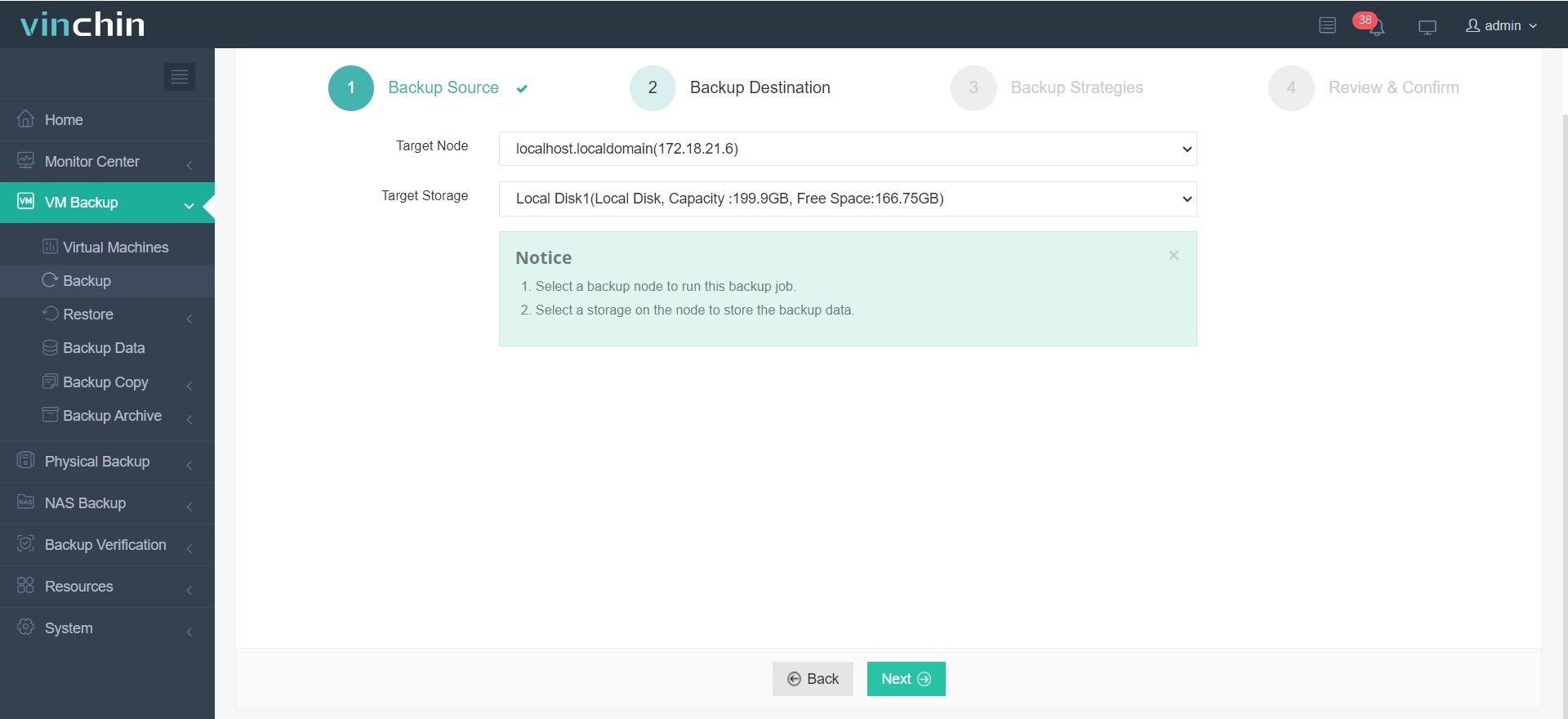
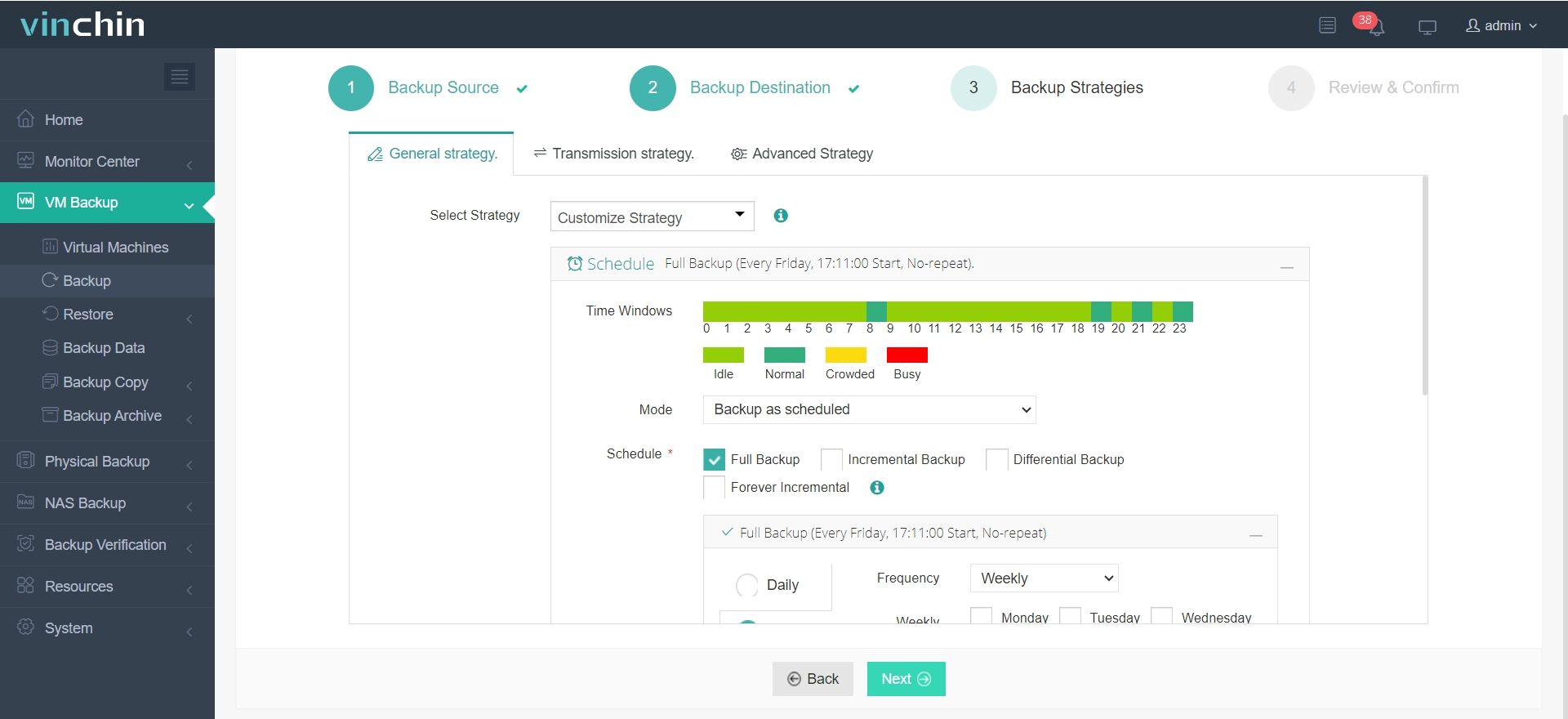
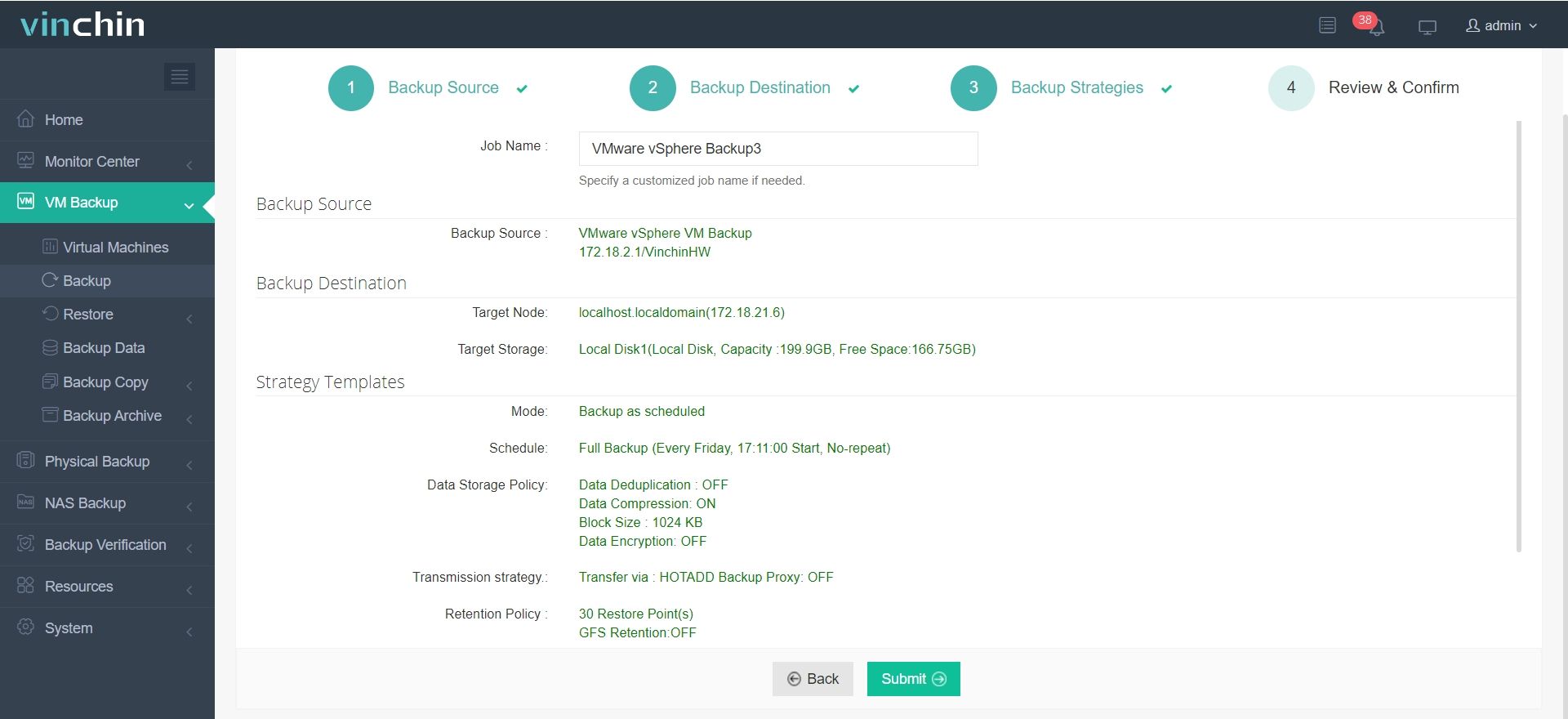
The intuitive Vinchin web console makes protecting your environment straightforward:
Step 1. Select Backup Source
Step 2. Select Backup Destination
Step 3. Select Backup Strategies
Step 4. Review and submit the job
Trusted worldwide by thousands of enterprises—with top ratings from industry analysts—Vinchin Backup & Recovery offers a 60-day fully featured free trial so you can experience its power firsthand.
Best VMware Backup Software FAQs
Q: Does incremental forever backup affect restore speed?
No. Modern solutions reconstruct full VMs quickly from chains of incrementals using optimized indexing techniques built into their architecture—so restores remain fast even after many cycles have passed since your last full copy was taken.
Q: Is deduplication supported with incremental forever backups?
Yes. Leading platforms combine incremental forever workflows with inline deduplication engines so duplicate blocks are stored just once—maximizing space savings throughout your repository regardless of how often changes occur within protected VMs.
Q: How does this approach impact compliance?
Incremental forever enables frequent restore point creation without ballooning storage requirements—making it easier to satisfy regulatory mandates around retention periods while still maintaining cost-effective infrastructure footprints suitable even for highly regulated industries like finance or healthcare.
Conclusion
Selecting an enterprise-class solution supporting true incremental forever delivers lasting gains in efficiency while controlling costs over time—all without sacrificing speed or compliance readiness.









