Key Takeaways
Hyper-V cluster backup protects VMs, cluster configuration, and shared storage in Failover Cluster environments.
Backup is essential to protect against ransomware, accidental deletion, corruption, and hardware failure.
Vinchin Backup & Recovery provides agentless backup, centralized management, and instant recovery for Hyper-V cluster.
Learn about Hyper-V Cluster Backup
Hyper-V cluster backup is a process to protect virtual machines (VMs), cluster configuration, and shared storage in a Microsoft Hyper-V Failover Cluster environments. Since clustered Hyper-V deployments are commonly used in enterprise production environments, backup and disaster recovery become essential for maintaining business continuity.
Different from Hyper-V hosts, clustered environments have additional complexities:
A proper Hyper-V cluster backup strategy ensures workloads can be restored quickly after accidental deletion, ransomware attack, hardware failures, and etc..
The Importance of Hyper-V Backup
Some people may mistakenly assume that clustering replaces backup, however, the two solve completely different problems.
Failover Cluster - Keep services online during host failure
Backup & Recovery - Restore lost, corrupted, or deleted data
Without backup, business is vulnerable to:
Human mistakes
Cyberattacks
Storage corruption
Application failures
Operation system issues
Site-level disaster
For production environments running SQL Server, Exchange, ERP systems, or VDI workloads, backup is essential for operational resilience.
Native Hyper-V Cluster Backup Options
Windows Server Backup
Microsoft provides Windows Server Backup for basic Hyper-V protection.
Advantages:
Limitations:
Limited scalability
Basic management features
Weak centralized monitoring
Limited enterprise automation
System Center Data Protection Manager (DPM)
Microsoft DPM provides more advanced backup features for enterprise environments.
Features include:
However, deployment complexity and licensing costs may increase operational overhead.
Protect Hyper-V Cluster with Vinchin Backup & Recovery
Vinchin Backup & Recovery is designed to simplify data protection for enterprise virtual infrastructures, including Hyper-V cluster.
Why Vinchin Fits Hyper-V Cluster Environments
Agentless Hyper-V Backup: No agents are inside virtual machines, reducing maintenance and minimizing resource overhead.
Centralized Management Console: Administrators can manage backup tasks across multiple Hyper-V hosts and cluster through a unified interface.
Incremental Forever Technology: Only changed data is transferred after the initial full backup, improving backup efficiency.
Instant Recovery: Critical VMs can be restored rapidly to reduce downtime during failures or ransomware incidents.
Flexible Storage Compatibility: Vinchin supports multiple storage destinations, like NAS, SAN, local disks, cloud storage, and object storage.
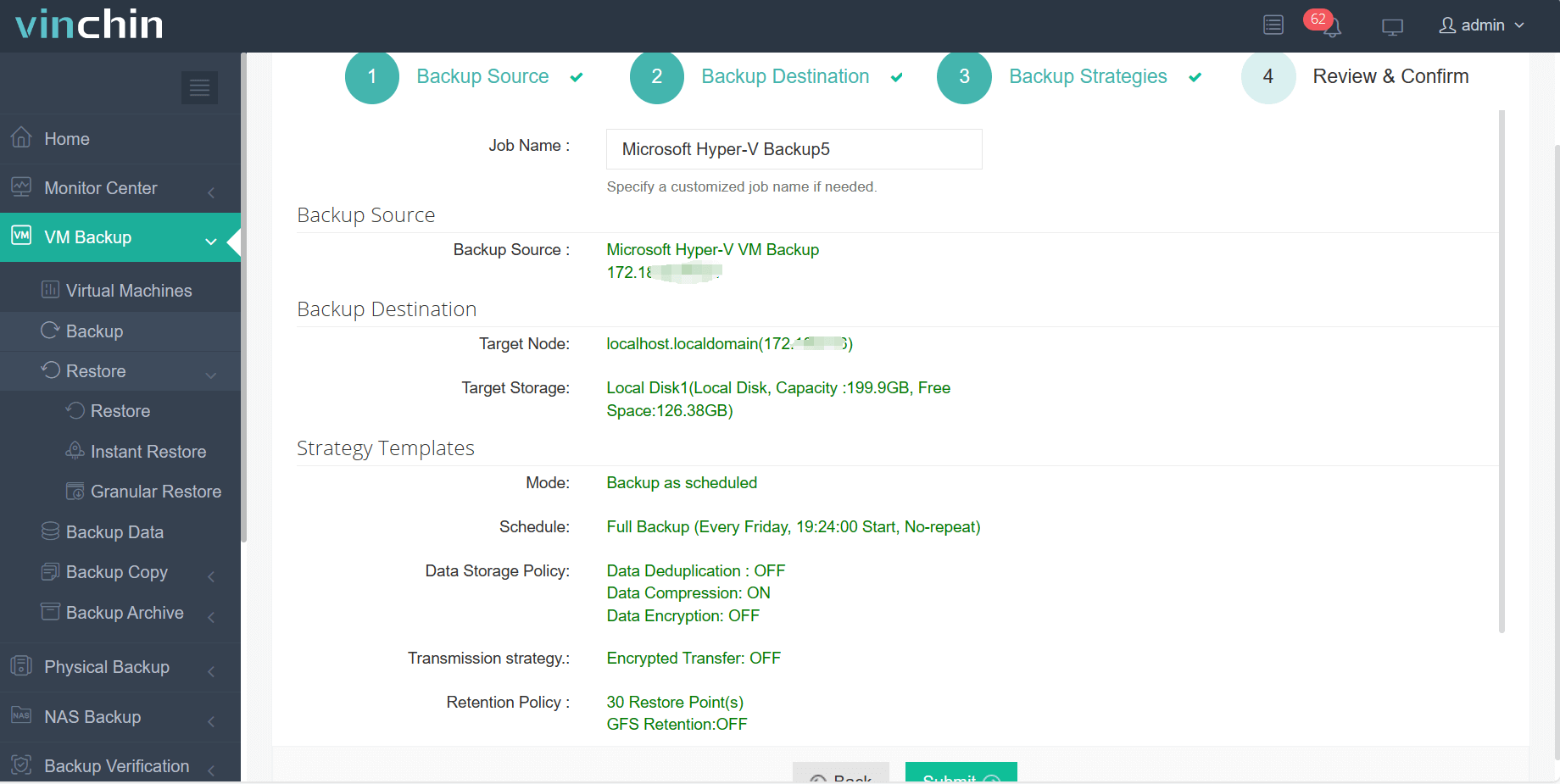
Efficient Workflow with Vinchin:
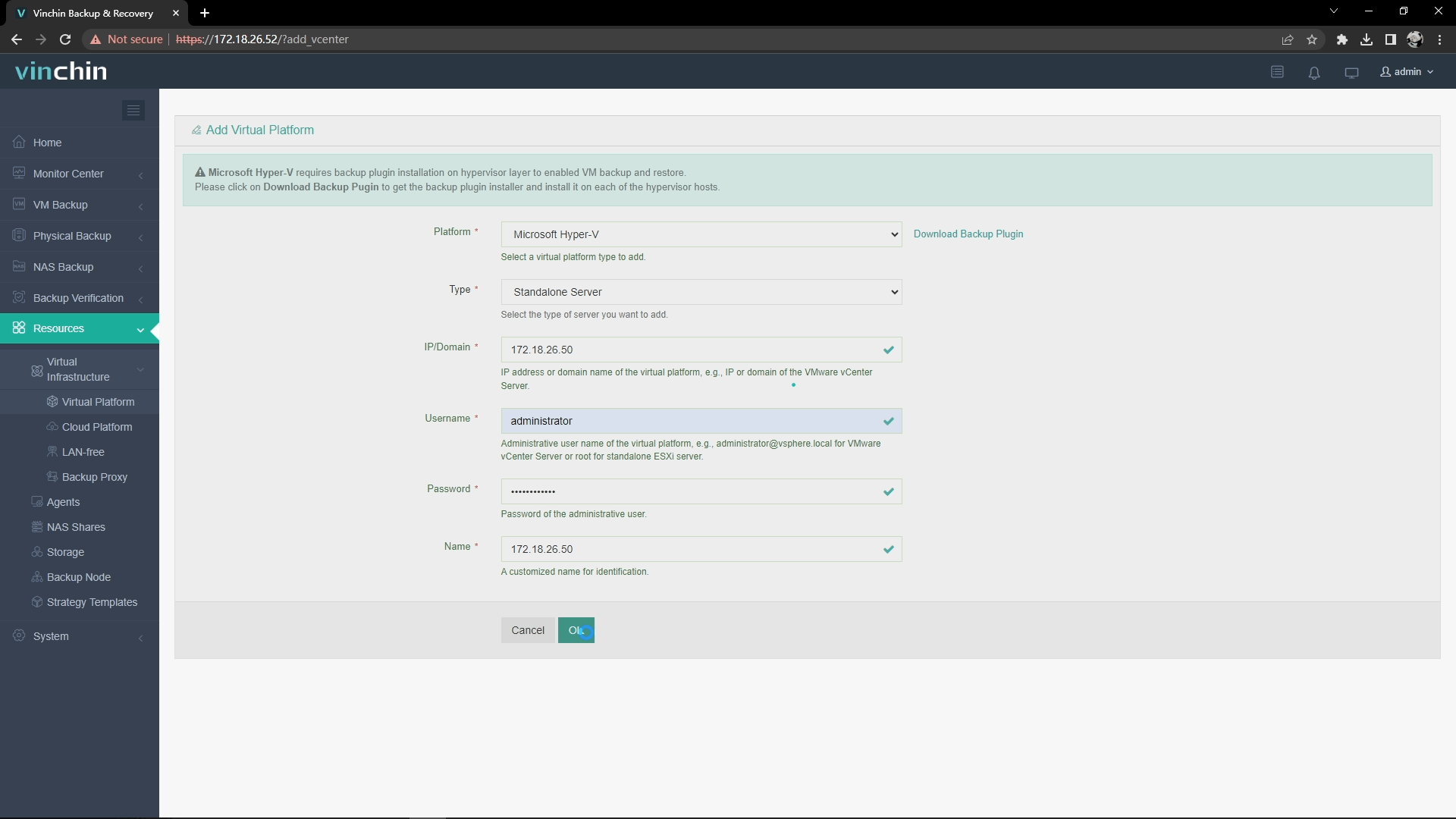
1. Install Hyper-V Backup Plugins
Go to Resource > Virtual Infrastructure > Virtual Platform, and click Add > Select Microsoft Hyper-V.
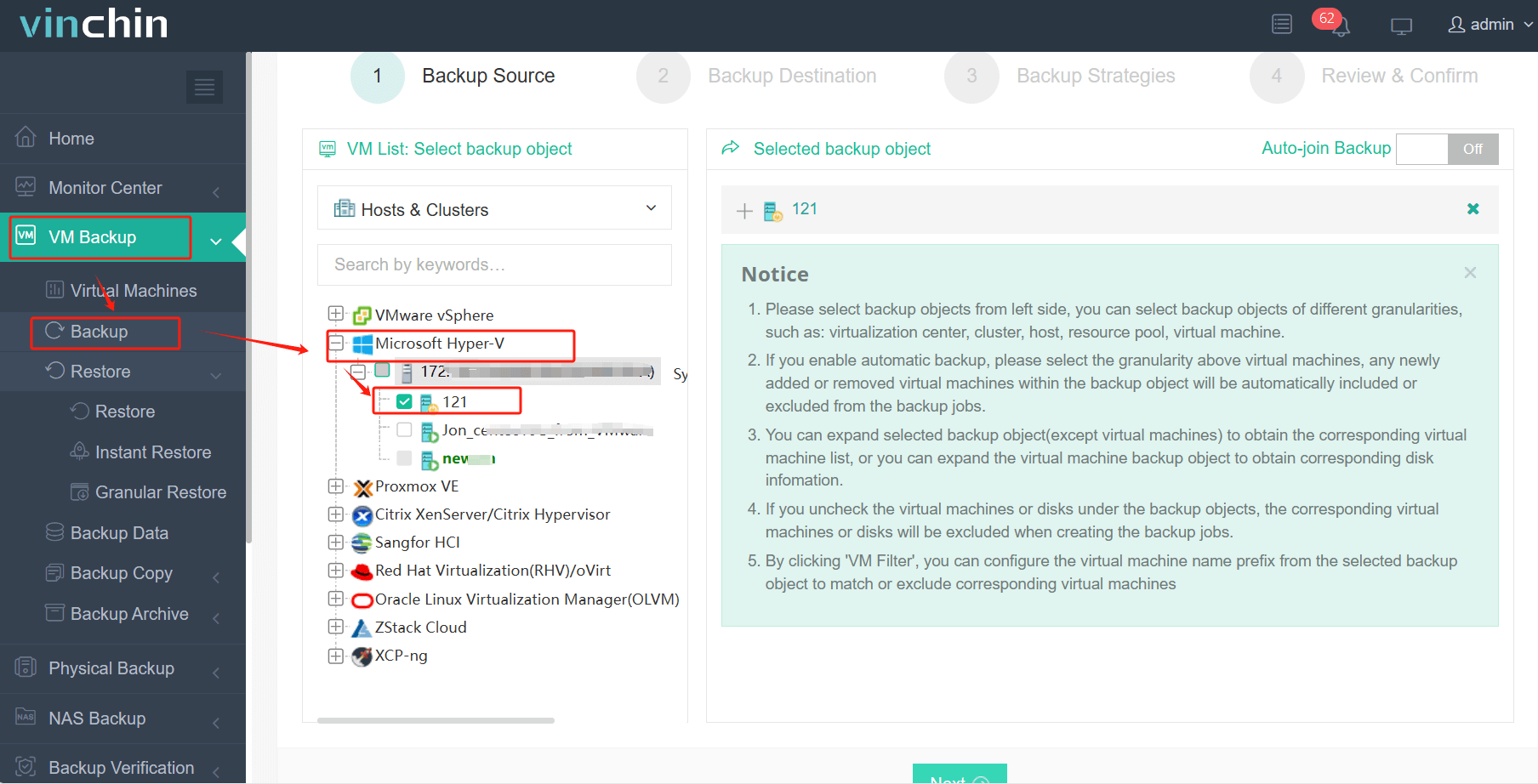
2. Create a Hyper-V Cluster Backup Job
Go to VM Backup > Backup, select Hyper-V cluster you want to protect, and click Next.
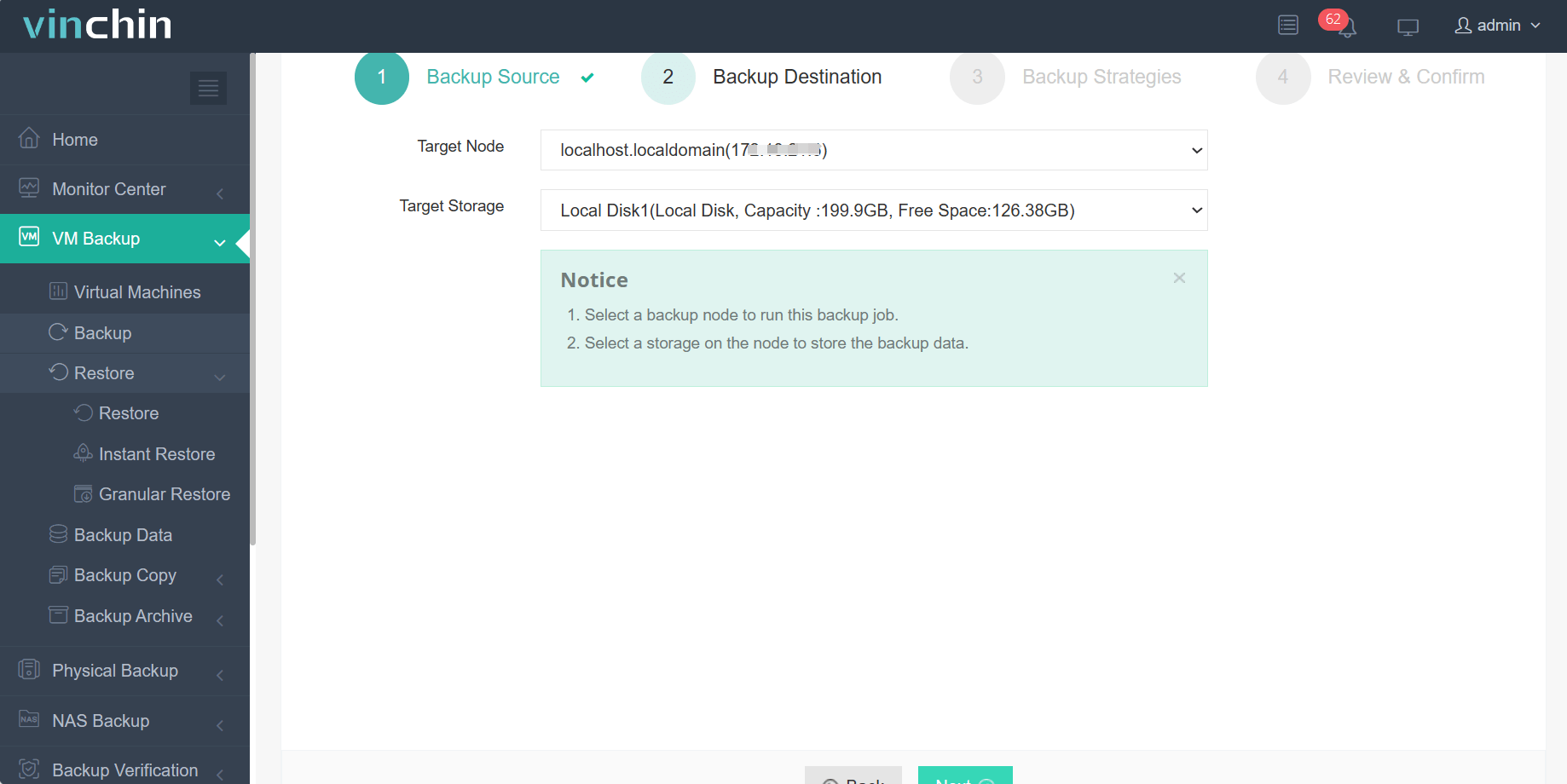
3. Select Backup Storage
Choose Target Node, and select Target Storage, including local disks, NAS, and etc..
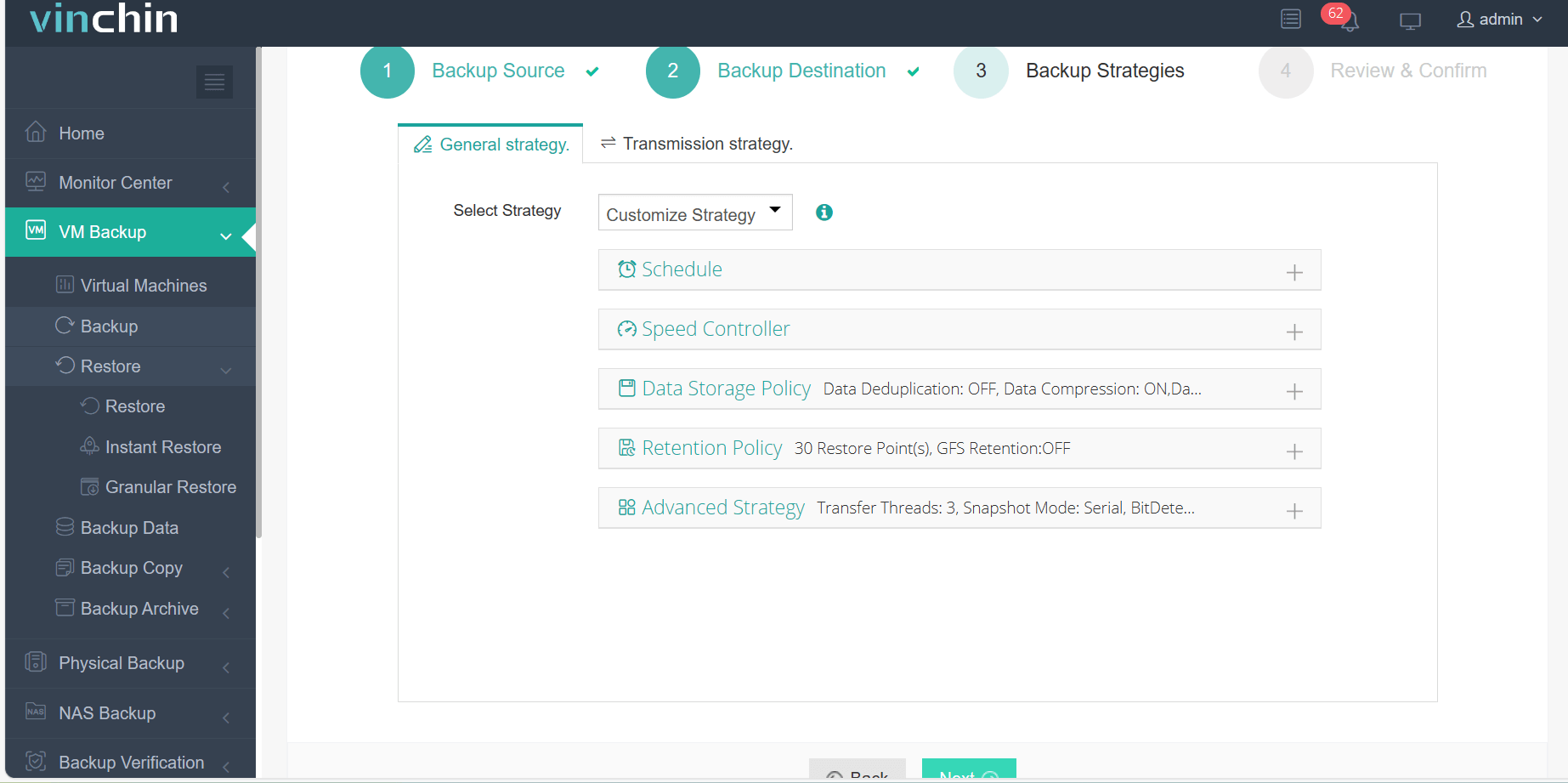
4. Configure Backup Strategy
Select Schedule, Data Storage Policy, Retention Policy, and other Advanced Strategy.
5. Review & Confirm
Review and confirm all your backup settings and submit the task.
Best Practice for Hyper-V Cluster Backup
1. Use Application-Aware Backup
This ensures workloads such as: Microsoft SQL Server, Active Directory, Exchange Server, remain in a recoverable state after restoration.
2. Follow the 3-2-1 Backup Rule
A common enterprise backup strategy includes: 3 copies of data, 2 storage types, and 1 offsite copy.
3. Automate Incremental Backups
This can help reduce backup windows, lower storage consumption, and improve backup efficiency.
4. Verify Recovery Regularly
Backups should always be tested.
Further: Hyper-V Cluster Disaster Recovery Considerations
Backup alone is not enough. Enterprise should also define disaster recovery objective such as:
1. Recovery Point Objective (RPO)
The maximum acceptable amount of data loss.
2. Recovery Time Objective (RTO)
The maximum acceptable downtime after an incident.
3. Offsite Replication
Storing backup copies in remote locations improves resilience during large-scale outages or disaster.
Vinchin provides capabilities designed for Hyper-V environments above, download Vinchin Backup & Recovery to have a 60-day free trial!
FAQs about Hyper-V Cluster Backup
Q1: Can Windows Server Backup back up a Hyper-V Failover Cluster?
Yes, Windows Server Backup supports Hyper-V workloads and can protect clustered virtual machines using VSS technology, although enterprise features may be limited.
Q2: How often should Hyper-V cluster backups run?
It depends on business requirements and PRO objectives. Many organizations perform daily incremental backups, weekly full backups, or continuous replication for critical workloads.
Q3: What is the best backup type for Hyper-V cluster?
Incremental, application-aware backups are commonly recommended because they improve efficiency while maintaining workload consistency.
Q4: Can backup software automatically detect new VMs in a Hyper-V cluster?
Some enterprise backup solutions support automatic VM discovery. This feature allows newly created VMs inside the cluster to be automatically added to backup policies and protected without manual configuration. In Vinchin, you can enable Auto-join backup to do so.
Final Thoughts
Hyper-V clustering helps keep workloads online, but it cannot protect businesses from data loss. A modern Hyper-V cluster backup strategy should combine: reliable VM protection, application-aware backup, incremental backup policies, offsite disaster recovery, and fast recovery capabilities.
For organizations seeking a more streamlined backup experience, Vinchin Backup & Recovery provides enterprise-grade protection for Hyper-V environments while simplifying day-to-day backup management.