Business-critical applications often run on Microsoft Hyper-V. Even a brief outage can disrupt operations. The right Hyper-V backup software helps keep these applications available. Rapid recovery options like instant restore and granular file recovery help you get back online fast after any incident.
Maximizing uptime is vital for enterprises. It prevents costly downtime, keeps productivity high, and supports compliance needs. A strong backup solution reduces risk and ensures continuous service delivery. Understanding what matters most helps you choose wisely.
Why Maximizing Uptime Matters in Enterprise Environments
Downtime has a real cost in today’s digital world. Even short outages can lead to lost revenue, damaged reputation, or regulatory trouble. Acording to the Uptime Institute’s 2022 Outage Analysis Report, over 60% of outages cost more than $100,000, and about 15% exceed $1 million. For regulated industries such as healthcare or finance, downtime may also mean failing audits or facing fines.
Inadequate backup increases risks like prolonged downtime or data loss. Enterprises need solutions that protect data but also enable fast recovery so business-critical apps stay available when needed.
Reasons Why Uptime Should Be Your Top Priority When Choosing Hyper-V Backup Software
Selecting Hyper-V backup software involves many factors. For organizations running critical workloads on Hyper-V, maximizing uptime must guide your decision-making process. Here are key reasons why:
● Downtime Directly Impacts Revenue
Lost access to core systems means lost sales opportunities and halted transactions. For example, if an e-commerce platform goes down during peak hours due to a failed VM restore process, every minute offline translates into missed orders and dissatisfied customers.
● Compliance Demands Continuous Availability
Many regulations require businesses to maintain access to sensitive data at all times. If backups cannot be restored quickly after an incident, such as ransomware, organizations may fail compliance checks or face legal penalties.
● Customer Trust Relies on Service Continuity
Clients expect uninterrupted service from their providers. Extended outages erode trust and can drive customers toward competitors who offer better reliability.
● Operational Efficiency Depends on Fast Recovery
IT teams need tools that let them recover entire VMs or specific files within minutes, not hours, so staff can resume work quickly after disruptions like accidental deletions or hardware failures.
● Reputation Management Requires Resilience
News of major outages spreads fast through social media and industry channels. Companies known for frequent disruptions risk long-term brand damage that is hard to repair even after technical issues are resolved.
These points show why uptime should always be front-of-mind when evaluating Hyper-V backup solutions for your enterprise environment.
Features That Help Maximize Uptime in Hyper-V Backup Solutions
Backup software must deliver more than just basic protection, and it should actively support rapid recovery while minimizing disruption to daily operations. Look for these essential features:
Instant VM Restore
This lets you bring virtual machines back online within minutes by running them directly from backup storage while full restoration completes in the background, which is a lifesaver during emergencies like server crashes.
Granular File Recovery
Sometimes only one file needs restoring rather than an entire VM image; granular recovery allows IT staff to retrieve individual files or folders quickly without lengthy processes.
Application-Aware Backups
For databases such as SQL Server or Exchange running inside VMs, application-aware processing ensures backups capture consistent states even during heavy transaction loads, so restores do not corrupt data integrity.
Automated Scheduling & Policy-Based Retention
Automation reduces manual errors by ensuring backups run at set intervals even overnight or during holidays, and retention policies help manage storage efficiently while meeting regulatory requirements.
Scalability Across Large Deployments
As infrastructure grows from dozens to hundreds of VMs across multiple hosts or clusters, scalable solutions prevent bottlenecks that could slow down both backups and restores when time matters most.
Strong Security Controls (Encryption & Ransomware Protection)
End-to-end encryption protects data both at rest and in transit; built-in ransomware defenses block unauthorized changes so attackers cannot delete your last line of defense (NIST Cybersecurity Framework).
Centralized Management Console
A single dashboard streamlines monitoring across many servers, saving time for busy IT teams managing complex environments with diverse workloads spread across locations.
Each feature above plays a role in reducing downtime risk while supporting business continuity goals for modern enterprises using Microsoft Hyper-V virtualization platforms.
How To Choose The Best Hyper-V Backup Solution for Maximizing Uptime
Choosing effective backup software requires careful evaluation against your organization’s unique needs, but certain criteria stand out when uptime is paramount:
● Proven High-Speed Recovery Options
Solutions offering instant VM restore reduce wait times dramatically compared to traditional full-image restores. Granular file-level recovery lets you address minor incidents without disrupting whole systems. For example, recovering a deleted spreadsheet instead of rolling back an entire database server VM image just because one user made a mistake.
● Automation Features
Automated scheduling ensures regular backups happen even if staff are unavailable due to vacations or turnover; policy-driven retention minimizes human error by enforcing consistent rules about how long different types of data are kept before deletion.
● Scalability
Your environment may start small but grow rapidly as new projects launch; scalable solutions adapt easily whether protecting ten VMs today or thousands tomorrow with no drop-off in performance.
● Robust Security Controls
Data breaches often occur during transfer between hosts/repositories; look for end-to-end encryption plus multi-factor authentication controls that limit who can initiate restores (especially important if remote workers have admin rights).
● Ease of Management
A centralized interface cuts training time so new admins become productive faster; intuitive dashboards highlight issues before they escalate into bigger problems, helping teams respond proactively rather than reactively.
By focusing on these criteria and testing shortlisted products under real-world conditions, you ensure your chosen solution delivers maximum uptime protection now and as your business evolves.
Vinchin Backup & Recovery: Enterprise-Grade Protection for Hyper-V
For organizations relying on Microsoft Hyper‑V virtualization, seamless protection is essential for maintaining uptime across critical workloads. Vinchin Backup & Recovery stands out as an enterprise-level virtual machine backup solution supporting over 15 mainstream virtualization platforms, including VMware, Proxmox VE, oVirt/RHV/OLVM, Oracle Linux Virtualization Manager (OLVM), and others.
Vinchin Backup & Recovery offers advanced features such as SpeedKit acceleration technology (for rapid backup performance), LAN-free backup (to minimize network load), forever-incremental backup strategies (for efficient storage use), granular restore capabilities (for precise file-level recovery), and comprehensive data deduplication/compression (to optimize space). Together these features ensure minimal disruption during incidents while maximizing operational efficiency.
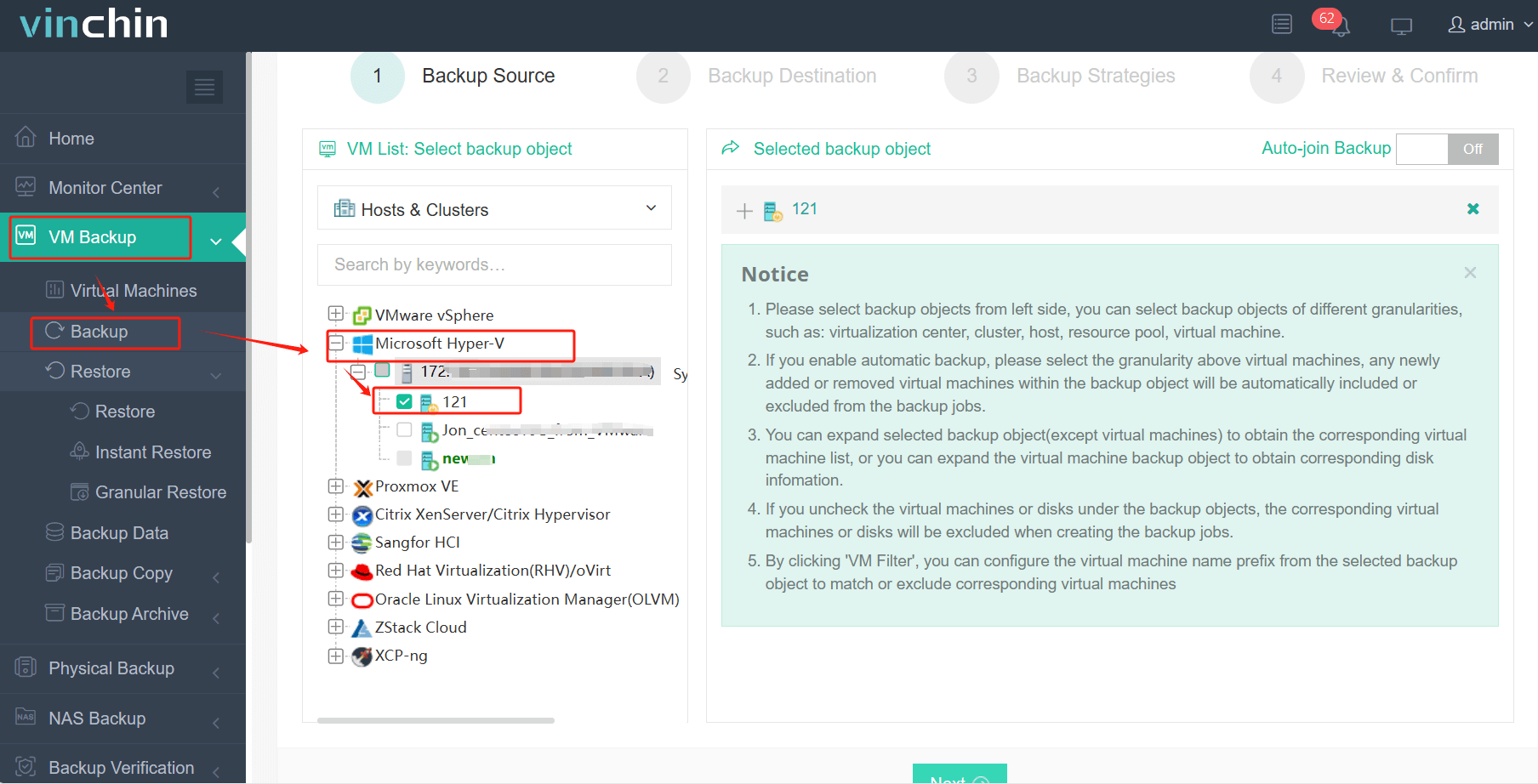
The intuitive web console makes protecting your virtual infrastructure straightforward:
Step 1: Select the Hyper‑V VM to back up
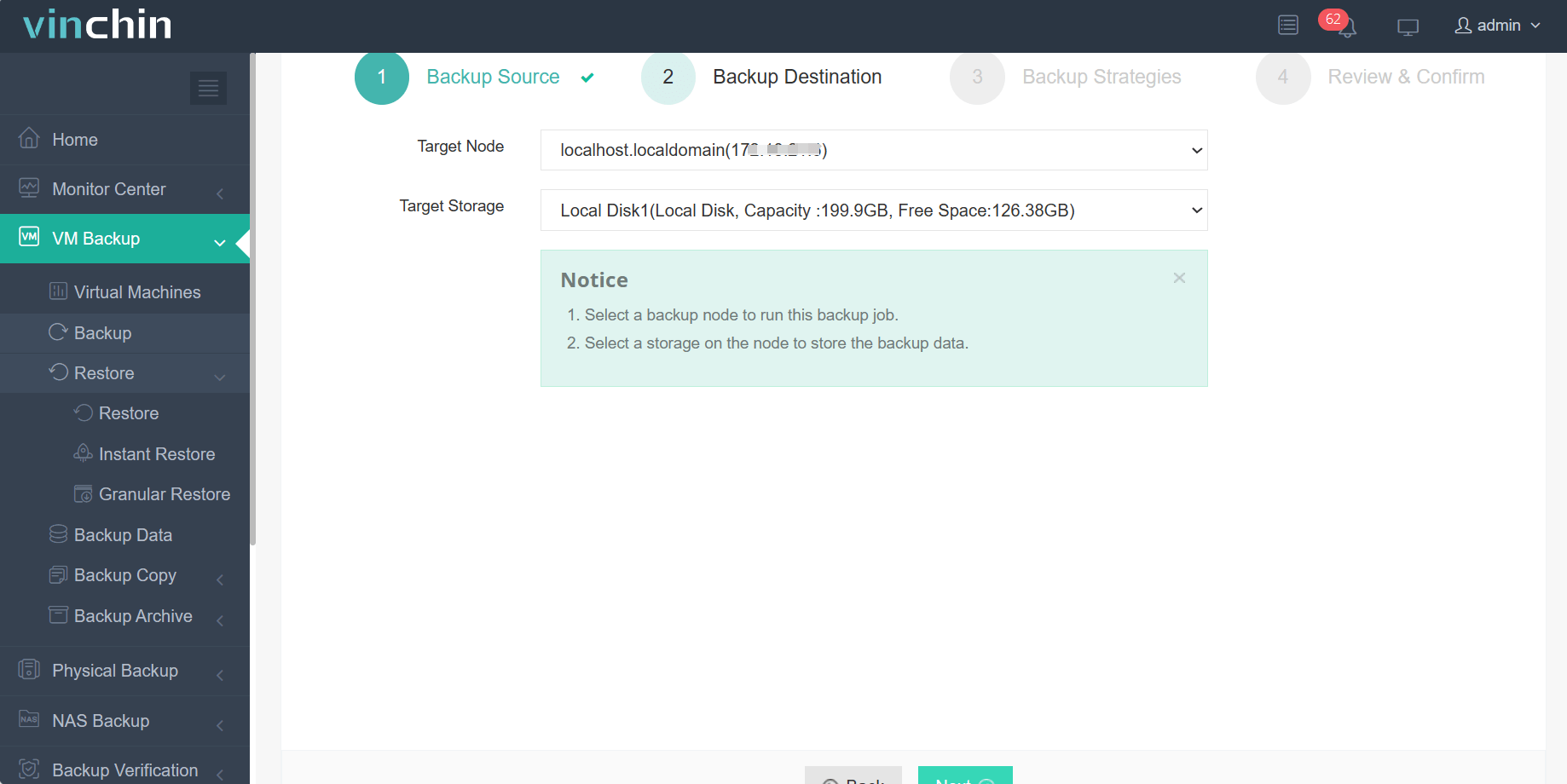
Step 2: Choose the desired backup storage
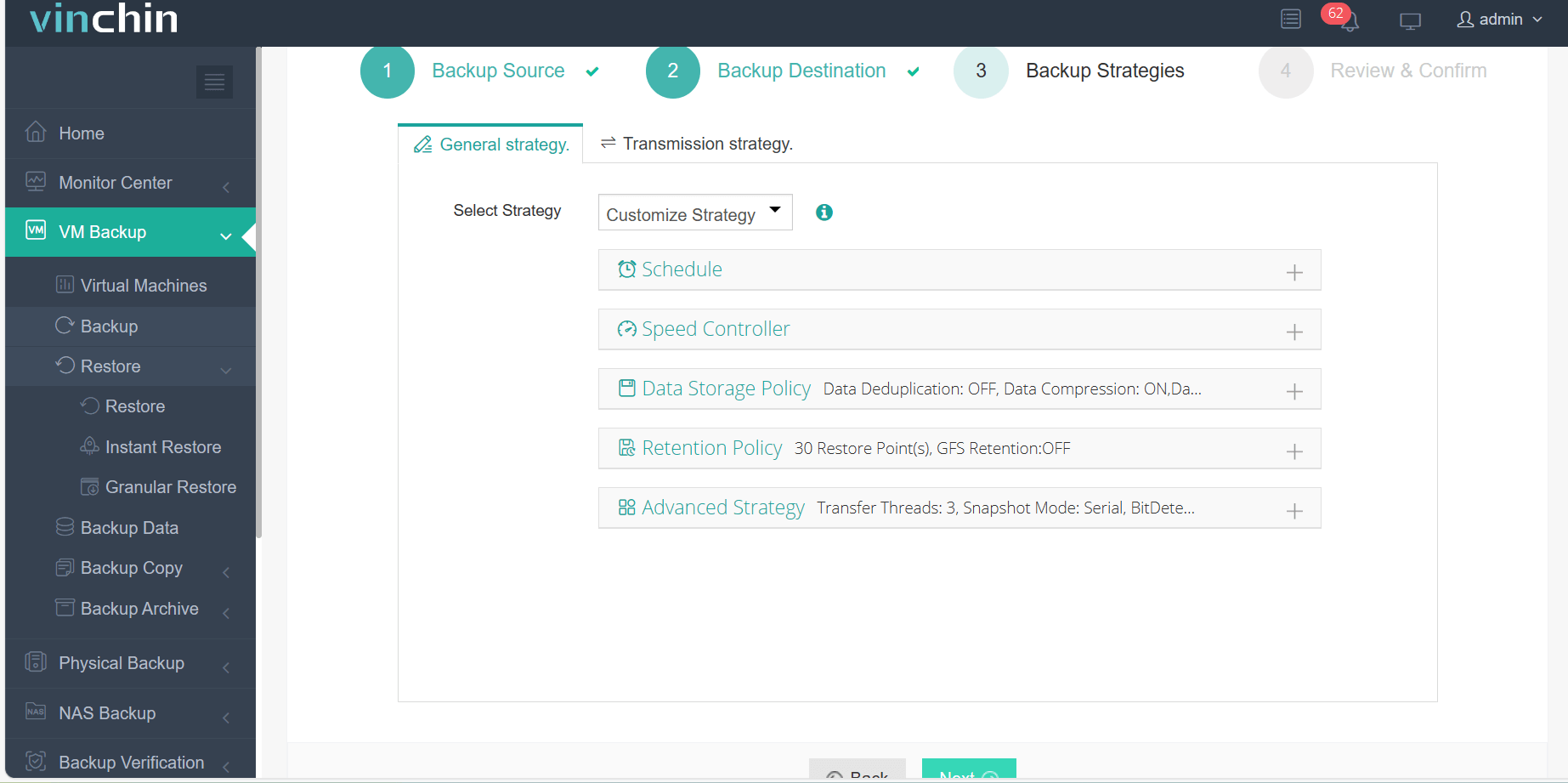
Step 3: Configure the appropriate backup strategy
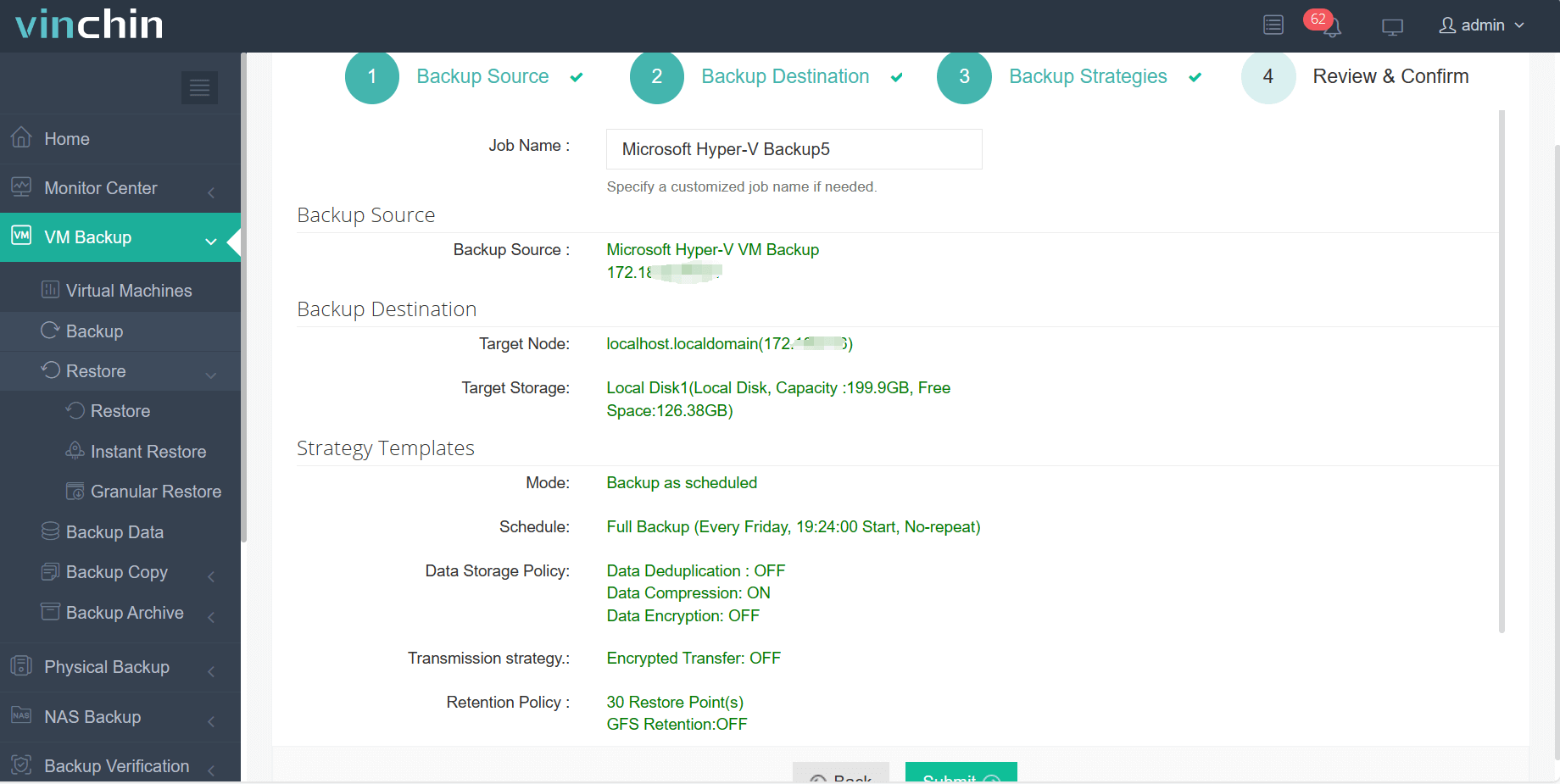
Step 4: Submit the job
With its global reputation and top ratings among enterprise users worldwide, Vinchin Backup & Recovery provides trusted data protection with a strong customer base; try it free with a 60-day full-featured trial by clicking the download button below!
Best Hyper-V Backup Software FAQs
Q1: What features are most important for maximizing uptime in Hyper-V environments?
Instant VM Restore; Granular File Recovery; Automated Scheduling; Application-Aware Processing; Encryption; Centralized Management Console, all helping minimize downtime risk by enabling rapid response when incidents occur.
Q2: How does scalability affect long-term uptime assurance?
A scalable solution adapts smoothly as environments grow larger, ensuring consistent protection regardless of workload size without introducing delays during critical restores.
Q3: Can backup solutions help meet compliance requirements?
Yes; comprehensive reporting tools plus secure retention policies demonstrate compliance readiness while ensuring regulated datasets remain recoverable at all times.
Q4: Is agentless backup preferable for large-scale deployments?
Yes; agentless approaches simplify management at scale by reducing deployment complexity while lowering maintenance overheads associated with updating agents inside every protected VM.
Conclusion
Rapid recovery limits financial loss from outages while supporting compliance goals, protecting both revenue streams and organizational reputation through reliable business continuity practices.









