Quick Answer
Neither agentless nor agent-based backup is universally better. Agentless backup is the faster, lighter way to protect large numbers of virtual machines, because nothing has to be installed inside each guest. Agent-based backup is the better fit for physical servers, file servers and databases that need in-guest, application-level protection. Most mixed environments end up using both: agentless for VMs at scale, agents where the hypervisor cannot reach.
What Is Agentless Backup?
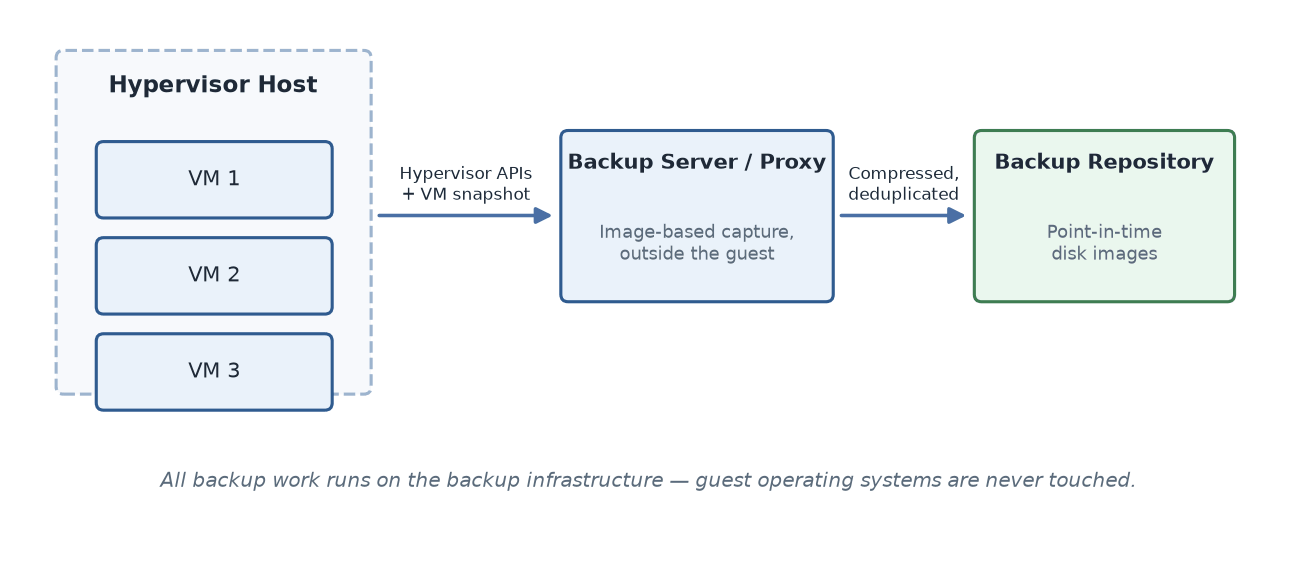
Agentless backup protects systems without installing any backup software inside them. A central backup server connects through the hypervisor or platform APIs, triggers a snapshot of the virtual machine, and copies the disk data to a backup repository, so the guest operating system is never touched.
Because the whole machine is captured as a point-in-time image, the model has become the standard for VMs, and the same approach extends to cloud instances such as AWS EC2 and NAS shares — Amazon's EBS snapshots work the same way. A neutral industry overview of agent vs. agentless backup is available from TechTarget.
What Is Agent-Based Backup?
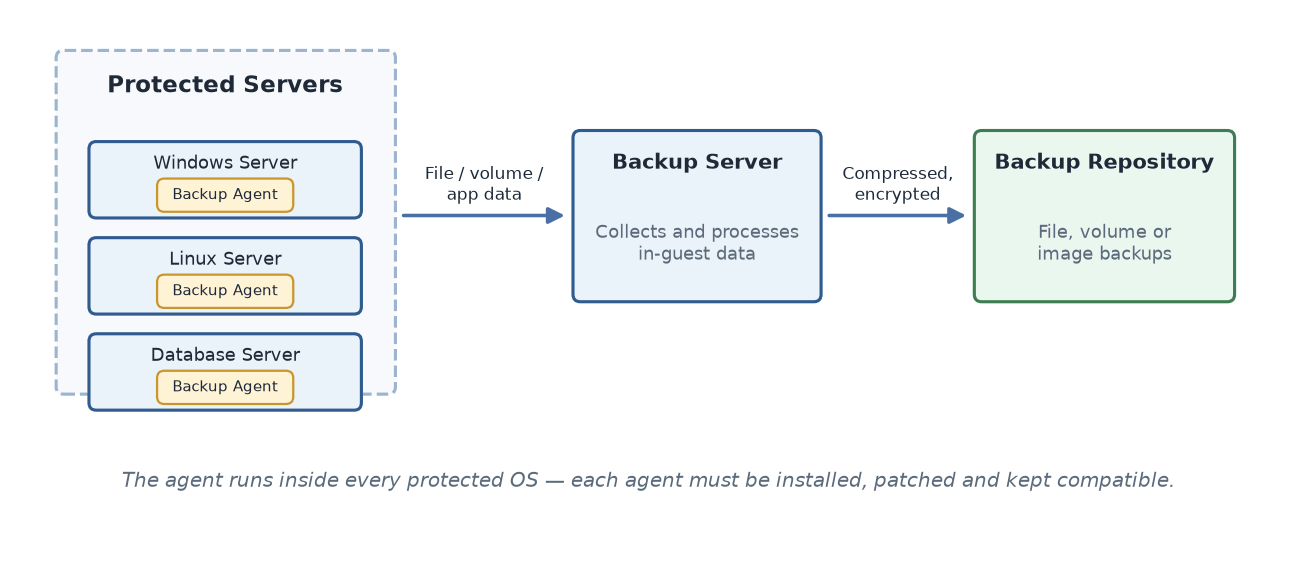
Agent-based backup runs a small software component inside the operating system of every protected server. The agent reads files, volumes or applications from within the guest OS, and because it lives inside the system it can coordinate with applications directly — on Windows typically through the Volume Shadow Copy Service (VSS) — to produce application-consistent copies while the applications keep running. That inside-out reach is why it is the natural fit for physical servers, file servers and databases such as SQL Server, Oracle, MySQL, PostgreSQL and MariaDB.
How Do Agentless and Agent-Based Backup Work Differently?
The two models follow different data paths, and each path shapes the decision that follows.
Agentless path (Figure 1): the backup server captures VM data through hypervisor APIs, with nothing installed inside the guests.
Agent-based path (Figure 2): an agent inside each protected OS reads the data and sends it to the backup server.
Agentless vs Agent-Based Backup: Key Differences
Decision Factor | Agentless Backup | Agent-Based Backup |
Deployment effort | One configuration against the hypervisor covers every VM; new VMs join by policy | Each server needs an agent installed, updated and monitored |
Load on protected systems | Backup work runs on the backup infrastructure; guests stay light | Jobs use each server's own CPU, memory and network |
Application consistency | Depends on the product's application-aware processing on your platform | Natural fit — the agent coordinates with applications directly |
Physical and legacy coverage | Not possible without a hypervisor layer | Fully supported, including bare-metal recovery in many products |
Cost of scale | Grows with policy and infrastructure, not with per-server installs | Grows with every agent deployed and maintained |
For the full technical mechanics of both data paths — snapshot handling, change tracking and transport — see the under-the-hood guide on the Vinchin blog.
Three Traps That Skew the Decision
Do not pick by feature checklist alone. The two models have converged on the usual backup features, so a feature list rarely separates them — supported capability on your specific platform version does.
Do not assume the label guarantees consistency. Ask how a product achieves application-consistent backups on your exact hypervisor and operating system, because quiescing and change-tracking support differ by platform and version.
Do not stop at backup. The backup mode matters less than whether recovery meets your RTO — compare the recovery options below before deciding.
How Do Recovery Options Differ?
Backup mode shapes not only how data is captured, but also what recovery looks like afterwards. Both models can restore whole machines and individual files, but their natural strengths differ.
Recovery Type | Agentless Backup | Agent-Based Backup |
Full machine restore | Natural fit — the backup is a complete image of the machine | Supported through image-level agents |
Instant recovery | Common for VMs — the machine boots directly from the backup while the full copy completes in the background | Offered by some products for physical servers |
File-level restore | Supported in most products by mounting or browsing the backup image | Native — the agent reads the file system directly |
Volume-level restore | Usually replaced together with the whole disk image | Supported, because the agent works at volume level |
Database object-level recovery | Depends on the product's application-aware features | Natural fit — the agent reaches inside the database engine |
Bare-metal recovery to new hardware | Not applicable | Supported — the agent captures the full system state |
Recovery capability is worth checking separately from backup capability: an agentless image backup can still support file-level restore, instant recovery or application object recovery if the product adds those features on top of the image. Define the recovery time and recovery point objectives for each workload first, then confirm the backup mode can actually meet them.
Pros and Cons of Agentless Backup
Advantages of Agentless Backup
Deployment is fast, because nothing has to be installed inside the virtual machines being protected.
There are no guest-side agents to patch, upgrade or troubleshoot, which removes a recurring maintenance task.
Backup workloads run on the backup infrastructure, so production VMs keep their CPU, memory and network for real work.
Coverage scales easily — protecting a hundred new VMs takes a policy change, not a hundred installations.
A single console can manage backups across multiple hypervisor platforms and cloud instances.
Limitations of Agentless Backup
The method depends entirely on the virtualization platform's APIs and snapshot support, which varies by platform and version.
Physical servers cannot be protected, because there is no hypervisor layer to connect to.
Snapshot and copy operations can create temporary storage I/O load on the host during backup windows.
Application-consistent backups require extra integration such as guest tools or application-aware processing.
Fine-grained, application-level backup (for example, individual database objects) may be limited compared with an in-guest agent.
Pros and Cons of Agent-Based Backup
Advantages of Agent-Based Backup
The agent sees the operating system from the inside, so it can read exactly the files, volumes or application data a job needs.
Application-consistent backups come naturally, because the agent can work with VSS and the applications directly.
Physical Windows and Linux servers are fully supported, including scenarios where bare-metal recovery matters.
Databases and file servers get precise, object-level protection and recovery options.
The approach works on systems the hypervisor cannot reach, including legacy or standalone machines.
Limitations of Agent-Based Backup
Every protected server needs an agent installed, updated and monitored, which adds steady management overhead.
Backup jobs consume the protected server's own CPU, memory and network while they run.
Agent versions must stay compatible with each operating system and application version in the estate.
In large or fast-changing environments, a missed agent deployment is the most common reason a server ends up unprotected.
Agentless vs Agent-Based Backup: Which One Fits Your Use Case?
The right answer depends less on the technology and more on what you are protecting.
Use Case | Better Fit | Why |
Hundreds of VMs on VMware, Hyper-V, Proxmox or similar | Agentless | Hypervisor-level coverage with no per-VM installation |
Physical Windows or Linux servers | Agent-based | No hypervisor layer exists for agentless tools to use |
Database servers (SQL Server, Oracle, PostgreSQL, MySQL) | Agent-based, or agentless with application-aware support | Application consistency needs in-guest coordination |
File servers and NAS | Agent-based for file servers; agentless NAS modes where offered | Match the mechanism to how the data is exposed |
Cloud instances such as AWS EC2 | Agentless | Cloud APIs support image-level capture without guests |
Mixed virtual and physical estate | Hybrid | Each workload gets the mechanism that suits it |
The cleanest way to see how the two modes divide the work is to walk through one mixed estate.
When to Choose Agentless Backup
Choose agentless backup when most of your workloads run as virtual machines on a supported hypervisor.
Choose agentless backup when deployment speed matters and you cannot afford per-server installation work.
Choose agentless backup when guest performance during backup windows is a concern.
Choose agentless backup when you need one management point across several virtualization platforms or cloud instances.
When to Choose Agent-Based Backup
Choose agent-based backup when you must protect physical servers that have no hypervisor layer.
Choose agent-based backup when databases or applications need true in-guest, application-consistent protection.
Choose agent-based backup when you need file- or object-level backup granularity as the primary backup method.
Choose agent-based backup for standalone or legacy systems that agentless tools cannot reach.
When a Hybrid Backup Strategy Makes the Most Sense
Most real environments mix both worlds: a virtualized core plus a handful of physical servers that cannot or should not be virtualized. In that case the practical question is not which model wins, but whether your backup platform can run both.
For example, Vinchin Backup & Recovery protects virtual machines and cloud instances with agentless, image-based backups taken at the hypervisor level, and covers physical Windows and Linux servers, file servers and databases with a lightweight agent — all managed from the same web console. Keeping both mechanisms under one roof means the coverage decision stays a technical choice, not a tooling compromise.
How to Choose: A Six-Factor Decision Framework
Work through these six factors in order. In most environments, the first two decide the outcome and the rest confirm it.
1. Infrastructure type. Mostly virtualized points to agentless; mostly physical points to agent-based; a mix points to a hybrid strategy.
2. Workload requirements. Databases and transactional applications need application consistency, which favors in-guest agents or application-aware agentless processing.
3. Backup and recovery objectives. Define your RTO and RPO before comparing products; formal guidance such as the NIST contingency planning guide treats these objectives as the foundation of any backup strategy.
4. Application consistency requirements. Decide whether crash-consistent images are acceptable, or whether applications must be quiesced during backup.
5. Deployment and management complexity. Count the servers that would need agents, and the staff time needed to keep them updated and monitored.
6. Scalability and long-term maintenance. Consider how the choice behaves as the estate grows — agentless coverage scales with policy, while agent-based coverage scales with administration.
The framework resolves to three outcomes:
If your estate is mostly virtualized and deployment simplicity matters most, agentless backup is the better fit.
If you protect physical servers or need deep in-guest application protection, agent-based backup is the better fit.
If you run both worlds side by side, a hybrid strategy with one management platform is usually the most defensible answer.
How Vinchin Supports Agentless and Agent-Based Backup
Vinchin Backup & Recovery is one example of a platform built around both modes. The split below follows its official documentation, so each capability can be checked against the vendor's own help center.
Workload | Vinchin Backup Mode | Documented Capabilities |
VMs on VMware, Hyper-V, Proxmox, oVirt, XCP-ng, RHV and other supported hypervisors | Agentless, image-level | Full Restore, Instant Restore, Granular Restore and V2V Migration; full, incremental, differential and forever-incremental backup methods |
Cloud instances (AWS EC2, Huawei Cloud) | Agentless, image-level | Full Restore, Granular Restore and V2V Migration |
NAS shares | Agentless | Image-level NAS backup |
Physical Windows and Linux servers | Agent-based | File, volume-level and full-system backup; Instant Restore for servers; bare-metal restore |
Databases (SQL Server, Oracle, MySQL, PostgreSQL, MariaDB) and Exchange Server | Agent-based | Application-consistent backup; restore to the original host or a new host |
What to Verify Before a PoC
Deployment Prerequisites
Agentless backup requires an account with hypervisor or platform API permissions, a network path from the backup infrastructure to the hosts, and a supported platform version.
Agent-based backup requires a supported operating system version on each server, administrator rights to install the agent, and connectivity between the server and the backup server.
Compatibility and Pricing
Check compatibility in three passes: whether the backup tool can connect to your exact platform version, which capabilities work on that version, and whether the platform vendor still supports that version. Vinchin publishes its VM backup compatibility matrix for this purpose. Licensing is sold as perpetual licenses per physical CPU socket or subscription licenses per protected virtual machine, with a free edition for up to 3 VMs and quote-based pricing for larger estates.
Security and Compliance Considerations
Each mode carries different security duties. An agent is additional software inside the guest, so it must be patched like any other component. Agentless backup depends on credentials with broad platform access, so those accounts should be scoped and protected. In both modes, confirm backup encryption, keep at least one isolated or offsite copy, and check that retention settings meet your compliance requirements.
A Practical PoC Checklist
Run both modes side by side on real workloads, and time each step:
Back up one busy VM agentlessly, including an incremental job and an instant recovery.
Restore individual files from that image backup to confirm granular restore.
Install the agent on one physical Windows server and run a job against its SQL Server database.
Test one bare-metal or server restore so recovery is proven, not assumed.
Copy backups offsite and verify that retention and encryption behave as expected.
Frequently Asked Questions
Q1: Is agentless backup better than agent-based backup?
Only for specific situations. Agentless is the better choice for large virtualized estates and when guest performance matters; agent-based is the better choice for physical servers, legacy systems and deep application-level protection. Map your estate first — the six-factor framework above turns that map into a decision.
Q2: Which backup method is better for virtual machines?
Agentless backup is generally the better fit for VMs. It scales without per-VM installation, keeps backup work off the guests, and supports incremental and file-level restore in most modern products.
Q3: Does agent-based backup provide better application consistency?
Agent-based backup achieves it more naturally because the agent works inside the guest with the application. If you prefer agentless for your VMs, shortlist products with proven application-aware processing and confirm support for your specific platforms before committing.
Q4: Can agentless and agent-based backup be used together?
Yes, and most mixed environments do exactly that: agentless backup covers the virtual machine estate while agents protect physical servers, file servers and databases. The practical challenge is keeping both under unified management.
Q5: Does agent-based backup slow down the server being protected?
It can, briefly: the agent borrows the server's own CPU, memory and network during jobs. Schedule jobs off-peak, throttle bandwidth and enable compression to keep the impact small — and note that agentless backup shifts this load off VM guests entirely, which is one reason virtualized estates prefer it.
Putting It Together
Treat the choice as a mapping exercise rather than a contest: map each workload to the mechanism that fits it, and then pick tooling that supports the whole map.
Before committing, test both modes against your own workloads. Most enterprise backup vendors offer a free trial, and a short proof of concept on a live database server and a busy VM will tell you more than any comparison table.