Virtual machines run most enterprise-critical applications: ERP systems, databases, identity services, file services, and customer-facing platforms. Protecting them has become more complicated than it was a few years ago.
This guide is written for IT directors, infrastructure managers, backup administrators, and security and compliance leads who evaluate VM backup software. It does not rank products; it provides an evaluation framework - what to assess, how to test, how to compare, and how to cost it.
VM backup software is a solution that protects virtual machines by capturing VM disk, configuration, and application data so organizations can restore entire VMs, files, or application items after deletion, corruption, ransomware, hardware failure, or site outage.
What Changes in VM Backup Evaluation in 2026?
Hypervisor ecosystem shift: licensing and packaging changes since Broadcom's acquisition of VMware have led many enterprises to reassess their virtualization strategy, so support for alternative platforms - Proxmox VE, Nutanix AHV, OpenStack, XCP-ng - alongside VMware and Hyper-V has become a primary selection criterion.
Ransomware and cost pressure: attacks increasingly target backup servers and credentials, and CISA's #StopRansomware guidance recommends keeping at least one copy offline, encrypted, and immutable. Cloud archive tiers, cross-cloud restore, and egress fees now shape backup TCO, while automated recovery verification and AI-assisted anomaly detection are emerging differentiators.
10 Critical Factors to Evaluate When Choosing VM Backup Software
Enterprises should evaluate VM backup software on platform compatibility, backup performance, recovery speed and granularity, ransomware protection, scalability, automation, application consistency, multi-cloud support, security and compliance, and total cost of ownership, weighted by business impact and verified through testing.
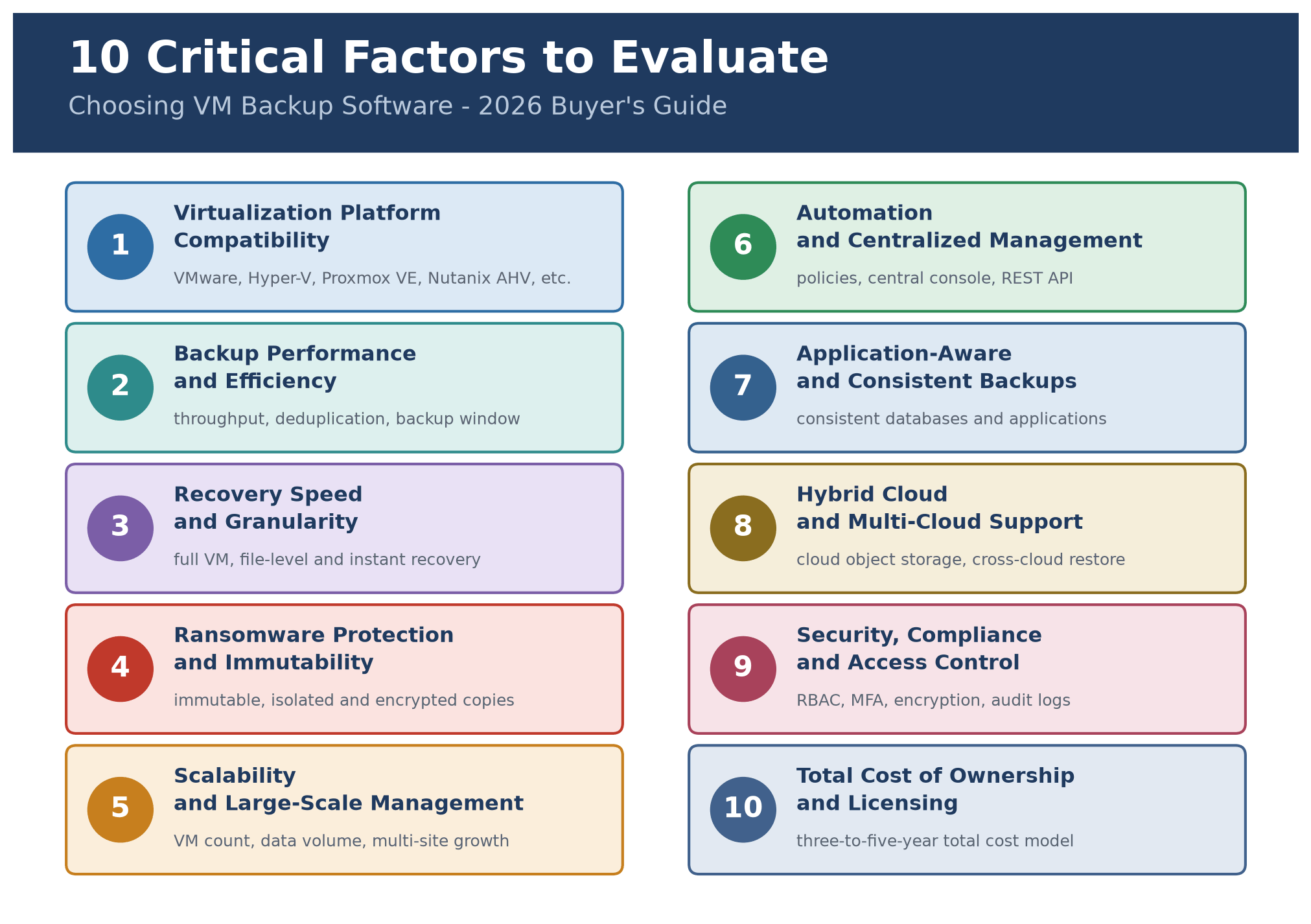
Use the same logic for each factor: what it is, what to evaluate, and what to ask vendors.
1. Virtualization Platform Compatibility
What it is: The hypervisors, versions, and workload types the product can protect.
What to evaluate:
Official support for each hypervisor and version you run (for example VMware vSphere, Hyper-V, Proxmox VE, Nutanix AHV)
Which features are available on which platform (incremental backup, instant recovery, and application-aware processing do not always work identically everywhere)
Whether backups can be restored to a different platform if you need to migrate or recover elsewhere
Platform differences are real. For example, the Proxmox VE documentation notes that its native vzdump backups are full backups, with deduplicated chunk storage available through Proxmox Backup Server. Third-party tools may handle incremental backup differently, so check feature behaviour per platform, not just a logo list.
Ask vendors: Which features are limited on each of our current platforms?
2. Backup Performance and Efficiency
What it is: How fast and efficiently the software completes backups with minimal production impact.
What to evaluate:
Throughput for first full backup and for daily incrementals
Impact on host CPU, storage, and network during backup
Change tracking method and its fallback behaviour
Deduplication and compression ratios on your own data
Ability to run many jobs in parallel
Ask vendors: How does backup performance scale as VM count and change rate increase?
3. Recovery Speed and Granularity
What it is: The options and speed for restoring whole VMs, files, and application items.
What to evaluate:
Full VM restore speed, including large VMs
File-level and application-item recovery
Instant recovery (running a VM directly from backup storage while data migrates in the background)
Restore to alternate hosts, platforms, or isolated networks
Ask vendors: Can we recover individual files or entire VMs quickly, and what do your published recovery times assume?
4. Ransomware Protection and Immutable Backups
What it is: Immutable backup - a copy that cannot be altered or deleted for a defined retention period, enforced by storage-level controls such as object lock or WORM - plus isolation, encryption, and clean recovery.
What to evaluate:
Immutable storage (object lock, hardened repositories, WORM)
Logical or physical isolation (air-gapped or offline copies)
Separate authentication and role-based access for the backup system
Encryption in transit and at rest
Malware scanning or integrity verification of backup data
A clean-room or isolated restore option
Ask vendors: Can an administrator with compromised production credentials modify or delete backups?
5. Scalability and Large-Scale VM Management
What it is: The ability to grow in VM count, data volume, and sites without degrading manageability.
What to evaluate:
Maximum tested VM counts and concurrent jobs
Scale-out architecture for backup servers, proxies, or repositories
Multi-site and multi-tenant management
Ask vendors: Can the solution scale without significant performance degradation, and what architecture changes are needed as we grow?
6. Automation and Centralized Management
What it is: Policy-based protection, scheduling, monitoring, reporting, and APIs.
What to evaluate:
Policies that automatically include VMs by tag, folder, or resource pool
Centralized console across sites and platforms
Alerting, reporting, and audit capability
REST API or CLI for integration with existing tooling
Ask vendors: How much manual administration is required to keep new and changed VMs protected?
7. Application-Aware and Consistent Backups
What it is: Application-aware backup - captures application data in a transactionally consistent state, so a restored database starts without lengthy manual recovery steps.
What to evaluate:
Support for application-consistent processing for your databases and business applications
Log truncation and transaction-log handling
Application-item level restore where needed
Ask vendors: Is application-aware backup supported for our database platforms?
8. Hybrid Cloud and Multi-Cloud Support
What it is: Protection and mobility across on-premises, private, and public cloud workloads.
What to evaluate:
Support for public cloud instances alongside virtual machines
Cloud object storage as a backup or archive target
Egress and API cost implications
Restore between on-premises and cloud environments
Ask vendors: Can one management layer protect and store copies across our environments?
9. Security, Compliance, and Access Control
What it is: Controls that protect the backup system itself and support audit requirements.
What to evaluate:
Role-based access control and multi-factor authentication
Detailed audit logs
Encryption key management
Retention and legal-hold capabilities
Alignment with your relevant regulatory and internal standards
Ask vendors: Does the product meet our security requirements, and can we audit administrative actions?
10. Total Cost of Ownership (TCO) and Licensing Flexibility
What it is: The full cost of acquiring, running, and supporting the solution over its lifetime.
What to evaluate:
Licensing model (per VM, per socket or CPU, per capacity, subscription or perpetual)
Repository and infrastructure requirements
Support tiers and upgrade policies
Cost changes as you scale
Ask vendors: What is the total cost over three to five years for our environment, including growth?
How to Evaluate VM Backup and Recovery Performance
Evaluate VM backup and recovery performance by defining RPO and RTO targets per workload tier, then measuring backup window, throughput, and restore times in a production-like environment. Only tested restores prove recovery readiness.
Understanding RPO and RTO Requirements
Recovery Point Objective (RPO): The maximum acceptable amount of data loss, measured in time. An RPO of one hour means you can tolerate losing up to an hour of data.
Recovery Time Objective (RTO): The maximum acceptable time to restore a service after an outage.
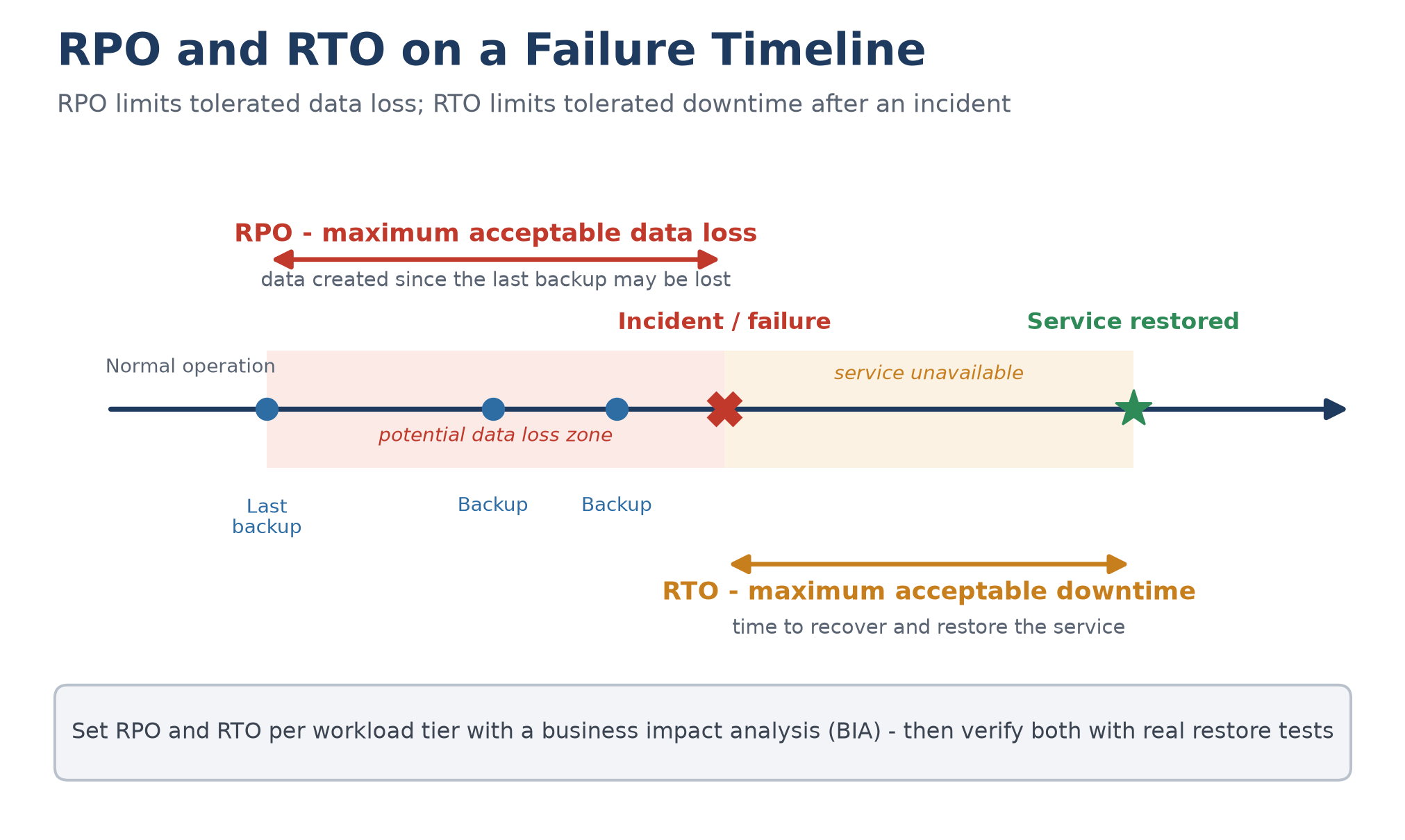
Set them per workload through a business impact analysis (BIA), a process covered in NIST SP 800-34 Rev. 1. The table below is an illustrative example; your values must come from your own BIA.
Business workload | Example RPO | Example RTO |
Mission-critical applications | 15 minutes | 1 hour |
Business applications | 1 hour | 4 hours |
Development environments | 24 hours | 24 hours |
Measuring Backup Window and Throughput
Record the duration of the first full backup and of daily incrementals, plus the load these jobs place on hosts, storage, and network. Measure at realistic change rates in production, not on an idle system.
Evaluating VM Recovery and Instant Recovery
Instant recovery starts a VM directly from backup storage while data moves back to production in the background, which can substantially reduce RTO. Test whether the recovered VM runs real workloads, and check backup-storage performance limits.
Testing Granular and Full VM Recovery
Test at least these recovery types: a single file, an application item, a full VM to the original and to an alternate host, and, if relevant, a restore to a different platform. Record completion time and manual steps.
How to Compare Enterprise VM Backup Software Vendors
Compare vendors with the same criteria, evidence, and test environment: platform support, performance, security, management, scalability, integration, and pricing. Verify claims through compatibility matrices and a POC, then score against pre-defined weights.
Evaluate Platform Support and Integration
Score platform fit against each vendor's official compatibility matrix, not marketing pages, and confirm your exact hypervisor versions and integrations.
Compare Backup and Recovery Capabilities
Compare the same capabilities across all vendors, and note where features differ by platform.
Assess Security and Ransomware Resilience
Request specifics on immutability, isolation, encryption, access control, and audit logging, including protection against compromised production credentials.
Review Licensing, Support, and Service Levels
Understand licensing metrics, expansion costs, support hours, response targets, and upgrade policies before signing.
Evaluate Vendor Reliability and Product Roadmaps
Check product maturity, release cadence, references in similar environments, and how quickly new platform versions are supported.
Run a Proof of Concept (POC) Before Purchasing
A POC is the most reliable way to compare vendors. Use this process:
1. Select representative VM workloads: a database VM, a large file server, and a lightly used application server.
2. Use identical infrastructure and test conditions for each vendor.
3. Test first full and incremental backups, recording time, throughput, and resource use.
4. Test full VM restore and file-level restore, including to an alternate host.
5. Simulate real failure scenarios: accidental deletion, system failure, and a ransomware recovery drill using an isolated network.
6. Record performance, recovery time, resource consumption, and admin effort.
7. Score each vendor against your pre-defined criteria.
Record every POC result in a template like the following:
| Test item | What to record | Where the target comes from |
| First full backup | Duration, throughput, and load on hosts and storage | Your backup window requirement |
| Daily incremental backup | Duration and impact at realistic change rates | RPO target for each workload tier |
| Full VM restore | Restore time and any manual steps | RTO target for the workload tier |
| Instant recovery | Time until the VM is usable, plus performance during migration | RTO target and downtime tolerance |
| Ransomware recovery drill | Clean restore success inside an isolated network | Security and compliance requirements |
Vendor Comparison Framework
Comparison dimension | Evaluation method |
Platform support | Check the official compatibility matrix |
Backup performance | POC on the same test environment |
Recovery performance | Perform real VM restores |
Security | Review immutability and permission model |
Management | Test centralized management and automation |
Scalability | Simulate future VM growth |
Integration | Verify compatibility with existing IT systems |
Pricing | Calculate three- to five-year TCO |
Support | Review SLA, support, and upgrade policy |
Example: Evaluating Vinchin Backup & Recovery in a POC
To make the framework concrete, here is how a multi-hypervisor enterprise could apply these criteria to one vendor, Vinchin Backup & Recovery, based on its official online help center (v8.1 documentation, accessed November 2026). Repeat this exercise for every shortlisted vendor and verify all claims on your own VMs.
Platform fit: Vinchin's agentless, image-based VM backup operates at the hypervisor level, and its v8.1 help center lists supported platforms including VMware vSphere, Microsoft Hyper-V, Proxmox VE, Red Hat Virtualization, oVirt, Oracle Linux Virtualization Manager, Citrix Hypervisor/XenServer, XCP-ng, OpenStack, Huawei FusionCompute, H3C CAS/UIS, Sangfor HCI, and ZStack, with per-release version details in the official help center.
Capabilities to verify during the POC: full restore, instant restore, granular restore, and V2V migration between supported platforms; offsite backup copy; S3-compatible cloud object storage archive; and backup encryption and storage protection against ransomware, per the product documentation.
Backup Retention and Copy Strategy
Design retention in two layers: short-term operational restore points for everyday recovery, and long-term compliance retention for audit, legal hold, and regulatory requirements. Retention length drives repository capacity and archive costs, so model it rather than accepting vendor defaults.
Layer backup copy types: an offsite copy for site-level loss, an immutable copy that resists deletion or encryption for its retention period, and an air-gapped copy unreachable from production networks. With the production copy these form the 3-2-1-1-0 strategy: three copies, two media, one offsite, one immutable or offline, zero verification errors after automated restore testing.
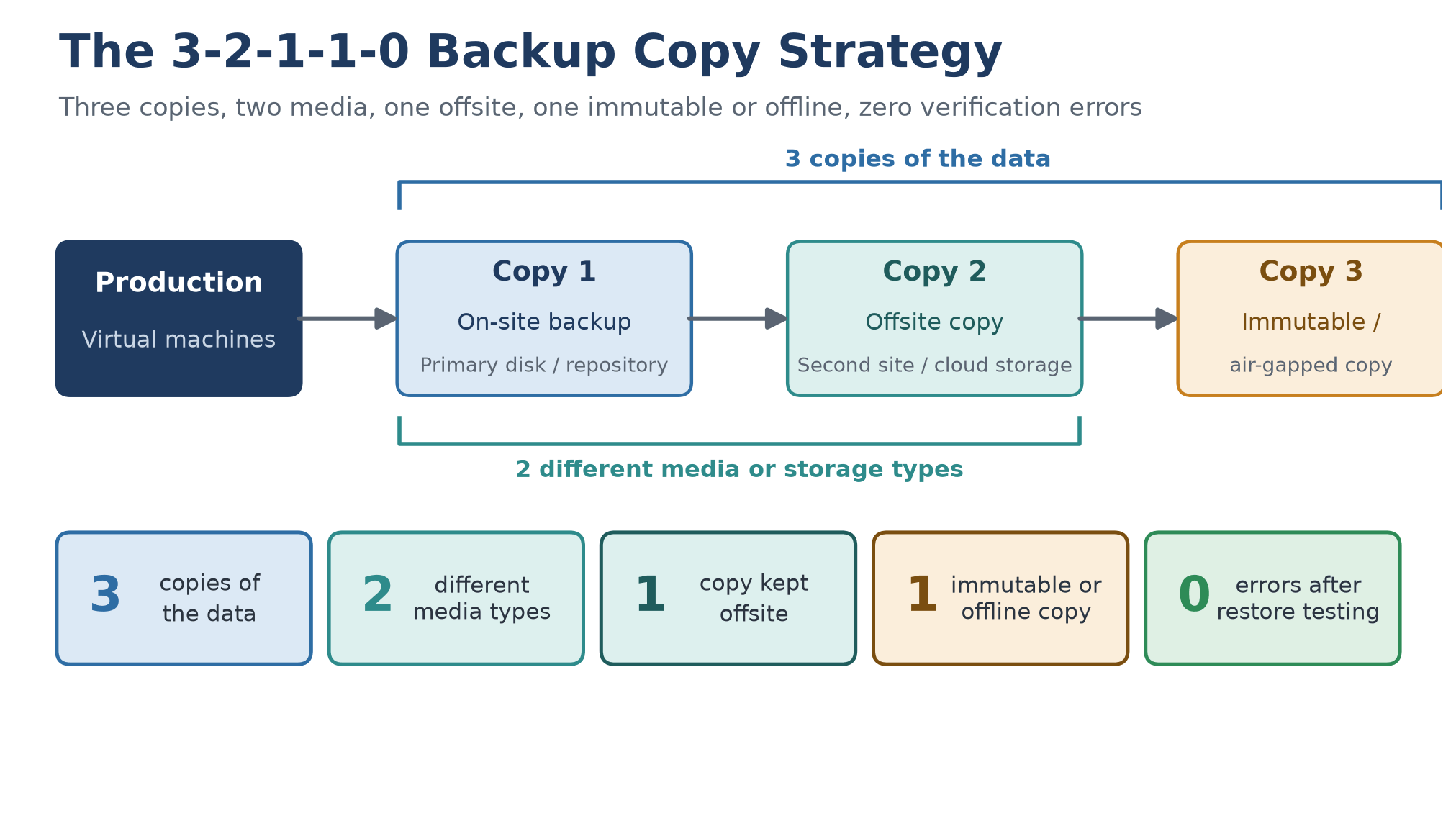
Typical starting points, adjusted per business impact analysis: databases and ERP combine months of operational restore points with yearly compliance archives; file servers need medium retention; identity services need short, frequent ones.
How to Calculate the Total Cost of Ownership of VM Backup Software
Calculate TCO by adding licensing, backup storage, infrastructure, operational effort, and maintenance over three to five years. Model growth in VMs and data, and include hidden costs such as cloud egress and recovery testing.
A simple framework:
TCO = L + S + I + O + M
L = Software licensing or subscription
S = Backup storage costs
I = Infrastructure costs (backup servers, proxies, networking)
O = Operational costs (administration time, training, testing)
M = Maintenance and support
Software Licensing and Subscription Costs
Licensing may be per VM, per socket or CPU, per capacity, or subscription-based. Compare models against your growth plan: per-socket favours dense hosts, per-VM favours consolidated estates.
Backup Storage and Infrastructure Costs
Include primary repositories, secondary copies, immutable or off-site copies, and cloud storage. Use realistic deduplication and compression ratios from your POC data, not best-case vendor numbers.
Network and Operational Expenses
Account for bandwidth upgrades, cloud egress fees, and the staff time required to administer, monitor, and test the system. Automation can reduce this materially.
Maintenance, Support, and Upgrade Costs
Include annual maintenance, premium support tiers, and the cost of upgrades and migrations when platform versions change.
Hidden Costs Enterprises Should Consider
Egress fees during large restores
Additional capacity for longer retention or immutability
Retraining and migration effort when changing vendors
Cost of recovery testing environments
Licensing impact if you add platforms or sites
Avoid building a budget from price ranges you cannot verify. Obtain written quotes for your actual environment.
Enterprise VM Backup Software Evaluation Checklist
An enterprise VM backup evaluation checklist should cover technical compatibility, recovery objectives, security controls, management capability, and vendor terms. Rank each item by priority and score vendors with a weighted model.
Technical Requirements Checklist
Checklist item | Priority |
Supports existing virtualization platforms and versions | Critical |
Offers automated backup policies | High |
Supports centralized management | High |
Supports hybrid environments | Medium–High |
Security and Compliance Checklist
Checklist item | Priority |
Supports immutable backups | Critical |
Role-based access control and MFA | Critical |
Encryption in transit and at rest | High |
Provides detailed audit logs | High |
Performance and Recovery Checklist
Checklist item | Priority |
Meets defined RPO/RTO targets | Critical |
Provides granular recovery | High |
Supports instant or rapid recovery | High |
Supports scheduled recovery testing | High |
Vendor and Procurement Checklist
Checklist item | Priority |
Provides reliable technical support and clear SLAs | High |
Offers flexible licensing | Medium |
Transparent roadmap and platform support policy | Medium |
Reasonable three- to five-year TCO | High |
How to Score and Shortlist Potential Solutions
An example weighting model (adjust to your business):
Category | Weight |
Security and recoverability | 30% |
Compatibility and integration | 20% |
Performance and scalability | 20% |
Management and automation | 15% |
TCO | 15% |
Score each vendor from 1 to 5 per category based on POC evidence, multiply by the weight, and total the result. Treat any Critical item failure as disqualifying.
Common Mistakes to Avoid When Selecting VM Backup Software
Choosing Based on Price Alone
The lowest licence cost does not account for storage, infrastructure, administration, or the cost of a failed recovery.
Overlooking Recovery Testing
If you have never restored a representative workload, you do not know your real RTO.
Ignoring Platform Compatibility
Check not just whether a platform is listed, but which features are supported and whether your exact versions are covered.
Underestimating Future Scalability
Test with the VM counts and data volumes you expect in three years, not only today’s.
Treating Backup as a Complete Disaster Recovery Strategy
Backup restores data. Disaster recovery restores services: network, identity, dependencies, sequencing, and people. You need both.
Final Thoughts: Choosing the Right VM Backup Software for Your Enterprise in 2026
Approach selection by starting from outcomes rather than features: the data loss you can tolerate, the downtime you can absorb, the threats you must withstand, and the budget you must stay within.
To recap: define RPO and RTO by workload, confirm platform compatibility, require ransomware resilience, compare vendors on one scorecard, run a restore-focused POC, and calculate TCO over three to five years.
Prioritize recoverability, security, scalability, and TCO, and let a structured evaluation and POC drive the decision; a solution that backs up everything but cannot restore on your timeline is not the right solution.
Frequently Asked Questions About Enterprise VM Backup Software
Q1: What is the best VM backup software for enterprises?
There is no single best product. The best choice supports your virtualization platforms, meets your RPO and RTO targets, provides strong ransomware protection, scales with your environment, and fits your budget; decide with a scorecard and a POC.
Q2: What features should enterprise VM backup software include?
At minimum: support for your hypervisors, efficient incremental backup, full and granular recovery, application-aware backup, immutable or isolated storage, encryption, role-based access control, centralized management, and reporting.
Q3: How do enterprises test VM backup software before purchase?
Enterprises should test VM backup software through a proof of concept on representative workloads: run full and incremental backups, test full VM, file-level, and ransomware recovery under identical conditions, then score each vendor on a weighted scorecard based on recorded results.
Q4: Should enterprises choose per-VM, per-socket, or capacity-based licensing?
Match the licensing model to your growth plan. Per-socket licensing favours dense hosts, per-VM licensing favours consolidated estates, and capacity-based licensing favours data-heavy environments. Model at least two growth scenarios and compare three-to-five-year totals, not first-year prices.
Q5: What hidden costs should enterprises consider when using cloud storage for VM backups?
Cloud backup costs extend beyond storage fees: egress charges during large restores or migrations, retrieval and API request charges, capacity growth from longer retention or immutability, and duplicate copies across regions. Model these into the three-to-five-year TCO calculation.