Quick Answer
Cross-platform restore (V2V) recovers a virtual machine onto a different hypervisor by converting its disk format, virtual hardware and boot setup so the target platform can run it. Most of that conversion can be automated, but how much depends on the tool, the platforms and the guest operating system.
Introduction: Why Cross-Platform VM Recovery Matters
A virtual machine backed up on one platform can’t simply be powered on in another. VMware ESXi, Microsoft Hyper-V and KVM each define their own virtual disk format, virtual hardware and boot behavior. A traditional restore assumes the VM returns to the same kind of environment it came from, so it breaks down when the destination is different.
That gap shows up whenever teams change hypervisors, consolidate environments after an acquisition, or need to bring workloads up on whatever platform is still available after an outage. Cross-platform restore (V2V, short for virtual-to-virtual) closes the gap by converting the VM during recovery rather than leaving the conversion to a separate manual project.
This article answers the two questions in the title. It first explains what V2V restore is and why format conversion is required. It then walks through how the conversion is automated, step by step, and where automation stops.
What Is Cross-Platform Restore (V2V)?
Cross-platform restore (V2V) is a recovery process that restores a virtual machine from one virtualization platform to another by converting its virtual disk and configuration formats to meet the target hypervisor’s requirements.
Definition of Cross-Platform Restore
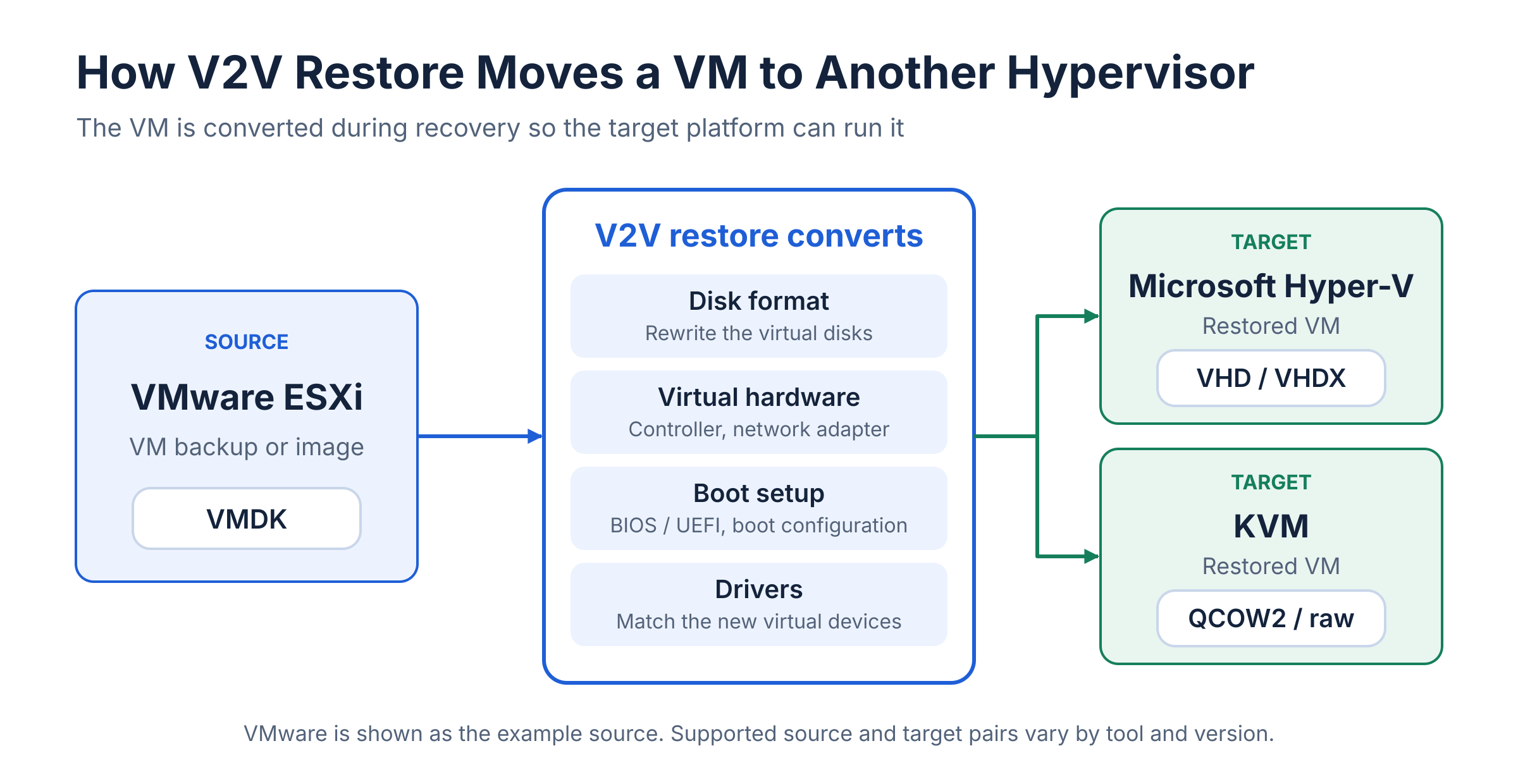
V2V stands for virtual-to-virtual. In a cross-platform restore, the recovery source is a backup or image of a VM that was created on one hypervisor, and the destination is a different hypervisor. The restore does more than copy data back: it translates the VM so that the destination platform recognizes its disks,virtual devices and boot configuration. Throughout this article, cross-platform restore and V2V are used interchangeably for hypervisor-to-hypervisor restores; restores that end on a physical server or in the cloud are treated as separate categories.
How Is V2V Different from Traditional VM Restore?
A traditional restore returns a VM to the same platform it was backed up from, so the disk format and virtual hardware already match. Cross-platform restore adds a translation layer between the backup and the new VM.
Approach | Source → target | What has to change |
Traditional VM restore | Hypervisor A → Hypervisor A | Usually nothing; formats already match |
Cross-platform restore (V2V) | Hypervisor A → Hypervisor B | Disk format, virtual hardware, boot setup, drivers |
P2V | Physical server → virtual machine | Hardware abstraction and drivers, then virtual disk creation |
V2P | Virtual machine → physical server | Virtual drivers replaced with physical hardware drivers |
How Does V2V Differ from V2P, P2V and P2C?
These abbreviations describe where the workload starts and where it ends up. V2V moves a virtual machine to another virtual environment, while V2P, P2V, P2C and V2C involve physical servers or cloud targets. The table below summarizes the common labels:
Type | Full name | Direction | Typical scenario |
V2V | Virtual to Virtual | Virtual machine → virtual machine | VMware → Hyper-V |
V2P | Virtual to Physical | Virtual machine → physical server | Restoring a VM onto bare metal |
P2V | Physical to Virtual | Physical server → virtual machine | Legacy server virtualization |
P2C | Physical to Cloud | Physical server → cloud | Migrating physical servers to the cloud |
V2C | Virtual to Cloud | Virtual machine → cloud | Moving local VMs to a cloud platform |
Note that vendors define these labels inconsistently, especially for P2C and V2C, where the target may be a cloud VM, a cloud platform or a managed service. Always confirm what a specific tool means by the term.
Which Restore Scenarios Count as V2V?
In the convention this article follows, the V2V label applies when both the source and the target are virtual machines. If either end is a physical server or a cloud environment, a different term usually applies:
Restore scenario | Counts as V2V? |
VMware → Hyper-V | Yes |
VMware → KVM | Yes |
Hyper-V → VMware | Yes |
VMware VM → physical server | No — this is V2P |
Physical server → cloud VM | No — this is P2C |
This distinction matters when you plan recovery capabilities.In this article, cross-platform restore and V2V are used interchangeably and mean the same thing: recovering a virtual machine from one hypervisor to another. Restores that end on a physical server or in the cloud fall outside both terms.
Common Virtualization Platforms Involved
VMware ESXi: uses VMDK virtual disks.
Microsoft Hyper-V: uses VHD and VHDX virtual disks.
KVM-based environments: commonly use QCOW2 or raw disk images.
Why Do Virtual Machines Need Format Conversion Across Platforms?
VMs need conversion because each hypervisor stores disks in its own format, presents its own virtual hardware to the guest, and expects its own boot and driver setup. A disk copied unchanged to a different platform often can’t be attached, or attaches but won’t boot.
Different Hypervisors Use Different Virtual Disk Formats
The three formats you meet most often in cross-platform recovery are:
Format | Typical platform | Notes |
VMDK | VMware | Comes in several disk types, such as sparse, flat and stream-optimized |
VHDX (successor to VHD) | Microsoft Hyper-V | Supports disks up to 64 TB, versus 2,040 GB for VHD |
QCOW2 | KVM, QEMU | Supports snapshots and copy-on-write allocation |
Utilities such as qemu-img convert can translate between these formats, which is why disk conversion is the most visible part of V2V. It is not the whole job.
Virtual Hardware and Configuration Differences
A VM is more than its disks. The hypervisor also defines the virtual CPU, memory, disk controller, network adapter and firmware the guest sees. Hyper-V illustrates the point: its generation 1 and generation 2 virtual machines differ in firmware (legacy BIOS versus UEFI) and in controllers (IDE versus SCSI). A VM restored onto the wrong virtual hardware profile may not find its boot disk.
Boot and Driver Compatibility Challenges
The guest operating system carries drivers for the virtual devices it was installed with. When those devices change, the drivers may be missing. The OpenStack image guide warns that converting a Windows image for KVM without the virtio driver installed can end in a blue screen at launch. Boot mode matters too: Microsoft’s documentation notes that Generation 2 Linux VMs need the UEFI CA Secure Boot template to start with Secure Boot enabled.
How Does Cross-Platform Restore Convert VM Formats Automatically?
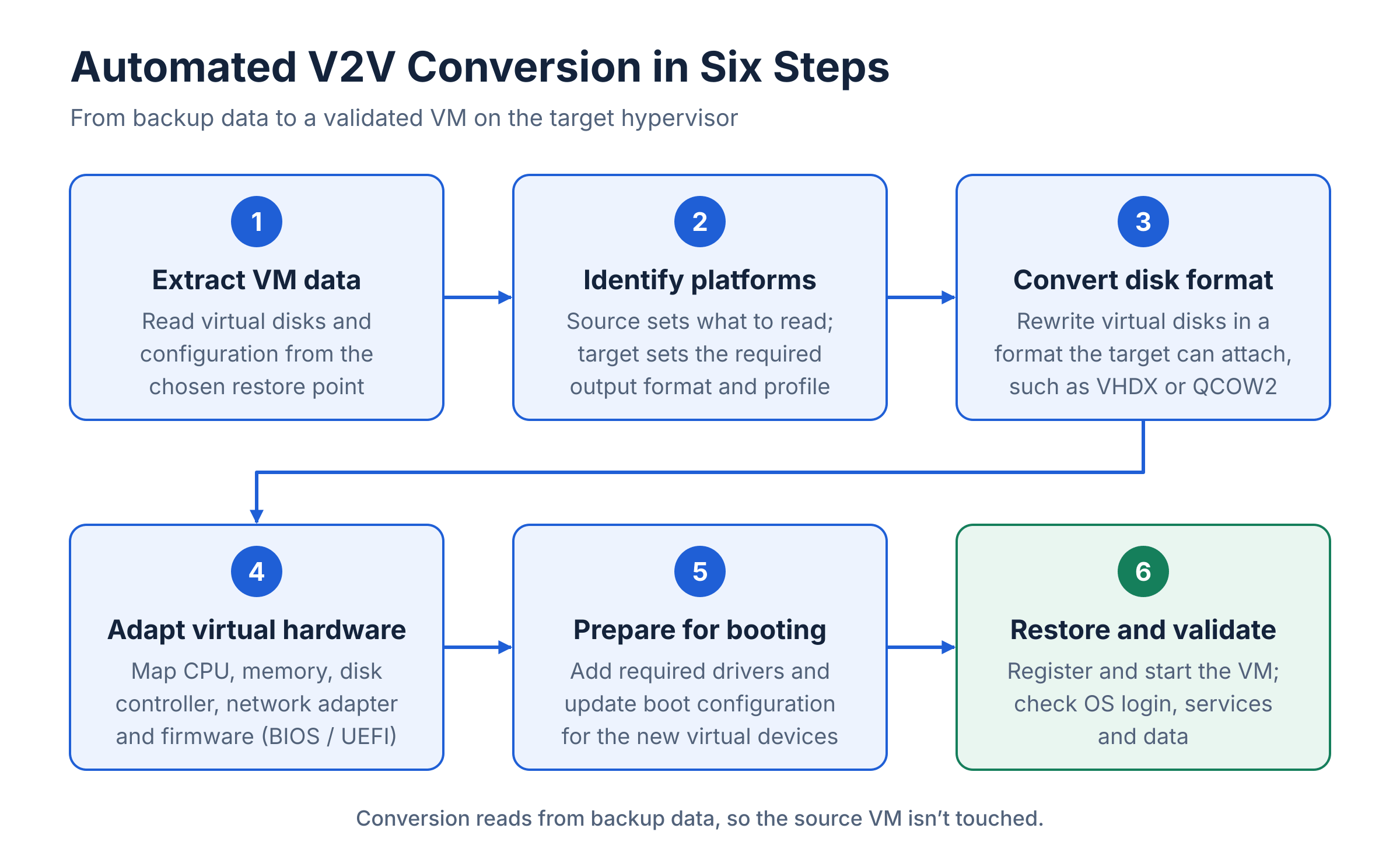
Cross-platform restore automates conversion by running a fixed sequence on the backup data: extract the VM, identify source and target, convert the disks, adapt the virtual hardware, prepare the guest to boot, then create and validate the target VM. The overall flow is:
Source VM → Backup data extraction → Disk format conversion → Hardware adaptation → Boot preparation → Target VM creation and validation
Step 1 – Extract VM Data from the Backup
The process starts from a backup or image rather than a running VM. The restore engine reads the VM’s virtual disks and its configuration metadata, such as CPU count, memory size and attached devices, from the chosen restore point. Because the process reads from backup data, the source VM isn’t touched; if the original is still running, it can keep running while the new copy is prepared.
Step 2 – Identify the Source and Target Platforms
The tool then needs to know where the VM came from and where it is going. The source platform determines which disk format and hardware model to read. The target platform determines what output is required, for example VHDX with a generation 2 profile for Hyper-V, or QCOW2 with virtio devices for KVM.
Step 3 – Convert Virtual Disk Formats
The virtual disk is rewritten in a format the target hypervisor can attach. Open-source tooling shows how this works at the disk level: qemu-img convert reads one image format and writes another, covering qcow2, vmdk, vhd and others. During restore, the backup product runs this kind of conversion for you and chooses the output format from the target platform.
Step 4 – Adapt VM Configuration and Virtual Hardware
Next, the VM definition is rebuilt for the target. CPU and memory settings usually carry over directly, provided the target platform supports the same values; otherwise the tool or an admin adjusts them to the target’s limits. Devices need mapping: an IDE or SCSI disk controller becomes whatever controller type the target prefers, and the network adapter is swapped for the target’s virtual NIC and attached to a chosen network. Firmware choices such as BIOS or UEFI are matched to how the guest was installed.
Step 5 – Prepare the VM for Booting
This step decides whether the restored VM actually starts. The guest operating system may need drivers for the new virtual devices, and its boot configuration may need to be updated to find the disk on a new controller. The open-source virt-v2v tool, for instance, modifies a converted guest so it can boot on KVM and installs virtio drivers. Some commercial backup products fold the same repair work into the restore itself, so the guest can boot without manual fixes.
Step 6 – Restore and Validate the Target VM
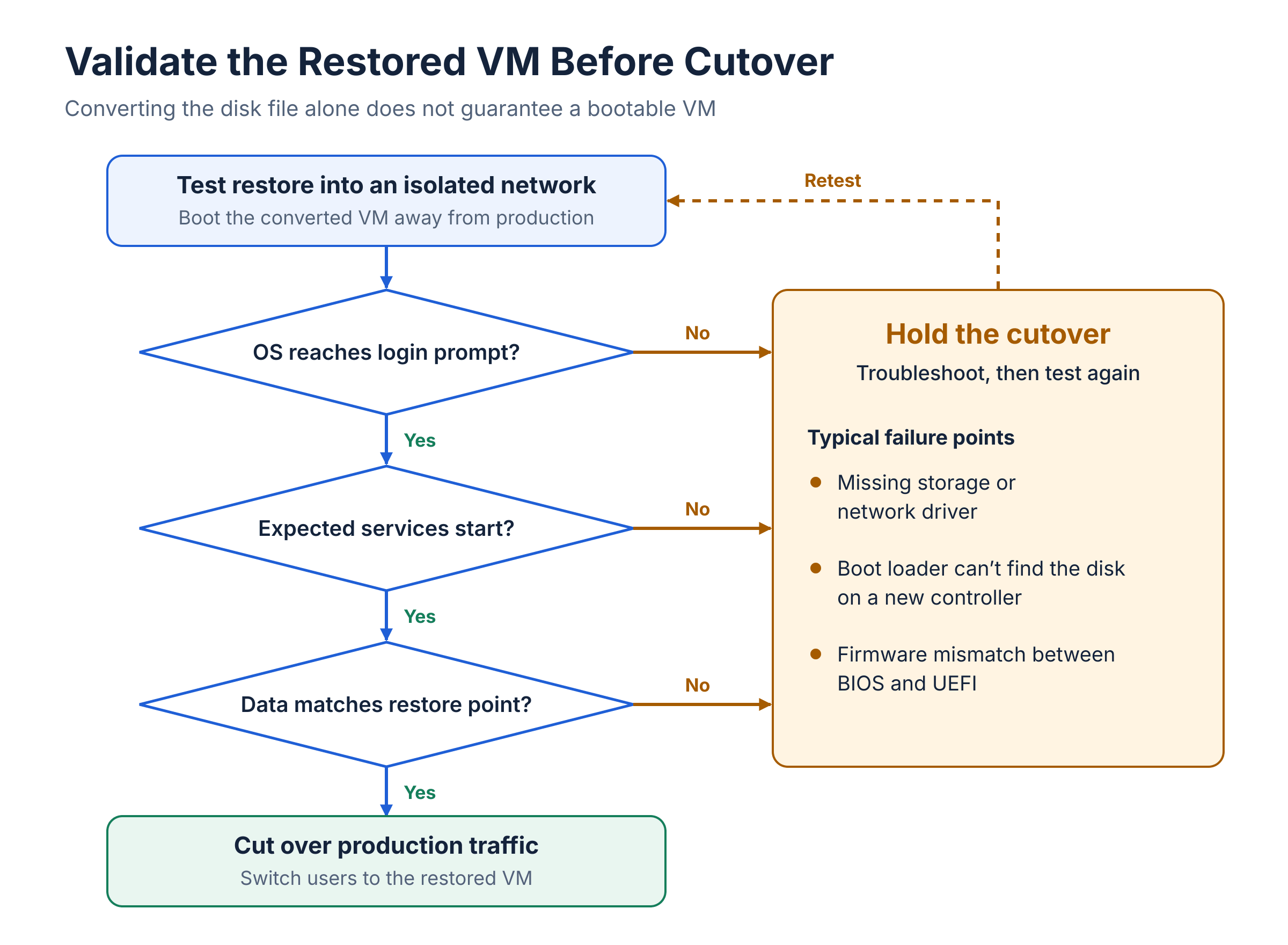
The converted disks and rebuilt configuration are registered on the target hypervisor, and the VM is started. Validation confirms three things: the operating system reaches the login prompt, the expected services start, and the data matches the source restore point. A test restore into an isolated network is the safest way to check before cutting over production traffic.
What VM Formats and Hypervisors Can V2V Support?
Support varies by tool and version, so there is no single list that applies to every V2V product. The common building blocks are the same across most of them.
Common Virtual Disk Formats
VMDK: the VMware disk format.
VHD and VHDX: Hyper-V formats. Microsoft’s guidance is to use VHDX where the Hyper-V version allows it, and convert between the two with Hyper-V Manager or the Convert-VHD cmdlet.
QCOW2: the disk format used by KVM and QEMU, alongside raw images.
Common Source and Target Hypervisors
VMware, Hyper-V and KVM are the usual anchors. The open-source virt-v2v tool, for example, reads guests from VMware, Xen and Hyper-V and converts them to run on KVM. Commercial backup products typically list a wider matrix of supported platforms.
Before planning a migration, check three things in the tool’s documentation: which source and target pairs are supported, which guest operating systems are covered, and whether conversion works in both directions.
What Are the Benefits of Automated Cross-Platform Restore?
Automation removes the manual stages that make cross-platform moves slow and error-prone: converting disks one by one, rebuilding VM definitions by hand and chasing driver problems after the first failed boot.
Less manual work. Disk conversion and configuration mapping happen as part of the restore.
Simpler platform changes. Moving between hypervisors becomes a restore operation instead of a separate migration project.
More recovery flexibility. A backup is no longer tied to the platform that produced it.
Lower platform dependency. Being able to leave a hypervisor reduces vendor lock-in.
Support for mixed environments. Teams running VMware, Hyper-V and KVM side by side can protect them with one backup process.
When Should You Use Cross-Platform Restore?
Use it whenever a VM has to run on a different hypervisor from the one that produced its backup. Typical cases:
Platform migration: moving from VMware to Hyper-V or KVM.
Infrastructure replacement: retiring legacy virtualization hosts and rebuilding workloads on new ones.
Disaster recovery: bringing VMs up on an alternative platform when the original environment is unavailable.
Workload consolidation: merging VMs from different virtualization environments after a merger or a data center move.
Flexible backup strategy: keeping the option to restore anywhere instead of only back to the source platform.
Is Cross-Platform Restore Fully Automatic?
Not always. Disk conversion, configuration mapping and common driver changes can usually be automated, but the result still depends on the tool, the platform pair and the guest operating system.
What is usually automated: reading the backup, converting the disk format, creating the target VM definition and mapping standard devices.
What can need manual attention: custom or unusual guest drivers, specialized virtual hardware, licensing tied to hardware identifiers, and applications that bind to a specific network adapter.
Platform limits: features that exist on one hypervisor and not another, such as particular firmware modes or secure boot options, may have no direct equivalent. Hyper-V, for example, doesn’t support or recommend a VHDX that boots under both of its VM generations.
Typical failure points: a missing storage or network driver, a boot loader that can’t find the disk on a new controller, or a firmware mismatch between BIOS and UEFI.
Validation is part of the process, not an extra. Boot the VM in an isolated network, check services and data, and only then switch users over. Converting a disk file alone, say from VMDK to VHDX, does not guarantee a bootable VM.
Frequently Asked Questions
Q1: What does V2V stand for in virtualization?
V2V stands for virtual-to-virtual. It refers to converting or moving a virtual machine from one virtualization environment to another.
Q2: Is V2V the same as VM migration?
No. VM migration is the goal of moving a workload. V2V describes a virtual-to-virtual method of doing it, and cross-platform restore specifically does it from backup data.
Q3: Can V2V convert VMDK to VHDX automatically?
Yes, disk conversion between these formats is a standard capability, and tools such as qemu-img handle it. Whether the converted VM boots also depends on hardware mapping and drivers, which is why restore tools handle more than the disk file.
Q4: Does V2V conversion affect VM data?
Pure disk-format conversion rewrites the disk container, not the guest’s files. A full cross-platform restore may go further, though: installing drivers and updating boot and network configuration inside the guest changes system files and settings, even though application data stays intact. Data integrity should still be confirmed after the restore, and the original backup stays unchanged as a fallback.
Q5: Can a VM boot immediately after cross-platform restoration?
Often, but not always. Missing drivers or a firmware mismatch can stop the first boot, so plan a test restore before relying on it for production.
Q6: What is the difference between V2V and P2V?
V2V converts a VM between hypervisors, so the workload stays virtualized. P2V takes a physical server and turns it into a VM, which requires hardware abstraction and driver installation on top of disk conversion.
A Practical Note on Cross-Platform Restore Tooling
Vinchin Backup & Recovery automates cross-platform restore end to end: it converts virtual disk formats, adapts virtual hardware and prepares the guest to boot, repairing boot and network configuration and replacing required drivers automatically during migration. Supported source and target pairs, guest operating systems and version requirements vary by release, so verify your platform combination before planning a migration — see the migration solutions page.