Direct Answer
Both methods can protect a database, but they solve different problems. VM-level backup protects the entire virtual machine and is the right tool for infrastructure recovery. Application-level backup works with the database engine itself and delivers the consistency, log handling, and point-in-time recovery that real database protection demands. For mission-critical databases, the strongest answer is usually both, layered together.
Key Takeaways
Capture the whole machine with VM-level backup: the operating system, database files, and configuration travel together in one image-level job.
Work with the database engine through application-level backup: it produces database-consistent copies and supports transaction-log and point-in-time recovery.
Do not assume VM-level backup is always crash-consistent. With application-aware processing such as Microsoft VSS, a VM-level backup can also be application-consistent.
Combine both layers for mission-critical databases: image backup handles infrastructure disasters, while application-aware or native backup handles granular, time-precise recovery.
Most production databases now run inside virtual machines, which creates a backup decision that did not exist in the physical-server era. You can protect the entire VM with an image-level backup, or you can protect the database itself with application-aware or native database backup tools.
The two approaches differ in backup scope, data consistency, recovery granularity, and management effort. Choosing the wrong one can extend recovery time, block granular restores, and put business continuity at risk. So the question is not which backup is "better" in the abstract — it is which layer of failure you need to recover from, and how precisely you need to recover the data.
What Is VM-Level Database Backup?
VM-level backup is an image-based copy of an entire virtual machine, taken by the hypervisor or a backup platform rather than by the database itself.
How VM-Level Backup Works
The hypervisor or backup appliance creates a snapshot of the VM and copies its virtual disks to backup storage. Because the backup operates at the disk level, it captures everything inside the machine: the operating system, database binaries and data files, application configuration, and any other data on the VM. Restores can typically return the whole VM, a single virtual disk, or individual files, depending on the solution.
Advantages of VM-Level Backup
Protect the full environment, not just the data: recovery returns a working VM with its OS, database, and configuration already in place.
Centralize management across the VM fleet: one policy can cover hundreds of machines without per-server agents.
Handle infrastructure-level failures: host failures, corrupted VMs, and site disasters all call for whole-machine recovery.
Cover mixed workloads: one image backup protects the database alongside everything else running in the VM.
Limitations of VM-Level Backup
Without application-aware processing, the snapshot may only be crash-consistent — the database equivalent of pulling the power cord and copying the disk.
Basic image backups rarely capture transaction logs, which limits point-in-time recovery.
Restoring a single database from a full-VM image can require extra file extraction or database mounting steps.
Recovering from a large VM image moves far more data than restoring only the database.
One clarification matters here. VM-level backup is not a synonym for crash-consistent backup. Three different concepts are involved: a crash-consistent VM backup taken without quiescing applications, an application-consistent VM backup taken with VSS or equivalent coordination, and a VM-level backup with database-aware recovery features. Broadcom's guidance on using VM snapshots for database workloads is explicit on this point: uncoordinated snapshots carry risk for database workloads, and databases should be protected either with native database tools or with certified application-aware backup solutions.
Key Terms, Defined Independently
Term | What It Means |
Application-level backup | The database engine or a database-aware agent performs the backup directly, under the database's own consistency rules. |
Application-aware VM backup | Still an image-level VM backup, but it coordinates the database (for example, via VSS) before the snapshot is captured. |
Crash-consistent VM backup | No application coordination; it captures the disk exactly as it was at one instant, including any in-flight transaction. |
What Is Application-Level Database Backup?
Application-level backup works through the database engine rather than around it, so the backup is produced with the database's own consistency rules instead of a snapshot's.
How Application-Level Backup Works
Three mechanisms enable application-consistent database backups: framework integration such as Microsoft VSS, database-native backup tools, and transaction-log or WAL archiving. Application-level backup means the backup is performed by the database engine or a database-aware agent, under the database's own consistency rules.
Native tools such as SQL Server's built-in backup, Oracle RMAN, and PostgreSQL's pg_basebackup work directly with the database engine. Backup agents use framework integration — for example, Microsoft documents how the SQL Server VSS writer and backup applications coordinate to quiesce the database and capture a consistent copy. Database-native log handling is the third piece: RMAN backup concepts cover data files, control files, and archived redo logs, while PostgreSQL's continuous archiving and point-in-time recovery model shows what this unlocks — archived WAL segments let you roll the database forward to almost any moment before the failure.
Advantages of Application-Level Backup
Understand the database's own structure and recovery machinery, including data files, control files, and transaction logs.
Recover at a granular level: a single database, table, or log position rather than a whole machine.
Roll back to a precise point in time when a complete backup-plus-log chain is in place.
Fit human-error scenarios: a dropped table or a bad UPDATE is repaired by restoring data, not by rebuilding a server.
Limitations of Application-Level Backup
Configure and maintain it per database platform — SQL Server, Oracle, and PostgreSQL each have their own mechanics.
Deploy agents, credentials, and permissions, then keep them current as systems change.
Accept that it cannot by itself rebuild the VM: no operating system, no hypervisor, no surrounding environment.
Expect different capabilities per platform, since backup and restore mechanisms vary across database engines.
VM-Level Backup vs. Application-Level Backup: Key Differences
Comparison Criteria | VM-Level Backup | Application-Level Backup |
Backup scope | Entire virtual machine | Specific database and related components |
Backup approach | Image-level backup | Database-aware backup |
Application awareness | Depends on backup configuration | Native database awareness |
Data consistency | Crash-consistent or application-consistent | Database-consistent when properly configured |
Recovery granularity | VM, disk, or file, depending on solution | Database, transaction logs, or point-in-time, depending on solution |
Point-in-time recovery | Not typically provided by basic VM backup alone | Supported with an appropriate log backup strategy |
Infrastructure recovery | Strong | Limited on its own |
Management complexity | Generally simpler for VM fleets | Requires database-specific configuration |
Best use case | Full VM and infrastructure recovery | Database-level protection and recovery |
Why Consistency Is the Deciding Factor
A crash-consistent copy captures the disk exactly as it was at one instant — which may be mid-transaction. The database may recover on restart, but you are relying on crash recovery to clean things up. An application-consistent or database-consistent copy is coordinated with the engine, so transactions are either complete or cleanly recorded in the logs. The Azure VM backup documentation distinguishes exactly these consistency tiers for VM backups, and the same distinction decides whether a database restore is a formality or a gamble.
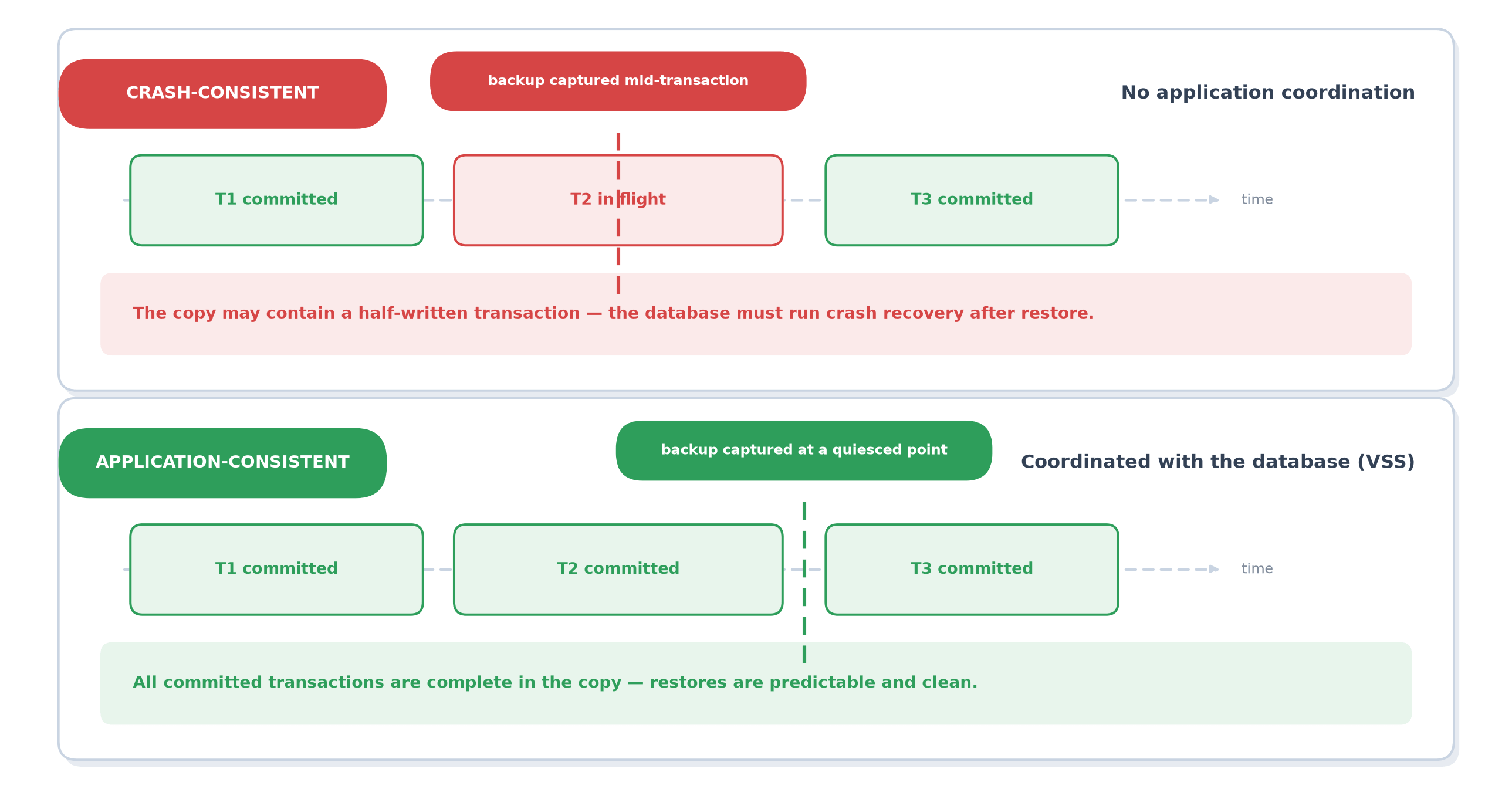 Crash-consistent vs. application-consistent backups: what matters is where the backup point lands relative to in-flight transactions.
Recovery Granularity
If a developer drops one table at 2:15 p.m., an image backup lets you restore the whole VM to the previous night — losing a day of transactions — or work through a slow extraction process. An application-level backup with a complete log chain can restore the database to 2:14 p.m. The finer the recovery granularity, the smaller the data-loss window.
Operational Flexibility
Image-level backups scale well across large virtualized estates because one policy covers every VM. Application-level backup demands per-database configuration but gives DBAs the native restore workflows they already know. Most organizations end up assigning ownership accordingly: infrastructure teams run the VM backups, and database teams run the database backups.
Backup Window and Resource Cost
An image-level backup reads every changed block on the VM's disks, so it competes with production I/O during the backup window. Changed-block tracking reduces that cost by moving only what changed since the last backup, but the image still has to be transported and stored. Application-level backups are lighter on the hypervisor but consume database engine resources, and log backup frequency drives the load. Neither approach removes the cost — they move it to a different place.
Which Layer Recovers What: Common Failure Scenarios
The clearest way to compare the two layers is to walk through the failures each one exists for:
Failure Scenario | What Recovers It | Why That Layer |
Host failure or corrupted VM | VM-level image backup | Rebuilds the entire machine, operating system included |
Accidental table drop or bad UPDATE | Log backups + application-level restore | Rolls the database back to the moment before the mistake |
Corrupted or torn database files | Application-consistent backup | Restores a valid database state, not a half-written one |
Ransomware encrypts the VM | Immutable offsite copy | Keeps a clean copy outside the attacker's reach |
Site-level disaster | Offsite copies of both layers | Rebuilds VMs and data at another location |
When Should You Choose VM-Level or Application-Level Backup?
The honest answer depends on what you need to recover, how fast, and how precisely. The scenarios below map each approach to the conditions where it fits.
Choose VM-Level Backup When...
You need to recover entire VMs, operating systems included.
You manage a large VM fleet and want centralized, agentless protection.
Your primary risk is infrastructure failure or site-level disaster.
Your backup platform delivers application-consistent backups for the databases involved.
Choose Application-Level Backup When...
Your recovery objectives demand point-in-time restoration.
You need to restore a single database, table, or log range without touching the rest of the VM.
Strict RPO and RTO targets apply to the database itself.
Database integrity and transaction-level recovery outrank operational convenience.
Consider Both When...
The database supports mission-critical business applications.
You need both whole-VM disaster recovery and granular data recovery.
You want independent protection against different types of failure.
Your disaster recovery plan benefits from multiple restore paths.
The two approaches are not competitors. One protects the machine; the other protects the data inside it. Critical databases usually deserve both.
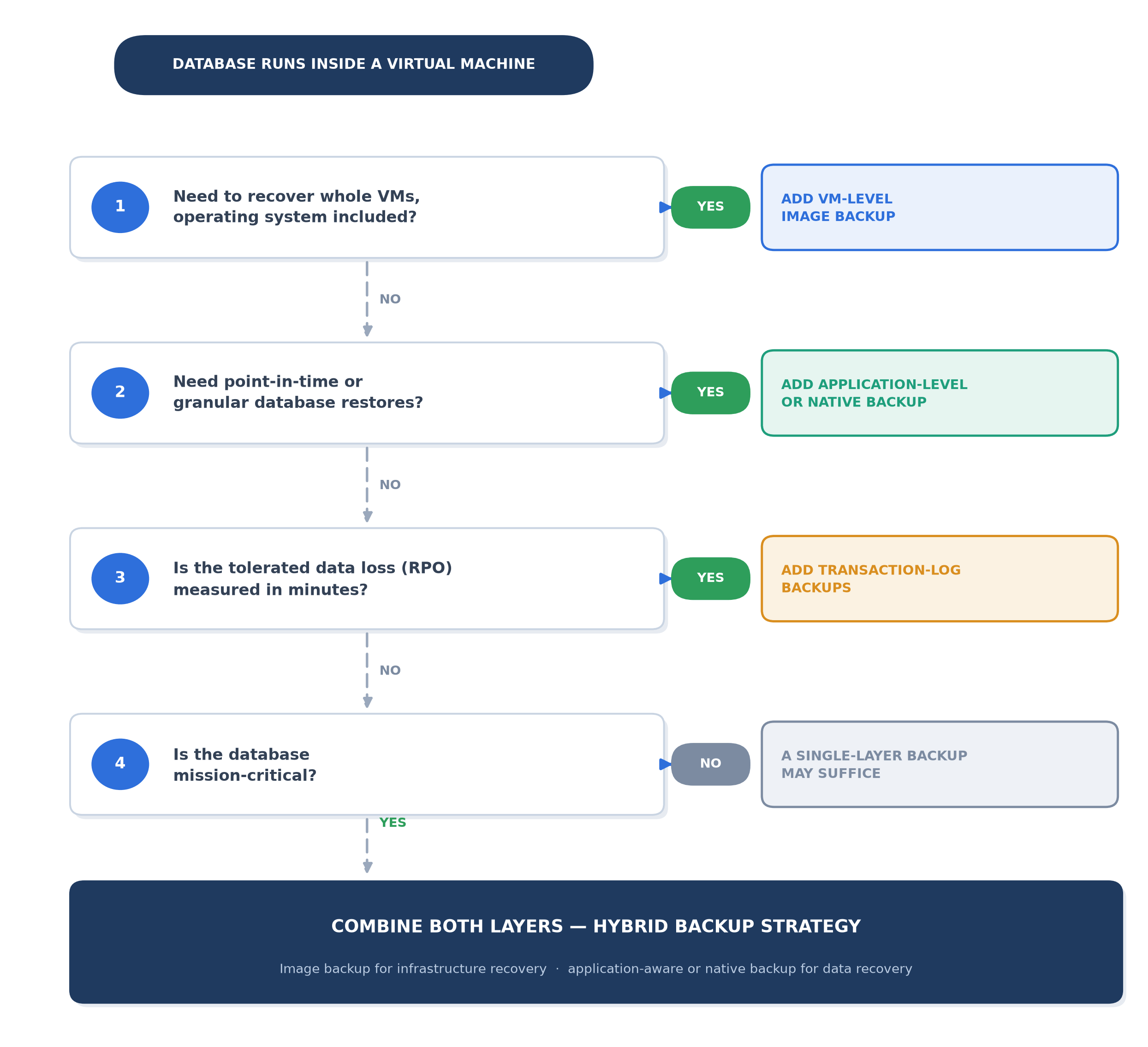
Decision flow: map your recovery requirements to the backup layers you actually need.
What Does This Look Like in Practice?
Consider a mid-sized company running an order-management database on a SQL Server VM. The database is backed up nightly as part of a full-VM image job, taken with application-aware processing.
On Wednesday at 2:15 p.m., a developer's script drops a key table. With only the VM image, the options are painful: restore last night's image and lose a full day of orders, or attempt to extract a single table from the image — slow, fragile work under business pressure.
With a layered strategy, the outcome changes. Last night's application-aware image still protects the infrastructure, but 15-minute transaction-log backups let the team restore the database to 2:14 p.m. — one minute before the mistake — directly onto the same VM. Total data loss: one minute. Total VM rebuild: none.
Same infrastructure, same backup schedule, different architecture. That difference is what this decision actually buys.
Should You Use a Hybrid Backup Strategy?
For most organizations running databases on VMs, the practical answer to the title question is: use both, deliberately. A layered strategy assigns each backup type the job it does best.
Protection Layer | Recommended Approach | Purpose |
Infrastructure | VM-level (image) backup | Recover the entire VM and its operating environment |
Database | Application-level or application-aware backup | Ensure database consistency and enable granular restores |
Transaction logs | Log / WAL archiving | Close the gap between backups and enable point-in-time recovery |
Disaster recovery | Offsite and immutable copies | Survive site failures and ransomware attacks |
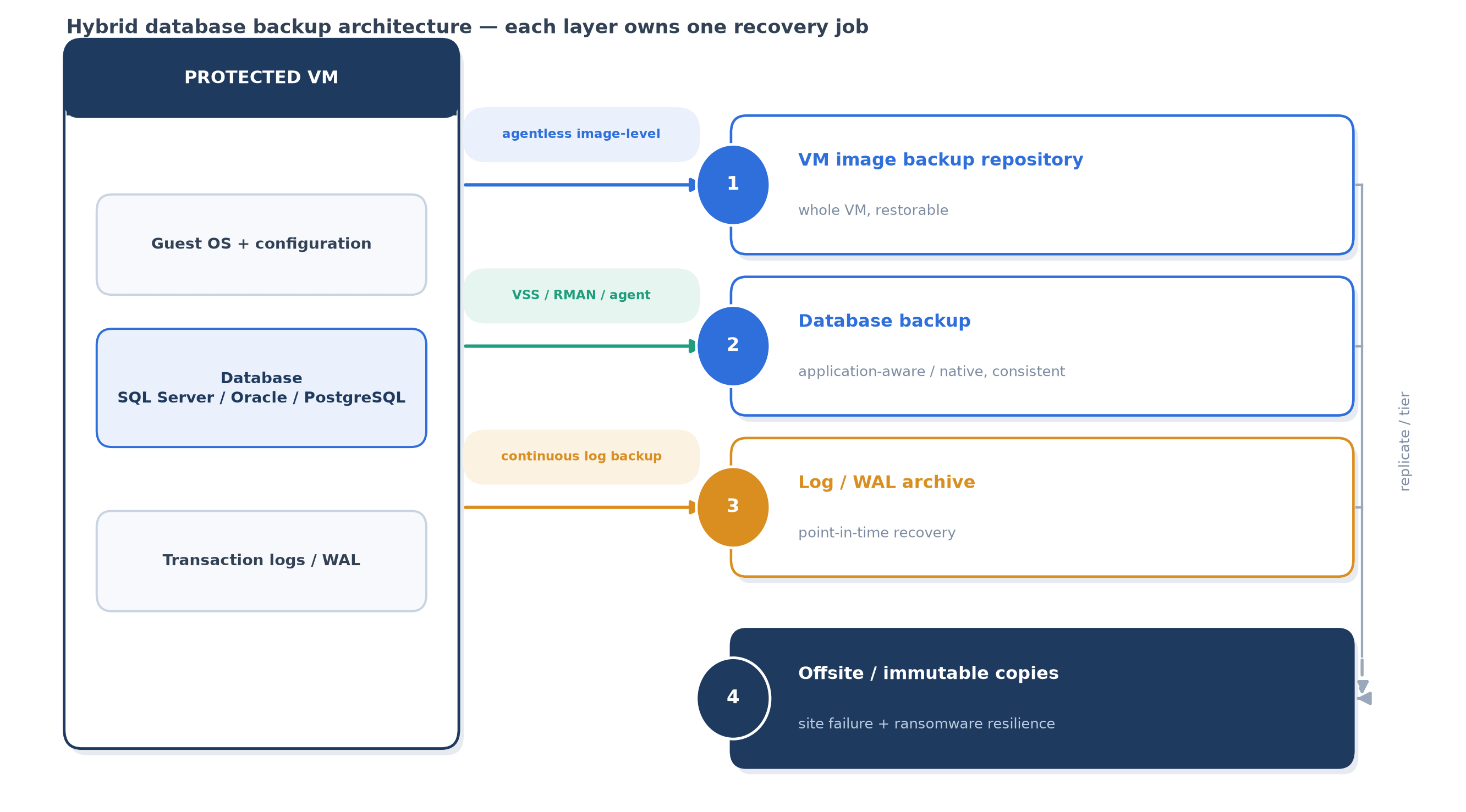 A hybrid database backup strategy: four layers, each owning one recovery job.
How a Unified Platform Supports Hybrid Database Protection
Platforms that handle both layers from one console make the hybrid strategy practical, because the same job produces the infrastructure copy and the database-consistent copy. Vinchin Backup & Recovery is one example of this approach.
It takes agentless, image-level backups across major virtualization platforms, including VMware, Hyper-V, and Proxmox VE, so one policy can cover the whole VM estate.
It applies application-aware processing for databases such as SQL Server and Oracle, so the image-level job also captures a database-consistent copy.
It supports granular file-level restore from image backups, so a single file can be recovered without rebuilding the VM.
It supports offsite backup copies and automated backup verification, closing the gap between "a backup exists" and "a backup actually restores."
Each layer then carries a distinct responsibility:
VM-level backups carry infrastructure recovery: rebuild the machine after a host failure or site loss.
Application-aware or native backups carry database consistency: restore data that is actually valid.
Log backups shrink the data-loss window between full backups.
Offsite and immutable copies add resilience against encryption attacks and site-wide failure.
5 Factors to Consider Before Choosing a Database Backup Strategy
Before standardizing on either layer, work through five questions that come directly from your environment rather than from a vendor datasheet.
1. Database type and architecture. SQL Server, Oracle, and PostgreSQL each expose different native backup mechanics — check what your engine requires for a consistent backup before committing.
2. Recovery Point Objective (RPO). Decide how much data loss the business tolerates; if the answer is measured in minutes, log backups are non-negotiable.
3. Recovery Time Objective (RTO). Restoring a whole VM image takes longer than restoring one database — size your RTO against the backup you actually have.
4. Recovery granularity. Identify whether recovery targets are whole machines, whole databases, individual tables, or points in time, and confirm the chosen method supports them.
5. Backup infrastructure and management. Verify the platform supports application-aware processing, log backup, offsite copies, and automated restore verification.
Final Verdict: VM-Level or Application-Level Backup?
Back up at the VM level when infrastructure recovery is the priority; back up at the application level when data consistency and granular recovery are the priority. For any database the business depends on, combine them.
VM-level backup is essential for full VM and infrastructure recovery — keep it in the plan.
Application-level backup is generally more suitable for database consistency, log handling, and point-in-time restores.
Combining both approaches is the more effective strategy for comprehensive database protection.
The right database backup strategy is not a choice between two layers. It is making sure your backup architecture can meet your recovery, availability, and data protection requirements — at whichever layer the failure strikes.
FAQ
Q1: Is VM-level backup enough to protect a database?
It protects the database's files, but it may not capture a consistent, log-complete state. Without application-aware processing, restores rely on database crash recovery and point-in-time options are limited. For non-critical databases it can suffice; for critical ones, add application-level protection.
Q2: Can VM-level backups provide application-consistent database protection?
Yes, when the backup solution supports application-aware processing. By coordinating with VSS and the SQL Server writer, for example, a VM-level backup can quiesce the database and produce an application-consistent copy. The capability depends on the backup platform, not on image-level backup itself.
Q3: Does application-level backup support point-in-time recovery?
Yes, when full backups are paired with a complete transaction-log or WAL backup chain. The database can be restored to the last full backup and then rolled forward to any point before the failure. Missing or broken log chains limit recovery to backup points.
Q4: Can you use VM-level and application-level backups together?
Yes, and for critical databases you should. The image backup covers infrastructure disasters, while application-aware or native backup covers data-level failures and fine-grained restores. The two layers recover from different failure types, so they complement rather than duplicate each other.
Q5: Which backup method is better for SQL Server databases?
SQL Server supports both paths well: VSS-based application-aware VM backups and native backups through the SQL writer. If you need point-in-time recovery, run transaction-log backups at the application level regardless of your VM backup schedule. Many environments combine both.