Backups keep growing even when your VMs don't. Files get deleted, workloads get retired, disks shrink — and the backup repository still quietly gets bigger. Deduplication and compression are supposed to stop that. So why don't they?
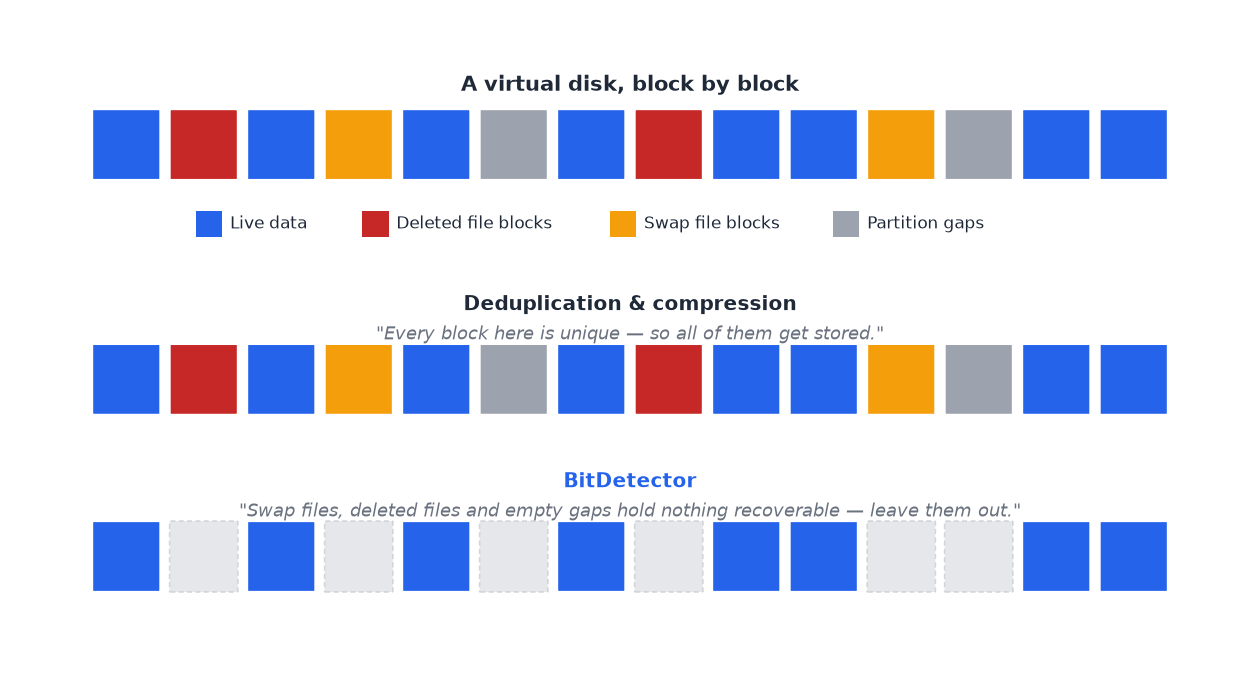
Because both techniques only judge what the data looks like — whether it repeats, and how well it squeezes. Neither can tell whether a block of data still matters to the operating system at all.
That gap is what BitDetector was built to close. It finds disk blocks that no longer hold useful data — swap files, deleted files, empty partition gaps — and leaves them out of the backup entirely. This article explains how it works, and when it pays off.
What Is BitDetector in Vinchin Backup & Recovery?
BitDetector is a feature of Vinchin Backup & Recovery that excludes unnecessary data blocks from virtual machine backups. According to the Vinchin Backup Data Reduction documentation, it belongs to the product's backup data reduction toolset, alongside data deduplication and data compression.
BitDetector: A Unique Data Reduction Feature by Vinchin
Vinchin describes BitDetector as a feature set for VM backup that keeps three categories of data out of the backup: swap file blocks, deleted file blocks, and unpartitioned spaces and partition gaps. This scope currently covers Windows VMs running on the NTFS file system.
Its uniqueness is a matter of product packaging: BitDetector is Vinchin's own implementation, delivered as part of Vinchin Backup & Recovery. It does not mean that excluding unnecessary blocks is a concept only Vinchin has ever applied, and other backup vendors document related capabilities of their own.
What Is the Purpose of BitDetector?
The purpose of BitDetector is to avoid backing up blocks that no longer hold data the guest operating system needs. When those blocks are left out, there is less data to read, transfer and store, which reduces the load on both backup storage and the network.
How Is BitDetector Different from Traditional Data Deduplication?
Deduplication asks, “Have I already stored this block?” BitDetector asks, “Does this block still hold valid data?” The first question is about repetition, the second is about necessity. Because they address different questions, the two features complement each other rather than compete.
Why Can’t Data Deduplication Remove All Unnecessary Backup Data?
Data deduplication cannot remove all unnecessary data because it judges blocks by whether they repeat, not by whether they are still valid. A block that appears only once is kept, whether or not anything in the operating system still refers to it.
How Does Data Deduplication Work?
Deduplication compares chunks of data and stores only one copy of each distinct chunk, with later occurrences pointing back to that copy. The SNIA dictionary defines it in the same terms: replacing multiple copies of data with references to a shared copy to save storage space, data transferred, or both.
In Vinchin Backup & Recovery, deduplication reduces stored backup data by eliminating duplicated and zeroed data blocks and keeping only the unique ones.
What Types of Data Can Deduplication Identify?
Deduplication is effective on content that repeats: identical operating system files shared by many VMs, data that is unchanged from one restore point to the next, and blocks that contain only zeros. Anything that repeats can be stored once, no matter what it represents.
Why Can Unique but Unnecessary Data Still Be Included in Backups?
Consider a user who deletes a large file inside a Windows VM. The file system generally marks the space as available again, but the old content can remain in the underlying disk blocks. Those blocks are unique, so deduplication has no reason to discard them.
There is a second effect. As described in the Vinchin knowledge base, traditional virtual disk backup methods, such as those based on change tracking interfaces or partition bitmaps, can detect which underlying disk blocks changed but cannot see file deletions that happen inside the operating system.
The backup therefore keeps recording changed blocks, and over time the accumulated deleted data can push the valid backup size toward the size of the whole disk. This is why unique does not always mean useful, and it is where BitDetector comes in.
How Does Vinchin BitDetector Work?
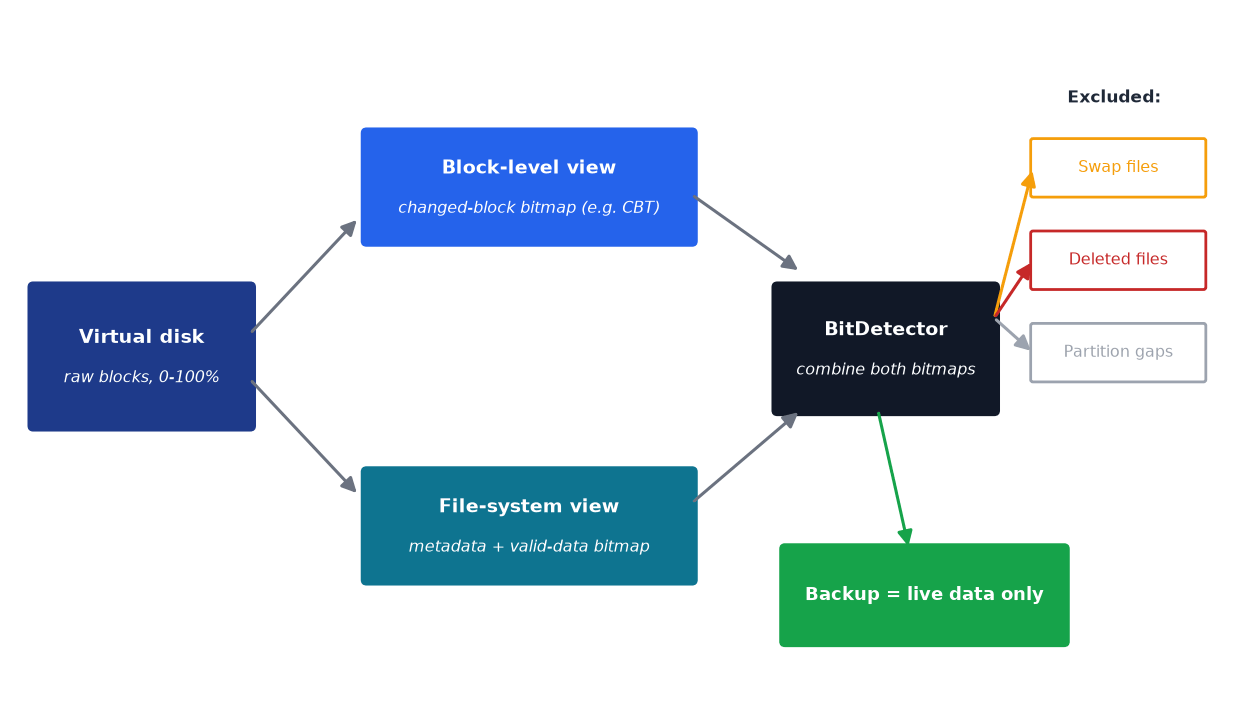
BitDetector works by using file system information, rather than only block-level change information, to decide which blocks of a virtual disk hold valid data and which do not.
Identifying Valid and Unnecessary Data Blocks
Per Vinchin’s documentation, BitDetector reaches through the block device layer to extract file system metadata and combines valid data bitmaps with traditional approaches. This lets it recognize blocks that are actually in use and set aside junk data such as deleted blocks, swap files and inter-partition gaps.
Using File System Metadata and Valid Data Information
File system metadata records how a file system has laid out its data on disk, and valid data information indicates which regions currently hold live content. A backup that sees only changed disk blocks has neither piece of context. A backup that also reads the file system’s view of the disk can separate live data from leftovers.
This article stays at the conceptual level; for the exact processing details of a given release, refer to the technical documentation for your Vinchin Backup & Recovery version.
Excluding Unnecessary Blocks from VM Backups
Blocks identified as unnecessary are excluded from the backup data, so they are neither transferred nor stored. In the product, BitDetector is applied to the virtual machine protection module and the operating system protection module, and it is configured under Advanced Strategy when a VM backup job is created.
Two further options, Exclude Swap Files and Exclude Unpartitioned Spaces, can be switched on or off to match your requirements.
What Types of Unnecessary Data Can BitDetector Exclude?
BitDetector can exclude three types of data: swap file blocks, deleted file blocks, and unpartitioned spaces and partition gaps. Each arises differently, and each can enlarge a backup without adding anything the business needs to recover.
Swap File Blocks
Operating systems such as Windows use a disk file, commonly called the pagefile, to extend physical memory when RAM runs low. Its content is temporary working data that can change heavily between backups even when little else on the VM has changed. Excluding it keeps this churn out of every restore point.
Deleted File Blocks
When a file is deleted, the file system releases the space but does not necessarily erase the content. Those leftover blocks no longer belong to any file. Excluding them stops the backup from preserving data that the operating system itself no longer considers part of any file.
Unpartitioned Space and Partition Gaps
A virtual disk is not always fully covered by partitions. Space may be left unallocated, or gaps may remain between partitions after the disk has been resized or repartitioned. Because this space is not part of any file system, it holds no files the guest operating system can use, yet a block-level backup can still read through it.
Note on scope: The exact range of data excluded depends on the product version, the file system and the supported conditions. Vinchin’s documentation currently states that BitDetector works on the NTFS file system, with the exclusions applying to Windows VMs, so confirm support for your environment in the documentation for your version.
BitDetector vs. Data Deduplication: What’s the Difference?
Deduplication eliminates redundant data, while BitDetector excludes unnecessary data. The table below summarizes the distinction.
Comparison | Deduplication | Vinchin BitDetector |
Core purpose | Eliminate redundant data | Exclude unnecessary data |
Main focus | Data duplication | Data validity and necessity |
Typical targets | Duplicate data blocks | Swap, deleted and unused disk blocks |
Main value | Reduce redundant storage | Avoid backing up unnecessary data |
Relationship | Data reduction method | Complementary data reduction feature |
Different Data Reduction Objectives
Deduplication aims to ensure that identical data is stored only once. BitDetector aims to ensure that data with no remaining value is not backed up at all. One shrinks the footprint of what is kept, and the other shrinks what is selected for keeping.
Different Data Identification Methods
Deduplication identifies data by comparing content across blocks. BitDetector identifies data by consulting file system information to determine whether blocks are in use. A deleted block can be perfectly unique by content, so only the second method will flag it.
How BitDetector and Deduplication Work Together
BitDetector is not a replacement for deduplication, nor is it the other way round. Together with compression, they form three complementary approaches to backup data reduction. SNIA’s data reduction material likewise treats compression and deduplication as distinct techniques that serve different purposes.
Approach | What it does |
Deduplication | Identifies and eliminates redundant data. |
BitDetector | Identifies and excludes unnecessary data blocks. |
Compression | Reduces the size of data through compression algorithms. |
This is a conceptual division of roles. The actual processing flow and the way the features combine should be confirmed in the technical documentation for the relevant Vinchin product version.
How Does BitDetector Further Reduce Backup Storage and Improve Efficiency?
BitDetector improves efficiency by shrinking the amount of data that has to be backed up in the first place, and every downstream stage benefits from that. Actual savings depend on how much unnecessary data a given VM contains.
Reduce the Amount of Data to Be Backed Up
Excluded blocks are never counted as backup data. This lowers the volume that the backup process must read from the source disk.
Save Backup Storage Space
Data that is not backed up does not occupy repository capacity. Because deleted data would otherwise accumulate across restore points, the effect grows the longer a VM runs.
Reduce Data Transfer Requirements
Fewer blocks to send means less traffic between the source and the backup target, which matters for bandwidth-limited links or backup windows.
Improve Overall Backup Efficiency
Less data to read, move and store contributes to a leaner backup process overall. Because results vary with each environment, evaluate the effect on your own workloads rather than assuming a fixed improvement.
When Can BitDetector Benefit Your VM Backup Strategy?
BitDetector is most useful where virtual disks hold a meaningful share of data that is no longer needed. Typical situations include:
Disks with many deleted files: VMs where large amounts of data are routinely created and removed, leaving deleted blocks behind.
Operating systems with swap files: Windows VMs whose paging file data changes between backups.
Unallocated space and partition gaps: Virtual disks with space that sits outside any partition.
Environments already using deduplication and compression: Teams that want to reduce backup volume further without replacing their existing methods.
For teams that want all three layers of data reduction in one place, Vinchin Backup & Recovery provides data deduplication, data compression and BitDetector as built-in options that do not depend on storage server support, with BitDetector enabled through the advanced strategy settings of a VM backup job.
Frequently Asked Questions About BitDetector
Q1: Is BitDetector the same as data deduplication?
No. Deduplication removes redundant copies of data, while BitDetector excludes data that is no longer necessary. The two address different problems and work as complementary features.
Q2: How does BitDetector reduce backup size?
It uses file system metadata and valid data information to recognize which disk blocks hold live data, then leaves unnecessary blocks out of the backup. Less data is read, transferred and stored as a result.
Q3: What types of data can Vinchin BitDetector exclude?
Swap file blocks, deleted file blocks, and unpartitioned spaces and partition gaps. The Exclude Swap Files and Exclude Unpartitioned Spaces options can be toggled on or off.
Q4: Is BitDetector a unique feature of Vinchin?
BitDetector is a unique feature of Vinchin Backup & Recovery, meaning it is Vinchin’s own product implementation. This does not imply that Vinchin invented the idea of excluding unnecessary blocks.
Q5: Does BitDetector replace data compression?
No. Compression reduces the size of the data that is kept, whereas BitDetector decides which blocks are kept at all. Vinchin lists BitDetector as another important feature for reducing backup size in addition to deduplication and compression.
Q6: Does BitDetector support all file systems?
No. Vinchin’s documentation states that BitDetector currently works on the NTFS file system and applies to Windows VMs. Support can change between versions, so confirm it for your release.
Conclusion: Go Beyond Deduplication with Vinchin BitDetector
Deduplication and compression are essential for controlling backup growth, but neither can tell whether a block still holds data the guest operating system needs. BitDetector fills that gap by using file system information to identify and exclude swap file blocks, deleted file blocks, and unpartitioned spaces and partition gaps before they reach the backup.
It is best understood as one layer in a three-part approach: deduplication eliminates redundant data, BitDetector excludes unnecessary data, and compression shrinks what remains. As a unique feature of Vinchin Backup & Recovery, BitDetector extends data reduction from “store less repeated data” to “back up less unneeded data.”
To check supported file systems and configuration details for your version, see the Vinchin backup data reduction documentation.