What Is Agentless Backup and How Does It Work?
Agentless backup protects virtual machines without installing a backup agent in each guest. Instead, backup software talks to the virtualization layer, asks it for a consistent view of each virtual disk, and copies that data out. VMware's own FAQ describes this model: backups built on its vSphere Storage APIs for Data Protection (VADP) use vSphere snapshots, rely on changed block tracking for incrementals, and do not need an agent installed in each guest VM.
The sections below use VMware vSphere as the worked example. Other hypervisors follow the same general idea through their own interfaces.
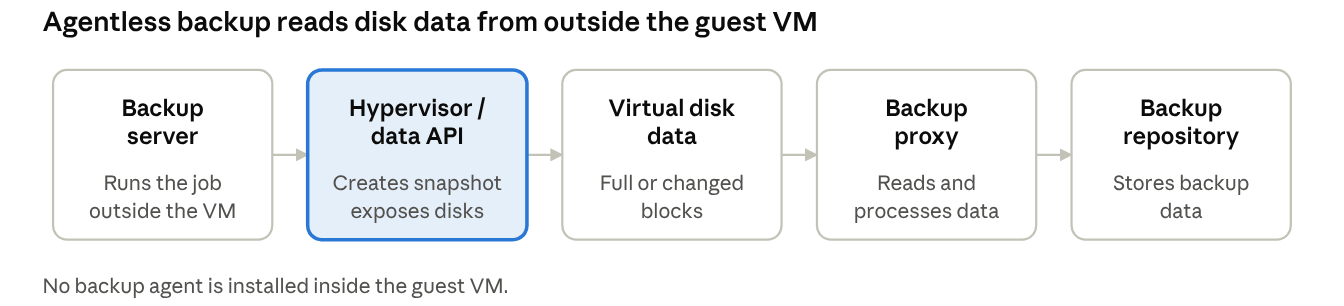
The diagram shows the path every agentless job follows: the backup server triggers the job, the hypervisor creates the snapshot and exposes the disk, and the proxy reads and processes the data before it lands in the repository.
Step 1: Connect to the hypervisor or management layer
The backup server first connects to the virtualization platform, for example vCenter Server or an ESXi host, using credentials you provide. Through that connection it discovers the VM inventory and learns which VMs, disks and datastores exist.
A backup proxy (sometimes called a worker or transporter) may sit between the hypervisor and the repository. It does the heavy lifting of reading disk data and processing it, which keeps that work off the backup server and the production guests. This is why "agentless" never means "no software": the components exist, but they run outside the VM.
Step 2: Take a snapshot and read the virtual disk data
For each VM, the backup software asks the hypervisor to create a snapshot. A snapshot freezes the base virtual disk and sends new writes to a separate delta disk, so the backup can read a stable point-in-time image while the VM keeps running.
The first run is a full backup that reads the allocated disk data. Later runs are incremental. On VMware, the software asks which blocks changed since the previous backup using changed block tracking (CBT), then reads only those blocks. If CBT data is unavailable or has been reset, the job may have to read the whole disk again.
Step 3: Move data to the backup repository
The proxy processes the blocks it read, typically with compression, deduplication and encryption depending on the product and settings, and writes them to the backup repository. Once the transfer finishes, the software removes the snapshot, and the hypervisor merges the delta disk back into the base disk.
This cleanup matters. A snapshot left open grows over time and can slow the VM, so a reliable agentless tool deletes it as soon as the read completes.
What Is Agent-Based Backup and How Does It Work?
Agent-based backup runs a small program, the backup agent, inside the operating system or application you want to protect. The agent works from the inside: it sees the guest's file systems, volumes and applications directly, so it does not depend on the hypervisor to reach the data. That is also why it works on physical servers and on platforms with limited hypervisor APIs.
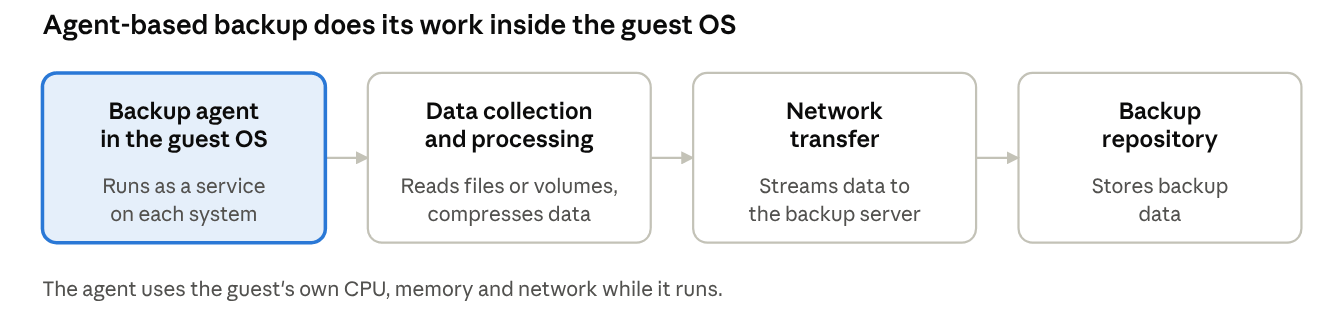
The flow is shorter than the agentless one, but all of the collection and processing happens on the protected system itself.
Step 1: Install and run the backup agent
You install the agent on each protected system, or push it with deployment tooling, and register it with the backup server. From then on it runs as a service inside the guest, takes instructions from the server, and uses the guest's own CPU, memory and network while a backup runs.
Database protection often works this way because the agent can talk to the database engine itself. For example, Vinchin's SQL Server backup requires an agent installed on the database server.
Step 2: Identify and collect the data
The agent decides what to read based on the job: individual files and folders, whole volumes, or the full system as an image. It then reads that data through the guest OS. For a first full backup it reads everything selected. For later runs it tracks what changed, using its own change tracking or by comparing the data against the previous state, so only new or modified data is sent.
Step 3: Process and transfer the backup data
Before sending, the agent typically compresses and may encrypt the data, depending on the product. It then streams it over the network to the backup server or repository. To read a stable view of live data, many agents use guest-level snapshot technology rather than the hypervisor's. On Windows that is usually the Volume Shadow Copy Service (VSS). Microsoft describes it as a way to take a consistent point-in-time copy of a volume while applications keep running, with the backup application acting as the requester. On Linux, tools such as LVM snapshots can play a similar role.
Because the processing happens inside the guest, the agent's work competes with the application for resources. On a host with many busy VMs, running many agent jobs at the same moment can add noticeable load.
Agentless vs Agent-Based Backup: Key Technical Differences
The table compares the two approaches on the points that most often decide a design. Treat it as a general guide, since individual products and platforms differ.
| Area | Agentless backup | Agent-based backup |
|---|
| Deployment | Configured once against the hypervisor or management layer | Agent installed and maintained on each protected system |
| Data access | Through hypervisor or platform interfaces, outside the guest | Through the guest OS, from inside the system |
| Backup granularity | Typically the whole VM (image level), with file-level restore options in many products | File, volume or image level, depending on the agent |
| Resource usage | Work runs on the proxy and hypervisor layer; snapshots can add storage I/O load | Work runs inside the guest and uses its CPU, memory and network |
| Application consistency | Depends on snapshot quiescing, guest tools and sometimes guest-level processing | Can use in-guest mechanisms such as VSS and application-aware components |
| Physical server support | Not applicable, because there is no hypervisor layer | Supported, since the agent runs on the OS itself |
| Deployment at scale | Fewer components to roll out and update | More agents to install, patch and monitor |
| Recovery options | Full VM, disk and file recovery; instant recovery in many products | Files, volumes, bare-metal or application-level recovery, depending on the product |
What the table does not tell you
A table flattens real differences, so a few cautions are worth stating plainly.
Agentless is not automatically faster. Speed depends on change tracking, the transport path, storage, network and the proxy. A well-tuned agent job can beat a poorly placed agentless one.
Agent-based is not automatically more consistent. In-guest tools make application-aware backups easier, but agentless products can also achieve application consistency with the right guest integration.
Both can offer the same features. Incremental backups, compression, encryption and granular recovery exist in both models, depending on the product.
The real question is rarely which model is better. It is which one fits the workload, the platform and the recovery goal.
Application Consistency and Recovery: Where the Two Models Really Diverge
Most of the practical debate between agentless and agent-based backup is about consistency. Getting data off a system is easy. Getting data you can restore into a working application is the harder part.
Crash-consistent vs application-consistent backups
A crash-consistent backup captures only what was already on disk, much like pulling the power cord. The system can usually start, but in-memory data and unflushed writes are lost, and applications may need to repair themselves, for example by replaying a transaction log. An application-consistent backup first asks the application to finish in-flight transactions and flush its data, so the copy reflects a state the application can recover from cleanly.
Microsoft's Azure Backup documentation draws the same three-way distinction between application-consistent, file-system-consistent and crash-consistent snapshots. On Windows, application consistency relies on VSS writers, which are supplied by applications such as SQL Server and Exchange. VSS freezes write I/O only briefly, so applications stay online.
Why agentless backup may still need guest-level processing
A hypervisor snapshot sees blocks, not transactions. It does not know whether a database has committed its latest changes. To close that gap, agentless products usually ask the guest to quiesce before the snapshot, often through guest tools or a lightweight in-guest component, and then run the snapshot from outside.
So "agentless" describes where the backup data is read, not whether the guest takes part at all. If quiescing is unavailable or fails, a product may fall back to a crash-consistent copy, which is why you should check how your tool reports consistency for each job. For database-heavy workloads, many teams also choose a dedicated database agent. Vinchin's SQL Server backup is one example of that pattern.
Why recovery testing matters
A backup that completes is not the same as a backup that restores. Consistency problems, missing drivers, snapshot errors and corrupt data often stay invisible until a recovery attempt. Whichever model you use, test restores regularly: boot a recovered VM in an isolated network, open the application and check the data. Testing also gives you a measured recovery time instead of a guess, and it is the only reliable way to confirm that a given job produces application-consistent data.
When to Use Agentless or Agent-Based Backup
The right choice depends on the workload and the platform, not on a blanket rule.
Agentless VM backup is a good fit when
You protect many VMs on a supported hypervisor such as VMware or Hyper-V and want one central setup instead of per-VM installs.
Whole-VM, image-level protection and fast full-VM recovery matter more than per-application control.
You do not want to patch, monitor and troubleshoot agents on every guest.
New VMs should be protected automatically as they appear in the inventory.
Agent-based backup is a good fit when
You must protect physical servers or systems the hypervisor APIs do not cover.
An application needs in-guest, application-aware processing, such as a database with its own backup interface.
You need file-level or volume-level selection controlled from inside the OS.
The platform offers limited agentless support.
Can you use both?
Yes, and many environments do. A common pattern is agentless image-level backup for most VMs, plus an agent on the few systems, often databases, that need application-level control. Running both is a sensible design as long as the two jobs do not protect the same data twice without a reason.
What to look for in agentless backup software
If you shortlist agentless backup software, check the points that decide whether it will work in your environment:
Platform and version support: confirm your hypervisor and version are covered.
Change tracking: ask how incrementals are detected and what happens when tracking resets.
Consistency options: check how it quiesces guests and how it reports crash-consistent fallbacks.
Snapshot handling: look for automatic cleanup and clear failure alerts.
Recovery and testing: look for instant recovery and a way to verify backups automatically.
Proxy and repository design: make sure it scales to your backup window.
Vinchin Agentless Backup Software for VM Environments
Vinchin Backup & Recovery protects virtual machines at the hypervisor level without installing agents in each VM. You connect the platform by entering its address and credentials, select VMs, choose a destination and set a backup strategy. It supports 18+ VM platforms, including VMware, Hyper-V, Proxmox and others, so check the supported-platform list for your exact versions before you plan.
On the recovery side, Instant VM Recovery can bring a VM back in about 15 seconds in typical cases, and backup verification can test restores in an isolated environment. Data is protected with compression, deduplication and AES-256 encryption.
Not every workload is agentless. For databases such as SQL Server, Vinchin uses a lightweight agent installed on the database server. A 60-day free trial is available if you want to test it in your own environment: download Vinchin Backup & Recovery.
FAQ
Q1: Is agentless backup better than agent-based backup?
A1: Not always. Agentless backup is simpler to deploy and manage for VMs on supported hypervisors. Agent-based backup gives in-guest control and covers physical servers. The better choice depends on the workload, the platform and your recovery requirements.
Q2: Can agentless backup give application-consistent backups?
A2: Often yes, when the guest is quiesced before the snapshot, for example through guest tools and VSS on Windows. If quiescing fails, many tools fall back to crash-consistent copies, so check how your product reports each job.
Q3: Can agent-based backup protect VMs?
A3: Yes. An agent can run inside a VM's operating system just as it does on a physical server. Teams use this for applications that need in-guest processing or for platforms with limited agentless support.
Q4: How does agentless backup impact the performance of production VMs?
A4: The backup workload runs mostly on the proxy and hypervisor instead of inside the VM. But snapshot creation and I/O tracking can still bring brief storage performance overhead.
Conclusion
Agentless backup reads VM data from outside the guest through the hypervisor, while agent-based backup runs software inside each system. Agentless usually means simpler deployment for VMs, and agent-based means in-guest control and physical server coverage. Consistency, recovery testing and platform support matter more than the label, so match the method to each workload, and verify with a real restore test before you rely on it.