The most reliable way to reduce backup window impact on multi-hypervisor production traffic is to stop optimizing for backup duration when backup I/O actually overlaps with peak production I/O.
Key Takeaways
Backup duration and backup impact are different variables. A four-hour job with a 15-minute I/O-heavy phase can hurt production less than a 90-minute job that reads throughout.
Every hypervisor tracks changed data differently - CBT (VMware), RCT (Hyper-V), dirty bitmaps (Proxmox/KVM), CBT-over-NBD (XenServer/XCP-ng), and checkpoint APIs (RHV/OLVM) - and each has its own failure mode that silently forces a full read.
A uniform bandwidth-throttle policy across a mixed fleet does not produce uniform impact, because the platforms expose throttling controls at different layers (datastore, host, VM, or none at all).
Compressing the backup window by deferring snapshot consolidation just relocates the I/O cost to a later, often less-monitored moment, it doesn’t eliminate it.
Guest-level TRIM/UNMAP activity can make VMware’s CBT over-report changed blocks; backup software that doesn’t intersect this against actually-allocated blocks silently moves far more data than really changed.
Off-host proxy transport (backup network/SAN/LAN-free) removes the biggest single lever of production impact: reading backup data through the production host’s network stack.
Scheduling strategy matters as much as technology choice - staggering by storage array and by uplink, not just by VM count, is what actually prevents contention.
Why Backup Windows Disrupt Production Traffic in Mixed Hypervisor Environments
A backup job touches production traffic in four distinct phases, and each phase has a different impact profile:
Snapshot creation. Every backup starts with some form of point-in-time capture, a VMware/XenServer/RHV snapshot, a Hyper-V checkpoint, or a Proxmox/KVM dirty-bitmap activation. This is normally fast, but on VMs with many virtual disks or heavy write activity, snapshot creation can briefly “stun” I/O while the hypervisor quiesces the guest.
Delta write amplification. Once a snapshot exists, every production write becomes two writes: one to the new delta/redo layer, one that will eventually merge back. On a busy database or file server, this roughly doubles the write load on the underlying datastore for as long as the snapshot is open, not just for the duration of the backup read.
Read and transfer. The backup job reads changed (or all) blocks and moves them across a network path. If that path is shared with production traffic, every read competes with live application I/O for the same storage controller queue, HBA, or switch uplink.
Consolidation/bitmap reset. After the transfer completes, the snapshot or checkpoint has to be merged back into the base disk. This is frequently the least-monitored phase and, on large or long-lived snapshots, can generate more I/O than the backup read itself.
In a single-hypervisor shop, teams eventually learn the shape of phase 2 and phase 4 for their specific platform and design around it. In a multi-hypervisor environment, each platform has a different shape for these four phases, different defaults, and different failure modes, so a scheduling and throttling policy tuned for VMware doesn’t transfer cleanly to Hyper-V or Proxmox sitting in the same data center.
The Impact Window vs. Backup Window
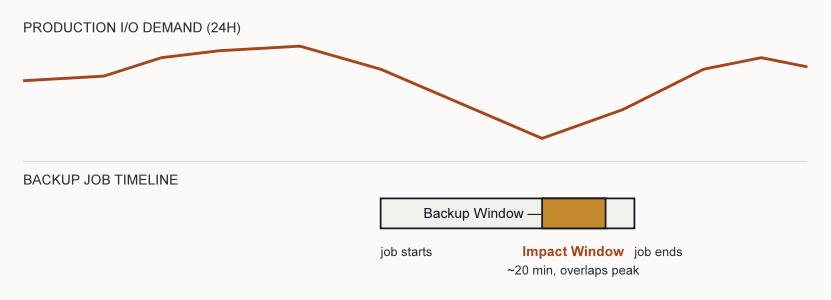
Duration is the wrong metric. Overlap is the right one.
Most teams manage backups against a single number: the backup window - the total elapsed time a job takes, or the maintenance window it’s allowed to run in. This number is almost useless for predicting impact, because it treats every minute of the job as equally disruptive. It isn’t.
What actually matters is the impact window: the subset of the backup window during which backup I/O materially overlaps with production I/O demand on the same physical resource (array controller, uplink, or host CPU/queue). A 4-hour incremental job against a lightly-used file server might have a 90-second impact window at the moment the snapshot is created. A 45-minute job against a busy OLTP database, run with an open snapshot during business hours, might have a 45-minute impact window — effectively the entire job.
This distinction changes what "reducing backup window impact" should mean operationally. Shrinking the backup window (via CBT, dedup, faster links) is worth doing, but it is a proxy metric. The direct target is shrinking or relocating the impact window: moving the I/O-heavy phases (snapshot open, transfer, consolidation) outside the hours when the resource they contend for is under production load, or moving them onto a resource the production workload doesn't share at all.
Practically, this means two backup jobs with identical reported durations in your backup software's dashboard can have completely different real-world costs, and teams that only track job duration in their SLAs are measuring the wrong thing.
How Change Tracking Works Across Seven Virtualization Platforms
Every meaningful reduction in backup window impact starts with change tracking, because it determines how much data has to move at all. But “changed block tracking” is not one technology, it’s a family of mechanisms that behave differently under stress, and knowing the difference is what separates a policy that works from one that silently degrades into full reads.
Platform
| Mechanism
| Where it can quietly fail
|
VMware vSphere | Changed Block Tracking (CBT) - a per-VMDK bitmap keyed to a sequence number (USN), queried through the vSphere APIs for Data Protection. | CBT resets after a hard power failure, some virtual-hardware changes, or vMotion edge cases, silently forcing the next job back to a full read. (Broadcom knowledge base) |
Microsoft Hyper-V | Resilience Change Tracking (RCT), built into Windows Server 2016+, using a three-tier bitmap: in-memory, an on-disk RCT file, and a Modified Region Table (MRT) for crash resiliency. | Requires VM configuration version 6.2 or later; older VMs upgraded in place need an explicit version bump before RCT is usable. (IBM documentation) |
Proxmox VE/generic KVM | QEMU dirty bitmaps that track changed chunks directly against Proxmox Backup Server’s chunk store, avoiding the need for storage snapshots to detect changes. | The bitmap lives with the running QEMU process. A full VM stop, and in some configurations a disk resize, drops it - the next job re-reads the entire disk even though it reports as “incremental.” (Proxmox Backup Server documentation) |
XenServer/XCP-ng | Changed Block Tracking exposed over the Network Block Device (NBD) service, comparing changed blocks between two VDI snapshots via the XenAPI. | Requires the NBD service to be explicitly enabled on the host network; if NBD isn’t reachable from the backup transport, jobs fall back to full VDI export. (XenServer developer documentation) |
Red Hat Virtualization (RHV)/Oracle Linux Virtualization Manager (OLVM) | oVirt’s checkpoint-based incremental backup API (built on libvirt checkpoints), which tracks changes between a from_checkpoint_id and a new checkpoint without holding a live snapshot open. | Disk must use QCOW2 (raw-format disks can’t participate in checkpoint tracking), and the feature has matured through iterations still marked technical preview in parts of the ecosystem. (oVirt project documentation) |
The operational takeaway: change tracking is not a checkbox you enable once. Each mechanism has a specific event - a power failure, a version mismatch, a disabled service, a disk format - that silently degrades it back to a full read, which is exactly the kind of backup that blows out both the backup window and the impact window without anyone noticing until the job runs long.
The Multi-Hypervisor Throttling Parity Gap
The same policy does not mean the same outcome.
Once a team has multiple hypervisors, an instinct is to write one throttling policy, "backups get 20% of link bandwidth" — and apply it everywhere for consistency. This is where most cross-platform impact-reduction plans quietly fail, because each hypervisor enforces I/O and bandwidth control at a different layer of the stack, and a percentage that is gentle on one platform can be aggressive on another:
VMware gives you datastore-level congestion control through Storage I/O Control, which reacts to a latency threshold (default 30ms, adjustable 10–100ms) rather than a raw bandwidth number, so a "20% bandwidth" cap set in your backup tool interacts with, rather than replaces, an independent latency-based governor. (Broadcom SIOC documentation, VMware SIOC performance study)
Hyper-V has no equivalent native storage-congestion governor for backup traffic specifically; throttling has to be enforced either in the backup application itself or via Windows QoS policy at the network layer, which controls bandwidth but not storage-queue contention.
Proxmox/KVM throttling is typically applied via cgroups/blkio limits on the backup process or bandwidth limits inside Proxmox Backup Server jobs — a per-job, per-host control rather than a cluster-wide array-aware one.
XenServer/XCP-ng throttling happens at the NBD transport layer and is bounded by how the export is consumed on the client side, not by a hypervisor-native QoS mechanism.
The practical consequence: a bandwidth cap that keeps VMware comfortably under its SIOC latency threshold can still let a Hyper-V or Proxmox job saturate a shared uplink, because nothing on those platforms is watching latency the way SIOC does. Reducing impact across a mixed fleet means treating each platform's throttle as a different variable calibrated to the same target latency/impact outcome, not the same input value copied four times. In practice this usually means setting bandwidth caps conservatively lower on platforms without a native storage-congestion governor, and validating with actual latency monitoring on the shared array rather than trusting the percentage alone.
Further Reading: Cross-platform fleets generally
Where a single backup engine has to operate consistently across all of the above, a unified incremental-forever approach that adapts to each platform's native change-tracking mechanism matters more than any single per-platform trick — it's how the throttling-parity gap gets closed operationally rather than just documented. Vinchin Backup & Recovery is built around this pattern, applying incremental-forever backup natively across VMware, Hyper-V, Proxmox, XenServer, KVM, Oracle OLVM, and Red Hat RHV from a single console.
Snapshot Consolidation Debt
Compressing the window doesn't remove the I/O — it postpones it.
A common tactic for shrinking backup windows is to keep the transfer phase short and let the platform "catch up" on consolidation afterward, especially on VMs with heavy write activity where the delta/redo layer grows quickly. This works for the reported backup window number, but it creates what is worth naming explicitly as snapshot consolidation debt: I/O work that was deferred, not eliminated, and that surfaces later, often outside the monitored backup window, and often at a moment nobody scheduled it for.
The mechanism is well documented on VMware: consolidation is designed as an online operation so the VM keeps running, but performance can be measurably affected while ESXi merges delta files back into the base disk, and the impact scales with how large the deltas grew and how busy the underlying storage is. The same debt exists conceptually on every platform that uses redo-log or checkpoint-based snapshots, the merge-back cost is a function of how much changed while the snapshot was open, not of how fast the backup job itself ran.
The practical implication is that backup window compression and consolidation debt trade off against each other unless you also shorten how long the snapshot stays open. A job that finishes reporting "complete" in 20 minutes but leaves a snapshot open against a high-write VM for consolidation later hasn't actually reduced impact, it has moved an unpredictable amount of it to an unscheduled time. Reducing true impact requires tracking snapshot lifetime as its own metric, separate from job duration, and alerting when consolidation is deferred rather than treating "job complete" as the end of the story.
CBT Unmap Inflation: The Hidden Cause of Oversized Incrementals
An "incremental" backup can quietly re-read data that never changed.
Every mitigation technique on this page assumes that once change tracking is enabled, "changed blocks" means data that actually changed. That assumption breaks down in a specific, well-documented, and widely underappreciated way on VMware: when a guest OS issues an UNMAP/TRIM request, something modern Windows and Linux guests do routinely during defragmentation, deletion of large files, or SSD-aware filesystem maintenance, ESXi's Changed Block Tracking can flag not just the unmapped blocks but also surrounding unallocated blocks as "changed." Backup software that queries QueryChangedDiskAreas() without also intersecting it against VixDiskLib_QueryAllocatedBlocks() (available since VDDK 6.7) will then dutifully read and transfer all of that reported area, even though most of it was never touched. (Broadcom knowledge base)
The practical effect is an incremental backup that looks, in the job log, exactly like a well-behaved small delta, but is actually moving several times more data than the workload really changed, silently widening both the transfer phase and the impact window. This is easy to miss because nothing about it looks like a failure: the job completes, CBT is "working," and the job is correctly labeled incremental. The only visible symptom is an incremental backup size that doesn't track with how much the application team says actually changed, a mismatch worth treating as a diagnostic signal rather than dismissing as normal variance.
This has two second-order implications worth naming. First, environments with thin-provisioned, SSD-backed datastores and guests that run routine TRIM/UNMAP maintenance (which is increasingly the default, not the exception) are structurally more exposed to this inflation than environments on traditional spinning disk without guest-level UNMAP enabled. Second, it means the earlier point about verifying change-tracking mechanisms isn't only about whether CBT/RCT/dirty-bitmaps are enabled, it's about whether the backup software's specific implementation correctly filters what those mechanisms report. Two backup products both listed as "CBT-compatible" can have meaningfully different real-world impact footprints on the same VM, purely based on whether they perform this allocated-blocks intersection.
There is also an operational corollary from the same VMware CBT enablement mechanics worth flagging: enabling CBT on a VM that is already powered on does not take effect immediately, the VM needs a stun/unstun cycle (a momentary snapshot create-and-delete, or a power cycle) before tracking actually initializes. Teams that enable CBT fleet-wide via automation and assume it's active from that moment can unknowingly run a full-read "incremental" for the first cycle on every VM that wasn't cycled.
Network-Level Mitigation Techniques and Transport Comparison
These are the levers that reduce contention on the wire, independent of which hypervisor is generating the traffic:
Dedicated backup network or VLAN. Separating backup traffic from the production VLAN, physically or logically, is the single highest-leverage change available — it removes backup reads from competing with application traffic for the same switch uplink entirely, rather than just limiting how much they compete.
Off-host/LAN-free transport. Where storage supports it (Fibre Channel or iSCSI SAN), routing backup reads through a proxy that talks to shared storage directly, rather than pulling data through the hypervisor host's network stack, keeps the read load off the production host's NICs and CPU entirely.
QoS tagging. Marking backup traffic with a lower DSCP priority than production traffic lets switches deprioritize it under contention without a hard bandwidth cap, which adapts better to variable production load than a fixed throttle.
Bandwidth throttling, calibrated per platform. As covered in the throttling parity gap above, this needs to be set per hypervisor against a shared latency/impact target, not copied as one number across the fleet.
Backup proxy placement close to storage. Where a proxy VM is used (common in VMware and RHV/OLVM environments), placing it on the same host or cluster as the storage it's reading from shortens the path and avoids inter-host network hops that add latency under load.
Transport path comparison
Which transport a backup job actually uses matters as much as how much data it moves, because each path has a different relationship to the production network stack:
Transport
| Path taken
| Impact profile
|
Hot-add/NBD (network block device) via host | Data flows through the hypervisor host’s own storage and network stack alongside production traffic. | Simplest to deploy, but shares the exact resources production VMs depend on, the most common source of unmanaged contention in smaller environments. |
SAN transport/LAN-free (Fiber Channel, iSCSI) | Backup proxy reads blocks directly from the SAN, bypassing the hypervisor host’s network stack entirely. | Removes host NIC/CPU contention almost completely; impact is limited to the storage array's own controller queue, which is where SIOC-style governors matter most. |
Dedicated backup VLAN over standard Ethernet | Same physical NIC’s and switches as production, but logically separated with QoS or VLAN tagging. | Cheaper than a separate SAN path; effectiveness depends entirely on whether QoS is actually enforced under contention, not just configured. |
Physically separate backup network | Dedicated NICs, switches, and often dedicated array ports. | Highest cost, but the only option that removes network-layer contention as a variable entirely rather than managing it. |
Storage and Snapshot-Level Mitigation Techniques
Incremental-forever with synthetic fulls. Doing one initial full backup, then only ever reading changed blocks afterward (using the change-tracking mechanisms above), and assembling "full" restore points synthetically in the backup repository rather than re-reading the source, minimizes ongoing read load on production storage indefinitely.
Storage-array snapshot offload. On arrays that support it, taking the point-in-time copy at the array level and reading from that copy (rather than a hypervisor-managed redo-log snapshot) avoids the write-amplification effect described earlier, because production writes never have to be redirected through a delta layer.
Snapshot chain-depth limits. Keeping the number of concurrent snapshots per VM low reduces both the read-analysis cost during backup and the consolidation cost afterward, since deeper chains mean more metadata to reconcile.
Application-consistent quiescing scoped narrowly. VSS or filesystem-freeze operations are necessary for consistency but briefly pause I/O; scoping them to the minimum required volume set (rather than freezing every disk on a multi-disk VM) shortens that pause.
Deduplication and compression at the source. Reducing the data volume that has to move, before it hits the network, shrinks both the transfer phase and the time a snapshot needs to stay open.
Scheduling Strategy: Staggering Across a Mixed Fleet
Most teams stagger backups by VM count or by alphabetical job order. Neither reliably prevents contention, because the resource that actually gets saturated is the shared storage array, switch uplink, or host CPU — not an abstract job slot. Effective staggering groups jobs by the physical resource they'll compete for, then spreads those groups across the window:
1. Map VMs to shared resources first. Group by underlying datastore/array LUN and by physical uplink, across all hypervisors — a VMware cluster and a Proxmox cluster sharing the same SAN array are one contention domain, not two.
2. Stagger within each contention domain, not just within each hypervisor. If VMware and Hyper-V VMs sit on the same array, their backup windows need to be offset, not scheduled independently, because they're "different platforms."
3. Front-load platforms with weaker native throttling. Given the parity gap above, running Hyper-V or Proxmox jobs (which lack VMware-style latency-aware congestion control) during the lowest-demand part of the window and reserving more flexible timing for platforms with SIOC-style governors reduces the chance of an unmanaged saturation event.
4. Separate the transfer phase from the consolidation phase in your scheduling model. If your tooling reports them separately, schedule consolidation-heavy VMs (high write rate, long snapshot lifetime) earliest in the window so their consolidation debt resolves before production ramps up.
Decision Matrix: Matching Techniques to Your Environment
Environment profile
| Priority techniques
| Why
|
Single shared array feeding multiple hypervisors | Contention-domain staggering, array-level snapshot offload | The array, not the hypervisor, is the actual bottleneck; platform-by-platform tuning alone won't fix array-level saturation. |
High-write databases on my platform | Shortest possible snapshot lifetime, narrow-scoped quiescing, early scheduling to resolve consolidation debt before business hours | Write-heavy VMs generate the most delta growth and the most consolidation debt per hour a snapshot stays open. |
Mixed VMware + Hyper-V or VMware + Proxmox | Per-platform throttle calibration, front-loading non-SIOC platforms | The throttling parity gap means a shared bandwidth number produces uneven real impact across these platforms. |
Remote/branch sites with limited WAN | Source-side dedup/compression, incremental-forever, QoS tagging over throttling alone | Bandwidth is the hard constraint, not storage I/O, so reducing bytes moved matters more than array-latency tuning. |
Environments still on full/differential backups | Enable native change tracking first, before anything else on this page | Every other technique compounds on top of a smaller data set; skipping this step limits the ceiling of all other optimizations. |
Building Your Own Impact-Window Benchmark
Stop borrowing benchmarks that describe someone else's storage.
Because impact depends so heavily on the specific array, network topology, and workload mix in a given environment, published benchmark percentages from vendors or blogs rarely transfer usefully to a different environment, which is exactly why this article deliberately avoids stating universal numbers. A more durable approach is to build a small, repeatable internal benchmark that measures the two metrics this framework centers on: the backup window and the impact window, side by side, per platform. A workable version of this needs only three ingredients most teams already have access to:
1. A latency baseline. Capture array-level read/write latency (or the equivalent metric your storage platform exposes) for a normal 24-hour period with no backups running, to establish what "normal" contention looks like at different times of day.
2. A backup-tagged latency trace. Run backups as normal, but capture the same array-level latency metric with timestamps, and overlay it against the backup job's own phase timestamps (snapshot creation, transfer start/end, consolidation start/end) if your backup software exposes them.
3. The overlap calculation. The impact window is the time range where the backup-run latency trace deviates meaningfully from the no-backup baseline, not the full span of the job. Doing this once per platform, on a representative sample of VMs (one write-heavy, one read-heavy, one idle), gives a per-platform impact-window figure that's actually meaningful for your environment, rather than borrowed from someone else's benchmark.
Repeating this quarterly, or after any storage/network topology change, turns "reduce backup impact" from a one-time project into a metric teams can actually track improvement against, and it's the only way to know whether a given mitigation (a new throttle setting, a schedule change, an array-offload feature) genuinely shrank the impact window or just moved the same contention to a different hour.
FAQs
Q1: Does deduplication at the backup repository help reduce production impact, or only storage costs?
Target-side deduplication (dedup applied after data lands in the backup repository) only reduces storage costs, the full data volume still had to be read from production and moved across the network to get there. Source-side deduplication, where redundant blocks are identified before transmission, is what actually reduces production-side impact, because it shrinks the read and transfer phases themselves.
Q2: Is it safe to run backups continuously in small increments throughout the day instead of one nightly job?
This can work well for reducing peak impact, since each increment moves less data, but it trades a large infrequent impact window for a smaller, more frequent one that has to be actively managed so it never lands during a known production peak. It also keeps a snapshot or checkpoint open more of the time in some implementations, which can increase cumulative consolidation debt if not monitored. It's a legitimate strategy for latency-sensitive workloads, but it needs its own scheduling discipline rather than being treated as a free win.
Q3: How does backup impact differ for VMs on hyperconverged infrastructure (HCI) versus traditional SAN/NAS?
On HCI, backup reads often compete not just for storage I/O but for the same compute and network resources the platform uses for its own data resiliency operations (replication, rebalancing), so a backup job can indirectly slow down the storage layer's internal housekeeping in a way that's less visible than a simple latency spike on a dedicated SAN. This makes off-host proxy placement and off-peak scheduling more important on HCI, not less.
Q4: Should backup traffic be throttled by IOPS or by throughput (MB/s)?
IOPS-based throttling generally protects latency-sensitive workloads (databases, VDI) better, since those workloads are more sensitive to queue depth and request count than to raw bytes moved. Throughput-based throttling is simpler to reason about and sufficient for large sequential workloads like file servers or archives. Environments with mixed workload types on the same array often need both controls available, not just one.
Conclusion
Minimizing backup impact in mixed hypervisor fleets is less about any single tool and more about precision: knowing where each platform's change-tracking and throttling mechanisms actually behave differently, scheduling around shared storage rather than shared platforms, and treating snapshot lifetime and consolidation as first-class metrics alongside job duration. Teams that manage all three consistently see backups fade into the infrastructure rather than compete with it.