The best way to set up air-gapped backups is to combine at least one physically isolated copy (tape or removable media with zero live network connectivity) with a logically isolated, immutable copy in a separate identity and security domain - sized to each workload's recovery objectives, verified through full restore drills on a fixed schedule, and layered on top of the 3-2-1-1-0 rule rather than used as a replacement for it. No single air-gap method is sufficient by itself: physical air gaps give the strongest isolation but the slowest recovery, while logical air gaps give faster recovery but depend entirely on identity and access controls holding up under attack. The architecture that actually survives a ransomware incident is the one matched to how fast each workload needs to come back, not the one that looks most impressive on a slide.
Key Takeaways
An air-gapped backup is a copy with no direct, continuous network path to production - created either physically (offline media) or logically (an isolated security domain with immutable storage).
Physical air gaps (tape, removable disk) offer near-absolute isolation but a longer RTO; logical air gaps (immutable object storage, isolated network segments) offer faster recovery but require strict identity separation to stay trustworthy.
NIST SP 800-209 recognizes both a "strict" air gap (permanent offline isolation) and a "relaxed" one (periodic, time-limited connectivity) - and treats air gapping and immutability as complementary, not interchangeable, controls.
An air gap is not a one-time architecture decision. It decays operationally over time through connectivity creep, credential overlap, and shrinking retention windows unless it is actively audited (see the Air Gap Decay framework below).
A workable default: tier by criticality - mission-critical systems get both a physical and a logical air gap; secondary systems get a logical air gap with immutability alone.
What Is an Air-Gapped Backup, Exactly?
An air-gapped backup is a copy of your data that sits outside the reach of anything that could compromise your production environment, including an attacker who has already gained administrator-level access. The isolation can be achieved two ways, and NIST SP 800-209, Security Guidelines for Storage Infrastructure, formally recognizes both:
Physical (strict) air gap: full, permanent network isolation - the backup media has no cable, no Wi-Fi radio, and no logical path back to any network until a human physically connects it. Tape cartridges, removable hard disks, and cold-storage vaults fall into this category.
Logical (relaxed) air gap: the storage stays reachable in principle, but access it gated by separate authentication, separate infrastructure, and a connection window that opens only for scheduled sync and then closes. Immutable object storage in a different cloud account, a hardened repository with its own identity provider, or a backup target on a network segment with no routable path from production all qualify.
The two are not competing definitions - they are two points on a spectrum of isolation strength, and NIST's own framing (permanent vs. time-limited connectivity) makes clear that "logical air gap" is a legitimate engineering category, not a marketing softening of the term.
Why Air-Gapped Backups Matter Right Now
Air gapping used to be a compliance checkbox for archival data. It is now a frontline control because ransomware operators changed their playbook: modern strains reconnoiter the environment specifically to locate and disable backup infrastructure before triggering encryption.
The financial exposure has grown alongside the frequency. Average ransom payments rose from roughly $400,000 in 2023 to around $2 million in 2024, and healthcare - now the most heavily targeted sector - saw a roughly 50% year-over-year increase in attacks. CISA's own guidance treats an offline backup copy as a baseline expectation rather than a bonus control: the #StopRansomware Guide directs organizations to maintain offline, encrypted backups precisely because ransomware routinely attempts to find and delete or encrypt any backup it can reach.
The Two (Really Three) Ways to Build an Air Gap
1. Physical air gap
The oldest and still the strongest form of isolation. Data is written to tape or removable disk, the media is disconnected, and it physically leaves the network - often to an offsite vault. Nothing an attacker does on your network can reach it, because there is no network path at all. The tradeoff is operational: physical media has to be rotated, transported, tracked, and protected against environmental risk (fire, humidity, theft), and recovery requires someone to physically retrieve and mount the media before restoration can even begin.
2. Logical air gap
Data is replicated to storage that stays technically reachable but is protected by a separate control plane: a different identity provider, its own MFA, retention locks that even an administrator cannot override during the lock period (WORM/object lock), and a connection that is opened only for the sync window. Because the copy stays online, recovery is typically faster - but the isolation is only as strong as the access-control boundary between it and production.
3. Hybrid (the practical default for most environments)
Most organizations that survive a serious ransomware event intact are running both: a logical air gap for day-to-day resilience and faster recovery, and a physical air gap as the last line of defense in case the logical boundary is somehow breached (misconfiguration, insider access, a supply-chain compromise of the cloud provider itself). This mirrors how the 3-2-1-1-0 rule frames it: the "1" for immutable/air-gapped isn't asking you to choose a single method - it's asking for at least one copy attackers categorically cannot reach with compromised credentials.
The Air-Gapped Backup Workflow, Step by Step
Regardless of whether you’re building a physical or logical gap, the underlying workflows are the same seven stages, they only diverge at the “seal the gap” step, where physical and logical isolation require different mechanics. Understanding this as one continuous workflow (rather than “buy tape” or “turn on immutability”) is what prevents the decay failures covered in the next section.
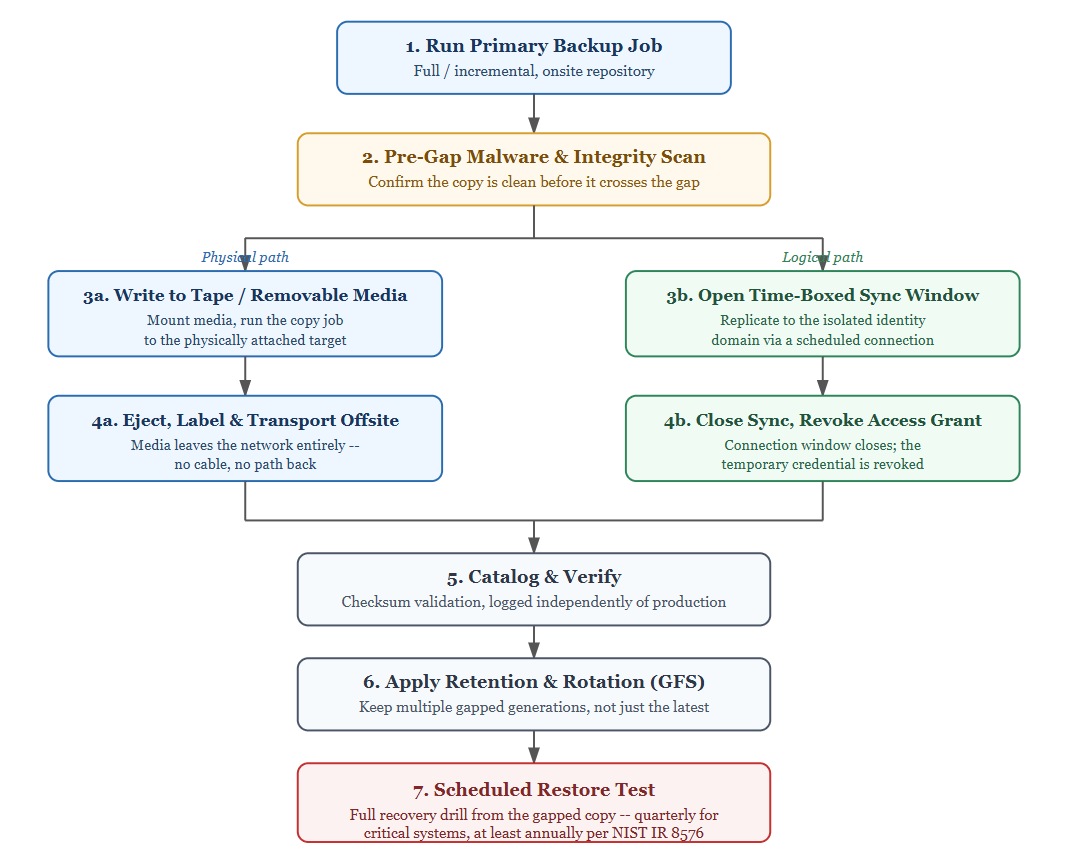
Two stages in this workflow are the ones most environments treat as optional but shouldn't: step 2 catches data that's already compromised before it becomes your "clean" recovery point, and step 7 is the only way to know the previous six steps actually produce a working restore rather than just a stored copy. Everything from Step 1 through Step 6 can be executed flawlessly, and you can still fail to recover - because nobody confirmed Step 7 works.
Air Gap Decay: Why a Correctly Built Air Gap Still Fails
Most air-gap failures we see in post-incident reviews were not architecture failures, the design was sound on the day it was implemented. They were decay failures: the isolation eroded quietly over months through routine operational shortcuts, and nobody re-validated the boundary before it mattered. It's useful to think of this as a four-stage process, because each stage is a different failure to check for, not a single "is it still air-gapped?" question:
Stage 1 - Connectivity creep. A jump host or VPN route gets opened "temporarily" for a migration, a troubleshooting session, or a vendor's remote-support tool, and is never closed. The logical air gap now has a permanent, forgotten path back to production.
Stage 2 - Credential overlap. The backup administrator's daily-use account gets added to the isolated environment "just to save time," or a service account is reused across both domains. The identity boundary that made the gap logical instead of nominal quietly disappears.
Stage 3 - Retention erosion. To save on storage cost, someone shortens the immutability lock period or reduces how often the physical media is rotated offsite. The gap still exists, but it now covers a shorter window than your actual ransomware dwell time, which averages well beyond 30 days for many attack chains, so the "clean" copy you'd restore from may already be compromised.
Stage 4 - Untested assumptions. Nobody has attempted a full restore from the air-gapped copy in over a year. The gap may be structurally intact, but whether it actually produces a working recovery is unverified.
The practical implication: air gapping is not a project you finish, it's a control you audit. A quarterly review that specifically checks for these four decay vectors - not just "is the tape still offline" - catches the failure mode that architecture reviews miss.
The One-Identity Test for Logical Air Gap
Vendors and internal teams alike tend to label anything with immutability enabled as “air-gapped,” which blurs an operational distinction that matters. Here is a concrete test to cut through that: if a single compromised credential - the one your backup administrator uses for daily operations - can reach, modify, or delete a given backup copy, that copy is not air-gapped. It is simply backed up.
Applying the one-identity test means asking, for every "isolated" copy in your environment:
Does this copy sit under a different identity provider or tenant than production - not just a different login, but a genuinely separate trust boundary?
Is MFA on that separate identity enforced independently, so a phished production credential can't cascade into it?
Is there a documented break-glass procedure requiring more than one person to access or alter retention settings on this copy?
Would deleting this copy require compromising two unrelated systems, not one?
If the answer to any of these is no, you have redundancy, not isolation. That's not a reason to abandon logical air gaps - it's a design checklist for making them real rather than nominal.
Decision Matrix: Choosing Your Air Gap Architecture
Criterion
| Physical air gap
| Logical air gap
| Hybrid
|
Isolation strength | Highest, no network path exists | High, contingent on identity separation holding | Highest overall (defense in depth) |
Typical RTO | Hours to days (media retrieval + mount) | Minutes to hours (stays reachable for restore) | Fast path via logical copy; physical as fallback |
Typical RPO | Determined by rotation cadence (often 24h+) | Can approach near-continuous sync | Best of both, tiered by system |
Ransomware resistance | Near-absolute | Strong if the one-identity test passes | Strongest practical option |
Operational overhead | High, media handling, tracking, transport | Moderate, IAM governance, monitoring | Highest, both disciplines required |
Best fit | Regulated data, long-term archives, last-restore recovery copy | System needing faster RTO with strong ransomware protection | Mission-critical production workloads |
Performance Benchmark: What Recovery Actually Looks Like
These figures are engineering estimates based on published media specifications, not guarantees, actual results depend on your network, hardware, and data change rate. They’re useful for sizing expectations, not for SLA commitments.
Method
| Native throughout
| Illustrative time to restore 10 TB
| Recovery friction
|
LTO-9 type | 400 MB/s native, up to ~1,000 MB/s compressed | ~4-7 hours of read time, plus media retrieval/transport time | Physical retrieval, drive availability, sequential access |
Disconnected disk (direct-attach, reconnected) | Limited mainly by disk/interface speed (often 150-500 MB/s) | ~6-18 hours depending on interface and disk health | Manual reconnection; verify integrity before trusting |
Logical air-gapped immutable cloud storage | Limited by egress bandwidth, often the real bottleneck | Highly variable - minutes for small workloads; can stretch well beyond a day for multi-TB restores over constrained links | No physical step, but bandwidth and retrieval-tier delays apply |
*Illustrative full-restore estimate for a 10TB workload under favorable conditions; real-world RTO should always be established through your own tested restore drills. LTO-9 specifications per the LTO Program.
Platform-Specific Air Gap Patterns
The core logic of physical vs. logical air gapping is the same across hypervisors, but how cleanly it integrates depends on the platform's architecture:
VMware vSphere: Because vSphere itself has no native immutability layer, most environments pair vSphere API-based backup with a hardened, separately authenticated repository or S3 Object Lock-compatible storage as the logical gap, and tape as the physical last line.
Microsoft Hyper-V: VSS-based backup jobs typically pair well with tape archiving or offline disk rotation, since Hyper-V environments are often already running in Windows shops with existing tape infrastructure.
Proxmox VE: Its open, Linux-based architecture makes network-level logical isolation (dedicated VLANs, separate backup-network segments) comparatively straightforward to implement without proprietary tooling.
Citrix XenServer / XCP-ng: Backup typically flows through the XAPI layer; logical air gapping is commonly achieved via a separately managed backup network segment plus offsite replication.
KVM: The flexibility of libvirt-managed environments makes it easy to script scheduled, time-limited connectivity windows - a practical way to implement NIST's "relaxed" air-gap model in a fully open-source stack.
Oracle OLVM and Red Hat Virtualization (RHV): Both sit on enterprise Linux foundations, so SELinux-enforced isolation and LVM-based snapshot handling integrate naturally with a logically segmented backup repository.
Regardless of hypervisor, the underlying requirement is the same: at least one copy your production credentials cannot reach. Vinchin Backup & Recovery supports direct backup and archiving to LTO tape libraries alongside cloud and secondary-storage copy jobs across all seven of the platforms above, which is one practical way to add a physical or logical air-gap tier without introducing a separate backup tool into the stack.
Common Mistakes That Quietly Break an Air Gap
Skipping a malware scan before the gap closes. NIST SP 800-209 calls for recording anti-malware scan results for backup copies used in cyber-event recovery - backing up already-compromised data into an isolated copy just creates a poisoned "clean" backup.
Treating the air gap as your only control. An air-gapped copy with no other protected copies is a single point of failure; it belongs inside a full 3-2-1-1-0 strategy, not as a replacement for it.
Never testing the restore. An untested air gap is a hypothesis, not a recovery plan.
Reusing credentials or service accounts across the production and air-gapped environments (fails the one-identity test above).
Letting retention windows shrink below realistic ransomware dwell time, so every "clean" copy in rotation is already tainted by the time the attack is discovered.
FAQs
Q1: How long should air-gapped backups stay offline before reconnecting?
There's no universal number, but the window should be set by how long your backup jobs actually need to transfer data, not left open by default. Many physical-media rotations complete the sync, disconnect immediately, and stay offline until the next scheduled window - often days between reconnections for tape, and much shorter, tightly scripted windows for logical air gaps designed around NIST's "relaxed" model.
Q2: Do air-gapped backups need their own encryption keys?
Yes, ideally. If the air-gapped copy is encrypted with keys stored in the same key management system as production, a compromise of that system can still lock you out of your last-resort copy even though the data itself was never network-reachable. Keeping encryption keys for the isolated copy in a separately governed system closes that gap.
Q3: What if the air-gapped copy is infected before the gap closes?
This is the scenario pre-gap malware scanning exists to catch. Because backups can be gradually poisoned over weeks before an attacker triggers encryption, a scan immediately before the connection window closes - checked against current threat signatures - is what prevents you from unknowingly sealing compromised data into your "clean" copy.
Q4: Does one person managing the air-gap rotation create risk?
Yes, a single administrator with unilateral control over retention settings, rotation schedules, and access represents both an insider-threat risk and a single point of compromise. Dual-control or quorum-based approval for anything that shortens retention or disables immutability is a low-cost way to close that gap.
Q5: Is air gapping legally required, or just recommended?
It depends on sector and jurisdiction. It isn't universally mandated by name, but it's increasingly the practical way organizations satisfy broader requirements - CISA's Cross-Sector Cybersecurity Performance Goals reference maintained offline backups directly, and various financial and healthcare regulatory frameworks require data retention and recoverability standards that are, in practice, very difficult to meet without an isolated copy somewhere in the architecture.
Conclusion
Air-gapped backup is less a single technology than a design discipline: match isolation strength to what each workload actually needs, verify the boundary continuously rather than assuming it holds, and never let a logical gap stand in for identity separation it doesn't actually have. Organizations that get this right treat the air gap as a control to be audited on a schedule - not a project that's ever really finished.