Choose backup software by matching it to the infrastructure your company will have in 18–24 months, not the infrastructure it has today. The single biggest predictor of a bad fit isn't a missing feature, it's a company outgrowing its backup platform's licensing model, hypervisor support, or compliance-evidence capability at a specific growth milestone, forcing an unplanned re-buy.
Key Takeaways
Backup needs change in step-jumps at three predictable growth inflection points, not gradually — buy for the next one, not the current one.
Licensing cost can outpace real growth through a pattern we call backup licensing drag — model pricing at 2–3x your current footprint before signing.
VMware's post-Broadcom pricing shifts make hypervisor lock-in a live financial risk, not a hypothetical one.
Ransomware, not hardware failure, now drives backup design — immutability (3-2-1-1-0) is baseline, not premium.
Confidence in recovery and proven recovery are statistically different things — only tested restores close that gap.
Compliance evidence becomes a revenue-blocking requirement the moment you sell to larger customers.
Why Growing Company is its Own Buying Category
A stable enterprise buys backup software to protect an environment that changes by single-digit percentages a year, so a checklist evaluation works fine. A growing company's environment can double in VM count, add a second hypervisor, open a new region, or absorb an acquisition's IT estate inside 18 months, the software isn't just protecting infrastructure, it's being asked to keep pace with infrastructure that hasn't found its final shape yet. Evaluating it only against today's environment is the most common, and most expensive mistake in this buying category.
The Three Growth Inflection Points That Change What You Need
Backup requirements for a growing company don't scale smoothly — they jump at specific, identifiable thresholds where the nature of the problem changes, not just its size. We call these growth inflection points. Recognizing which one you're approaching is more useful than any generic feature checklist, because it tells you which capabilities you're buying for the future, not the present.
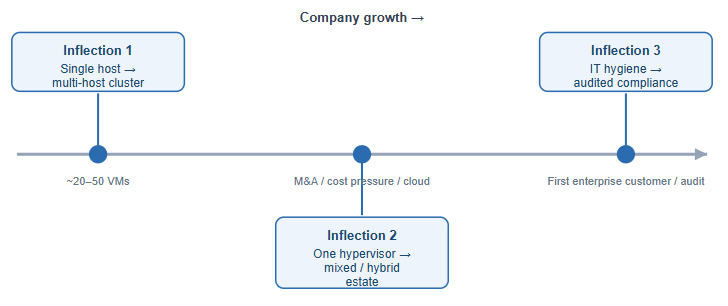
Inflection 1 — Single host to multi-host cluster (typically 20–50 VMs)
Backup software bought for one host often lacks cluster-aware scheduling and the ability to track a VM as it migrates between hosts — gaps that surface only after the cluster is live.
Inflection 2 — Single hypervisor to a mixed or hybrid estate
Triggered by an acquisition, a cost-driven platform switch, or a deliberate hybrid strategy. This is the inflection point most buying guides ignore, and it currently carries the largest financial stakes: reported VMware price increases since the Broadcom acquisition range from roughly 150% at the low end to over 1,000% for some accounts, driven by subscription-only, core-based bundle licensing. A 2026 industry survey found the large majority of VMware customers are now actively reducing their footprint or evaluating alternatives such as Proxmox, Hyper-V, or Nutanix AHV, even as most pursue a gradual dual-hypervisor strategy rather than a clean cutover. Backup software that only protects one hypervisor turns this transition into a second, unplanned migration project.
Inflection 3 — IT hygiene to audited compliance
Triggered from outside IT: a growing company lands its first enterprise customer, and that customer's procurement team sends a security questionnaire or requires SOC 2 evidence. "We run nightly backups" stops being an adequate answer — documented RPO/RTO, tested restores, and immutable copies become required evidence, often discovered only after the deal is already underway.
What are the Core Criteria for Evaluating Backup Software?
Eight criteria do most of the predictive work for a growing company specifically, they’re the ones most likely to break at an inflection point above. Each stands on its own as an evaluation question.
1. Does it cover every hypervisor and workload you might realistically run?
Confirm coverage for VMware, Hyper-V, Proxmox VE, XenServer/XCP-ng, KVM, Oracle Linux Virtualization Manager, and Red Hat Virtualization — not just your current platform. Given the hypervisor-migration pressure described above, this is arguably the single highest-leverage line item in the entire evaluation.
2. How does the licensing model behave as you scale?
Backup licensing typically falls into three models, and each behaves differently as you scale:
Per-socket / per-host: predictable at small scale, but adding hosts (not just VMs) to a cluster for performance reasons — not just to run more workloads — can silently trigger new license units.
Per-VM / per-workload: the most common model for growing companies, but vulnerable to "VM sprawl" — analysis of 1,000-employee environments has found per-server pricing traps where virtual machine counts effectively double as environments scale, doubling licensing cost independent of any change in actual data volume protected.
Capacity-based (per-TB): scales with data, not workload count, which is more predictable for VM sprawl but directly punishes data growth — and analysis shows data volumes commonly grow 25–35% annually in mid-market environments, meaning a capacity-licensed environment can see licensing costs climb even with zero new applications.
We use the term backup licensing drag to describe the specific failure mode where a company's backup cost curve outpaces its actual infrastructure growth curve — not because the vendor raised prices, but because the licensing unit (sockets, VMs, or capacity) scales faster than the business problem it's meant to solve. The practical fix is to model your licensing cost at 2x and 3x your current VM count and data volume before signing, using the vendor's own published or quoted rate card, not just today's quote.
Separately, be aware that storage is frequently priced apart from the software license and can represent 30–50% of total backup cost of ownership at scale — a detail that's easy to miss when comparing headline license prices between vendors.
3. Is ransomware resilience built in, or bolted on?
Backup repositories are the explicit target in the large majority of ransomware incidents, and a meaningful share of those attacks succeed in compromising backups before encryption even begins. Where backups are compromised, recovery costs run roughly eight times higher than when they remain intact - a median of about $3 million versus roughly $375,000 in comparative research. Confirm native support for immutable repositories under the extended 3-2-1-1-0 model: three copies, two media types, one off-site, one immutable/air-gapped copy, and zero errors verified through actual test recoveries.
4. What does recovery actually look like under time pressure?
Ask what recovery tools they like for your most critical workload: full VM restore, instant recovery (booting from backup storage while data migrates in the background), granular file/item recovery, and cross-hypervisor recovery, restoring a VMware backup directly onto Hyper-V or vice versa, which matters directly at Infection Point 2.
5. How much operational overhead does it add to a lean team?
Growing companies rarely have a dedicated backup administrator. Look for policy-based protection that auto-applies to newly created VMs, centralized multi-site management, and automated verification scheduling. The real cost of “cheap software” is often the engineering hours spent babysitting it.
6. Can it produce the evidence an auditor or enterprise customer will ask for?
Directly tied to Inflection Point 3: documented RPO/RTO per workload, retention enforcement, access controls and audit logging on the console itself, and reports proving restore tests were actually performed, not just scheduled.
7. Does it scale across cloud, hybrid, and multi-site environments?
Confirm backup to and from cloud object storage, offsite replication between your own sites without prohibitive bandwidth costs, and single-console management across locations as you open new offices or extend into public cloud IaaS.
8. Is the vendor and pricing model stable enough for a multi-year bet?
Look for a published, predictable rate card rather than opaque per-tier sales quotes, support SLAs matched to your actual operating hours, and visible continued investment in the platforms you run. Given current market disruption in virtualization, this criterion deserves as much weight as any single feature.
What Backup Approach Fits Each Specific Virtualization Platform?
"Hypervisor support" on a vendor's website is a checkbox; the underlying change-tracking mechanism, clustering model, and platform trajectory are what actually determine whether backups stay fast and reliable as you scale. The considerations below are specific to each platform a growing company is likely to run.
Platform | Native incremental mechanism | Key consideration for a growing company |
VMware vSphere/ESXi | Changed Block Tracking (CBT) via VADP | Broadcom licensing pressure; confirm CBT-reset handling after Storage vMotion |
Microsoft Hyper-V | Resilient Change Tracking (RCT) | Common VMware-diversification target; confirm CSV/cluster support |
Proxmox VE | Proxmox Backup Server chunk-based dedup | Leading VMware-exit destination; confirm true PBS integration vs. wrapped vzdump |
Citrix XenServer/XCP-ng | Version-dependent CBT-equivalent support | Confirm incremental support explicitly by version, don't assume parity |
KVM (generic/libvirt) | QEMU/libvirt dirty bitmaps | Capability depends on management layer — confirm exact certification |
Oracle Linux Virtualization Manager | oVirt/KVM lineage, similar to RHV | Common in Oracle-centric stacks staying within Oracle's support ecosystem |
Red Hat Virtualization/OpenShift Virtualization | oVirt/KVM lineage, similar to RHV | RHV reaches end-of-life in 2026 — plan for a fundamentally different backup model |
What Do Good Recovery Numbers Actually Look Like at Each Company Stage?
Backup performance is rarely benchmarked publicly by company size, which makes it hard for a growing company to know whether its RTO/RPO targets are reasonable. The table below synthesizes downtime-cost and recovery-outcome research into practical benchmarks.
Company stage | Reasonable RTO target | Reasonable RPO target | Reported downtime cost range | Minimum restore-test cadence |
Early growth (<50 VMs, single site) | 4-8 hours for critical systems | 4-24 hours | Roughly $300-$800 per minute for critical outages at this scale, per extrapolated mid-market/startup data | Quarterly |
Scaling (50–300 VMs, multi-host) | 1-4 hours for tier-1 systems | 1-4 hours | Mid-market (200-1,000 employees) reported average around $2,400 per minute | Monthly |
Enterprise-adjacent (multi-site, hybrid, audited) | Under 1 hour, instant recovery for tier-1 | Under 1 hour, near-continuous for tier-1 | Median enterprise outage reported near $9,000 per minute (~$540,000/hours) for 1,000+ employee organizations | Continuous/automated |
Confidence ≠ proven recovery
A 2026 survey of more than 900 senior IT, security, and risk leaders found that while roughly 90% expressed confidence in their ability to recover from a cyber incident, fewer than one in three organizations actually hit by ransomware fully recovered all affected data, and 44% recovered less than three-quarters of it. The gap closes only through regularly tested, verified restores.
Which Criteria Matter Most at Each Company Stage?
Company stage | Highest-priority criteria | Lower priority for now | Watch for |
Early growth (single site, 1 hypervisor, <50 VMs) | Each of setup, automation for a lean team, baseline immutability | Multi-hypervisor breadth, deep compliance reporting | A tool with no path to cluster-aware or multi-site management |
Scaling (multi-host cluster, possible 2nd hypervisor, 50–300 VMs) | Hypervisor breadth, licensing scalability, cross-platform recovery, centralized management | Deep audit/evidence reporting (unless already selling to enterprise) | Backup licensing drag from per-VM sprawl; single-hypervisor lock-in |
Enterprise-adjacent (multi-site, hybrid cloud, landing enterprise customers) | Compliance evidence, immutability at scale, RTO/RPO precision, support SLAs | Basic feature parity (should already be resolved) | Discovering compliance gaps during a customer's security review |
Vendors purpose-built to protect diverse virtual environments — for instance, Vinchin Backup & Recovery, which protects VMware, Hyper-V, Proxmox, XenServer, KVM, Oracle OLVM, and Red Hat Virtualization from a single console — are worth shortlisting specifically for companies approaching the hypervisor-breadth inflection point, since platform coverage is difficult to retrofit once a deployment is already in production.
What Happens When Backup Assumptions Turn Out to be Wrong?
The 2017 NotPetya attack on shipping giant Maersk remains one of the clearest public illustrations of why backup assumptions, not just backup schedules, matter. Maersk's roughly 150 domain controllers synchronized with each other so any one could effectively back up the others, a reasonable design for a localized failure, but never tested against every domain controller being wiped simultaneously, which is exactly what happened within about an hour of the attack. Recovery only became possible because one domain controller in a Ghana branch office happened to be disconnected during a power outage at the moment of the attack, preserving the only clean copy of identity data the global recovery was rebuilt around.
The lesson isn't "get lucky with a power outage", it's that backup strategy has to be tested against the scenario where your assumed source of redundancy is itself the single point of failure, which is precisely what immutable, air-gapped copies under 3-2-1-1-0 are designed to guarantee deliberately.
What Mistakes do Growing Companies Most Often Make When Choosing Backup Software?
Sizing for today’s VM count only - the single most expensive mistake, and the direct opposite of the inflection-point approach above.
Treating backup and disaster recovery as the same purchase - backup answer “can I get the data back?”; disaster recovery answer “can I get the business running again, and how fast?”
Comparing list price without modeling growth - a cheaper per-VM rate today can be more expensive at 2x scale than a slightly higher capacity-based rate, depending on whether growth comes from more workloads or more data per workload.
Assuming "backup completed successfully" means "recoverable" - only a verified test restore proves it.
Delaying compliance-readiness features until a customer asks - by the time a security questionnaire requests RTO/RPO documentation, it’s already a deal blocker.
How Should a Growing Company Actually Run the Evaluation?
1. Inventory today's environment and project 18–24 months out — VM count, hypervisor(s), data growth rate, planned M&A or cloud initiatives, known future compliance requirements.
2. Shortlist against the eight criteria above, weighted using the decision matrix for your current stage.
3. Request a live, timed recovery demo of a production-sized workload from each finalist — not a completed-backup-job screenshot. Ask for a cross-hypervisor restore if you're near Inflection Point 2.
4. Model licensing cost at 1x, 2x, and 3x your current footprint, including storage, to expose backup licensing drag before signing.
5. Confirm the immutability and verification story in writing — where the immutable copy lives, how it survives a compromised admin account, how often restores are tested and reported.
FAQs
Q1: Does backup software replace the need for cyber insurance?
No. Backup capability directly affects whether an insurer offers coverage and at what premium, since insurers increasingly ask about immutable backups and tested recovery times during underwriting, but it supports an insurance strategy rather than substituting for one.
Q2: Should a growing company build backup in-house on open-source tools instead of buying commercial software?
Open-source options can work for a single, well-understood environment with a team that has bandwidth to maintain scripts and build reporting themselves. The trade-off shifts once the environment becomes heterogeneous or compliance evidence becomes a business requirement, since the engineering hours saved on maintenance usually exceed the license cost.
Q3: How does backup software fit into a broader business continuity plan?
Backup software is one component within business continuity planning, which also covers incident communication plans, a defined chain of command, and dependencies outside IT such as vendors, facilities, and staffing. Vendor selection should feed into that larger plan rather than stand in for it.
Conclusion
Backup software selection is ultimately a forecasting exercise, not a checklist exercise. Companies that get it wrong rarely picked bad software, they picked good software for an environment that stopped existing eighteen months later. Anchoring the decision to how infrastructure actually changes, rather than how it looks today, is what separates a durable choice from a near-term re-buy.