








Product: Vinchin Backup & Recovery
Version: V9.0
KB Number: 100227
Last Modified: 2026-09-23 18:12:46
Discovered Version:v9.0
Question
Why do I need to enable the BitDetector function? How does it works?
Answer
1.Shortcomings of Traditional Backup Methods
-
Principle Limitation: Traditional virtual machine disk backup (such as through CBT interfaces or partition bitmaps) can only sense changes in underlying disk blocks and cannot sense file deletion operations within the operating system.
-
Core Pain Point: Because it does not know that files have been deleted, the backup tool can only mindlessly record all changed disk blocks. Over time, this useless deleted data continuously accumulates, causing the valid backup data to grow larger and larger, eventually approaching the size of the entire disk, greatly wasting storage space and transmission bandwidth.
2.Advantages of BitDetector
- By penetrating the block device layer to extract file system metadata and combining valid data bitmaps with traditional ones, this technology precisely filters out junk data (e.g., deleted blocks, swap files, and inter-partition gaps). This enables the accurate identification of only actually used data, significantly reducing backup transmission and storage size while boosting overall efficiency.

3.How to enable the BitDetector
Currently, this technology is applied to the virtual machine protection module and the operating system protection module.
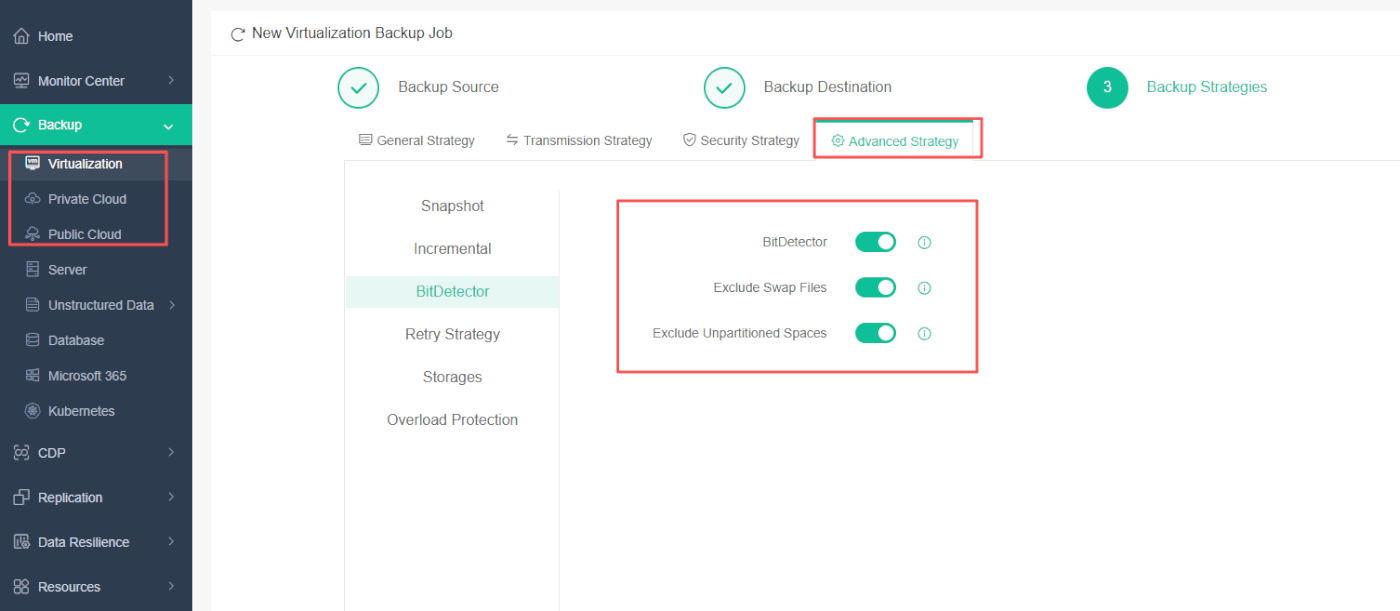
Enter Advanced Strategy > BitDetector when you creating backup job for VM
Additionally, it provides two advanced options—Exclude Swap Files and Exclude Unpartitioned Spaces—which can be toggled on or off based on user requirements.
60-DAY FULL-FEATURED FREE TRIAL
No credit card required
Get started in 10 minutes