








Product: Vinchin Backup & Recovery
Version: V9.0
KB Number: 200245
Last Modified: 2026-10-10 18:13:55
Discovered Version:v9.0.0
Question
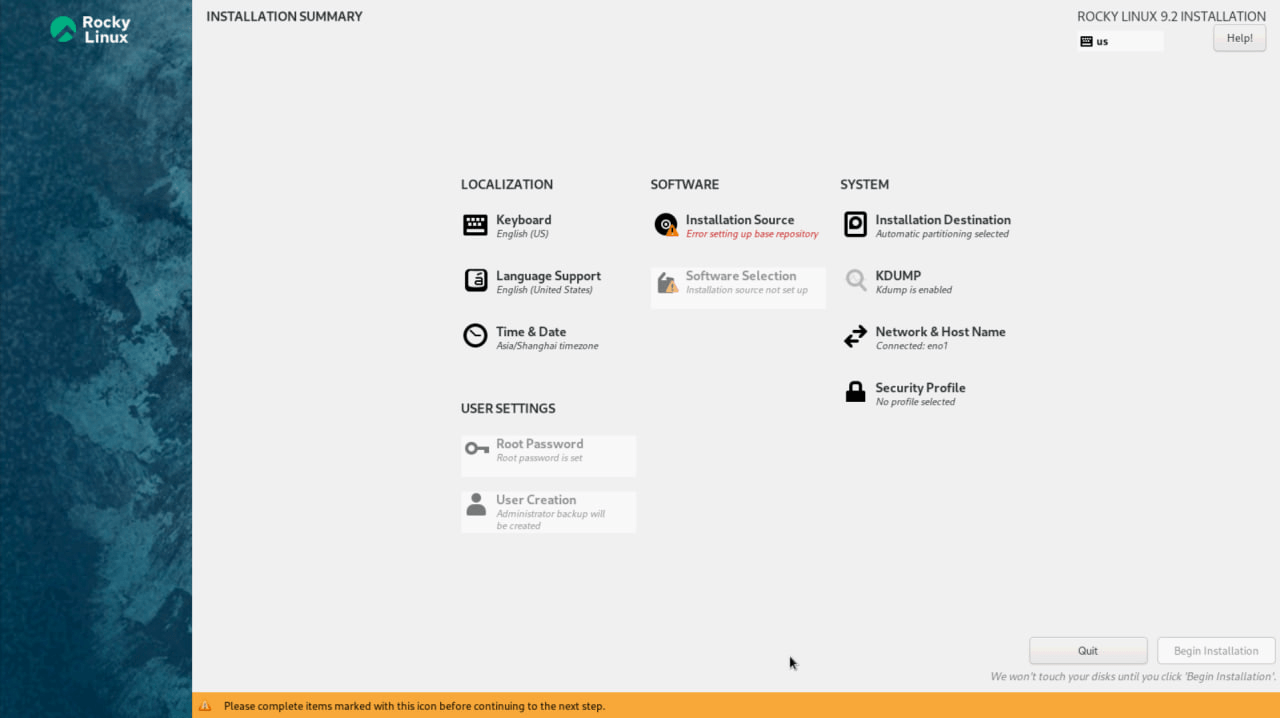
When booting a server using the Vinchin-customized Rocky Linux 9.2 ISO to install the operating system, the process halts at the "Installation Summary" screen.
The Installation Source section displays a warning: Error setting up base repository, and the Software Selection section shows Installation source not set up. Consequently, the "Begin Installation" button remains grayed out, preventing the installation from proceeding.
Answer
This error indicates that the Anaconda installer cannot locate or read the necessary installation packages (the AppStream or BaseOS repositories) from the boot media.
Resolution
To resolve this issue, please follow the troubleshooting steps below sequentially:
Step 1: Verify the ISO MD5 Checksum
Before proceeding, ensure the integrity of the downloaded ISO file. Calculate the MD5 checksum of the ISO file on your local machine and compare it against the official MD5 value provided by Vinchin. If the values do not match, re-download the ISO file.
Step 2: Use an Alternative USB Creation Tool
Step 3: Verify RAID Initialization
Ensure that the physical disks have been correctly configured into a Virtual Disk (VD) and that the RAID array is fully initialized and set as the bootable virtual drive.
60-DAY FULL-FEATURED FREE TRIAL
No credit card required
Get started in 10 minutes