




Product: Vinchin Backup & Recovery
Version: V9.0
KB Number: 200144
Last Modified: 2026-06-03 09:56:43
Discovered Version:v9.0.0.86562-SP1
Question
Backup jobs for Sangfor SCP in a 10GbE network environment are significantly slower than expected (actual speed ~80MB/s), failing to utilize the available 10GbE bandwidth.
Answer
The slow performance is caused by default transfer speed limits imposed by the Sangfor SCP platform for third-party agentless backups. These default settings are relatively low and need to be manually adjusted within the SCP's "CDP & Backup" configuration to allow for higher throughput and fully leverage the 10GbE network infrastructure.
Resolution
Option 1: SCP Transfer Speed Optimization
-
Access Settings: Log in to the Sangfor SCP management interface and navigate to System Settings → CDP & Backup Settings.
-
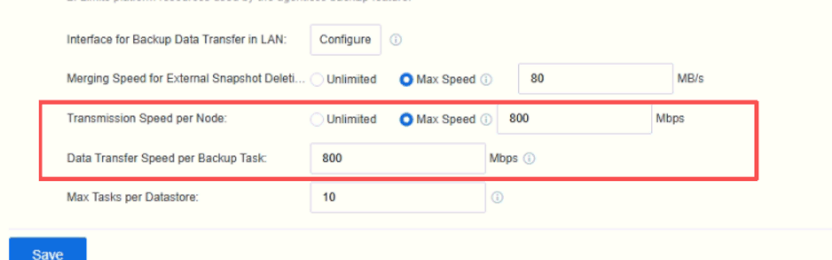
Adjust Parameters: Update the following configurations to increase transfer efficiency:
-
Single Task/Node Transfer Speed: Set to "Unlimited" or the maximum available value.
-
Transfer Speed Limit: Increase to the platform maximum of 2400Mbps.
-
External Snapshot/Backup Host Limit: Set to "Unlimited" to remove artificial bottlenecks.
-
-
Verification: Apply the changes, wait 1-2 minutes for the configuration to take effect, and re-run the backup task to monitor performance improvements.
Option 2: Comprehensive Network Performance Testing (Diagnostic Solution)
-
Network Baseline: Use
iperf3between the Vinchin server and the SCP node to verify raw network throughput and ensure the physical link is not the bottleneck. -
Storage I/O Verification: Use
ddcommands to test the read/write performance of the underlying storage to rule out disk-level performance issues. -
Localization: Compare the results of the network, storage, and backup task tests to confirm that the bottleneck is indeed the SCP software-defined speed limit.
60-DAY FULL-FEATURED FREE TRIAL
- No credit card required
- Get started in 10 minutes