




Product: Vinchin Backup & Recovery
Version: V8.1, V9.0
KB Number: 200151
Last Modified: 2026-06-09 16:49:57
Discovered Version: V8.1
Question
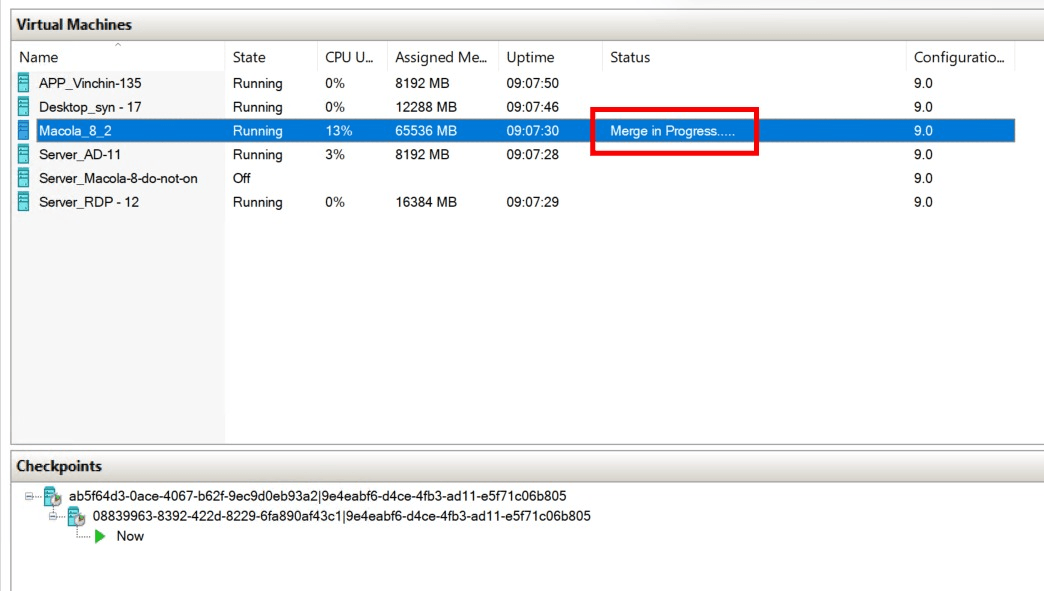
Hyper-V cannot automatically merge checkpoints without enabling CBT mode. After delete checkpoint manually, it will show merge in progress.
Answer
Root cause
Due to the current VM being directly cloned from another VM, a checkpoint chain loop of the VM in the virtualization center has occurred, our program has been continuously taking checkpoints and cannot exit the loop, resulting in the failure of the backup job.
Resolution
-
If the environment allows, delete one of the VMs.
-
Manually delete redundant checkpoints.
-
Run the backup job again to trigger checkpoint merge.
Notes
We suggest that if you need to manually delete a checkpoint, do not delete the checkpoint tree all at once, but delete it sequentially until the merge is complete before deleting the next one.
60-DAY FULL-FEATURED FREE TRIAL
- No credit card required
- Get started in 10 minutes