




Product: Vinchin Backup & Recovery
Version: V9.0
KB Number: 200158
Last Modified: 2026-06-17 15:14:29
Question
After cross-platform recovery (V2V) of a virtual machine from Hyper-V to VMware, the recovery operation succeeds, but the virtual machine fails to start normally.
Answer
The issue is caused by a disk controller incompatibility. During Hyper-V to VMware cross-platform recovery, the default disk controller type configured by the Vinchin recovery process may be incompatible with the VMware environment. As a result, the virtual machine fails to boot because it cannot correctly identify or access its virtual disk.
Resolution
Option 1: Modify Disk Controller Type in VMware
-
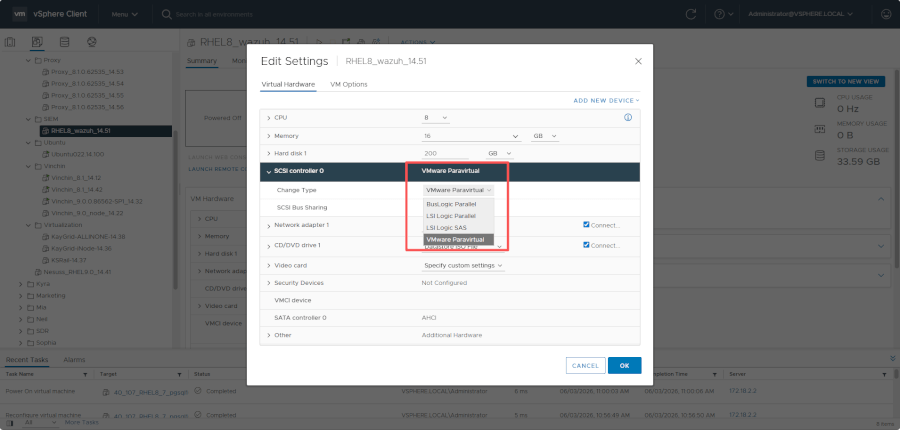
Check Settings: Shut down the virtual machine, edit its hardware settings in the VMware vSphere Client, and locate the current disk controller configuration.
-
Update Controller: Modify the controller type to a VMware-compatible format, such as VMware Paravirtual (PVSCSI) for modern systems or LSI Logic SAS for traditional Windows environments.
-
Verification: Save the configuration changes and restart the virtual machine to confirm that it boots and runs correctly.
Option 2: Specify Disk Controller During Recovery
-
Recovery Wizard: In the Vinchin management console, start the cross-platform recovery wizard for the specific Hyper-V virtual machine.
-
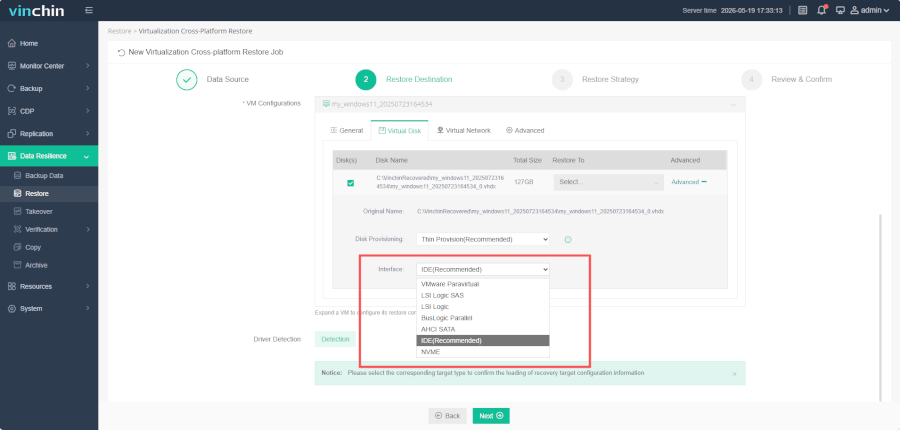
Configure Hardware: During the target VMware platform configuration step, navigate to the "Virtual Disk" section.
-
Select Compatibility: Explicitly select a VMware-compatible controller type (e.g., VMware Paravirtual, LSI Logic SAS, or LSI Logic Parallel) before executing the recovery job.
-
Validation: Once the recovery job completes, verify that the virtual machine starts normally on the VMware platform.
Technical Reference for Controller Selection
-
VMware Paravirtual (PVSCSI): Strongly recommended for high performance on modern OS (Windows Server 2008+ and Linux).
-
LSI Logic SAS: Recommended for traditional Windows systems due to wide compatibility.
-
LSI Logic Parallel: Available for legacy operating systems.
-
Note: Avoid using IDE or SCSI controllers unless specifically required, as they may offer poor performance or limited compatibility in V2V scenarios.
60-DAY FULL-FEATURED FREE TRIAL
- No credit card required
- Get started in 10 minutes