What Is Agricultural Data Protection?
Agricultural data protection safeguards agricultural data, systems, and workloads against data loss, cyber threats, system failures, human errors, and disasters. It also ensures that authorized teams can restore critical information within the time and data-loss limits defined by the business.
The protected environment can include a single farm, a group of remote fields, a livestock facility, a forestry operation, a central production site, and a headquarters IT environment. The protection plan must cover the relationships between these locations.
Agricultural Data Protection vs Traditional Business Backup
Traditional office backup often assumes stable connectivity, centralized infrastructure, and predictable file types. Agricultural environments rarely have all three. Data may originate from remote sensors, machinery, drones, databases, field servers, and temporary storage devices.
An agricultural data backup solution combines backup with remote-site management, bandwidth control, offline recovery, long-term retention, and disaster planning. The goal is to protect production continuity as well as the data itself.
What Types of Agricultural Data Need Protection?
Agricultural data protection must cover both the information people read and the IT workloads that create, process, and store it. A complete inventory prevents teams from protecting only databases while overlooking files, devices, or recovery dependencies.
Structured agricultural data
Structured data includes crop records, livestock records, yield reports, sensor databases, inventory tables, machinery logs, financial systems, and traceability databases. These systems often support daily decisions, reporting, compliance, and production planning.
Unstructured agricultural data
Unstructured data includes drone footage, surveillance video, GIS maps, satellite imagery, field photographs, inspection documents, contracts, spreadsheets, and research files. These files can be large, difficult to transfer, and expensive to recreate after loss.
Agricultural IT workloads
The backup scope should include virtual machines, physical servers, SQL databases, NAS storage, local file systems, portable monitoring terminals, and applications that support production. Protecting the data without protecting its workload dependencies can delay recovery.
Compliance and historical records
Food safety, environmental, forestry, and traceability records may require retention across multiple seasons or years. Retention periods depend on applicable laws, contracts, and internal policy, so each dataset should receive a documented retention class before automatic deletion is enabled.
Why Is Data Protection Important for Agriculture?
Agricultural organizations operate with narrow timing windows. A damaged production database, unavailable irrigation record, or missing traceability file can affect field work, animal care, shipments, audits, and customer commitments at the same time.
| Reasons | Core Risks |
|---|
| Data loss
| Hardware failure, deletion, software errors, or storage damage — historical yield, ecological, and traceability data become irrecoverable. |
| Ransomware
| Encrypts production systems, file shares and backup connections; causes prolonged downtime while rebuilding and verifying records. |
| Natural disasters
| Floods, wildfire, storms, extreme heat – backups stored on-site are lost together with production systems. |
| Distributed operations
| Data moves across fields, warehouses, facilities, and offices with varying hardware/network – centralised visibility and consistent policies are hard to enforce. |
| Business disruption
| Data loss interrupts planting, irrigation, feeding, monitoring, harvesting, logistics, and reporting – leading to financial and reputational damage. |
What Are the Main Agricultural Data Protection Challenges?
Agricultural organizations must protect important workloads across sites that were not designed as one uniform data center. The main challenge is to create consistent recovery outcomes without ignoring local equipment, network limitations, or staffing realities.
Distributed data environments
Data may be spread across remote farms, woodland stations, warehouses, laboratories, regional offices, and headquarters. A protection plan must identify ownership, connectivity, storage targets, and recovery dependencies for each location.
Complex IT infrastructure
One agricultural organization may operate virtual machines, physical servers, SQL databases, NAS devices, file shares, and specialized monitoring systems. Separate tools can create inconsistent schedules, duplicated administration, and gaps between systems.
Remote-site management
Remote sites may not have dedicated IT staff. When a backup job fails, sending a technician to a distant location can delay correction and increase the risk of an unprotected recovery point.
Limited IT resources
Many agricultural businesses must protect critical systems with small IT teams. The operating model should reduce repetitive configuration, present clear alerts, and let administrators manage multiple sites through a consistent workflow.
Increasing cybersecurity risks
Connected equipment and shared credentials can widen the attack surface. Farm IoT data protection should combine access control, network separation, immutable copies, retention rules, and recovery testing.
Recovery requirements
A successful backup job does not prove that an organization can recover. Teams must define RPO and RTO targets, then test whether storage, network, applications, and staff can meet them under pressure.
How Should Agricultural Data Be Protected?
Agricultural data protection works best as a repeatable lifecycle: identify important workloads, define recovery targets, create copies, secure those copies, verify restoration, and improve the plan after each exercise.
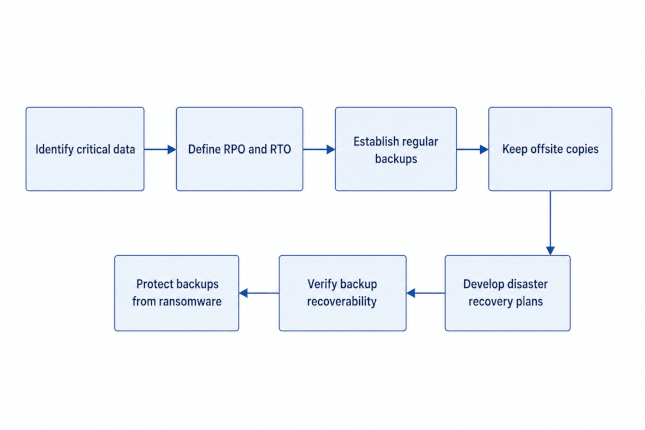
Agricultural Data Protection Best Practices
Best practices turn individual backup tasks into a dependable operating model. They help agricultural organizations balance speed, cost, security, retention, and the practical limits of distributed field operations.
Follow the 3-2-1 backup strategy
Keep at least three copies of important data, use at least two different storage media, and keep at least one copy offsite. Adapt the exact layout to the organization's hazard profile, RPO, RTO, and retention requirements.
Prioritize business-critical workloads
Rank systems by their effect on safety, production, traceability, revenue, and compliance. This ranking determines backup frequency, storage performance, recovery order, and the amount of testing each workload requires.
Keep an offsite backup copy
A local backup helps with fast restoration but cannot protect against every site-wide event. Store an additional copy in a different location or region so a flood, wildfire, theft, or major outage does not remove both source and backup.
Use immutable backups
Immutable backups prevent defined recovery points from being changed or deleted during their retention period. They provide a cleaner recovery source when ransomware or an administrative mistake affects production data.
Test backups regularly
Recovery tests should include representative files, databases, virtual machines, and business workflows. Test results should record recovery time, missing dependencies, permission issues, and actions needed before the next exercise.
Define RPO and RTO
Recovery targets make backup decisions measurable. They help teams choose between local disk, remote replication, tape, cold cloud storage, or a combination of tiers instead of applying one expensive policy to every dataset.
Centralize backup management
A centralized console can show job status, policy coverage, storage use, and failures across remote farms and facilities. Central visibility reduces the chance that a quiet failure remains unnoticed until recovery is needed.
Document and test the recovery plan
A documented plan should explain who makes decisions, which systems recover first, where clean copies are stored, and how operations communicate during downtime. Test the plan with technical and business owners together.
Key Technologies for Agricultural Data Protection
Agricultural data protection uses several technologies because no single target or method fits every workload. The right combination depends on data size, change rate, recovery speed, connectivity, retention, and risk.
Virtual machine backup
Virtual machine backup captures complete workloads, configuration, and application data in a form that supports faster recovery. It helps central IT restore production services without rebuilding every virtual component manually.
Database backup
Database backup protects structured records used by production, inventory, traceability, finance, and reporting systems. Policies should account for transaction consistency, backup frequency, retention, and application-aware recovery.
NAS backup
NAS backup protects shared files, images, maps, documents, and media stored outside the main server environment. It is important for agricultural teams that collect large unstructured files at field or office locations.
File backup
File backup provides granular protection for spreadsheets, inspection records, contracts, photos, field reports, and user-created documents. Granular restoration can reduce downtime when only a small set of files is damaged or deleted.
Offsite backup
Offsite backup places a recovery copy away from the source site. It limits the effect of local disasters and supports continuity when a farm, forestry station, warehouse, or regional facility cannot operate.
Backup replication
Backup replication sends protected data to another server or region. Incremental replication can reduce bandwidth use after the initial copy, which is valuable when rural networks cannot support repeated full transfers.
Immutable backup
Immutable backup prevents recovery copies from being modified during a defined retention period. It is a core control for agricultural ransomware protection because it preserves a clean recovery point after production data is encrypted.
Backup verification
Backup verification checks whether copies are complete and restorable. Automated checks combined with periodic application and workload recovery tests provide stronger evidence than backup completion logs alone.
Disaster recovery
Disaster recovery coordinates people, procedures, infrastructure, and backup copies after a serious incident. It defines recovery order, alternative operating locations, communication, and the steps required to return to normal production.
Cloud backup
Cloud backup can provide offsite capacity and geographic separation without requiring every rural site to maintain a second physical facility. Cloud tier selection should account for transfer time, restoration speed, retention, access control, and ongoing cost.
Agricultural Data Protection Example
The following hypothetical example shows how a large agricultural organization can connect remote operations, centralized backup, offsite protection, immutable copies, and disaster recovery. It is an architecture example, not a customer case study or a performance claim.
A multi-site agricultural enterprise
The organization operates several remote farms, a central production facility, and a headquarters IT environment. Remote farms run virtual machines, local databases, file storage, monitoring systems, and operational applications that must continue during intermittent connectivity.
Each remote farm creates a local recovery copy first. Changed data then moves to centralized backup during planned transfer windows. The central environment replicates selected workloads to an offsite location and keeps an immutable copy for ransomware recovery.
Recovery flow
Remote farms: protect virtual machines, files, databases, and monitoring workloads locally.
Centralized backup: collect job status and policy results through one management workflow.
Offsite backup: replicate priority workloads to a separate facility or region.
Immutable copy: preserve defined recovery points against alteration or deletion.
Recovery and disaster recovery: restore local files, complete workloads, or site services according to business priority.
What this architecture achieves
The architecture separates fast local recovery from site-level disaster recovery and long-term protection. It also gives administrators a way to monitor distributed backup jobs, identify gaps, and test recovery before a real incident exposes them.
How Vinchin Helps Protect Agricultural Data
Agricultural organizations looking to simplify backup, recovery, and disaster recovery across distributed IT environments can use Vinchin Backup & Recovery as a unified data protection platform. The following capabilities map directly to common agricultural operating conditions.
Unified data protection
Vinchin can bring virtual machines, physical servers, SQL databases, NAS storage, and local files into one management workflow. For agricultural organizations, this reduces the need to operate separate backup tools for each field system and improves policy consistency across workloads.
Broad infrastructure support
Vinchin supports more than 19 mainstream virtualization platforms, along with physical servers, SQL databases, and local file storage. This broad coverage helps farms and forestry operations protect heterogeneous environments without forcing every remote site into the same infrastructure design.
Centralized web console
A browser-based console allows administrators to manage backup nodes across farms, woodland stations, production facilities, and offices. Centralized status monitoring helps small IT teams identify failed jobs remotely and reduce unnecessary travel to distant sites.
Bandwidth-optimized backup
Incremental and forever-incremental backup reduce the amount of changed data transferred after the initial full copy. Scheduled time windows can move large drone, video, and GIS transfers away from peak farming hours, helping backup jobs coexist with limited rural bandwidth.
Multi-tier storage
Vinchin can support storage assignments that match recovery and retention needs. Local storage can support fast daily restoration, remote servers can hold replicated copies, public cloud can provide offsite capacity, and tape libraries can retain historical ecological or traceability records.
Immutable backup and retention control
Immutable backup locking helps prevent defined recovery copies from being altered or encrypted by ransomware. Automated retention policies can separate temporary sensor logs, seasonal production records, and long-term archives, helping agricultural teams control storage growth while keeping required records.
Automated verification and recovery
Automated integrity checks help confirm that backup copies remain usable. Vinchin also supports full virtual machine recovery and granular file restoration, allowing agricultural organizations to match the recovery method to the incident and keep RPO and RTO decisions practical.
FAQs
Q1: What farm data should businesses prioritize for backup?
A1: Prioritize sensor readings, crop growth logs, traceability records, drone imagery and farm equipment operational data. These datasets are hard to reproduce.
Q2: Are there special compliance rules for agricultural data backups?
A2: Yes. Follow general data laws plus agriculture‑specific requirements for traceability, land information and germplasm resource data storage.
Q3: What risks come with only storing farm data on-premises locally?
A3: On-premises storage faces risks like hardware failure, flood, fire or site damage. A single disaster may erase all valuable farm production records.
Q4: Is cloud backup suitable for remote rural smart-farm deployments?
A4: Cloud backup works for farms, yet rural low-bandwidth requires incremental sync and edge cache to handle unstable field network conditions.
Conclusion
Agricultural data protection is a business continuity discipline, not a single backup task. Farms and forestry organizations must protect structured records, large files, field workloads, compliance archives, and the systems that connect them.
A resilient plan combines local recovery, offsite copies, immutable protection, bandwidth-aware transfer, centralized management, and tested restoration. By matching each workload to the right recovery and retention tier, agricultural organizations can protect digital production without losing sight of practical field conditions.













