Downtime disrupts business. Every minute lost can mean missed revenue and unhappy customers. For organizations running Oracle Linux Virtualization Manager (OLVM), backup software is more than a safety net; it’s a lifeline. The right solution keeps your applications available even during failures or disasters.
Maximizing uptime is not just about technology; it’s about meeting business goals. Reliable backup protects against data loss and helps you meet strict compliance standards. It also builds trust with stakeholders who expect uninterrupted service. Choosing wisely means your business stays resilient no matter what happens.
Why Oracle OLVM Backup Matters in Enterprise Environments
A strong OLVM backup strategy forms the backbone of enterprise IT resilience. Enterprises depend on virtual machines to run databases, web servers, ERP systems, and other key services. Without reliable backups, these workloads are exposed to risks that can halt operations or cause permanent data loss.
● Minimizing Downtime
Downtime costs add up fast—lost sales, delayed projects, and reduced productivity all impact your bottom line. Average downtime costs can reach thousands of dollars per minute for large enterprises. A robust OLVM backup ensures quick restoration so you can resume operations without long delays.
● Ensuring Data Integrity
Data corruption or accidental deletion can cripple business processes if not addressed quickly. Backups provide a clean copy of your data at specific points in time so you can recover from errors or attacks without losing valuable information.
● Meeting Compliance Requirements
Regulations like GDPR and HIPAA demand strict controls over data availability and protection. Failing to comply may result in audits or heavy fines. Reliable backups help prove compliance by ensuring data is always recoverable when needed.
● Protecting Reputation
Customers expect constant access to services, any outage can erode trust quickly. By maintaining high uptime through effective backups, businesses show they value reliability and customer satisfaction.
Oracle Linux Virtualization Manager (OLVM) is based on oVirt technology, making it a powerful platform for managing virtualized environments at scale. However, its complexity increases risk exposure if not paired with an enterprise-grade backup solution tailored for virtual workloads.
How To Choose The Best Oracle OLVM Backup Solution for Maximizing Uptime
Selecting backup software for OLVM requires careful evaluation of features that directly support uptime goals while simplifying management tasks across complex environments.
A top-tier solution should offer several core capabilities:
● High-Speed Backup & Instant Restore
Speed matters most during recovery scenarios involving mission-critical apps like databases or transaction systems. Look for solutions that enable instant VM recovery, allowing you to boot VMs directly from backup storage rather than waiting hours for full restores. This approach minimizes disruption by restoring access within minutes.
● Automation & Policy-Based Management
Manual processes increase error risk and drain IT resources. Automated scheduling ensures regular backups occur without human intervention while policy-driven management lets you define rules once then apply them consistently across all VMs.
● Scalability Across Growing Workloads
As your environment expands with new clusters or applications, your backup tool must keep pace without slowing down performance or requiring major reconfiguration efforts. Centralized consoles that automate VM discovery make it easy to protect every workload as soon as it’s deployed.
● Comprehensive Security Controls
Backup data must be protected both at rest (when stored) and in transit (while moving between systems). Encryption safeguards sensitive information from unauthorized access while role-based access control (RBAC) limits who can manage jobs or view reports; a key requirement under many regulations (NIST Access Control Guidelines).
● Granular Recovery Options
Sometimes only one file needs restoring—not an entire VM image. Granular recovery lets administrators retrieve individual files or folders quickly instead of performing full system restores each time something goes wrong.
● Comprehensive Reporting & Auditing Tools
Detailed logs help track job success rates and resource usage over time while providing evidence needed during compliance audits. Visibility into scheduled jobs also helps spot issues before they become outages.
Technical innovations such as Changed Block Tracking (CBT), which tracks only modified parts of disks since the last backup can further reduce storage needs and speed up incremental backups. Agentless architecture means there’s no need to install extra software inside each VM; this reduces compatibility problems while lowering maintenance overheads across large deployments.
When evaluating vendors’ claims about “enterprise-grade” protection or “maximum uptime,” ask how their solutions perform under real-world disaster scenarios and request references from similar organizations whenever possible.
Vinchin Backup & Recovery: Enterprise-Level Protection for Oracle OLVM
For enterprises seeking robust protection for Oracle Linux Virtualization Manager (OLVM), Vinchin Backup & Recovery stands out as a professional solution supporting 15+ mainstream virtualization platforms, including VMware, Hyper-V, Proxmox, oVirt, RHV, XCP-ng, XenServer, OpenStack, ZStack, and others with comprehensive coverage across diverse infrastructures like yours.
Key features include agentless backup technology for minimal disruption; LAN-free backup modes that optimize network efficiency; Changed Block Tracking (CBT) which accelerates incremental backups; instant recovery capabilities enabling rapid restoration after incidents; plus advanced deduplication/compression to maximize storage savings, all designed to ensure seamless business continuity.
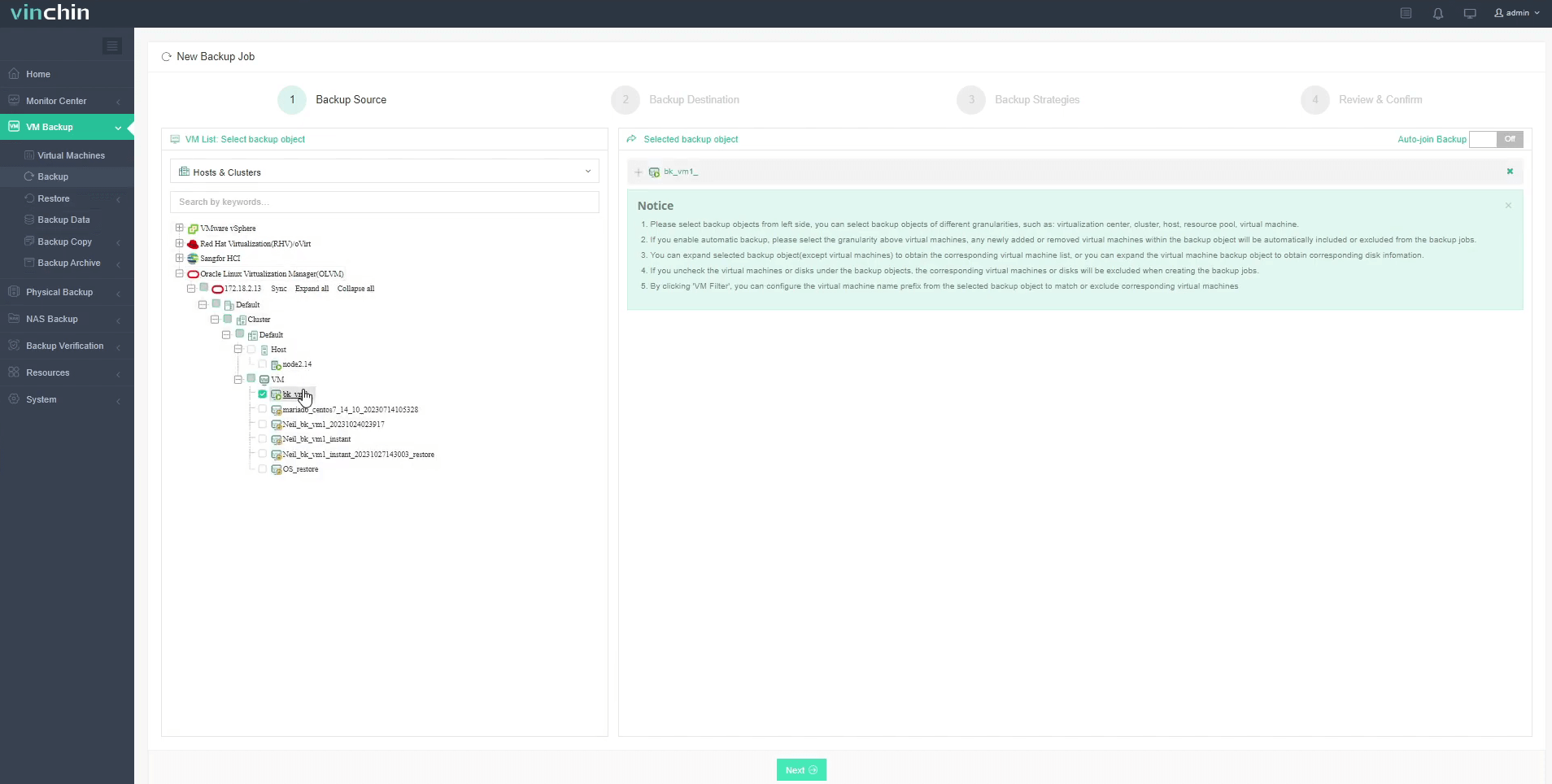
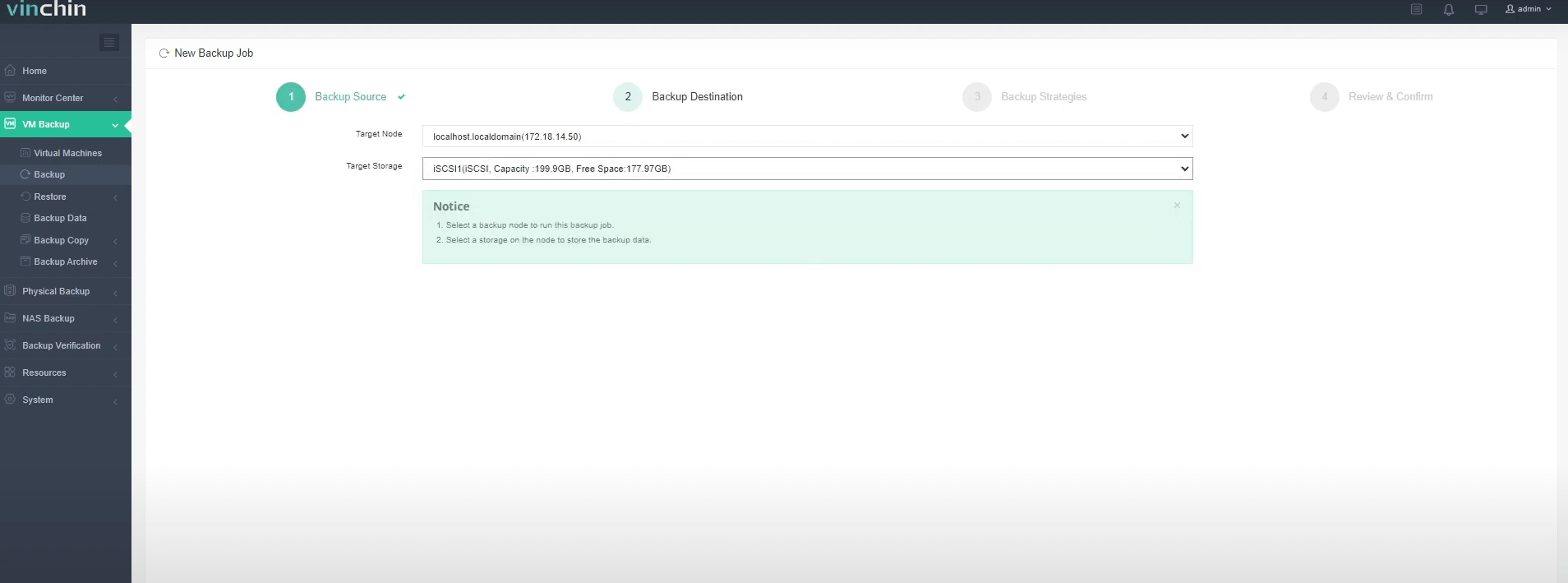
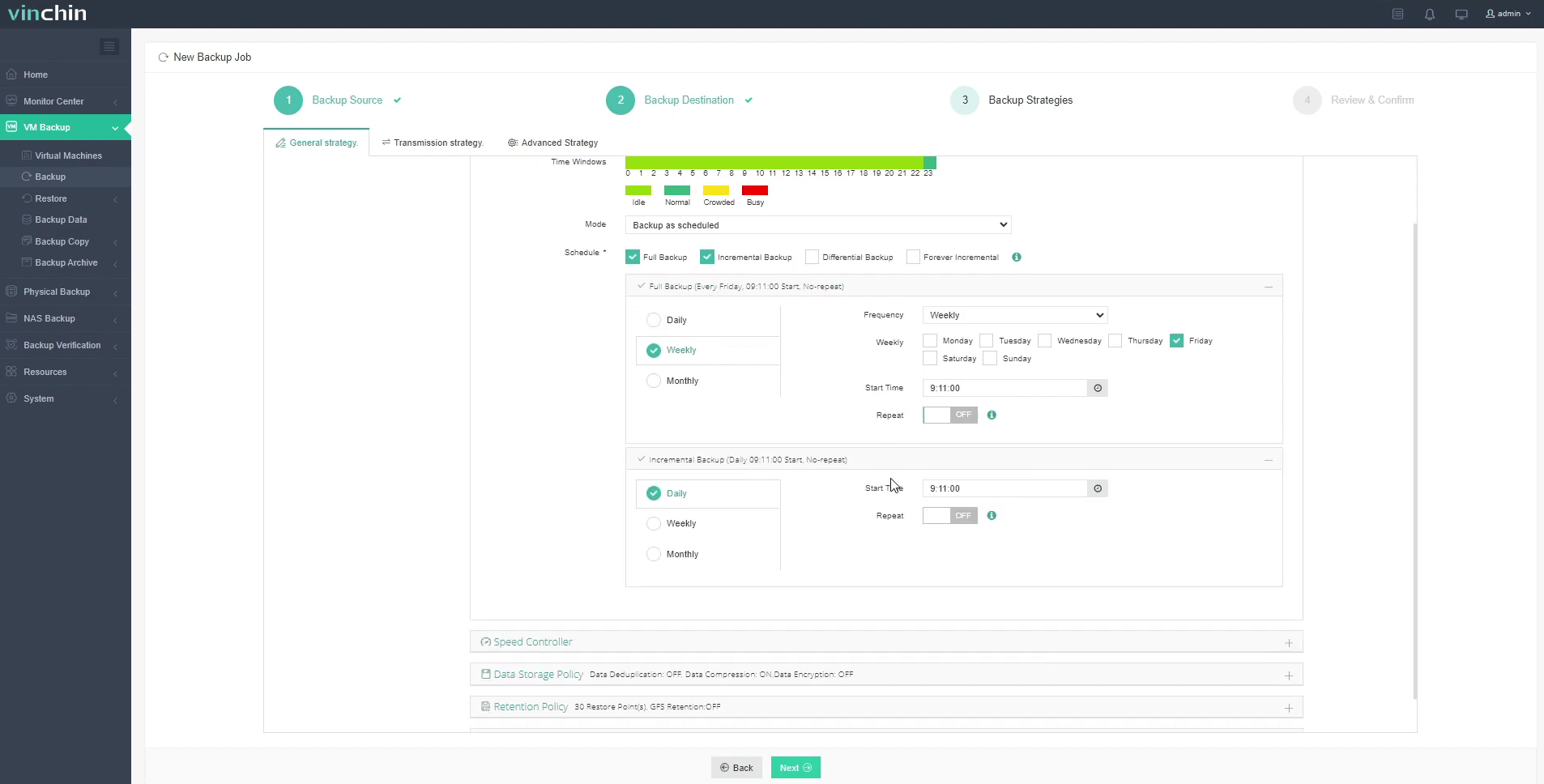
Using the intuitive Vinchin web console makes protecting OLVM VMs straightforward:
Step 1: Select the Oracle OLVM VM to back up
Step 2: Choose the desired backup storage location
Step 3: Configure policies such as schedule frequency and retention settings
Step 4: Submit the job

With global recognition among enterprise users and top industry ratings,Vinchin Backup & Recovery offers a 60-day full-featured free trial; click below to experience trusted enterprise-level data protection firsthand.
Best Oracle OLVM Backup Software FAQs
Q1: What features should an enterprise-grade Oracle OLVM backup solution include?
Look for instant VM recovery capabilities that allow rapid restoration after failures; automated scheduling so regular backups happen without manual effort; encryption both at rest/in transit; RBAC security controls limiting user permissions; scalability options supporting growth; plus detailed reporting/auditing tools required by auditors.
Q2: How does advanced backup software reduce downtime risk?
By enabling rapid restores, including full VM images or single files, and advanced solutions minimize service interruption after incidents occur For example instant VM recovery boots VMs directly from secure backup storage often restoring access within minutes instead of hours.
Q3: Is integration with existing infrastructure important?
Yes. Seamless integration ensures efficient operation within current IT workflows This avoids compatibility issues reduces training needs lowers operational risks Integration also supports consistent policies across hybrid/multi-cloud environments
Q4: Can a single solution protect multiple virtualization platforms?
Yes. Leading solutions like Vinchin support multi-platform environments through one interface This simplifies administration reduces operational overhead eliminates gaps between different hypervisors
Conclusion
A Backup software for OLVM is a critical component for ensuring business continuity. It continuously protects essential data and applications, enabling rapid recovery of systems in the event of failures, human errors, or cyberattacks. Vinchin Backup & Recovery enhances uptime in OLVM environments by safeguarding mission-critical applications and ensuring continuous business operations even during unexpected disruptions.









