Isolate the affected systems first, then rebuild or verify the hypervisor and reset credentials before any workload goes back. Restore VMs from a clean backup point into an isolated network, as new guests rather than over the encrypted ones, and boot-test them before reconnecting. If no clean backup exists, recovery depends on the ransomware family and is not guaranteed.
Key Takeaways
Contain before you restore. CISA's response checklist starts with isolating impacted systems, and it recommends powering them down if they can't be disconnected.
Identify which layer was encrypted. Guest OS, hypervisor datastore, and backup repository need different recovery paths.
Never restore over the encrypted VM. Restore to a new guest on an isolated network and test it first.
The “last good” restore point depends on the attack layer. For hypervisor-level encryption, the latest pre-attack backup may be usable; for guest-level encryption, newer backups may already contain encrypted files, attacker persistence, or compromised configurations.
No backup ≠ no hope, but no guarantee either. CISA and FBI do not encourage paying, because payment does not guarantee recovery.
What Does "Ransomware Encrypted my VMs" Actually Mean?
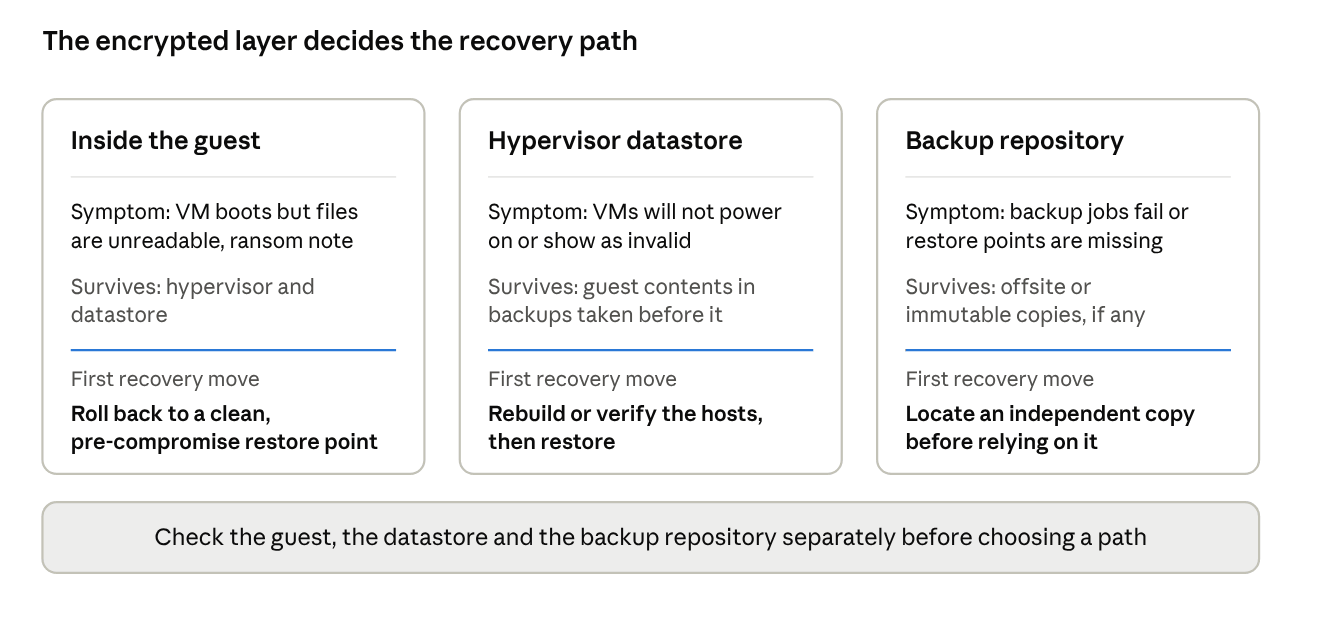
It means files were encrypted at one of three layers, and the layer decides your recovery path.
Layer encrypted | Typical symptom | What survives | First recovery move |
Inside the guest (Windows/Linux OS) | VM boots, files unreadable, ransom note | Hypervisor and datastore | Roll back to a pre-compromise restore point |
Hypervisor datastore (VM files on host storage) | VMs won't power on or show as invalid | Guest contents before the attack (in backups) | Rebuild or verify hosts, then restore |
Backup repository | Backup jobs fail; restore points missing or unreadable | Possibly offsite/immutable copies | Locate an independent copy |
Hypervisors are attractive targets. Microsoft's analysis notes that many security products have limited visibility into ESXi, and that encrypting its file system impacts every hosted VM at once.
Real-world scenarios (verifiable):
ESXiArgs, February 2023. CISA and FBI reported that the campaign encrypted VM configuration files on ESXi servers and had compromised over 3,800 servers globally. The advisory lists CVE-2021-21974, a known vulnerability, as the entry path. The encrypted file types included .vmdk, .vmx, .vmxf, .vmsd, .vmsn, .vswp, .vmss, .nvram and .vmem. Lesson: hypervisor-level attacks can leave guest disks intact while breaking the metadata VMs need to start.
CVE-2024-37085, observed 2024. Microsoft reported that attackers abused a default behavior in domain-joined ESXi hosts, where members of a domain group named "ESX Admins" received full administrative access. Microsoft observed one actor, Storm-0506, use it in an attack that deployed Black Basta ransomware against an engineering firm. Lesson: an Active Directory compromise can become a hypervisor compromise.
What is the Correct Order to Recover VMs?
Contain, scope, rebuild trust, choose the restore point, restore in isolation, verify, then reconnect in priority order.
Before you Begin: Prerequisites for a VM Ransomware Restore
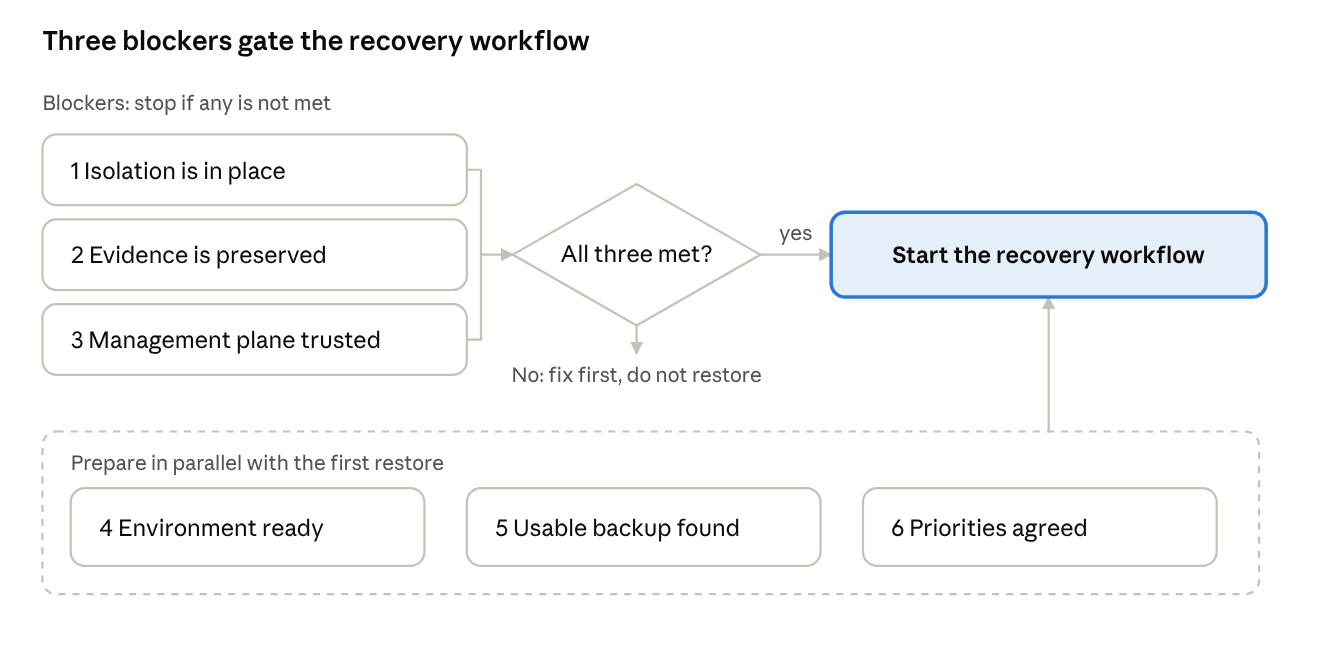
Confirm six conditions before restoring anything: isolation, evidence, management-plane trust, a clean recovery environment, a usable backup, and a priority list. If the first three are not met, stop and fix them first, because a restore onto a compromised host or domain can be encrypted again. (This go/no-go rule is a recommended practice derived from the sources below, not a CISA or NIST requirement.)
# | Prerequisite | What to confirm | Why it matters |
1 | Isolation is in place | Impacted systems are disconnected from the network, or powered down if they cannot be disconnected. | CISA's checklist makes isolation the first step, so restored VMs are not re-exposed to the spread. |
2 | Evidence is preserved | Ransom note, logs, and, where feasible, images or memory captures from a sample of affected systems are saved. The incident is reported to law enforcement (cisa.gov/report in the US). | Restoring over affected VMs destroys evidence and complicates scoping. |
3 | Management plane is trusted | Hypervisor hosts, management servers and the directory they authenticate against are verified clean or rebuilt. Privileged credentials are reset and the entry point is closed. | Microsoft's CVE-2024-37085 analysis shows a directory compromise can become full hypervisor control. |
4 | Recovery environment is ready | An isolated network segment, enough target storage, unused VM names/IDs, and a target host that supports the VM's configuration (for Hyper-V, see the import and configuration-version notes). | Restores go to new guests, not over encrypted ones (Proxmox guidance). |
5 | A usable backup is identified | At least one restore point from an independent copy is located. Backup repository credentials and any encryption keys are available and not compromised. A candidate restore point is chosen against the attack timeline (see the restore-point section below). | A job marked successful does not prove restorability. |
6 | Priorities are agreed | Business owners have ranked services, and identity and management services are sequenced first. A named decision-maker can approve reconnecting systems. | CISA's checklist calls for restoring by prioritization of critical services. |
Go/no-go rule: Do not start VM restoration until isolation, evidence preservation, and management-plane trust are confirmed. Restoring to a compromised host or directory can lead to re-encryption.
VM Ransomware Recovery Workflow
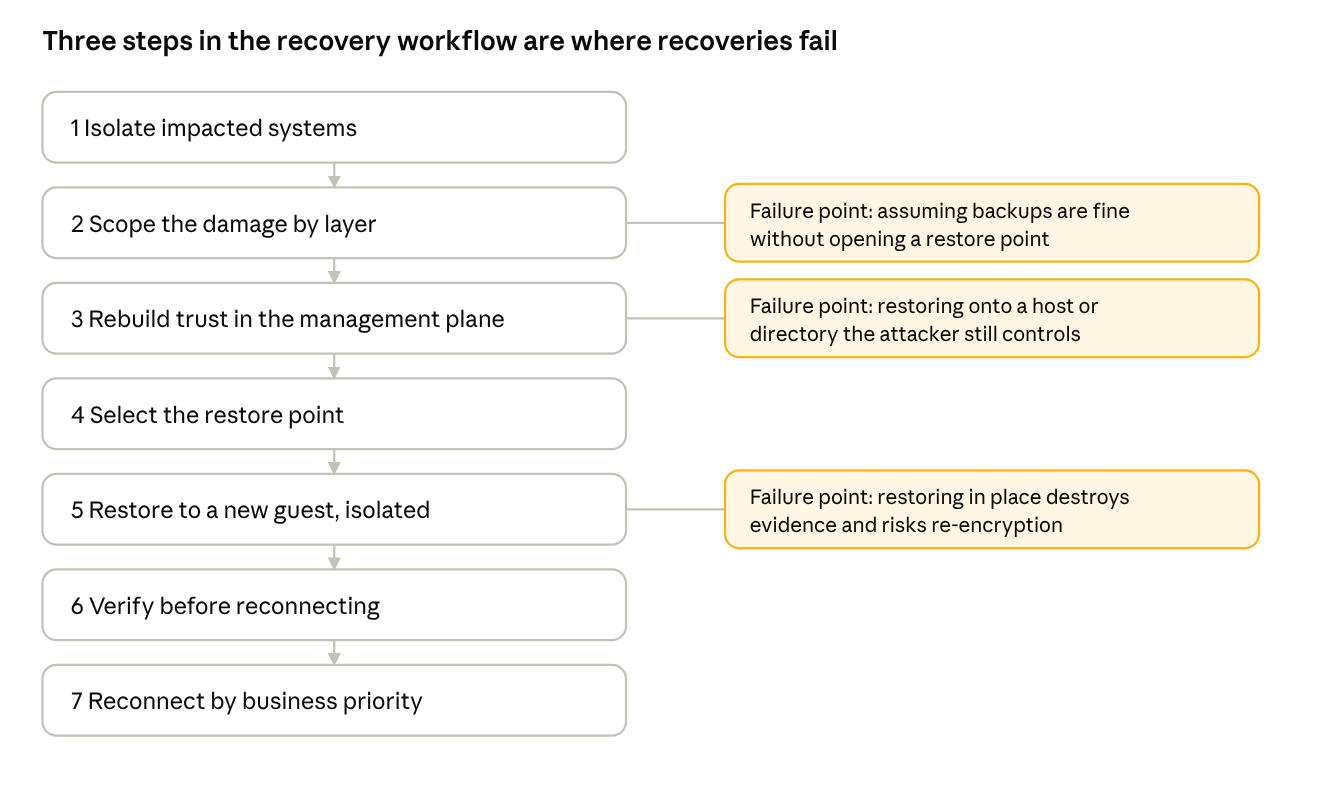
1. Isolate impacted systems. CISA's checklist says to determine which systems were impacted and isolate them immediately. If you can't disconnect them, power them down to limit spread. Preserve evidence where feasible, and report the incident to law enforcement (CISA, or your national authority outside the US).
2. Scope the damage by layer. Check the guest, the datastore, and the backup repository separately (see table above). Failure point: assuming backups are fine without opening a restore point.
3. Rebuild trust in the management plane. Reset credentials, close the entry point, and verify or rebuild hypervisor hosts and management servers before bringing workloads back. CISA's checklist includes resetting passwords and patching the security gaps before reconnecting systems.
4. Select the restore point.
5. Restore to a new guest on an isolated network. Proxmox's documentation advises restoring to a new guest rather than overwriting the current one when testing backups. Failure point: restoring in place destroys forensic evidence and risks re-encryption.
6. Verify before reconnecting. NIST SP 1800-11 frames the goal as recovered data that is accurate, complete, and free of malware. Boot the VM, scan it, and test the application, not just the OS.
7. Reconnect by business priority. CISA's checklist says to restore data based on a prioritization of critical services, then document lessons learned.
What if There is No Usable Backup?
Direct answer: Recovery is sometimes possible, but only for specific ransomware families and conditions. Do not assume it applies to your incident.
For ESXiArgs, CISA noted that the malware encrypted configuration files but not the flat disk files, so it was possible in some cases to reconstruct the metadata. CISA released a recovery script that rebuilds VM metadata from the unencrypted virtual disks. Three conditions apply:
It is based on third-party researchers' findings, and CISA advises reviewing the script before use.
It creates new configuration files rather than decrypting anything.
It is specific to ESXiArgs. Other families encrypt differently, so this does not transfer. Confirm your variant first.
Broadcom's knowledge base article covers recreating a missing disk descriptor when the flat file exists. It recommends attempting to restore the descriptor from a backup first, and warns against editing the flat file because that can cause data loss. Work on copies where you can.
Ransom payment: CISA and FBI do not encourage paying, as payment does not guarantee files will be recovered. They recommend consulting federal law enforcement about possible decryptors.
Decision Matrix: Which Recovery Path Fits?
Situation | Recommended path | Key caution |
Clean backups exist; hypervisor intact | Restore as new guests in isolation, verify, reconnect | Check the timeline for the restore point |
Clean backups exist; hypervisor/vCenter/AD compromised | Rebuild and harden management plane first, then restore | Skipping this invites re-encryption |
Backups encrypted or deleted; flat disks intact (ESXiArgs-type) | Use CISA's script path on copies | Variant-specific; may not apply |
No backups; disks encrypted | Report, consult law enforcement about decryptors, rebuild from known-clean images | No guarantee of recovery |
Post-Restore Validation Checklist: Is the VM Safe to Bring Back Online?
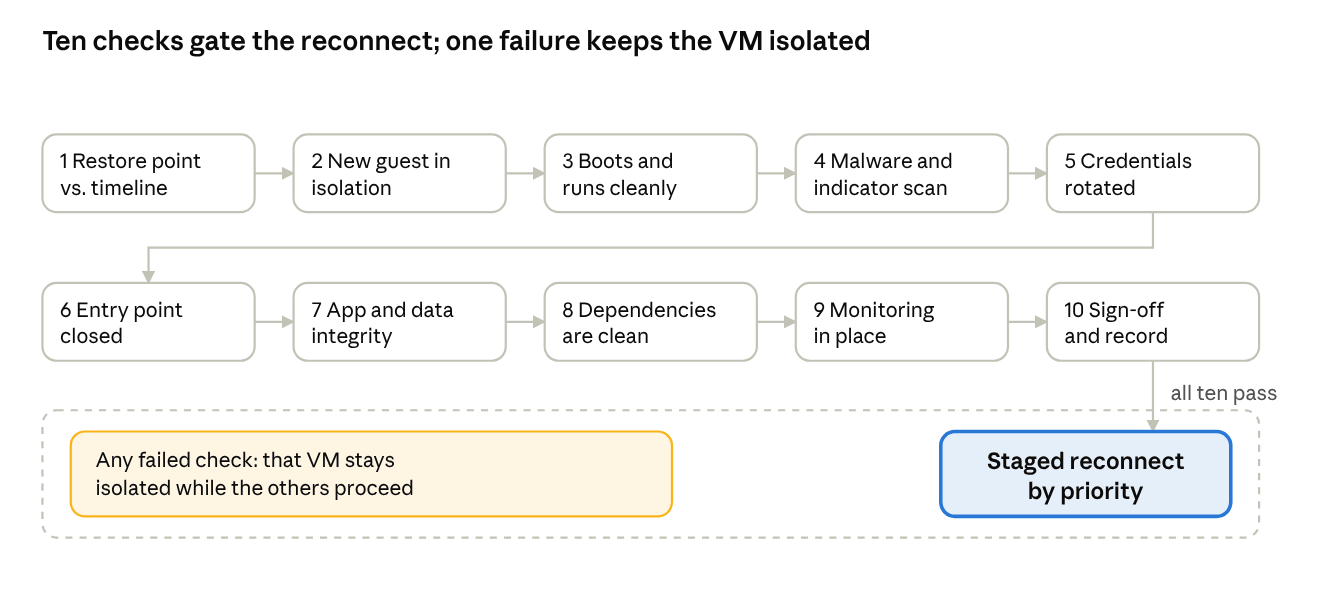
Direct answer: A restored VM is safe to reconnect only when it passes every check below in the isolated network. Booting successfully is not enough, because boot success does not prove the data is intact or the attacker is gone. The list is a recommended practice that combines the CISA, NIST SP 1800-11, Proxmox, and Microsoft sources cited in this article. None of them prescribes this exact checklist.
# | Check | Pass criterion | Fail action |
1 | Restore point vs. timeline | The restore point predates the earliest confirmed compromise indicator (first suspicious logon, first encrypted file). | Pick an earlier restore point. |
2 | Isolation and identity | VM runs as a new guest on the isolated network, with no duplicate VM ID or MAC conflict with other machines. | Re-restore as a copy with a new ID (for Hyper-V, the Copy import type). |
3 | Boots and runs cleanly | OS boots, services start, and system and application logs show no unexpected errors or encryption artifacts (ransom notes, renamed extensions). | Treat as a bad restore point. Do not repair in place. |
4 | Malware and indicator scan | A scan using clean, up-to-date tooling finds no malware, and known indicators from the investigation are absent. NIST SP 1800-11 frames the goal as data that is accurate, complete and free of malware. | Keep isolated, escalate to incident response, try an earlier restore point. |
5 | Credentials rotated | Local, service, application and directory-related secrets stored on or used by the VM are reset, with no attacker-created accounts remaining. | Rotate before any reconnect. |
6 | Entry point closed | Known vulnerabilities and misconfigurations that enabled the attack are patched or mitigated on the VM and the host. | Do not reconnect until closed. |
7 | Application and data integrity | The application starts, database consistency checks pass, a business owner confirms sample transactions, and the newest data timestamp matches the expected recovery point. | Escalate to the application owner. Restore from another point. |
8 | Dependencies point to clean systems | DNS, directory, licensing and integration endpoints used by the VM are the rebuilt or verified ones, not the compromised originals. | Repoint before go-live. |
9 | Monitoring is ready | Logging and alerting cover the VM and its host, and someone is assigned to watch for re-encryption or unusual access after reconnect. | Delay go-live until monitoring is in place. |
10 | Sign-off and record | Business owner and security lead approve, and the restore point, checks run and results are documented. | Hold in isolation. |
Go-live rule: reconnect in stages, in the priority order agreed in the prerequisites, and keep the isolated copy of the evidence until the investigation closes. Any failed check keeps that VM in isolation while others proceed.
Troubleshooting After the Restore
Symptom | Likely cause | Action |
Restored VM is encrypted again | Entry point still open, credentials not reset, or restore point post-dates compromise | Re-isolate; revisit steps 3 and 4 |
VM won't power on after restore | Missing or damaged config/descriptor; version mismatch | On ESXi, see Broadcom's descriptor article; on Hyper-V, check configuration version support |
Import fails because VM already exists (Hyper-V) | Register/Restore reuse the original ID | Use Copy with a new ID, or remove the old VM object |
Restore completes but application is broken | Boot success ≠ data integrity | Run application-level tests before reconnecting |
Common Mistakes
Restoring over the encrypted VM instead of to a new guest.
Reconnecting restored VMs before credentials are reset, and the entry point closed.
Treating "backup job succeeded" as proof that the backup restores.
Using hypervisor snapshots as the recovery plan. In the ESXiArgs file list, snapshot-related types (.vmsn, .vmsd) were among those encrypted, because snapshots live with the VM files.
Where Backup Tooling Fits
Vinchin Backup & Recovery is an agentless VM backup product whose published feature set includes immutable backups, instant recovery, and cross-platform recovery. Availability varies by platform and version, so confirm against your environment's compatibility list.
1. Restore from a clean backup point
Vinchin restores from multiple points in time, and instant restore works with full, incremental and differential restore points. Pick the point from your timeline, before the earliest compromise indicator, and make sure retention reaches back past the dwell time.
2. Recover the VM as a new guest instead of overwriting the encrypted VM
Per the help center, full VM recovery and instant restore both create a new VM on the target host or cluster. The encrypted VM stays untouched as evidence. Give the new VM a distinct name and isolate its network.
3. Start instant recovery in an isolated network
Instant restore boots the VM from backup storage over NFS. The backup is mounted read-only and new writes go to a cache area, so the backup is not modified. Run it on an isolated segment, or in the built-in DR lab where your version supports it, and live-migrate only after validation. Vinchin quotes about a minute for the restore; measure it in your own test.
4. Use immutable backups to reduce ransomware impact
Vinchin's WORM feature (V9.0) works at the software level for local, DAS, NAS, and SAN storage, through cloud S3 lock, or on tape. Enable it on the storage and the job before an incident, because adding WORM to existing storage makes its jobs downgrade to full. Immutability preserves restore points but does not make them clean, so the attack timeline still decides which one to use.
5. Use cross-platform recovery if the original hypervisor is unavailable
Vinchin can restore a VM backup to another virtualization with full or instant recovery, across platforms such as VMware, Hyper-V and Proxmox. Supported pairs differ by version, so check the compatibility list, and make sure the new target host is itself trusted (prerequisite 3).
6. Validate the recovered VM before reconnecting to production
The V9.0 datasheet describes a DR lab with malware scanning and recovery verification in an isolated sandbox. Use it as one input to the post-restore checklist, not a replacement for credential rotation, business-owner checks, and security review.
Simplified Vinchin recovery workflow
Menu names vary by version.
1. Log in to the Vinchin Backup & Recovery web console.
2. Open the restore page and select the affected VM's backup.
3. Choose a clean restore point before the earliest compromise indicator.
4. Select Instant Recovery or Full VM Restore.
5. Restore as a new VM on the target host rather than overwriting the encrypted one.
6. Connect the recovered VM to an isolated recovery network.
7. Boot-test the VM and validate application and data integrity.
8. Reconnect to production only after malware scanning and security review, in staged priority order.
FAQs
Q1: Does a hypervisor snapshot count as a backup for ransomware recovery?
No. Snapshots sit with the VM files on the same storage, and ESXiArgs encrypts snapshot-related file types. A recoverable copy needs to be independent of the production datastore and credentials.
Q2: Can I restore a VM to a different hypervisor after an attack?
Sometimes. It depends on the backup tool's cross-platform capability and the guest's drivers. For Hyper-V, configuration versions limit import to the same or a newer host version. Test the path before you need it.
Q3: How do I know the backup itself isn't infected?
You can't confirm from job status alone. Restore it to an isolated network, boot it, scan it, and test the application. NIST SP 1800-11 frames the objective as data that is accurate, complete, and malware-free.
Q4: Is CISA's ESXiArgs script usable for other ransomware?
No. It rebuilds metadata from unencrypted flat files, which was specific to ESXiArgs behavior. Other families may encrypt the disks themselves.
Q5: How long will recovery take?
There is no reliable universal figure. It depends on data volume, restore bandwidth, how many hosts must be rebuilt, and verification depth. Measure it in restore tests, not estimates.
Conclusion
Ransomware recovery succeeds or fails on sequence, not speed. Trust the management plane first, pick the restore point from the attacker's access path, and prove each VM clean in isolation before it rejoins production. Backups that haven't been test-restored are an assumption, and the quarter before an incident is when to turn them into evidence.