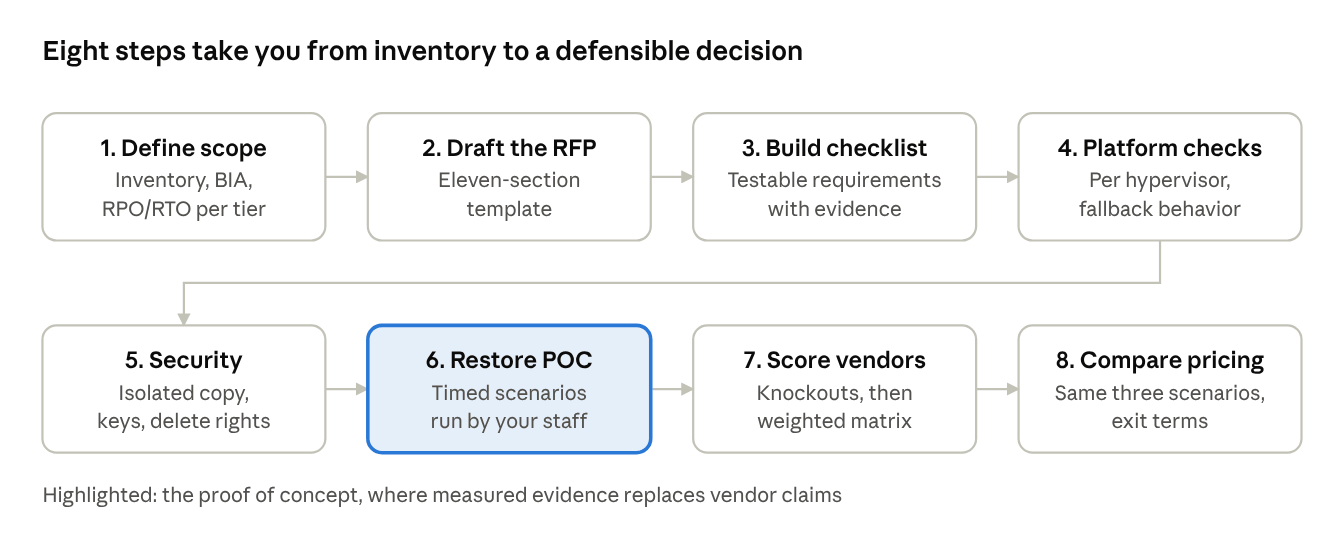
A good VM backup RFP states your workloads, recovery objectives (RPO and RTO per tier), and security requirements first, then makes every vendor prove it can meet them on your hypervisors and versions. Write each requirement as a testable statement, such as a timed restore of a named VM to a different cluster, not as a feature checkbox. Score vendors on evidence from scripted proof of concept, and keep pricing comparable by asking every vendor to quote the same sizing scenarios.
Key Takeaways
Start from impact, not features. Set RPO and RTO for each workload tier based on a business impact analysis before drafting any requirements (NIST SP 800-34).
Platform details change the answer. Change tracking, snapshots, and incremental behavior differ across VMware vSphere, Hyper-V, Proxmox VE, and oVirt/KVM, so ask per platform.
Make ransomware resilience measurable. Require offline or isolated copies, separate credentials and tested restores, as CISA recommends.
Replace "supports restore" with timed scenarios. Score the measured result of each restore path under failure conditions.
Normalize pricing. Ask every vendor to quote the same three sizing scenarios, and ask what leaving the product costs.
RFP, RFI or RFQ: Which Document Do You Need?
Use an RFP when vendors must propose how they will meet your recovery and security requirements. Use an RFI to learn what the market offers, and an RFQ only when requirements are fixed and price is the one open variable. For VM backup, an RFP is usually the right tool, because recovery outcomes depend on architecture, not on price alone.
Document | Purpose | Use it when | What you get back |
RFI (request for information) | Learn what products and approaches exist | You do not yet know your requirements or shortlist | Capability overviews |
RFP (request for proposal) | Compare how vendors meet defined requirements | Requirements are known, but solutions differ in architecture | Proposals, evidence, pricing |
RFQ (request for quotation) | Compare price for a fixed specification | The product is already chosen or interchangeable | Itemized quotes |
When a Formal RFP is Worth the Effort
No standard sets a size threshold, so treat these as practical triggers rather than rules:
You run more than one hypervisor, or plan to migrate from one to another.
Backup is part of a ransomware or compliance program that auditors will review.
You are replacing an incumbent product and need a defensible reason.
Several teams (virtualization, security, storage, finance) must agree on one choice.
If none of these apply, a short requirements list and a two-vendor proof of concept may be enough.
Step 1: Define scope, Workload Tiers, and Recovery Objectives
Before you write a single requirement, document what must be protected and how quickly it must be returned. NIST SP 800-34 Rev. 1 frames this as contingency planning built on a business impact analysis (BIA). The BIA tells you which systems matter most, so the RFP can set recovery objectives per tier instead of one blanket number.
What to Inventory
1. Hypervisors and versions: product, exact version, cluster or standalone, management layer (for example vCenter, SCVMM, Proxmox cluster, oVirt Engine).
2. Workloads: VM count, total provisioned and used capacity, largest single VM, database or application-consistency needs, VMs with passthrough devices or special disk types.
3. Storage and network: datastore types, backup network bandwidth, existing backup targets and their location.
4. Constraints: compliance regimes, data residency, retention periods, air-gapping or offline-media rules, staffing for operations.
5. Current pain: failed jobs, restore times observed in tests, and licensing or support issues with the incumbent.
Set RPO and RTO Per Tier
RPO is how much data loss is acceptable. RTO is how long recovery may take. Both come from your BIA, not from a vendor datasheet. The table shows the structure; the values are illustrative and must be replaced with your own.
Tier | Example workloads | RPO target (illustrative) | RTO target (illustrative) | RFP implication |
1 | Transaction databases, identity services | Minutes | Under 1 hour | Frequent backups or replication, instant or live restore, tested runbooks |
2 | Line-of-business apps, file servers | Hours | Hours | Daily or more frequent backups, fast full-VM restore |
3 | Dev/test, internal tools | Next day | Next business day | Standard schedule, cost-efficient storage |
Write the targets into the RFP as measurable requirements, and state that vendors will be tested against them. A vendor claim of "fast recovery" without an RTO is not scoreable.
Step 2: Draft the RFP Using This Template
A complete RFP has eleven sections, ordered so vendors can answer mandatory items first. Copy the structure below and replace the bracketed fields with your own data.
# | Section | What to write |
1 | Purpose and objectives | One paragraph: why you are buying, what success looks like, decision date. |
2 | Environment overview | Hypervisors with exact versions, VM and capacity counts, largest VM, sites, network links, current backup targets. |
3 | Mandatory requirements | Pass/fail items. A "no" disqualifies the response (for example, support for your hypervisor version). |
4 | Functional requirements | Backup methods, restore types, replication, retention, reporting. Each item is scored. |
5 | Security and compliance | Encryption, access control, immutability or offline copies, audit logs, regulatory mappings. |
6 | Operations and support | Deployment model, upgrade process, support hours and escalation, documentation, training. |
7 | Vendor profile and references | Company background, product roadmap, references running a comparable hypervisor mix. |
8 | Commercial proposal | Pricing for the same three sizing scenarios from every vendor, licensing metric, renewal terms, exit terms. |
9 | Response format and timeline | Question-by-question response template, deadline, contact for questions, scoring weights shown up front. |
10 | Evaluation and proof of concept | Scoring method, POC scope, success criteria, who runs the tests. |
11 | Contract and exit terms | Data portability, backup format documentation, termination assistance. |
Write Requirements as Testable Statements
Vendors answer "yes" to vague requirements. They cannot hide behind a measurable one. Compare the pairs:
Vague | Testable |
"Supports incremental backup" | "State, for each hypervisor in section 2, which change-tracking mechanism is used, what causes it to reset, and what the next backup does after a reset." |
"Fast restore" | "Restore the [name] VM ([size] GB) to [target cluster]. State the measured time from restore request to VM boot, and the conditions of the test." |
"Ransomware protection" | "Describe how at least one backup copy stays unreachable if the backup server and hypervisor credentials are compromised. Provide the documentation." |
"Secure" | "List the encryption algorithms and key-management options for data at rest and in transit, and who can delete backups or shorten retention." |
Show your scoring weights in section 9. Vendors then spend their effort where it counts for you.
Step 3: Build the Requirements Checklist
A VM backup RFP should cover 13 requirement areas, and every area needs a named piece of evidence the vendor must supply. Use the table as your section 4 and 5 draft, then trim areas that do not apply.
Area | What to require | Evidence to request |
Platform and version coverage | Exact hypervisor, management-layer and guest OS versions supported today, plus how fast new versions are certified | Dated compatibility matrix; release notes for the last two platform updates |
Backup method | Agentless image-level backup where the platform allows it; full, incremental and synthetic or forever-incremental modes; the change-tracking mechanism used per platform | Architecture description per hypervisor |
Consistency | Application-consistent backup through guest tooling; stated behavior when guest tools are missing or fail | Documented fallback behavior; sample job log |
Restore types | Full VM, single disk, file-level, application items, instant or live restore, restore to a different host, cluster or hypervisor | Per-platform restore matrix (restore options often differ by platform) |
Restore to dissimilar targets | Ability to rebuild on different hardware or a different platform, as CISA notes older or mismatched hardware can block image-based rebuilds | Documented procedure; POC result |
Storage efficiency | Deduplication, compression, supported targets (disk, NAS, object, tape), and the effect on restore speed | Vendor documentation; ratios only with the test data described |
Retention and scheduling | Policy-based retention, long-term archive, legal hold, per-VM overrides | Policy configuration walkthrough |
Replication and DR | Off-site copy, replication, isolated recovery environment, orchestrated recovery | DR runbook template; reference customer |
Verification | Automated integrity checks and test restores or boot tests; reports usable as audit evidence | Sample verification report |
Ransomware resilience | Offline, isolated or immutable copy; separate credentials; deletion controls | See the security section below |
Access and audit | Role-based access, multi-factor authentication, audit logs, encryption at rest and in transit, key management | Security whitepaper; log sample |
Scale and performance | Concurrent job limits, proxy or transport scaling, impact on production hosts | Test conditions behind any quoted figure |
Operations and exit | Monitoring, alerting, API, upgrade process, support SLAs, export of backups in a documented format | Support policy; exit clause |
Treat numeric claims such as speed or storage reduction as vendor figures. Ask for the dataset, hardware and configuration behind each one, and replace them with your own POC measurements.
Step 4: Add Platform-Specific Questions for VMware, Hyper-V, Proxmox VE and oVirt/KVM
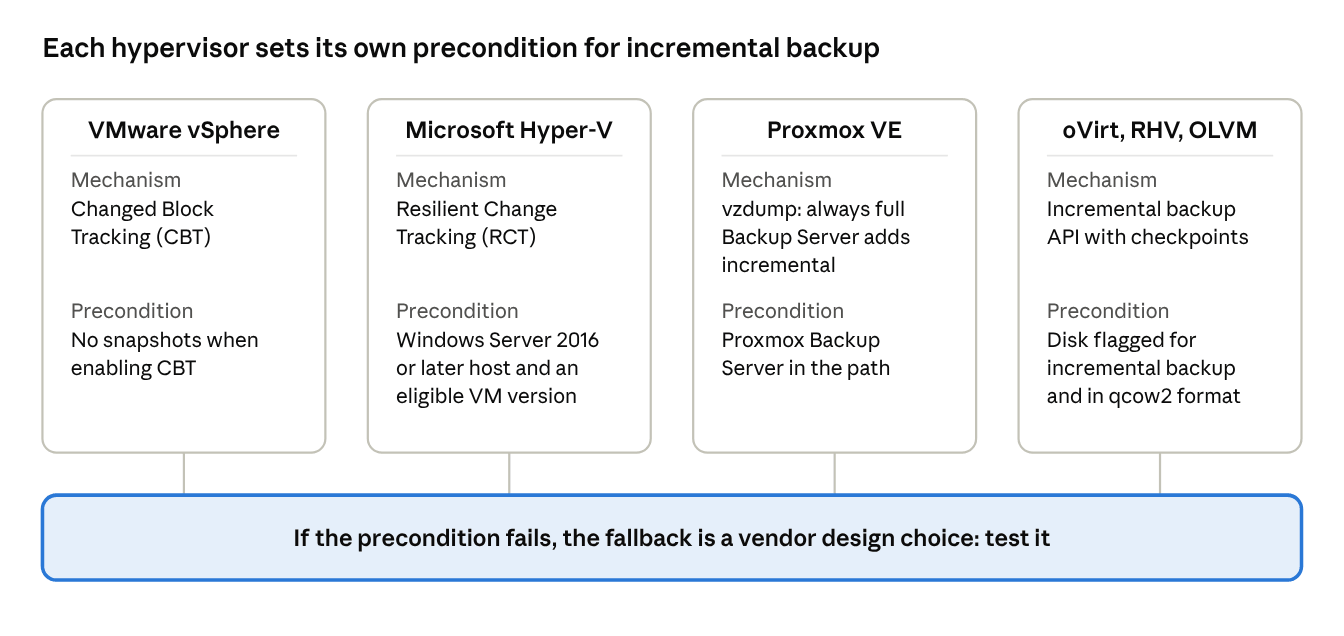
Ask every vendor to answer per platform, because the hypervisor, not the backup vendor, decides how changed blocks are tracked and what can break that tracking. Only add the rows for platforms you run. Details depend on the platform version and configuration.
Platform | What the platform documentation says | Ask in the RFP |
VMware vSphere | The vSphere Storage APIs for Data Protection let backup products protect VMs from a central server without agents inside each VM. Changed Block Tracking (CBT) is a VMkernel feature that records changed blocks, and Broadcom advises having no snapshots on a VM before enabling it. | How does the product handle a CBT reset or an "incorrect changed block tracking configuration" error? What does the next job read after a reset? Which vSphere and ESXi versions are certified? |
Microsoft Hyper-V | Hyper-V exposes Resilient Change Tracking (RCT) through reference points, with Windows Server 2016 as the minimum server. Microsoft does not upgrade a VM's configuration version automatically when it moves to a newer host, and the upgrade is one-way. | Which host OS and VM configuration versions does the product require for incremental backup? What happens for VMs on older configuration versions? |
Proxmox VE | vzdump backups are always full backups. Proxmox Backup Server adds deduplication and incremental backups. Snapshot mode carries a small inconsistency risk unless the guest agent can freeze the file system. | Does the product use vzdump, Proxmox Backup Server or its own data path? Is the guest agent required for consistency? How is incremental achieved? |
oVirt, RHV, OLVM (KVM) | oVirt's incremental backup design requires disks to be marked for incremental backup and stored as qcow2. The backup application selects restore points, not oVirt. | How does the product enable incremental backup per disk? What happens to raw disks? Which oVirt, RHV or OLVM versions are supported, and is that platform version still supported by its vendor? |
Step 5: Security and Ransomware-Resilience Requirements
Require at least one backup copy that an attacker holding production and backup-server administrator credentials still cannot delete or encrypt, and require evidence that restores from it have been tested. CISA's #StopRansomware Guide recommends offline, encrypted backups tested regularly for availability and integrity in a disaster recovery scenario, and warns that many ransomware variants try to find and delete or encrypt accessible backups.
NIST SP 800-209 covers storage and backup infrastructure security and names data protection, isolation, restoration assurance, and encryption among its focus areas. Use those four words as headings when you write section 5 of the RFP.
Requirement | RFP wording | Why it matters |
Unreachable copy | "Describe how one backup copy remains offline, isolated, or immutable if the backup server is compromised." | An accessible copy can be deleted or encrypted along with production. |
Separate credentials | "State whether backup storage uses credentials distinct from the hypervisor and directory domain, and whether the backup console enforces multi-factor authentication." | Attackers hunt for stored credentials in the environment, per CISA. |
Deletion controls | "List which roles can delete backups, shorten retention or remove a lock, and whether dual approval is available." | A locked copy is only as safe as the roles that can unlock it. |
Where the lock is enforced | "State whether immutability is enforced by the storage or operating system layer or only inside the backup application." | Proxmox VE documents that its backup protection is enforced by Proxmox VE, not the file system, so anyone with write access to the underlying storage can still remove the file. Ask this of every product. |
Encryption and keys | "Describe encryption at rest and in transit, key storage, and how backups are recovered if the backup server and its keys are lost." | Encrypted backups are unrecoverable without a key-recovery plan. |
Clean restore point | "Describe how you help confirm a restore point is not already compromised, and whether restores can target an isolated network." | If ransomware encrypts files before the backup runs, the newest copy may be unusable. |
Recovery assets | "Document where installers, license keys, and configuration backups are kept for rebuilding the backup system itself." | CISA advises storing executables and license agreements with offline backups. |
Audit and hardening | "Provide audit-log samples, the patch cadence for the backup software, and the vulnerability disclosure process." | The backup system is an attack target and needs its own lifecycle. |
These requirements describe design properties. Ask the vendor to demonstrate each one in the proof of concept instead of accepting a description.
Step 6: Run a Restore Proof of Concept with Timed Scenarios
Score vendors on restore results you measure yourself, from scripted scenarios run on your own VMs. A vendor demo shows capability under ideal conditions. Your RTO has to hold under bad ones. CISA recommends testing backups for availability and integrity in a disaster recovery scenario, and NIST SP 800-34 includes testing, training, and exercises as a step of contingency planning.
Your RTO is set by the Weakest Link in the Restore Path, not by the Restore Feature
Why: a restore depends on more than the restore function. The backup server and its catalog must be alive, the keys and credentials available, the repository reachable from the target, the target storage able to absorb the writes, and the hypervisor management layer working. A feature list scores none of these.
Evidence from platform behavior: Proxmox VE documents that large restores can congest storage bandwidth for other guests, and that its live-restore option starts the VM early with limited read speed and can leave the VM in an undefined state if the restore fails. A restore feature can therefore be fast in the good case and risky in the failure case. This is one product's documented behavior, so check the equivalent for every product you evaluate.
Decision value: run each restore scenario with one dependency removed, and weight those results above the number of restore types a vendor lists. Two vendors with identical feature lists can have very different recovery times once the backup server must be rebuilt or the production credentials are revoked.
A caution: a successful backup job proves the copy was written. It does not prove the copy can be restored within your RTO.
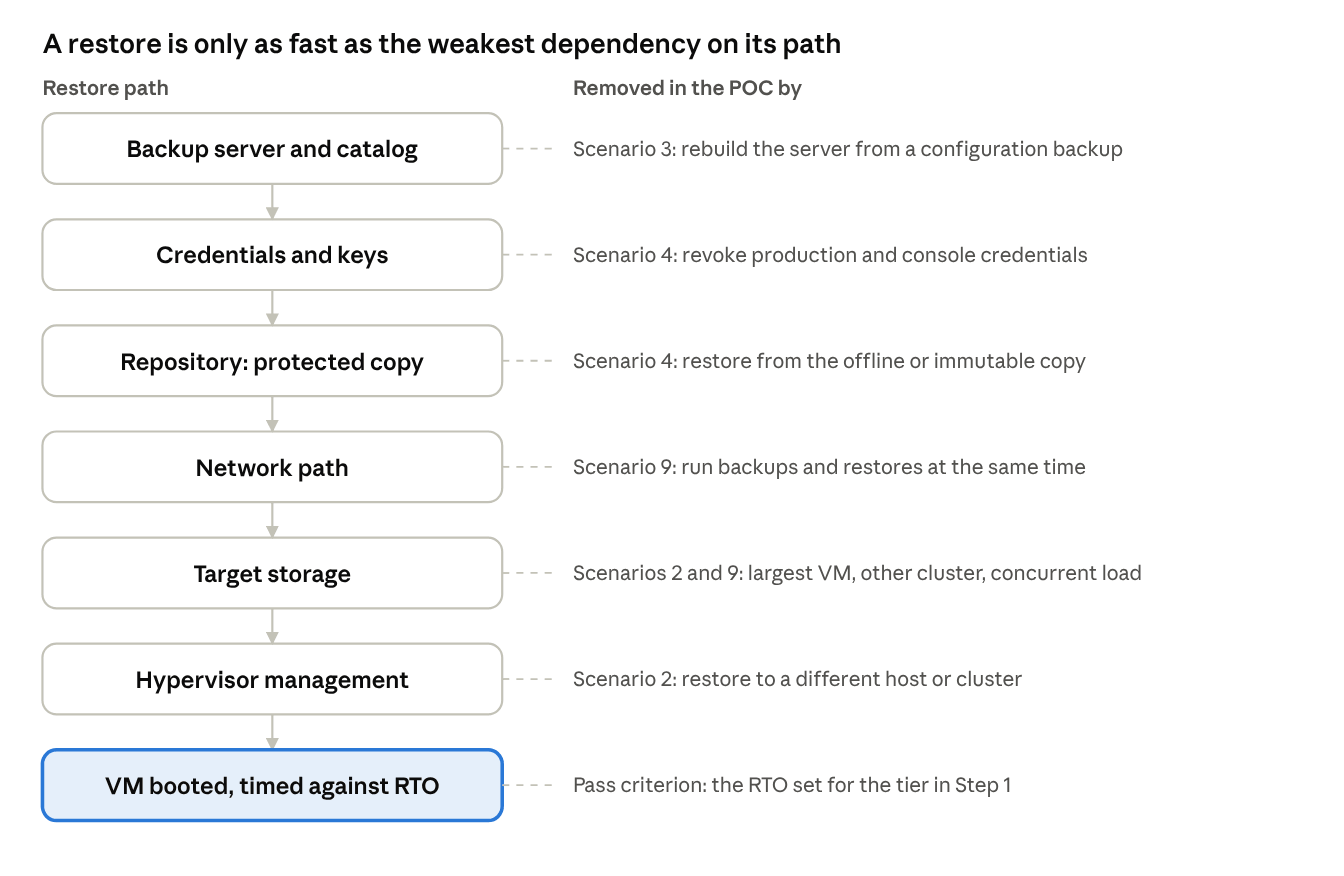
Each POC scenario in the table below removes one of these dependencies from the path.
Restore Scenarios to Script
Set each pass criterion from the RTO you defined in Step 1. Run every scenario for every shortlisted vendor, with the same data.
# | Scenario | Setup | Measure |
1 | Single VM, same cluster | Restore a mid-size Tier 2 VM | Time from request to booted VM; manual steps needed |
2 | Largest VM, different cluster | Restore your largest VM to another host or cluster | Elapsed time, throughput, effect on other workloads |
3 | Rebuilt backup server | Install a fresh backup server and recover from configuration backup | Time to first restore; what could not be recovered |
4 | Offline or immutable copy | Revoke production and backup-console credentials, then restore | Whether restore succeeds; who could delete the copy |
5 | Instant or live restore | Boot a VM from the backup; interrupt the restore once | Time to boot, performance during restore, state after interruption |
6 | File and application item | Recover one file and one database or mailbox item | Time, fidelity |
7 | Cross-platform | Restore to a different hypervisor, if you may migrate | Success, driver and boot fixes needed |
8 | Change-tracking fallback | Force a fallback (see the platform section) | Next job duration and size |
9 | Concurrent load | Run backups and restores together | Impact on production latency |
Proof of Concept Workflow
1. Fix the scope and success criteria in writing before vendors touch your environment. Share the same document with each vendor.
2. Build a representative test set: the same VMs for every vendor, including your largest VM and one VM per hypervisor and storage type.
3. Give each vendor the same time box and the same documentation access. Unequal time makes scores meaningless.
4. Have your own staff run the scenarios, with the vendor available for questions. Steps that need vendor intervention are findings, and record them. This is where POCs most often fail, because a demo run by the vendor hides operational friction.
5. Record start and stop timestamps, data volumes, errors, and manual steps for every scenario.
6. Score immediately, while the evidence is fresh, against the weights published in the RFP.
Step 7: Score Responses with Knockout Criteria and a Weighted Matrix
Score in two passes: first remove any vendor that fails a mandatory requirement, then score the rest on weighted criteria using evidence from the responses and the proof of concept. Publish the weights in the RFP so vendors know what you value.
Pass 1: Knockout Criteria
A "no" on any item removes the vendor, whatever its other scores:
Does not support your hypervisor and management-layer versions today (not on a roadmap).
Cannot restore a full VM to a different host or cluster.
Offers no copy that is offline, isolated, or protected from deletion by backup-console administrators.
Will not allow a hands-on proof of concept run by your staff.
Will not give pricing for your sizing scenarios.
Pass 2: Weighted Matrix
Score each criterion from 0 to 5 using evidence, multiply by the weight, and divide the weighted total by 5 for a 0 to 100 result. The weights below are illustrative starting points for three common situations. They are not industry benchmarks, so adjust them to your own BIA.
Criterion | Mixed hypervisors or planned migration | Regulated or ransomware-driven | Small team, single platform |
Platform and version fit | 20 | 10 | 10 |
Restore options and measured restore results | 20 | 20 | 20 |
Ransomware resilience | 10 | 25 | 10 |
Backup window and change-tracking fallback | 10 | 5 | 10 |
Operations and usability | 10 | 5 | 20 |
Verification and audit reporting | 5 | 15 | 5 |
Cost across the three sizing scenarios | 15 | 10 | 20 |
Vendor support and viability | 10 | 10 | 5 |
Total | 100 | 100 | 100 |
Scoring Rules that Keep the Result Defensible
Score only what is demonstrated or documented. A marketing claim earns at most a 2.
Have the technical evaluators finish scoring before they see prices, then add the cost score.
Record the evidence behind every score in one sheet so the decision can be audited later.
Re-run the matrix with the weights changed by plus or minus five points. If the winner changes, the decision is close, and the POC results should decide.
Step 8: Make Pricing and Licensing Quotes Comparable
Ask every vendor to price the same three sizing scenarios and to state its licensing metric in writing. Vendors license by different units, such as per socket or CPU, per VM, per host or per terabyte protected, so a single "price per unit" comparison misleads.
The three scenarios to specify in the RFP:
1. Today: your current VM count, protected capacity and sites.
2. Growth: your expected size at the end of the contract term, using your own growth estimate.
3. Change: a migration case in which a defined share of VMs moves to another hypervisor.
The third scenario matters when you may leave a platform. A license that does not follow the workload across hypervisors turns a migration into a repurchase.
Cost element | Question for the vendor |
Licensing metric | What is the unit, and what counts toward it (powered-off VMs, replicas, templates)? |
Edition boundaries | Which features from your checklist sit in higher editions or paid add-ons? |
Support | What is included at the quoted tier, and what are response targets by severity? |
Infrastructure | What backup server, proxy, and repository capacity is required, and who supplies it? |
Renewal | What is the renewal price rule and the notice period? |
Portability | Can the license move between hypervisors or sites without repurchase? |
Exit | What does it cost to export or read backups after the contract ends? |
Check hypervisor-side licensing too. A Broadcom knowledge base article states that the Data Protection APIs are included with all licensed vSphere editions. That article may predate later changes to Broadcom's licensing, so confirm the current terms for your own entitlement before assuming it applies.
Common Mistakes When Writing a VM Backup RFP
Most failed selections trace back to a handful of avoidable drafting and testing errors.
Mistake | Why it hurts | Fix |
Feature checklist with yes/no answers | Every vendor answers "yes"; nothing separates them | Write testable requirements and ask for evidence |
One RPO/RTO for everything | Overpays for low tiers or under-protects critical ones | Set targets per tier from a BIA |
Treating "supports incremental" as one capability | Hypervisors differ in change-tracking preconditions and fallbacks | Ask per platform; test the fallback in the POC |
Vendor-run demos | Hide operational friction and manual steps | Have your own staff run scripted scenarios |
Testing only the happy path | RTO fails under degraded conditions | Remove one dependency per scenario |
Ignoring the backup system's own security | Backups become the attacker's next target | Require isolation, separate credentials and deletion controls |
Accepting vendor speed or savings figures | Numbers come from unknown datasets and hardware | Ask for test conditions; use your POC data |
Comparing prices per unit | Metrics differ, so totals are not comparable | Require quotes for the same three scenarios |
No exit terms | Switching later means losing access to old backups | Require documented export and termination assistance |
Writing requirements around one product | Biases the field and weakens the result | Derive requirements from your BIA and inventory |
FAQs
Q1: Can open-source tools such as Proxmox Backup Server respond to an RFP?
Yes, if you hold them to the same evidence rules. Proxmox Backup Server is open source and has paid subscription plans for support, so score it on the same POC scenarios and ask for the support terms you would require from any vendor. Remember that it is built for Proxmox VE, so it does not answer requirements for other hypervisors.
Q2: Is agentless backup always possible?
Not always. It depends on the platform's APIs and on the workload. Ask vendors to list disk types and devices they cannot back up. For example, Proxmox documents that for containers, device and bind mounts are never backed up. Require a written list of exclusions for every platform you run.
Q3: How should the RFP treat encrypted VMs?
Ask explicitly. VMware's VDDK programming guide contains a dedicated chapter on encrypted VM backup and restore, which indicates it needs specific handling. Ask how the product backs up and restores encrypted VMs, which key services it depends on, and test one in the POC.
Q4: Can one product restore across hypervisors if we plan to migrate?
Some can. Vinchin states that it supports restoring VM backups between platforms including VMware vSphere, Hyper-V, Proxmox, oVirt and OLVM. Support depends on the exact source and target pair and version, so name your pairs in the RFP and test one in the POC. Treat cross-platform restore as a migration aid, not as a substitute for a migration plan.
Q5: Does the RFP need to cite a compliance framework?
It helps, but it is not required. NIST SP 800-34 is written for U.S. federal systems, yet its contingency-planning process is a reasonable structure for any organization. If you face a specific regulation, name it and ask vendors which of your required controls their product supports. Do not accept "compliant" as an answer without a control mapping.
Q6: What if a vendor supports my platform version, but the platform vendor no longer does?
Treat it as a risk to record, not a pass. Ask both questions in the RFP: is this platform version supported by its own vendor, and for how long will the backup vendor keep supporting it? This matters most for older or community-driven platforms, where lifecycle details differ between products that share a code base.
Q7: Who should be on the evaluation team?
At minimum: a virtualization administrator, a storage or backup administrator, a security representative who reviews the isolation and credential requirements, and finance for the pricing scenarios. Give each a defined set of criteria, so scores do not become one person's preference.
Conclusion
A VM backup RFP works when it measures outcomes instead of listing features. Set recovery objectives from business impact, ask every vendor how its product behaves on your specific hypervisors when something goes wrong, and let timed restores decide. The vendor that recovers your largest VM under degraded conditions has answered the question the RFP exists to ask.