A quiesced snapshot is a VM snapshot taken after the guest operating system, and ideally its applications, has flushed pending writes and briefly paused new ones, so the snapshot captures a consistent state. Without quiescing, a snapshot is typically only crash-consistent: restoring it looks like a power loss, and databases must run recovery on startup.
Whether you actually get application consistency depends on the platform, the guest tools or agent, and whether the application cooperates (on Windows through a VSS writer; on Linux usually through scripts).
Key Takeaways
Quiescing is a short, coordinated pause. The guest flushes buffered data and holds new writes just long enough for the hypervisor to create the snapshot, then resumes.
There are three consistency levels. Crash-consistent, file-system-consistent, and application-consistent give different guarantees; only the last makes transactional applications start cleanly without recovery.
Windows and Linux get there differently. Windows relies on VSS writers; Linux relies on filesystem freeze plus application-specific pre/post scripts for anything beyond file-system consistency.
Hypervisors expose it differently. VMware uses VMware Tools, Hyper-V uses production checkpoints, and Proxmox VE and libvirt-managed KVM use the QEMU guest agent.
A completed snapshot task does not prove the VM was quiesced. Stopped guest services or failed writers can leave a snapshot that is only file-system or crash-consistent.
Quiescing can change application state. The VSS backup type used can truncate logs or disturb another tool's backup chain.
What is a Quiesced Snapshot?
To quiesce a system is to bring it to a quiet state in which in-flight work has been completed or paused. For VM snapshots, Broadcom's VMware documentation states that file systems inside the guest must be quiesced before a snapshot for backup and data integrity purposes. A snapshot without that step captures whatever was on disk at that instant, including half-finished writes.
The term is used loosely, so it helps to separate three consistency levels. Microsoft's Azure Backup documentation uses this same vocabulary.
Consistency level | What the snapshot guarantees | What happens on restore | Typically requires |
Crash-consistent | Disk contents at one instant; no guarantee of OS or application consistency | OS and applications recover as after a power loss | Nothing in the guest |
File-system-consistent | All files captured at the same time; file system is clean | VM boots without corruption, but applications must run their own fix-up | Guest-level flush or freeze |
Application-consistent | Applications were notified and brought to a consistent state | Applications start in a consistent state | Windows: VSS writers succeed. Linux: pre/post scripts configured and succeed |
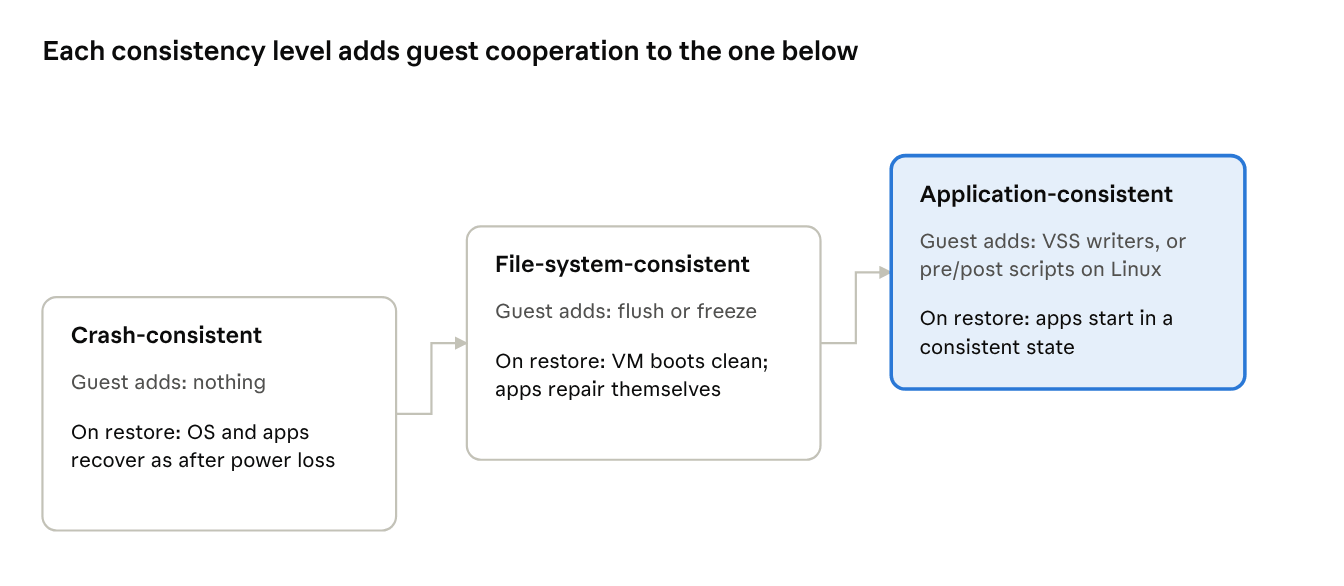
The practical consequence: "quiesced" is a request, and "application-consistent" is an outcome. A quiesce request can end at any of the three levels.
How Does Quiescing Work?
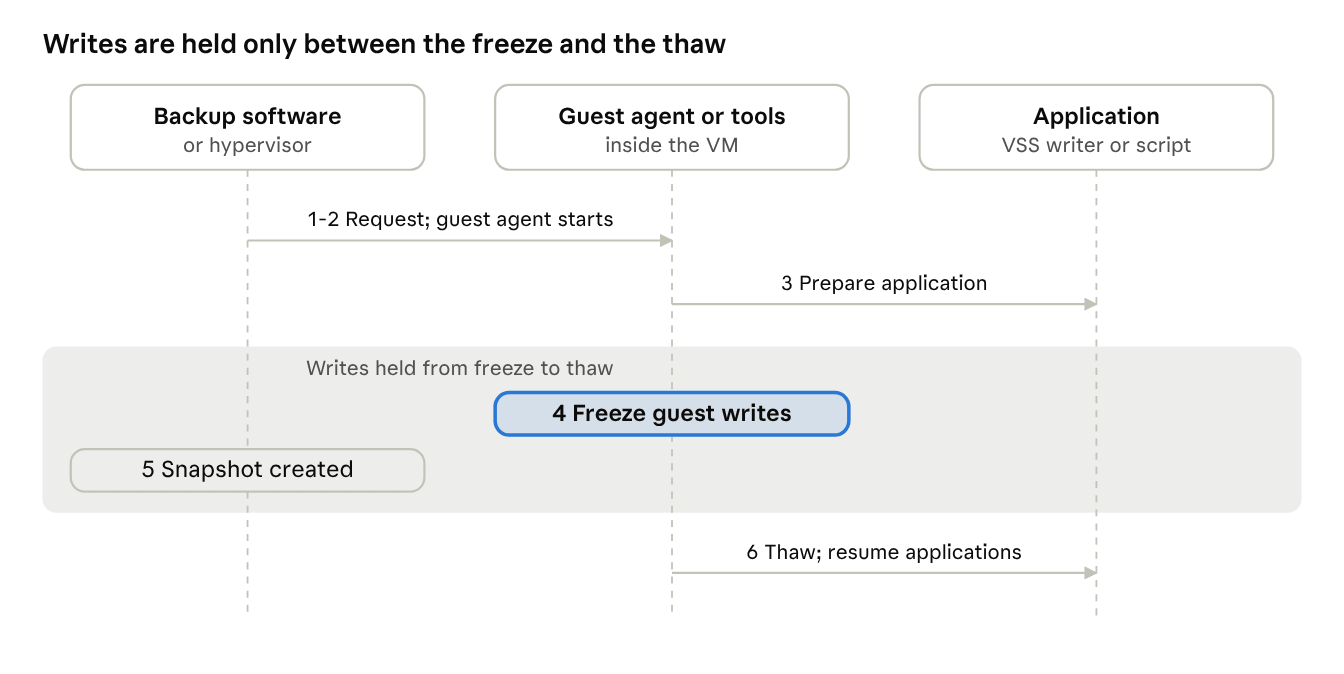
Quiescing is a sequence: prepare applications, freeze writes, take the snapshot, thaw. The hypervisor starts it, but a component inside the guest does the work.
1. Request. Backup software or the hypervisor requests a snapshot with the quiesce option.
2. Guest component takes over. VMware Tools, Hyper-V integration services or the QEMU guest agent runs inside the VM. On Windows, Broadcom documents that a quiesced VMware snapshot uses VSS by default unless the Volume Shadow Copy service is disabled in the guest.
3. Applications prepare. Under VSS, writers are told to prepare their data. On Linux, optional pre-freeze or hook scripts run first, for example to flush a database.
4. Writes are frozen. Microsoft's VSS documentation says writers pause application write I/O while reads continue, and that the shadow copy creation window during which file system writes stay frozen lasts no more than 10 seconds.
5. Snapshot is created. The hypervisor or storage layer captures the point-in-time image.
6. Thaw. Writes resume, and post-thaw scripts or VSS thaw restart paused applications.
On Linux, the freeze itself is a kernel feature. The util-linux fsfreeze man page describes it as halting new modifications to a mounted filesystem, and notes that it is unnecessary for device-mapper (LVM) snapshots because the device mapper freezes the filesystem automatically. Freeze support is per filesystem; the man page listed btrfs, ext2/3/4, f2fs, jfs, nilfs2, reiserfs and xfs as of its 2016 list, and warns the list may be incomplete.
For libvirt-managed KVM, Red Hat's documentation describes the same chain: libvirt sends a freeze command to the QEMU guest agent, the agent freezes guest filesystems with the FIFREEZE ioctl, and a later thaw command unblocks the writers. That page documents RHV 3.6, so confirm details against your current version.
Most failure-prone steps: 3 and 4. A failing writer, a third-party VSS provider, or a freeze that outlasts the hypervisor's I/O hold limit makes the whole quiesce fail (see the troubleshooting table).
Why Does Quiescing Matter for Application Consistency?
It matters because applications hold state in places a disk-level snapshot cannot see: write buffers, caches, and logs that are only partly on disk at any instant. Quiescing gives the application a chance to bring that state onto disk first.
Microsoft's Azure Backup guidance spells out the recovery difference. A crash-consistent snapshot does not capture I/O in flight or memory contents and does not guarantee consistency for the OS or the application. A file-system-consistent snapshot boots cleanly, but installed applications must repair themselves at startup. Only an application-consistent snapshot lets applications start in a consistent state.
The SQL Server case shows the mechanism. Microsoft documents that SQL Server provides a VSS writer so that a backup application can use the VSS framework to back up database files. Per Microsoft's SQL Writer Service documentation (written for SQL Server 2008, so verify for your version), the Database Engine holds exclusive access to its data files while running, and without the writer service, Windows backup programs cannot access those files.
What quiescing does not do:
It does not replace database-level backups. Azure's documentation notes that VM-level backup is not the same as workload backup, and that database point-in-time recovery from transaction logs needs a workload-level backup.
It does not protect against ransomware or deletion. NIST guidance on data integrity and recovery treats backups as one control among several, alongside secure storage and regular restore testing.
How Do VMware, Hyper-V and Proxmox VE Handle Quiescing Differently?
All three rely on a component inside the guest, but they differ in what happens for Linux guests and in what the default behavior does to the application. Behavior depends on platform version, guest tools version, and configuration.
Platform | Windows guest | Linux guest | Watch for |
VMware vSphere | VMware Tools invokes VSS (Broadcom) | VMware Tools quiesces the file system; custom pre-freeze and post-thaw scripts handle applications | Tools must be running; scripts must handle freeze, freezeFail, and thaw arguments |
Microsoft Hyper-V | Production checkpoints use VSS inside the guest (Microsoft) | File system buffers are flushed, giving a file-system-consistent checkpoint | New VMs default to production checkpoints with fallback to standard checkpoints, so check which type was actually taken |
Proxmox VE (QEMU/KVM) | QEMU guest agent uses VSS; default backup type is full (Proxmox) | Agent issues fs-freeze and fs-thaw; a fsfreeze-hook script can run application commands | Guest agent must be installed and enabled, and the freeze/thaw option must be on |
Vinchin Backup & Recovery offers a quiesce guest file system option for VMware backup jobs, and its Hyper-V documentation describes coordination with in-guest VSS writers to ensure application consistency. Confirm exact behavior for your platform and version in Vinchin's current documentation.
Why Can a "Successful" Quiesced Snapshot Still Be Inconsistent with the Application?
A successful snapshot task proves only the first of three separate things, and most job dashboards report only that one.
1. The snapshot task completed. The hypervisor created the point-in-time image.
2. The guest quiesce mechanism ran. VSS or a filesystem freeze actually executed inside the guest.
3. The application took part. Every relevant VSS writer succeeded, or the Linux pre/post scripts ran and exited cleanly.
The documentation shows each layer can fail independently:
These behaviors fit a design that prefers a usable restore point over none. That is our reading of the documentation, not a vendor statement, and it is reasonable. The risk is that the downgrade is easy to miss.
Practical implication: treat the achieved consistency level as a per-recovery-point attribute, not a job status. For tier-1 databases, alert when a recovery point is not application-consistent, and periodically restore one and start the application to confirm. NIST likewise recommends testing backup and restoration processes periodically.
What are The Limitations and Risks of Quiesced Snapshots?
Quiescing trades a short write pause and added dependencies for a better consistency guarantee. The main limits are below.
Limitation | Why it happens | Mitigation |
Writes are held during the freeze | Freeze and snapshot creation must finish within a bounded window; Microsoft documents a 10-second creation window for VSS, and VMware reports an error when the I/O hold time limit is exceeded | Schedule jobs off-peak for write-heavy VMs; test on a copy under load |
More moving parts can fail | Failing VSS writers, third-party VSS providers or inaccurate guest time can break the quiesce (Broadcom); low free space on the guest disk is also listed as a cause (Broadcom) | Monitor writer health; remove unneeded VSS providers |
Linux application consistency is only as good as the scripts | Azure Backup notes that with custom scripts you are ultimately responsible for application consistency | Version-control scripts; test freeze, freezeFail and thaw paths |
No VSS on some platforms | Microsoft's SQL Server VSS guide states that Linux has no VSS framework, so the SQL writer is not available on Linux | Use application-native backup or documented Linux procedures for that database |
Disabling the freeze to avoid pauses | Proxmox VE exposes a per-VM freeze/thaw option; without the freeze, the snapshot can only offer crash-consistency at best (our analysis) | Disable only for workloads that tolerate crash recovery, and compensate with application-native backups |
Device-level details also vary: filesystem freeze support is per filesystem type, and LVM snapshots freeze the filesystem automatically, as covered in the fsfreeze man page.
Which Consistency Level Does Each Workload Need?
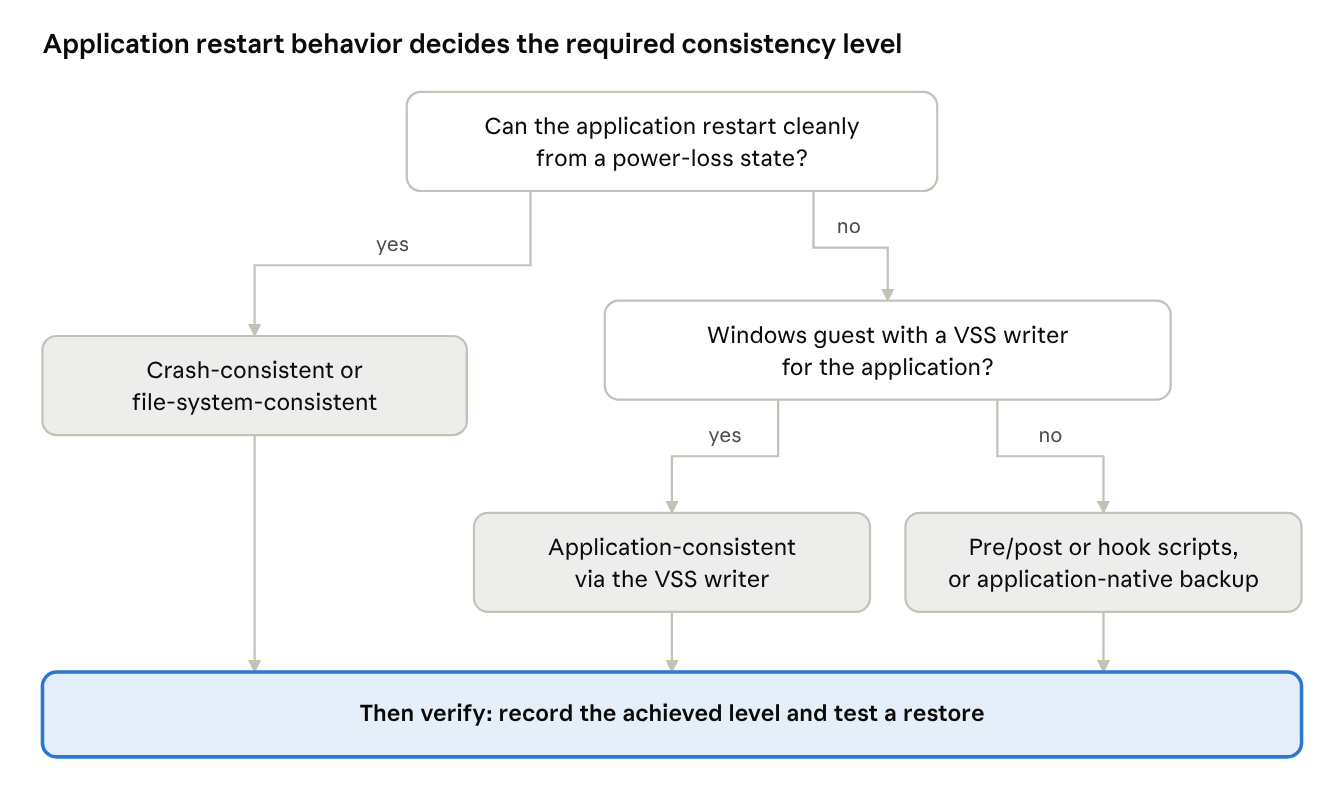
Choose by what the workload does when it restarts from a snapshot. If it can recover cleanly from a power-loss state, crash-consistency may be enough; if not, require application consistency.
Workload | Minimum recommended level | Reasoning |
Transactional database on Windows (for example SQL Server) | Application-consistent via the VSS writer | The writer coordinates with the engine; add native log backups if you need point-in-time recovery |
Database on Linux | Application-consistent via pre-freeze/post-thaw or guest-agent hook scripts, or application-native backup | No VSS on Linux, so consistency depends on scripts you maintain and test |
File server, stateless web or app server | File-system-consistent | Restores boot without corruption, and there is little application state to repair |
VM that also runs an in-guest backup agent | Application-consistent with a single owner of the backup chain | See "Can quiescing interfere with other backup tools" above |
Write-heavy, latency-sensitive VM where the freeze causes problems | Crash-consistent only if the application tolerates crash recovery | Azure Backup advises against crash-consistent backups when the application cannot tolerate recovery from them |
Dev/test VM | Crash-consistent is often sufficient | Recovery cost is low; confirm the application's behavior first |
How Do I Troubleshoot Quiesced Snapshot Failures?
Start by separating the hypervisor from the guest: if a manual non-quiesced snapshot works but the quiesced one fails, the problem is in the guest quiesce path, as Broadcom's troubleshooting article advises. On Windows guests, vssadmin list writers shows each writer's state. Exact steps vary by platform and version.
Symptom | Likely cause | What to check |
VMware: "Cannot create a quiesced snapshot because the snapshot operation exceeded the time limit for holding off I/O" | Failing VSS writers, third-party VSS providers, or insufficient free space (Broadcom) | Writer state, third-party providers, guest time sync, free space; reinstalling VMware Tools re-registers VSS. Quiescing off or removing the VSS component are last-resort workarounds that lower consistency |
VMware: task succeeds but "Quiesce guest file system" shows No | Virtual Disk or VMware Snapshot Provider service stopped or disabled (Broadcom) | Start both services in the guest, then retake the snapshot |
Hyper-V: checkpoint was not application-consistent | Production checkpoints can fall back to standard checkpoints (Microsoft) | VM checkpoint type setting; guest VSS health |
Proxmox VE: in-guest backup chain breaks after PVE backups of a Windows guest | Guest agent issues a full VSS backup type by default (Proxmox) | Set VssOption to 5 (copy), reboot the VM; needs agent 0.1.262 or later |
Proxmox VE: Linux database not consistent after restore | Default freeze covers filesystems, not application state (Proxmox) | Agent installed and enabled, freeze/thaw option on, and a fsfreeze-hook script that quiesces the database |
SQL Server missing from VSS backups | SQL Writer service not running or misconfigured (Microsoft) | Service runs under Local System, starts automatically, and NT SERVICE\SQLWriter is in the sysadmin role |
What are the Best Practices and Common Mistakes?
Best-practice checklist
1. Match the level to the workload. Use the decision matrix above and record the required level per application.
2. Keep the guest component healthy. VMware Tools, Hyper-V integration services or the QEMU guest agent must be installed, running, and enabled for the quiesce option to work.
3. Keep Windows VSS clean. Check writer state before changing backup schedules, and remove third-party VSS providers you do not need.
4. Treat Linux hook scripts as code. VMware's guidance is that scripts must handle the freeze, freezeFail and thaw phases; version-control and test each path.
5. Record the achieved consistency level for every recovery point and alert on downgrades for tier-1 applications.
6. Assign one owner per backup chain and use copy semantics where a second tool also backs up the application.
7. Test restores, not just backups. Restore into an isolated network, start the application, and run its integrity checks. This follows NIST's recommendation to test backup and restoration regularly; Vinchin's product page describes isolated-lab verification for VMware backups.
8. Keep native database backups where you need point-in-time recovery.
Common mistakes
Reading job success as consistency. See the first Original Insight.
Assuming Linux guests are application-consistent by default. On Azure Backup, Linux snapshots are file-system-consistent unless pre/post scripts are configured.
Turning quiescing off permanently to stop failures. It removes the symptom and the guarantee together.
Running two tools that both request full VSS backups on the same VM without checking the effect on each chain.
Never restoring a quiesced recovery point. A consistency label is a claim; a started application is evidence.
FAQs
Q1: Is a quiesced snapshot the same as a backup?
No. A snapshot is the capture mechanism; a backup also copies the data to separate storage. In Azure Backup's design, for example, a snapshot is taken first and the data is then transferred to a vault.
Q2: Does quiescing take the application offline?
Not normally. Under VSS, reads continue while writes are held during a window that Microsoft documents as no longer than 10 seconds. Whether an application notices depends on its own write timeouts, so test write-heavy systems.
Q3: Can I quiesce a VMware VM without VMware Tools?
Not through the standard mechanism. Broadcom's articles describe quiescing as performed by VMware Tools, and the VMware Snapshot Provider service comes with the Tools installation.
Q4: Does SQL Server on Linux support VSS-based quiesced snapshots?
Microsoft's SQL Server VSS guide states that Linux has no VSS framework and the SQL writer is not available on Linux. Check Microsoft's current guidance for your SQL Server version before relying on a snapshot-based method.
Q5: If LVM already freezes the filesystem, do I still need scripts?
For application consistency, usually yes. The fsfreeze man page says device-mapper and LVM freeze the filesystem automatically for snapshots, but that protects the filesystem, not the application's in-memory state. Azure Backup's Linux model needs application-specific pre/post scripts for that.
Q6: How do I tell whether a KVM guest is still frozen?
The QEMU guest agent protocol provides a guest-fsfreeze-status command. Its documentation warns the result can be wrong if other guest processes issued their own freeze or thaw, and that a thaw count differing from the freeze count means some filesystems changed state in between.
Q7: Does a quiesced snapshot protect against ransomware?
No. Consistency and security are separate properties. NIST's guidance pairs regular backups with encrypted, secure storage and tested restores.
Conclusion
Quiescing works as a chain, not a switch: hypervisor integration, guest freeze, and application writers must all succeed before a recovery point deserves the label application-consistent. Treat the achieved level as data to record and alert on, coordinate tools that request full VSS backups, and prove the result by restoring a recovery point and starting the application.