Quick Answer
A ransomware-resilient backup architecture layers immutable storage, offline or isolated copies, access controls, encryption, continuous verification and tested recovery, so clean data survives even when production, admin credentials or backup infrastructure are compromised.
Introduction: Why Traditional Backup Architectures Fail Against Ransomware
Ransomware operators now hunt for backup servers, delete snapshots and disable retention jobs before encrypting production, a pattern MITRE ATT&CK tracks as Inhibit System Recovery (T1490).
Having backups does not guarantee recoverability. Backups on a domain-joined share, under production admin credentials, or synced to the cloud without versioning can be encrypted too. CISA's #StopRansomware Guide recommends offline, encrypted backups and regular restoration tests.
A resilient design assumes production will be compromised and the attacker may gain privileged access, so keep at least one verified, clean copy beyond reach.
This guide builds that architecture from scratch:
1. Requirements and threat model
2. Core design principles
3. Reference architecture
4. Technology choices
5. Step-by-step implementation
6. Validation and recovery testing
7. Common mistakes
Understand the Requirements of a Ransomware-Resilient Backup Architecture
Identify critical systems, set tolerable data loss and downtime (RPO and RTO), and map how attackers would target backups.
Identify Critical Data, Systems and Workloads
Inventory every workload the business depends on:
Databases (SQL, NoSQL, ERP, CRM)
File servers and shared storage
Virtual machines and hypervisors
Endpoints with unique data
Cloud and SaaS workloads (IaaS, buckets, Microsoft 365)
Identity infrastructure such as Active Directory, DNS and DHCP
Document dependencies too: an application is useless if its database or authentication service cannot be restored first.
Define Recovery Point Objectives (RPO) and Recovery Time Objectives (RTO)
RPO is tolerable data loss; RTO is tolerable downtime. NIST SP 800-34 Rev. 1 shows how to derive both from a business impact analysis.
Tier workloads rather than applying one target everywhere:
Tier | Example workloads | Typical RPO | Typical RTO | Backup approach |
Tier 0 | Identity, DNS, backup systems | Minutes–1 hour | 1–4 hours | Frequent copies, runbook |
Tier 1 | Core databases, ERP | 15 min–4 hours | 2–8 hours | Frequent incrementals, immutable copy |
Tier 2 | File servers, apps | 12–24 hours | 24–48 hours | Daily backup, offsite copy |
Tier 3 | Archives, dev/test | 1–7 days | Days | Weekly, offline storage |
Values are illustrative; derive yours from a business impact analysis.
Assess Your Ransomware Threat Model
Common ways attackers defeat backups:
Backup deletion and encryption: Attackers delete or encrypt backup chains, snapshots and repositories.
Compromised admin credentials: One admin account that also runs the backup console exposes everything.
Lateral movement: Domain-joined backup servers are reachable over standard management protocols.
Exfiltration and double extortion: Restoring cannot undo data theft, so add detection and response.
Poisoned backups: Malware present before the backup runs gets copied into every restore point.
Build a Backup and Recovery Requirements Matrix
Combine the above into one document mapping each workload to its RPO, RTO, retention, copies and recovery order. The NIST Cybersecurity Framework 2.0 Recover, Protect and Detect functions help tie these requirements to organizational risk.
Establish the Core Principles of Ransomware-Resilient Backup Design
Five principles: 3-2-1-1-0 copies, an immutable copy, a network-isolated copy, Zero Trust for the backup plane, and encryption with protected keys.
Follow the 3-2-1-1-0 Backup Strategy
The classic 3-2-1 rule survives hardware and site failure; ransomware demands two additions:
3 copies (production plus two backups)
2 storage media or types
1 copy offsite
1 copy immutable or offline
0 errors after backup verification
An offsite copy a compromised admin can delete is not immutable, and an unverified copy cannot be counted.
Implement Immutable Backup Storage
Immutability means data cannot be modified or deleted until retention expires, even by an administrator (WORM: write once, read many).
Common implementations include:
Object storage with object lock: Amazon S3 Object Lock and Azure Blob immutable storage block deletion or overwriting during retention.
Hardened Linux repositories with filesystem immutability flags and a non-root backup account.
Array snapshots with retention locks enforced by the array, not the backup software.
Retention must exceed attacker dwell time, no single compromised account should be able to shorten the lock, and immutability does not prove data was clean when written. CISA and FBI advisories such as the Rhysida ransomware advisory repeatedly recommend offline or immutable backups.
Introduce Air-Gapped and Isolated Backup Copies
An air gap limits network reachability. It complements, not replaces, immutability:
Property | Immutable backup | Air-gapped backup |
Primary protection | Blocks modification or deletion | Blocks network access |
Typical implementation | Object Lock, WORM, hardened repository | Tape, offline vault, isolated network |
Weakness | Network-reachable; misconfiguration or key compromise exposes it | Slower, more manual effort; copies may be stale |
Best fit | Fast, frequent restore points | Last-resort copy |
Two types of air gap:
• Physical: media disconnected, such as vaulted tapes.
• Logical: a separate security domain with its own credentials and no inbound management access from production.
Apply Zero Trust Security to Backup Infrastructure
Treat backup as a high-value target; NIST SP 800-207 (Zero Trust Architecture) applies directly:
• Least privilege: Operators get only needed roles, such as restoring but not deleting.
• MFA everywhere: Backup, storage and cloud consoles.
• Separate credentials: Never reuse production admin accounts; a compromised Active Directory should not hand over backups.
• Four-eyes approval: A second approver for deleting restore points or shortening retention.
• Dedicated management network: Only required ports and sources.
Encrypt Backup Data and Protect Encryption Keys
Encrypt data in transit and at rest so stolen backups are unreadable, but lost keys mean no restore. Follow NIST SP 800-57 and keep keys, offline copies included, apart from the data.
Design the End-to-End Ransomware-Resilient Backup Architecture
Four layers, each with its own trust boundary and credentials: production, a hardened control plane, multi-tier storage and an isolated recovery environment.
Overview of the Reference Architecture
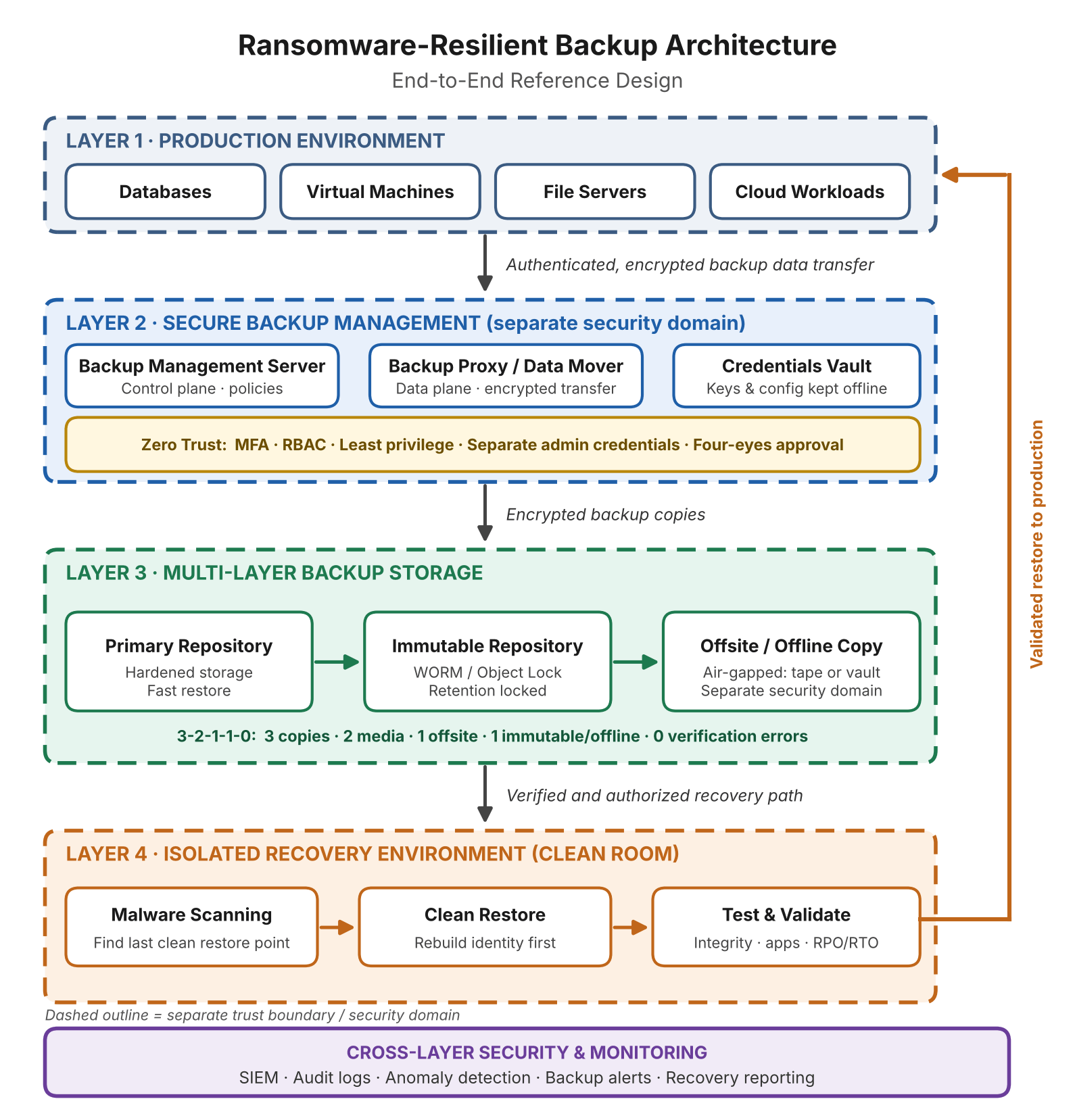
Figure 1: Ransomware-Resilient Backup Architecture, End-to-End Reference Design
Data flows downward, management is separate from production, and recovery passes through isolation first.
Production Environment and Data Sources
This layer holds the workloads from your requirements matrix; give backup software dedicated read-only or snapshot-only service accounts.
Backup Management and Control Plane
The control plane (management server, schedules, vault, consoles) is the highest-value target: whoever controls it can delete every restore point.
Hardening guidelines:
Isolate it in its own network segment, ideally outside the production identity domain.
Limit inbound access to MFA-protected jump hosts.
Patch aggressively; keep the OS minimal.
Back up its configuration and database to immutable or offline storage.
Backup Data Plane and Secure Data Transfer
Proxies or data movers carry data to repositories over encrypted transport and defined ports, so repositories accept no arbitrary production connections.
Primary Backup Repository and Immutable Storage
The primary repository serves fast restores and is hardened, non-domain-joined and unexposed to production. It replicates on schedule to the immutable tier for longer retention.
Offsite and Offline Backup Repository
This last-resort copy sits in a separate cloud account, data center or tape vault under its own credentials.
Isolated Recovery Environment (Clean Room)
A clean room is a network-isolated environment where backups are restored, scanned and validated before returning to production.
Network Segmentation and Access Control Between Layers
Enforce segmentation with firewalls and explicit allow lists:
Production → proxies: backup ports only.
Proxies → repositories: storage ports only.
Management → all layers: MFA jump hosts.
Repositories → offsite: scheduled, outbound-only replication.
Production → backup management: no direct access.
Log every cross-boundary connection to your SIEM.
Choose the Right Backup Technologies and Storage Infrastructure
No single storage type fits every requirement: combine a hardened local repository, immutable object storage and a tape or vault offline copy.
Backup Software and Centralized Management Platforms
Backup software determines coverage, credential handling, immutability enforcement and verification. Evaluate:
Platform coverage (hypervisors, databases, physical, cloud, SaaS)
Native immutable repository and object lock support
RBAC, MFA and audit logging
Automated restore verification and malware scanning hooks
Replication to multiple targets, including offline media
Protection of its own configuration
One agentless tool across several virtualization platforms reduces the credentials, consoles and policies to secure. Vinchin Backup & Recovery, for example, covers VMware, Hyper-V, Proxmox VE and other hypervisors with agentless VM backup. Whichever product you choose, test its immutability and recovery yourself.
On-Premises Backup Storage: NAS, SAN and Hardened Repositories
NAS: Easy to manage, but SMB/NFS shares exposed to production are frequent targets. Restrict access and enable snapshot locks.
SAN: Fast, but block volumes on a domain-joined server can be encrypted. Use array snapshots under a separate admin domain.
Hardened repositories: Dedicated Linux servers with immutability flags and non-root accounts enforce protection at the filesystem layer; see NIST SP 800-209.
Cloud Backup Storage and Immutable Object Storage
Cloud object storage adds geographic separation; S3 Object Lock and Azure immutable blob storage offer retention even administrators cannot shorten in strict modes. Risks: account compromise, misconfiguration and egress costs.
Tape Backup and Offline Storage
Tape is the most dependable true air gap, but restores are slow. Use it for long-term retention and last-resort recovery, not Tier 0 or 1 RTOs.
Cloud-to-Cloud and Hybrid Backup Strategies
SaaS and cloud workloads need their own backup path; file sync is not backup, since encrypted files sync too. Back up SaaS data to a separate account or provider.
How to Choose Between Different Backup Storage Models
Storage type | Main advantage | Main limitation | Best-fit scenario |
NAS | Easy to manage | Network exposure | Short-retention local repository |
Hardened repository | Strong isolation, fast restores | Needs dedicated management | On-premises primary or immutable tier |
Immutable object storage | Retention-based protection, scalable | Configuration and cost complexity | Offsite immutable copies |
Tape | True offline isolation | Slow recovery, manual handling | Long-term archive, last resort |
Cloud backup | Geographic separation, elasticity | Account compromise risk, egress cost | Disaster recovery, remote sites |
Selection guidance:
If your RTO is under four hours, keep a fast hardened local repository; cloud or tape is secondary.
If regulations require long retention, add locked object storage or tape.
If you lack Linux hardening staff, use immutable cloud object storage.
If identity and network may be fully compromised, keep an air-gapped copy.
Prefer delayed, versioned asynchronous replication: synchronous copies replicate encryption instantly.
Build the Backup Architecture Step by Step
Inventory, set policies, segment the network, configure immutable and offline copies, secure credentials, monitor, then document recovery.
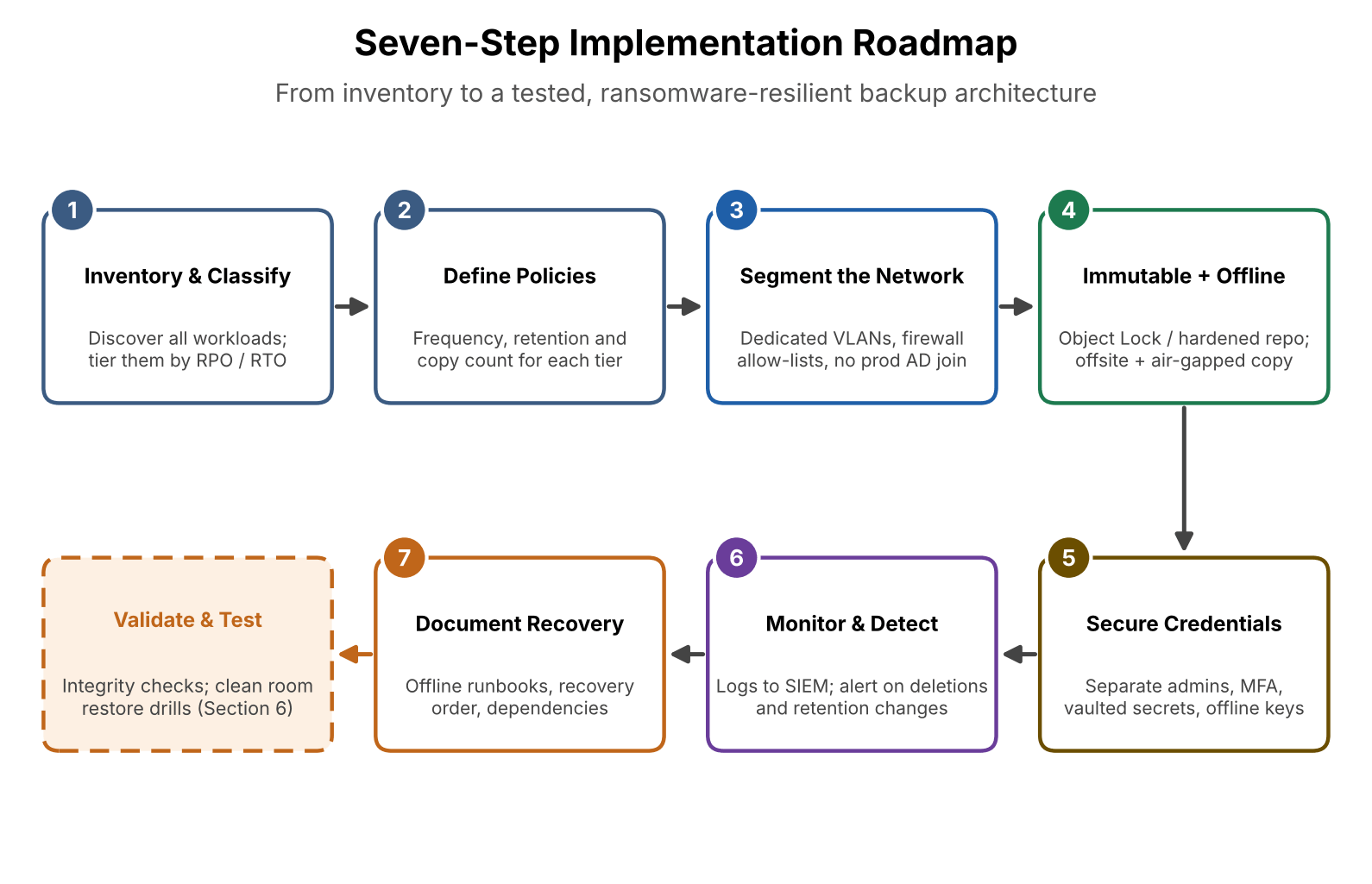
Figure 2: Seven-Step Implementation Roadmap
Step 1 – Inventory and Classify Your Data
Scan hypervisors, cloud accounts and storage for undocumented workloads; shadow IT often hides unrecoverable data.
Step 2 – Define Backup Policies and Retention Periods
Define frequency, retention, copy count and immutability per tier. Immutable retention should exceed realistic detection time (14–30 days is common).
Step 3 – Deploy Backup Infrastructure in a Segmented Network
Place the management server, proxies and repositories in dedicated VLANs behind explicit firewall rules, outside the production Active Directory domain.
Step 4 – Configure Immutable and Offline Backup Copies
Enable object lock or repository immutability matching policy.
Replicate offsite under separate credentials.
Set up the offline workflow: tape rotation or scheduled connect-copy-disconnect.
Confirm no single account can disable immutability or delete the offsite copy.
Step 5 – Secure Backup Credentials and Administrative Access
Create dedicated backup admin accounts with MFA.
Remove standing privileges (PAM or just-in-time).
Keep secrets in a vault, not scripts.
Rotate credentials regularly and after incidents.
Back up encryption keys and configuration offline.
Step 6 – Automate Backup Monitoring and Threat Detection
Send backup logs to your SIEM and alert on deleted restore points, changed retention, skipped jobs, size spikes and new administrators.
Step 7 – Document Recovery Procedures and Dependencies
Write runbooks usable under stress: recovery order, contacts, vault credentials, network diagrams. Keep an offline copy.
Validate Backup Integrity and Test Ransomware Recovery
A successful backup job proves little. Verify integrity, scan for malware, restore in isolation and measure against RPO and RTO, as CISA advises.
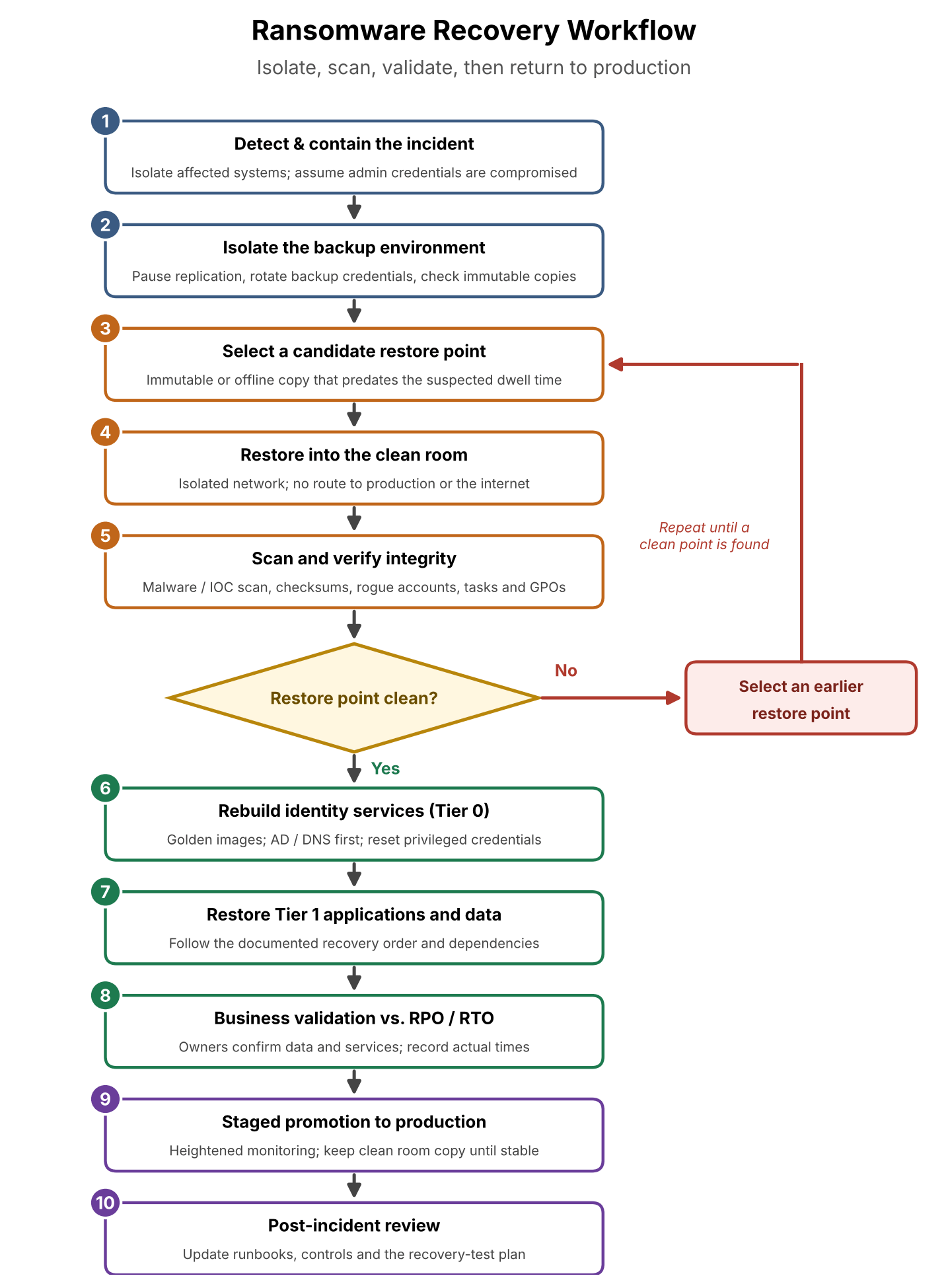
Figure 3: Ransomware Recovery Workflow
Why Backup Success Does Not Equal Recovery Success
Distinguish four concepts:
Backup success: The job finished without errors.
Backup integrity: Stored data is complete and unaltered.
Recovery success: Data restores to a working system.
Recovery readiness: Critical services return within the RTO.
Most organizations monitor only the first; many discover the rest during an incident.
Automated Backup Integrity Checks and Verification
Use checksums, full-chain validation and automated test restores, such as booting VMs in a sandbox; these deliver the "0 errors" in 3-2-1-1-0.
Malware Scanning Before Restoration
Scan restore points for malware and indicators of compromise before production use, and scan several to find when infection began. NCCoE's data integrity guidance on detecting and responding to ransomware covers this.
Clean Room Recovery and Isolated Restore Testing
Restore into isolation first: rebuild identity services, validate applications, check for rogue accounts, scheduled tasks and modified group policies, then promote workloads.
Conducting Tabletop Exercises and Disaster Recovery Drills
Run tabletop exercises with the backup admin account compromised, then drills restoring a Tier 1 application in the clean room.
Measuring Recovery Performance Against RPO and RTO
Record restore time, data loss and failures against matrix targets; an 18-hour result against a 4-hour RTO is a design gap. Retest after major changes and at least quarterly for Tier 0 and 1.
Common Backup Architecture Mistakes to Avoid
Most failures come from avoidable flaws: connected copies, shared credentials, sync-as-backup, unprotected backup servers, untested restores and missing keys.
Keeping All Backup Copies Connected to the Production Network
If every copy is reachable from production, an admin-level attacker reaches them all. Keep one copy offline or isolated.
Using the Same Credentials for Production and Backup Systems
Shared accounts turn a production compromise into a backup compromise. Use separate identities and MFA.
Relying on Cloud Sync Instead of Independent Backups
File sync mirrors malicious changes. Without versioning and immutability, it is a replica, not a backup.
Ignoring Backup Infrastructure as an Attack Surface
Backup servers run privileged software, and backup product vulnerabilities are exploited. Patch, restrict and monitor them like a domain controller.
Failing to Test Actual Data Restoration
An untested backup is an assumption. Schedule restore tests and track results.
Overlooking Encryption Key and Configuration Backups
Losing the backup server together with its keys and catalog can make restores impossible. Keep both offline.
Ransomware-Resilient Backup Architecture Best Practices
Security Best Practices
Isolate the backup network and management plane.
Enforce MFA and least privilege everywhere.
Keep immutable retention longer than detection time.
Encrypt data; manage keys separately.
Require approval for destructive actions.
Backup and Retention Best Practices
Tier policies by RPO and RTO.
Keep multiple restore points for rollback.
Maintain an offline or air-gapped copy.
Back up backup-system configuration and keys.
Recovery and Business Continuity Best Practices
Maintain a clean room and golden images.
Document recovery order and dependencies.
Keep offline runbooks and contacts.
Practice realistic scenarios, including identity loss.
Monitoring, Auditing and Continuous Improvement
Alert on deletions, retention changes and anomalies.
Review access rights regularly.
Use test results to justify improvements.
Revisit the architecture as threats change.
Ransomware-Resilient Backup Architecture Checklist
Use this list to review an existing design or track a new build.
Requirements
☐ Data and systems classified by tier
☐ RPO and RTO defined per tier
☐ Threat model documented
Architecture
☐ 3-2-1-1-0 implemented and verified
☐ Immutable copy retained longer than detection time
☐ Offline or air-gapped copy in a separate security domain
☐ Management plane segmented from production
Access and security
☐ Separate backup admin identities
☐ MFA on backup, storage and cloud consoles
☐ Least privilege; approval for destructive actions
☐ Data encrypted; keys stored separately and offline
Monitoring and recovery
☐ Backup logs in SIEM with deletion alerts
☐ Automated integrity checks running
☐ Malware scanning before restore
☐ Clean room available
☐ Recovery runbooks stored offline
☐ Restore tests measured against RPO/RTO
Conclusion: Build a Backup Architecture That Can Survive a Ransomware Attack
A ransomware-resilient backup architecture is about ensuring clean, recoverable data remains available even when production systems, admin credentials or backup infrastructure are compromised. Start from requirements, not products. Layer immutable, offline and offsite copies so no single credential removes them all, protect the backup plane with Zero Trust, and rehearse recovery in a clean room.
Frequently Asked Questions
Q1: How does the 3-2-1-1-0 backup strategy protect against ransomware?
Three copies on two media types, one offsite, one immutable or offline, and zero verification errors. The immutable copy is beyond a network attacker's reach, and verification ensures usability.
Q2: Are immutable backups enough to prevent ransomware attacks?
No. Immutability stops changes during retention, but not attacks on production, unclean backups or exfiltration. Combine it with isolation, access control, scanning and recovery testing.
Q3: Should ransomware backups be stored in the cloud or on-premises?
Use both: on-premises hardened storage restores fast; cloud immutable storage adds geographic separation and scale. Balance by RTO, data volume, budget and risk.
Q4: How can organizations protect backup infrastructure from compromised admin credentials?
Use separate backup identities with MFA, remove standing privileges, require approval for destructive actions, keep one copy under unrelated credentials, and follow NIST SP 800-207.