Quick Answer
The 3-2-1-1-0 backup rule is a data protection strategy that keeps three copies of your data on two different types of storage media, with at least one copy offsite, one copy offline or immutable, and zero errors in backup verification and recovery testing. It helps reduce ransomware data loss by preserving isolated copies and confirming that data can actually be restored.
A note on scope: 3-2-1-1-0 is a widely used best-practice framework, not a formal standard or a guarantee against data loss. The final “0” in particular is about verified, tested recovery, not about a backup job reporting success.
What Is the 3-2-1-1-0 Backup Rule?
What Does 3-2-1-1-0 Stand For?
Each digit is a requirement. Together they describe how many copies to keep, where to keep them, how to protect at least one from attack, and how to prove it all works:
3 copies of your data (the production data plus two backups).
2 different types of storage media.
1 copy stored offsite.
1 copy that is offline or immutable.
0 errors in backup verification and recovery testing.
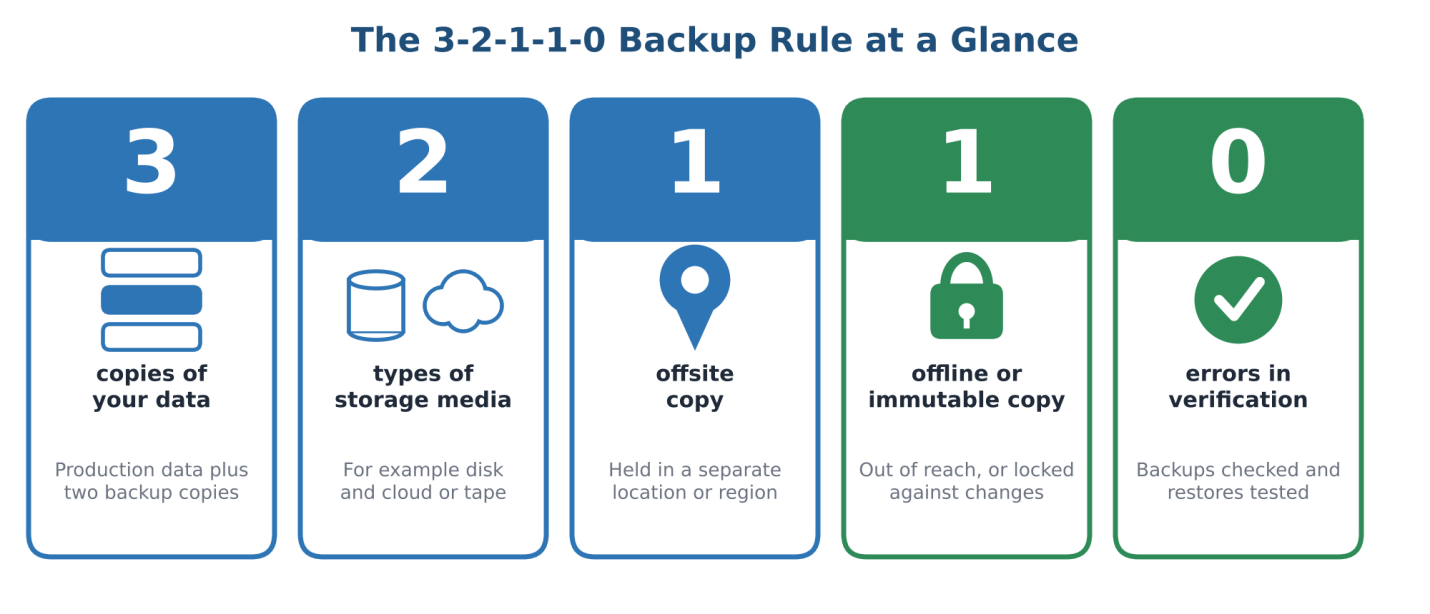
Figure 1. The five parts of the 3-2-1-1-0 backup rule.
Why Has the Traditional 3-2-1 Rule Evolved?
The classic 3-2-1 rule asks for three copies of data, on two kinds of media, with one copy offsite. It protects well against disk failure, a damaged site or a single corrupted copy. Ransomware introduces a different failure mode: an attacker with valid credentials and network access can reach every copy that is reachable, wherever it is stored. 3-2-1-1-0 keeps the original three requirements and adds two that address that problem, an isolated copy and proof of recoverability.
Who Should Use the 3-2-1-1-0 Backup Strategy?
The rule suits any team responsible for data it cannot afford to lose: enterprise IT and operations teams, small and mid-sized businesses, and administrators who protect servers, virtual machines, databases and business-critical file shares. It scales down to a small office with a NAS and a cloud bucket, and up to a multi-site data center.
What Does Each Number in the 3-2-1-1-0 Rule Mean?
Each element below is explained the same way: what it is, an example, the risk it addresses, and a common mistake.
3 — Three Copies of Your Data
What it is: the original production data plus at least two backup copies.
Example: a production server, a local backup repository and a cloud backup.
Risk addressed: a single damaged or deleted copy turning into total data loss.
Common mistake: counting a snapshot that lives on the same storage array as the original as a separate copy.
2 — Two Different Storage Media
What it is: backups stored on at least two distinct types of storage.
Example: local disk plus tape, or local disk plus cloud object storage.
Risk addressed: common-cause failure, where one firmware bug, hardware fault or storage-specific attack damages everything.
Common mistake: buying two identical disk arrays and assuming that is media diversity. Different media reduces shared failure modes; separate logical access matters just as much.
1 — One Offsite Copy
What it is: a copy held in a different physical location or remote storage environment.
Example: a secondary data center, a vaulting service or a cloud region separate from production.
Risk addressed: fire, flood, theft or other events that affect a whole site.
Common mistake: assuming offsite means safe from ransomware. An offsite copy that is reachable with the same credentials can still be encrypted or deleted.
1 — One Offline or Immutable Copy
What it is: an offline copy sits outside the attack path, disconnected from the network. An immutable copy is write-protected by the storage layer, so it cannot be altered or deleted until its retention period ends.
Example: tape that is ejected and stored, or object storage using write-once-read-many (WORM) controls such as S3 Object Lock, which can block deletion or overwriting for a fixed period or indefinitely.
Risk addressed: an attacker deleting, encrypting or tampering with backups.
Common mistake: leaving immutability settings in a mode that a compromised administrator account can override, or never confirming the lock is actually in force.
0 — Zero Errors in Verification and Recovery Testing
What it is: backups are checked for integrity, and restores are tested regularly, with any errors investigated and fixed.
Example: a scheduled restore of a database and a virtual machine into an isolated test environment, with results recorded.
Risk addressed: discovering during an incident that backups are incomplete, corrupted or impossible to restore in time.
Common mistake: treating a green “job completed” status as proof of recoverability. Vendors also define the scope of “0” differently, so your team should write down exactly what it will verify.
How Does the 3-2-1-1-0 Backup Rule Prevent Ransomware Data Loss?
The rule does not stop ransomware from getting in. What it does is raise the odds that, after an attack, at least one clean and restorable copy of your data still exists. Each part of the rule closes a specific gap.
How Does Ransomware Attack Production Data and Backups?
Modern ransomware operators rarely stop at encrypting production files. The UK’s National Cyber Security Centre (NCSC) has reported incidents in which ransomware encrypted not only the original data but also connected USB drives, network storage and cloud storage locations holding backups. When backups share credentials, permissions or network paths with production, one compromised account can reach all of them, however many copies exist.
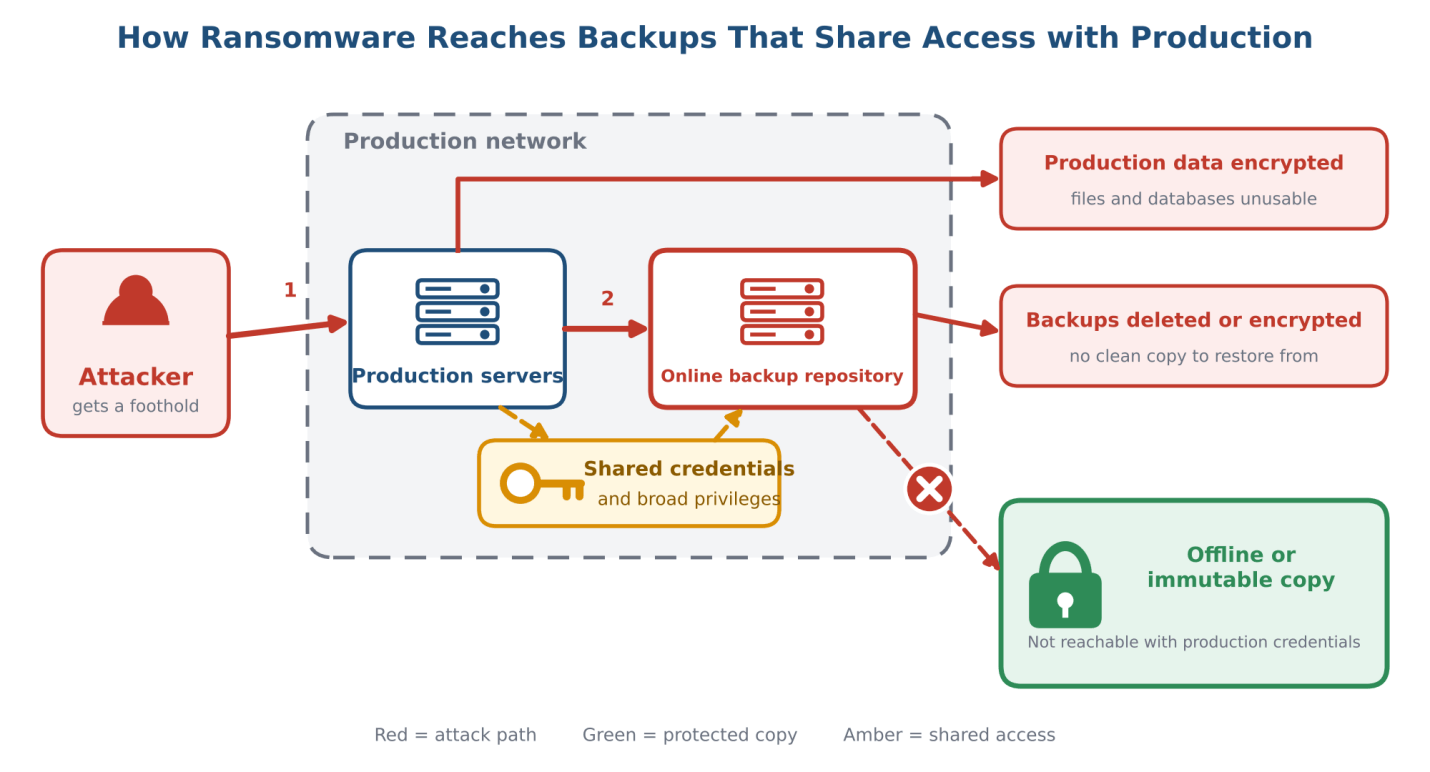
Figure 2. How ransomware can reach backups that share credentials and network access with production.
Why Are Offline and Immutable Backups Critical?
Backups are the victim’s alternative to paying a ransom, so attackers have every reason to destroy them first. CISA’s #StopRansomware Guide recommends maintaining offline, encrypted backups of critical data and testing their availability and integrity, and it explains why: many ransomware variants try to find and then delete or encrypt any backups they can reach. An offline copy cannot be reached over the network, and an immutable copy cannot be changed during its retention window, so in both cases the attacker’s usual tools stop working.
How Does Backup Verification Reduce Recovery Risk?
An isolated copy is only useful if it restores. Verification and recovery testing find corrupted backup chains, missing dependencies, expired credentials and unrealistic recovery times before an incident exposes them. Testing also produces something a backup job status cannot: evidence of how long recovery actually takes, which you can compare against your recovery time objective.
What Happens When One Backup Copy Is Compromised?
Because the rule requires several independent copies with different exposure, losing one should not mean losing everything. If the local repository is encrypted, the offsite copy may survive. If both online copies are affected, the offline or immutable copy remains. The design goal is that no single credential, network path or storage system can reach every copy.
Risk | Protection that addresses it | What it solves |
Production data is encrypted | Multiple independent backup copies | Provides a source to restore from |
A site-level disaster occurs | Offsite copy | Limits loss from a single location failing |
Attacker deletes or encrypts online backups | Offline or immutable copy | Keeps at least one copy out of the attacker’s reach |
Backup files are corrupted or incomplete | Verification and recovery testing | Reveals restore failures before an incident |
Backup account credentials are stolen | Separate credentials, least privilege and MFA | Reduces the chance of attackers taking control of the backup system |
The key point: the value of 3-2-1-1-0 is not simply having more copies. It is increasing the likelihood that a copy is still usable after an attack. It cannot stop an intrusion on its own and it cannot promise zero data loss, but it meaningfully improves your recovery position.
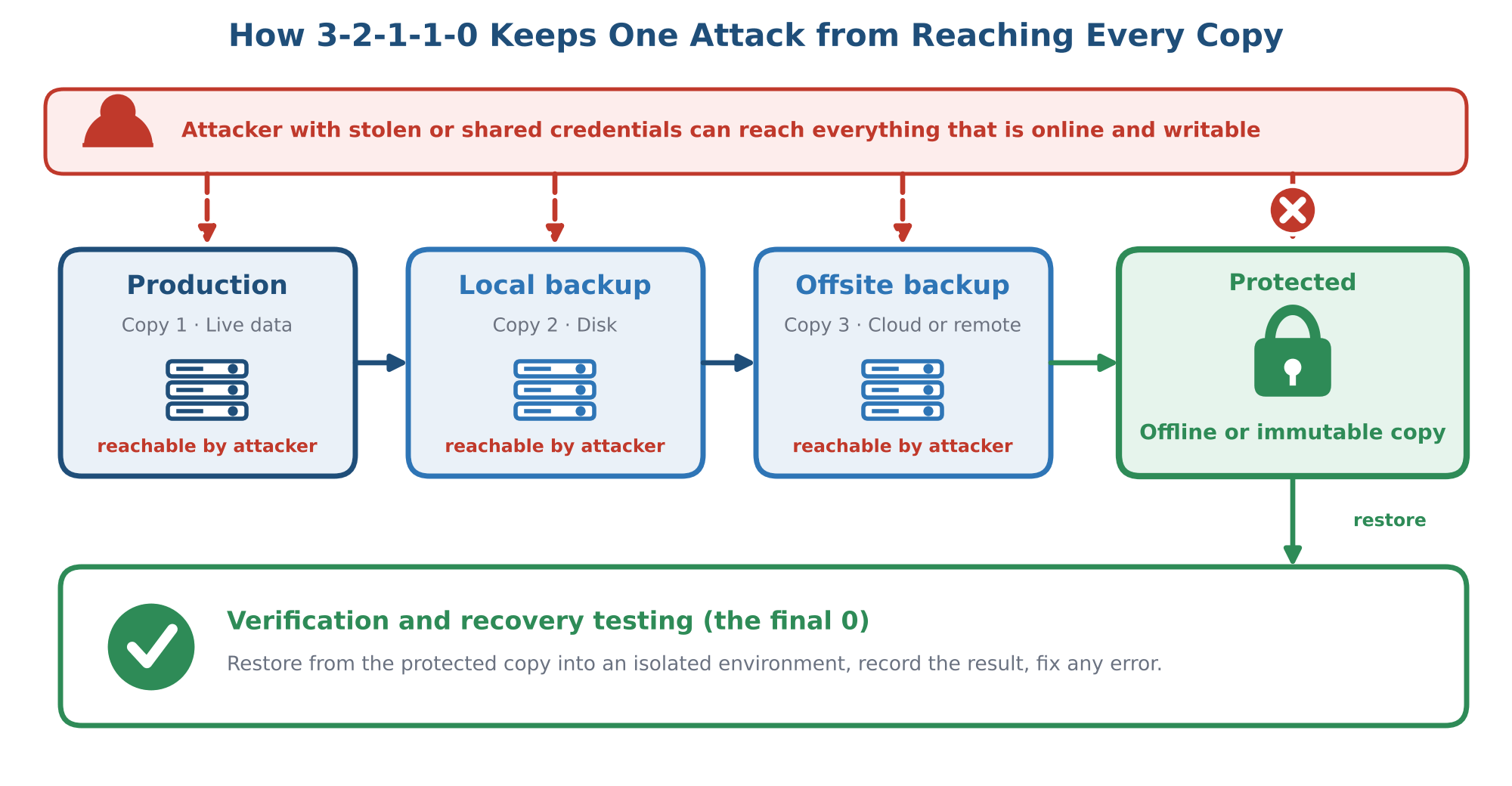
Figure 3. How 3-2-1-1-0 keeps one attack from reaching every copy, ending in recovery testing.
3-2-1 vs. 3-2-1-1-0: What Is the Difference?
If 3-2-1 already gives you three copies, why add two more digits? Because 3-2-1 describes where copies live, while the extra two describe how well they are protected and whether they work. A well-run 3-2-1 setup may already include isolation and restore testing, but the original wording does not require either. 3-2-1-1-0 makes them explicit.
Comparison | 3-2-1 | 3-2-1-1-0 |
Data copies | 3 | 3 |
Storage media | At least 2 types | At least 2 types |
Offsite copy | At least 1 | At least 1 |
Offline or immutable copy | Not explicitly required | At least 1 |
Verification and recovery testing | Depends on the implementation | Zero-error verification is part of the rule |
Ransomware resilience | Depends on isolation and access design | Backup isolation and recoverability are built into the rule |
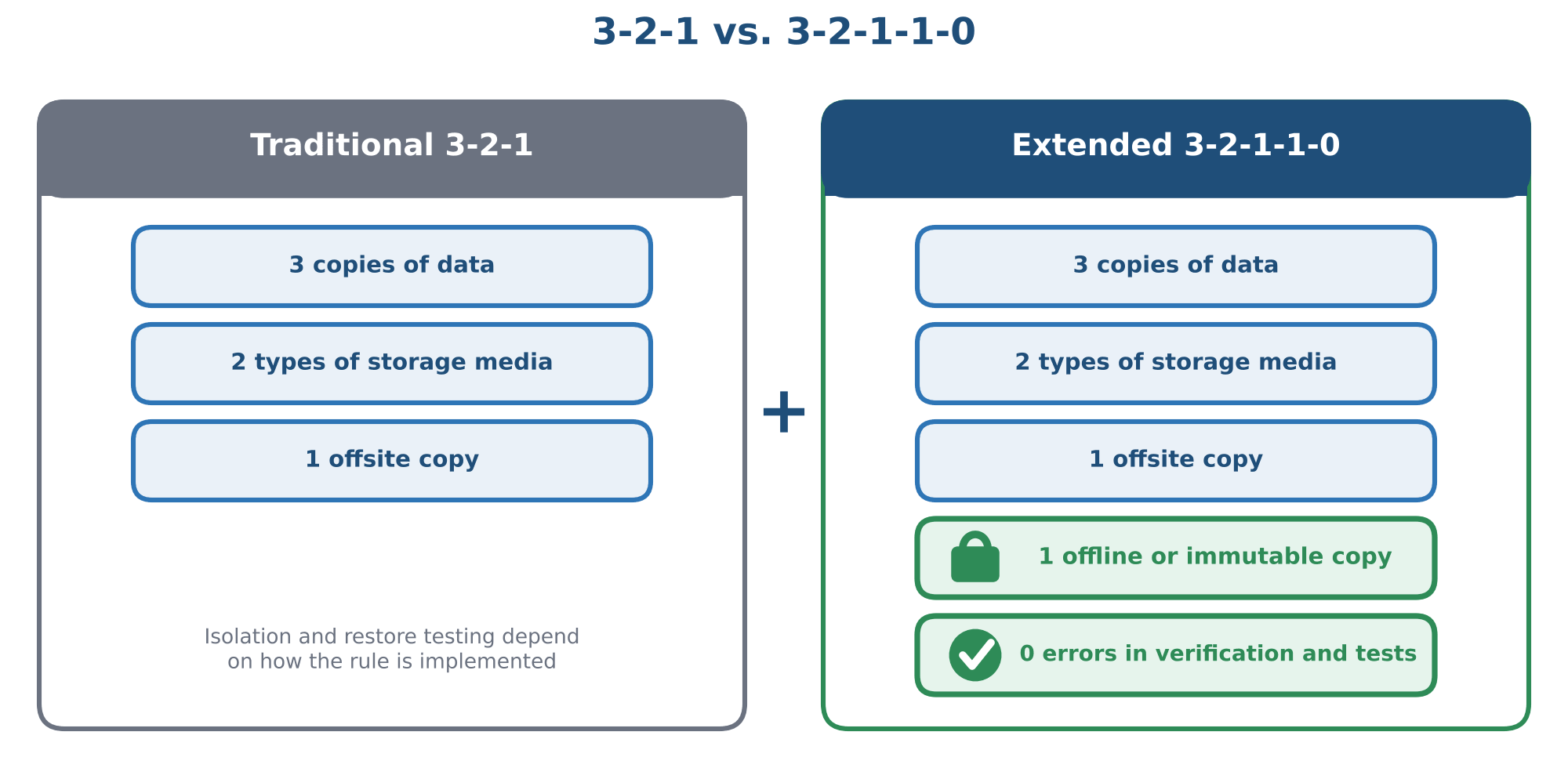
Figure 4. The traditional 3-2-1 rule compared with the extended 3-2-1-1-0 rule.
How to Implement the 3-2-1-1-0 Backup Rule
Step 1: Identify Critical Data and Recovery Priorities
Inventory servers, databases, virtual machines, file shares and SaaS data.
Rank systems by business impact, then set a recovery point objective (RPO, how much data you can afford to lose) and a recovery time objective (RTO, how long you can afford to be down) for each tier.
Step 2: Design the Backup Architecture
Choose at least two media types and an offsite location.
Decide which copy will be offline and which will be immutable, and how each will be protected.
Keep the backup environment separate from production identity systems wherever possible, so one compromised domain account does not unlock everything.
Step 3: Secure the Backup Infrastructure
Enforce MFA, least-privilege roles and dedicated credentials for backup administration. NIST’s practice guide SP 1800-25 covers protecting data against ransomware with backups, secure storage, integrity checking and audit logging, and is a useful reference for this step.
Restrict who can delete backups or shorten retention, and alert on those actions.
Confirm that retention locks and isolation are actually enforced, rather than assuming the configuration worked.
Step 4: Verify Backups and Test Recovery
Monitor job results and check data integrity after each backup.
Restore files, databases and full systems into an isolated test environment on a regular schedule.
Record the outcome, the time it took, any failures and the fix, then repeat until the results are clean.
Automation helps here, because manual restore tests are the first thing to slip when teams are busy. Some backup platforms can run recovery verification on a schedule; Vinchin Backup & Recovery, for example, offers automatic verification of server and database recoveries alongside agentless virtual machine backup and backup-storage protection. Whatever tool you use, judge it by the evidence from your own restore tests.
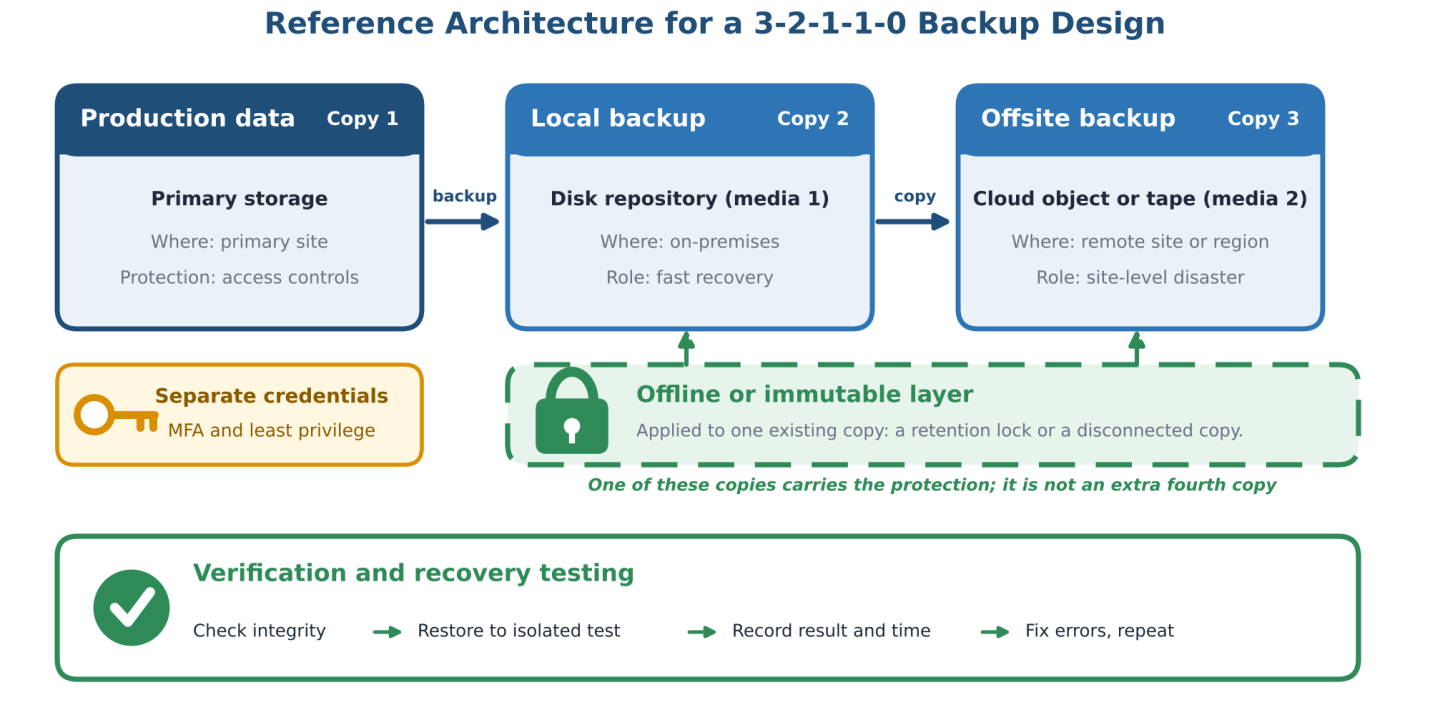
Figure 5. Reference architecture for a 3-2-1-1-0 backup design. The offline or immutable layer is applied to an existing copy.
Common 3-2-1-1-0 Backup Mistakes to Avoid
Common mistake | Why it is risky |
Treating cloud sync as a complete backup | Sync can replicate accidental deletions and encrypted files, so it cannot replace independent, versioned backups. |
Assuming offsite means immutable | An offsite copy can still be deleted or encrypted through the network or with stolen credentials. |
Relying only on backup job status | A successful job does not prove that every critical dataset can be restored correctly. |
Giving backup systems excessive privileges | Broad rights make it easier for an attacker to delete or tamper with backups. |
Never testing disaster recovery | Without a restore test there is no evidence that recovery will work or meet your RTO. |
Frequently Asked Questions
Q1: What is the difference between 3-2-1 and 3-2-1-1-0?
The 3-2-1 rule focuses on three copies, two storage media types and one offsite copy. The 3-2-1-1-0 extension adds an offline or immutable copy and zero errors in verification and recovery testing.
Q2: Why do ransomware attacks target backups?
Because working backups let victims recover without paying. Attackers who delete or encrypt backups first increase the pressure to pay, which is why reachable backups are a common target.
Q3: Is an immutable backup better than an offline backup?
Neither is universally better. Offline copies are out of reach of network attacks but can be slower to restore and often involve manual handling. Immutable copies can stay online for faster recovery, but they rely on correct configuration and on protecting the accounts that manage the lock. Many organizations use both.
Q4: Does cloud storage count as an offsite backup?
Yes, it is physically separate from your site. It is not automatically offline or immutable, though. To count toward the offline-or-immutable requirement, the cloud copy needs controls such as object lock, separate credentials and MFA.
Q5: How often should backup recovery be tested?
There is no single schedule. A common starting point is automated integrity checks after every backup, file-level restores monthly and full-system restore drills quarterly or after major changes, tightened for your most critical systems and driven by your RTO.
Q6: Does the 3-2-1-1-0 rule guarantee zero data loss?
No. Data created since the last good backup can still be lost, and the rule does not prevent intrusion. The “0” refers to errors in verification and recovery testing, not to zero loss. What the rule does is improve the chance that a clean, restorable copy survives an attack.
Key Takeaways
3-2-1-1-0 means three copies, two media types, one offsite copy, one offline or immutable copy and zero verification errors.
Ransomware targets backups, so copies that share credentials or network paths with production can be lost together.
Offline or immutable copies keep at least one backup out of an attacker’s reach.
Only restore tests prove recoverability. Record the results and fix every failure.






