




Product: Vinchin Backup & Recovery
Version: V9.0
KB Number: 200209
Last Modified: 2026-09-02 17:08:28
Discovered Version:v9.0
Question
Deploying Vinchin system using "vinchin_enterprise_en-9.0.0.90995-SP2.rocky9.x86_64_agentless_vm_backup.iso", then trying to do a granular recovery for windows or linux server, the job failed with #95 File not exist error.
However, instant recovery and original platform recovery run successfully.
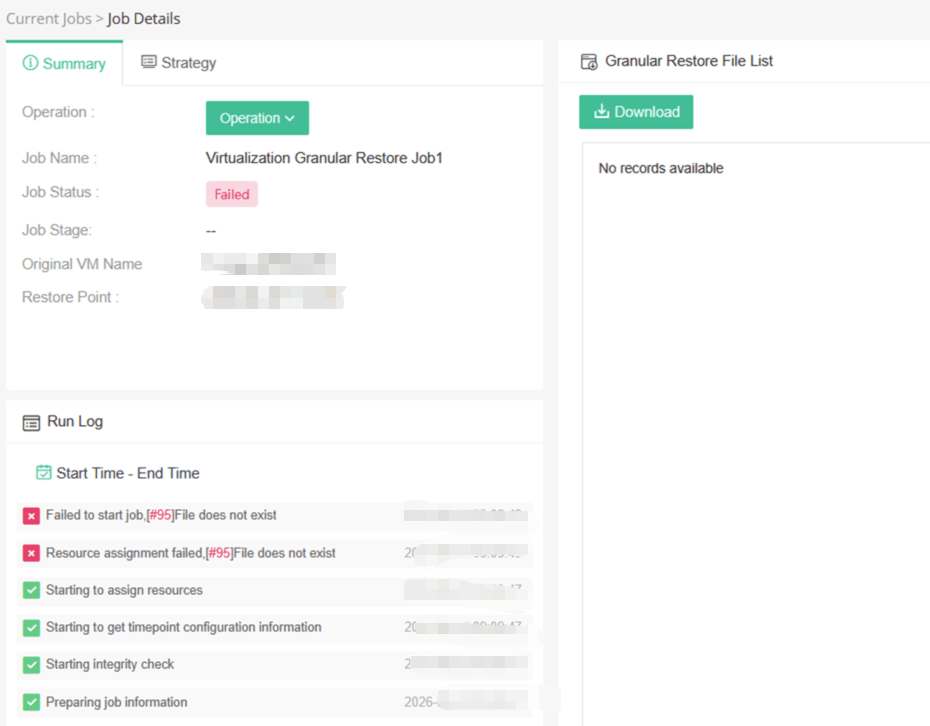
Job Failed, #95 File not exist error.
#95 File not exist error, cdrom file not exist, path: /opt/vinchin/image/emd_image/winpe.iso
Answer
Issue Description
vinchin_enterprise_en-9.0.0.90995-SP2.rocky9.x86_64_agentless_vm_backup.iso only involves the basic vm backup function. So, some programs may be absent from this ISO.
All ISO files ending with "agentless_vm_backup.iso" does not include client plugins. Ideal for standard deployments without file, database, or OS backup requirements.
Resolution
Upgarde Vinchin to obtain full features
- For the vinchin_enterprise_en-9.0.0.90995-SP2.rocky9.x86_64_agentless_vm_backup.iso
please using this upgrade package: https://www.vinchin.com/download/?i=wd8dkdl3eq
MD5: 0312d94b57e9dddae58379b21399ecf9
- For the vinchin_enterprise_en-9.0.0.92348-SP3.rocky9.x86_64_agentless_vm_backup.iso
please using this upgarde package: https://www.vinchin.com/download/?i=s15otwzg1l
MD5: d2f954dab9fc109eb332fb3b5bbee894
Contact vinchin technical support for help
- If the issue persists after upgrading, please contact technical.support@vinchin.com
60-DAY FULL-FEATURED FREE TRIAL
- No credit card required
- Get started in 10 minutes