


Product: Vinchin Backup & Recovery
Version: V9.0
KB Number: 100169
Last Modified: 2026-06-05 15:14:14
Compatibility List
Oracle Database Compatibility List
| Type | Version | CPU arch | Bit | Operating System | Bit of OS |
|---|---|---|---|---|---|
| Oracle | 10G | x86_64 | 64 | Windows Server 2008R2, RHEL 7, Kylin V10 SP3 | 64 |
| Oracle | 11G | x86_64 | 64 | Windows Server 2008R2, RHEL 6, RHEL 7, Kylin V10 SP3 | 64 |
| Oracle | 11G R2 | x86_64 | 64 | Windows Server 2008R2, RHEL 6, RHEL 7, Kylin V10 SP3 | 64 |
| Oracle | 12C | x86_64 | 64 | Windows Server 2012, RHEL 7, Oracle Linux 6, Kylin V10 SP3 | 64 |
| Oracle | 18C | x86_64 | 64 | Windows Server 2016, Oracle Linux 7 | 64 |
| Oracle | 19C | x86_64 | 64 | Windows Server 2019, RHEL 7, SLES 15 SP3, Ubuntu 18, Kylin V10 SP3 | 64 |
| Oracle | 21C | x86_64 | 64 | Windows Server 2019, RHEL 8, Kylin V10 SP3 | 64 |
| Oracle RAC | 11G R2 | x86_64 | 64 | RHEL 5, RHEL 6, RHEL 7, Windows Server 2008R2, Kylin V10 SP3 | 64 |
| Oracle RAC | 19C | x86_64 | 64 | RHEL 7, Kylin V10 SP3 | 64 |
| Oracle RAC | 21C | x86_64 | 64 | Kylin V10 SP3 | 64 |
Restrictive Explanation
- To ensure the correctness of backup data, other backup software or scripts need to be closed before backup.
- Does not support cross version database recovery.
- Backup and recovery require enabling archive mode.
- Oracle instance authentication requires users to have a combination of
sysdba + dbaorsysbackup(introduced in 12c) +dbapermissions. - When Oracle RAC archive logs are local and a node fails, it can cause backup jobs to run with errors.
Preparation Before Backup
Enable Archive Log Mode
Close the database under the SQL command line:
shutdown immediate;
Start the database to mount status:
startup mount;
Enable the archivelog:
alter database archivelog;
Open the database:
alter database open;
Backup User Required Permissions
The added user needs to be granted the following permissions:
SYSDBADBA
Preconditions for Backup
- Backup the database version to the compatibility list, install the corresponding version Vinchin agent, and configure the application in Proxy & Client.
- In the Vinchin backup system Agent & Client, confirm that the host status is online.
Preparation Before Restore
- To restore to a different machine, the corresponding client version must be installed on the target host and the application configured.
- When performing the restore task, the operating system user with the backup client installed should have read, write, and execute permissions for the target directory.
- Backup and restore must be performed using a user with
sysdba + dbaorsysbackup(introduced in 12c) +dbapermissions.
Select Backup Point
Click Data Resilience → Restore → Database → Restore to enter the database recovery task settings interface. First, select "Oracle" as the database type. You can then filter the target by searching to select the database that needs to be recovered.
Select Restore Mode
Complete recovery is suitable for situations where data is being restored to the backup source database server. It directly overwrites the original data in the target database and uses the remaining archived log files of the source database to restore the database to the latest time, without losing any data.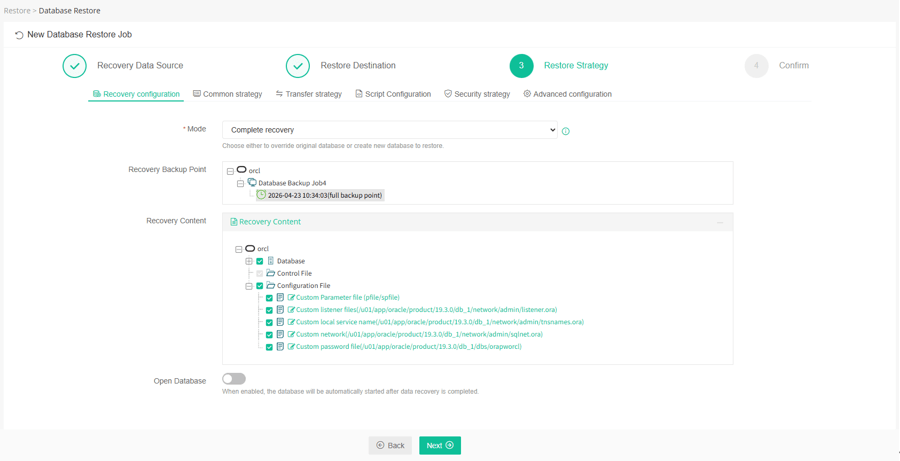
60-DAY FULL-FEATURED FREE TRIAL
No credit card required
Get started in 10 minutes