What Is Automotive Manufacturing Data Backup?
Automotive manufacturing data backup is the process of creating protected, recoverable copies of manufacturing data and the systems that use it. It helps authorized teams restore information within business-defined recovery point objective (RPO) and recovery time objective (RTO) limits.
Automotive Backup vs Ordinary Office Backup
Office environments often protect documents and email. However, automotive organizations must also protect engineering repositories, production databases, OT-connected workloads, inspection records, supplier exchanges, and distributed plant services. These workloads have different change rates, retention needs, and recovery priorities.
What Automotive Manufacturing Data Needs Protection?
A complete automotive backup inventory covers data people read and the workloads that create, process, and store it. Protecting only a database or file share can still leave a plant unable to recover the applications and dependencies that make the data usable.
Engineering and product data
CAD models, 3D drawings, PLM records, test results, calibration data, and engineering change documents contain valuable intellectual property. Loss, corruption, or unauthorized changes can delay design approval, tooling work, validation, and production release.
Production and quality data
MES, SCADA, production scheduling, machine logs, IoT sensor streams, inspection images, and quality-control records support daily line decisions. Their backup policies should reflect the cost of lost production history and the urgency of restoring operations.
Business, supply chain, and after-sales data
ERP, procurement, inventory, supplier quality records, customer warranty claims, diagnostic information, and service histories support traceability and fulfillment. Long-term retention and automotive data archiving should be assigned by policy, contract, and applicable regulatory requirements.
Why Is Backup Critical for Automotive Manufacturing?
Automotive operations use connected data to coordinate materials, equipment, quality, shipments, and service. A recovery failure can spread beyond one application, affecting a production line, a supplier handoff, traceability work, and customer commitments at the same time.
| Risk Category | Description |
|---|
| Data loss and human error | Hardware failure, accidental deletion, and software faults can erase hard-to-recreate data like quality evidence and engineering records. |
| Ransomware and intellectual property risk | Ransomware can encrypt production systems and backups; immutable recovery copies and tested procedures protect clean restore points. |
| Production interruption | MES, planning or quality system outages disrupt work order visibility and inspection tracking; documented recovery order prevents extended stoppages. |
| Traceability and audit readiness | Manufacturers must retain product history, process control and supplier quality records; backup retention policies must align with legal and contractual obligations. |
Main Automotive Manufacturing Data Protection Challenges
The central challenge is delivering consistent recovery results across plants that were built over time with different equipment, teams, storage systems, and network conditions. A useful plan accounts for those differences instead of assuming every workload behaves like a central data-center application.
Distributed plants and suppliers
Data can reside in assembly plants, component facilities, warehouses, test laboratories, regional service centers, and headquarters. Each location needs defined ownership, a recovery target, and a practical path for moving or restoring protected copies.
Heterogeneous IT Environment Backup
Automotive environments commonly combine virtual machines, physical servers, databases, NAS devices, older controllers, and cloud applications. A heterogeneous IT environment backup plan must account for separate schedules, credentials, recovery dependencies, and legacy systems rather than assume a single policy fits every plant.
Backup windows and bandwidth
Large engineering files and plant data can strain inter-site links. Backup jobs must avoid competing with time-sensitive production traffic, while still moving changed data quickly enough to meet the recovery objectives for each workload.
Recovery dependencies
Restoring a file is not the same as restoring a usable service. Recovery plans must identify application versions, credentials, network paths, databases, configurations, and upstream or downstream systems needed to return work to a reliable state.
How Should Automotive Manufacturing Data Be Protected?
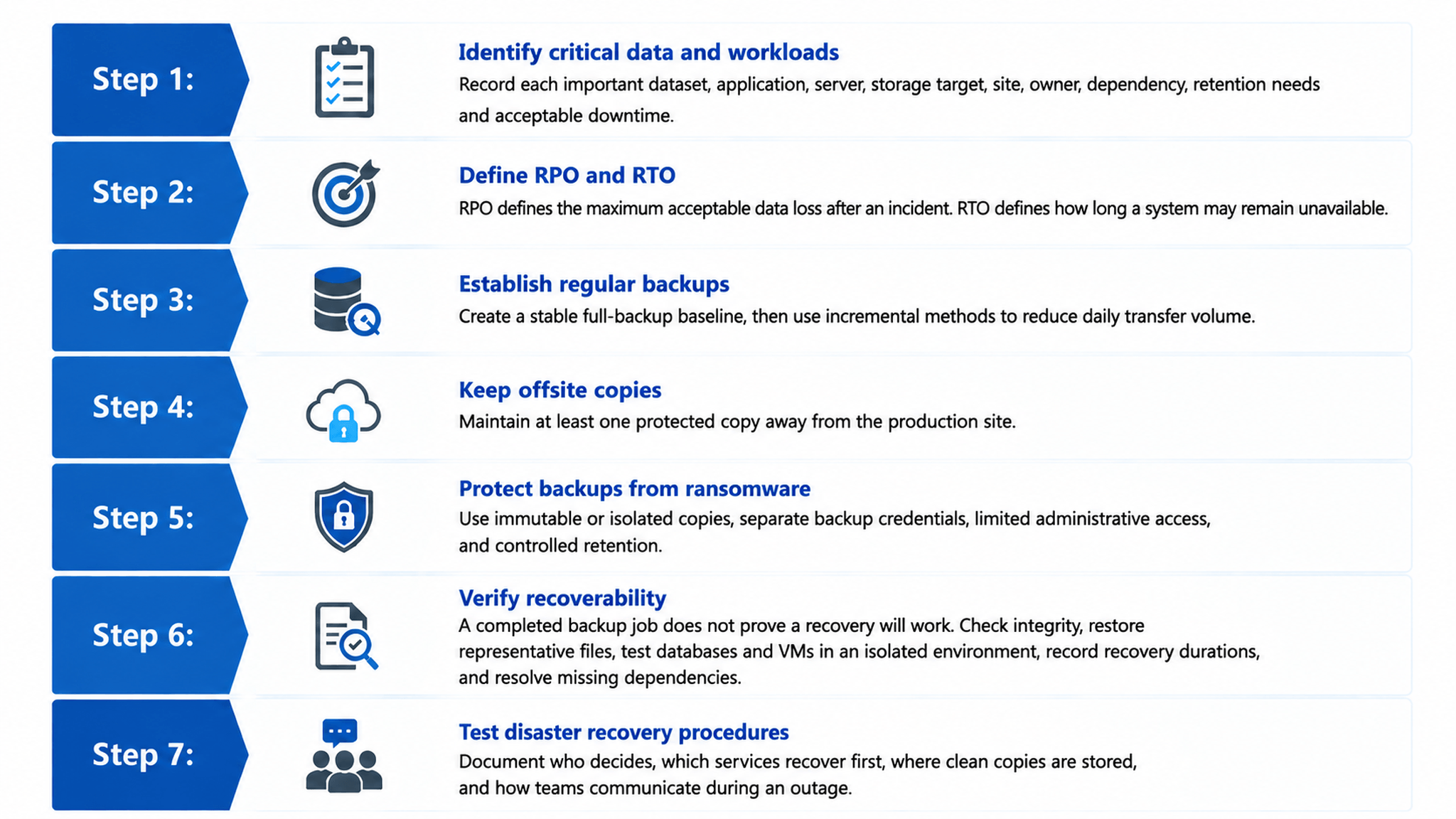
Automotive manufacturing data protection should operate as a lifecycle: identify critical workloads, define recovery targets, create copies, secure the copies, verify recoverability, and improve the plan after tests or incidents. This approach turns backup jobs into a continuity discipline.
Automotive Manufacturing Backup Best Practices
Best practices help manufacturers balance recovery speed, cost, security, storage growth, and traceability. They create repeatable decisions across engineering, production, quality, and after-sales systems instead of applying one generic backup policy to every workload.
Follow the 3-2-1 backup strategy
Keep at least three copies of critical data, use at least two storage media, and store at least one copy offsite. Adapt the layout to each workload's RPO, RTO, hazard profile, and retention requirements.
Prioritize business-critical workloads
Rank systems by their effect on production, safety, quality, revenue, customer commitments, and audit obligations. The ranking should determine backup frequency, storage tier, recovery order, and test frequency.
Use immutable copies and retention control
Immutable retention helps preserve defined recovery points against deletion or encryption. Retention policies should separate short-lived operational logs from engineering history and long-term traceability archives, reducing unnecessary storage without deleting records prematurely.
Centralize monitoring and test regularly
A central view of job status, policy coverage, storage use, and failures helps small teams manage dispersed facilities. Regular recovery tests expose quiet failures before they affect a time-sensitive manufacturing response.
How to Build an Automotive Data Protection Strategy
A practical automotive data protection strategy follows connected stages: Assess, Prioritize, Protect, Secure, Verify, Recover, and Improve. The sequence gives manufacturers a clear way to connect technical controls with production, quality, and continuity requirements.
Assess and prioritize
Inventory systems, sites, storage, users, interfaces, and data flows. Then classify workloads by business impact and recovery urgency, recognizing that a production database and an old engineering archive require different protection levels.
Protect and secure
Assign backup methods and storage tiers to each class. Combine local recovery, offsite copies, replication, encryption where appropriate, least-privilege access, immutable retention, and separation from ordinary production credentials.
Verify, recover, and improve
Run integrity checks and restoration exercises, then record outcomes such as recovery time and missing dependencies. Use incidents, audit findings, plant changes, and test results to update policies and recovery procedures.
Key Technologies for Automotive Data Backup
No single method fits every automotive workload. The right technology mix depends on data size, change rate, recovery speed, application consistency, site connectivity, retention duration, and the consequences of a delayed restoration.
Virtual machine and application-aware backup
Virtual machine backup can capture complete workloads and configurations for faster service restoration. Application-aware database protection helps preserve transaction consistency for MES, ERP, quality, and after-sales systems.
NAS and file backup
NAS and granular file backup protect shared CAD libraries, drawings, inspection images, supplier documents, and user-created records. Granular restoration is useful when a small set of files is damaged without requiring a full workload recovery.
Offsite backup and replication
Offsite backup provides geographic separation, while replication moves selected recovery copies to another server or site. Incremental transfer after an initial baseline can make cross-site disaster recovery replication more practical on constrained links.
Immutable backup and verification
Immutable storage preserves recovery copies for a defined period, helping defend against ransomware and accidental deletion. Automated verification and scheduled restore tests provide stronger evidence of recoverability than job-completion status alone.
Multi-Site Automotive Manufacturing Example
A manufacturer operates assembly plants, component warehouses, an engineering center, regional service sites, and a headquarters IT environment.
Protection flow
Each site creates a local recovery copy for important virtual machines, databases, files, and NAS shares. During planned windows, changed data moves to centralized backup. Priority workloads are replicated offsite, while immutable copies preserve recovery points for ransomware scenarios.
What this architecture achieves
The design separates fast local restoration from site-level disaster recovery and longer-term retention. It also lets administrators monitor distributed protection, identify failed jobs, and test recovery before a real interruption exposes an unaddressed dependency.
How Vinchin Helps Protect Automotive Manufacturing Data
Vinchin Backup & Recovery can provide a unified data protection platform for automotive organizations that need to manage backup, recovery, and disaster recovery across mixed and distributed IT environments. The following capabilities map to common manufacturing requirements.
Unified data protection for mixed workloads
Vinchin can bring virtual machines, physical servers, SQL databases, NAS storage, and local files into one workflow. This can reduce tool fragmentation across engineering, production, quality, and service systems while improving policy consistency.
Heterogeneous infrastructure support
Support for more than 19 mainstream virtualization platforms, physical servers, SQL databases, and file storage helps protect heterogeneous IT environments. Plants can retain different local infrastructure designs without forcing every site into the same platform.
Centralized web console
A browser-based console enables administrators to view and manage backup tasks across factories, warehouses, engineering centers, and service locations. Central status monitoring can help lean IT teams identify failed jobs without repeated site visits.
Bandwidth-optimized backup and replication
Incremental and forever-incremental backup reduce changed data transfer after the initial full copy. Scheduled windows and replication policies can help protect large engineering and plant workloads without unnecessarily competing with operational network traffic.
Immutable backup and retention management
Immutable backup locking can preserve recovery copies against alteration or encryption during a defined retention period. Automated retention rules can separate short-lived logs, active production records, and long-term engineering or traceability archives.
Automated verification and flexible recovery
Automated integrity checks help confirm that backup copies remain usable. Full virtual machine recovery and granular file restoration allow teams to choose a recovery method that fits the incident, supporting practical RPO and RTO decisions.
Cross-site disaster recovery replication
Replication can place selected workloads at a separate site for disaster recovery planning. This gives manufacturers another recovery option when an assembly plant or local data room cannot operate, subject to the design of the target environment and recovery procedures.
FAQs
Q1: What backup strategy works best for automotive manufacturing environments?
A1: The 3-2-1 backup framework is highly recommended: multiple copies across different media, off-site and air-gapped storage, plus zero-error backup verification to satisfy automotive production continuity demands.
Q2: What is the difference between IT backup and OT backup for automotive manufacturing?
A2: IT backup covers office systems, ERP and databases. OT backup focuses on production line controllers, manufacturing execution systems and shop-floor devices. Automotive plants need unified protection for both IT and OT environments.
Q3: How frequently should automotive manufacturing production data be backed up?
A3: Mission-critical line-side data requires frequent incremental backups, while design files and quarterly business data can follow longer cycles. RTO and RPO goals should be defined based on each production line’s tolerance for downtime.
Conclusion
Automotive manufacturing data backup supports business continuity. Manufacturers need to protect intellectual property, plant workloads, quality evidence, supply records, and the systems that connect them.
A resilient approach combines layered copies, offsite protection, immutable retention, centralized visibility, bandwidth-aware transfer, and tested restoration. By matching each workload to a recovery and retention tier, teams can reduce operational disruption while keeping data protection practical.












