MySQL often sits behind online stores, SaaS products and internal tools that cannot go offline for a nightly backup window. Stopping the database to copy its files is simple, but it means downtime every time you protect your data.
A MySQL hot backup solves this by backing up the database while it keeps serving reads and writes. The catch is that "hot" does not mean "free". A careless hot backup can produce an inconsistent copy, slow down production queries or leave you unable to restore to the moment before a failure.
This article shows how to back up a MySQL database online. It explains what a hot backup is, compares the main methods, and gives MySQL backup best practices you can apply to production servers, then covers common mistakes and answers frequent questions.
What Is a MySQL Hot Backup?
A MySQL hot backup is a backup taken while the MySQL server is running and applications can still read and write data. It differs from other approaches in how much it interrupts the database:
| Type | Server state | Impact on applications | Typical use |
|---|
| Hot backup | Running, reads and writes continue | Little or none for transactional tables, plus extra I/O and CPU load | Production databases with no downtime window |
| Warm backup | Running, but writes are blocked or tables are locked | Writes wait while the lock is held | Non-transactional tables, or short low-traffic windows |
| Cold backup | Stopped | Full downtime | Test systems, planned maintenance |
The MySQL reference manual on backup methods uses the same distinction: InnoDB tables can be copied with a hot mechanism, while tables from other storage engines are copied with a warm one.
That storage engine point matters. InnoDB is transactional, so a consistent snapshot of its data is possible while writes continue. Engines such as MyISAM are not transactional, so a consistent copy usually requires locking tables. If your database mixes engines, check which tables are which before you choose a backup method.
A hot backup also adds load. Reading every data page uses disk I/O and CPU, and large backups can slow queries. Treat "hot" as "online", not "invisible".
How to Back Up a MySQL Database Online: Four Hot Backup Methods
There is no single best way to take a MySQL hot backup. Different MySQL backup tools fit different solutions. The right method depends on database size, storage engine, and how fast you need to restore.
Method 1: mysqldump with --single-transaction
mysqldump creates a logical backup, a file of SQL statements that rebuilds the data. With --single-transaction, it issues a BEGIN before dumping so InnoDB tables are read from one consistent snapshot without locking them.
mysqldump --single-transaction --routines --triggers --events \
  --source-data=2 --all-databases > full_backup.sql
--source-data=2 writes the binary log file name and position into the dump as a comment, which you need for point-in-time recovery. Avoid running ALTER TABLE, DROP TABLE, RENAME TABLE or TRUNCATE TABLE on dumped tables while the dump runs. Non-transactional tables such as MyISAM are not covered by the snapshot. Restoring a large dump means replaying every statement, so recovery slows as the database grows.
Method 2: Percona XtraBackup
Percona XtraBackup takes a physical backup. It copies InnoDB data files while the server runs and keeps copying new redo log entries, then a prepare step applies the redo log so the files become consistent.
xtrabackup --backup --target-dir=/backups/full
xtrabackup --prepare --target-dir=/backups/full
For non-InnoDB tables it uses backup locks, copying InnoDB data first and locking only afterwards, so InnoDB writes are not blocked by the file copy. Physical restores are generally faster than replaying a logical dump, which makes this method a common choice for large databases.
Method 3: Storage Snapshots
If your data directory sits on LVM, ZFS or similar storage, a snapshot can capture it almost instantly. The MySQL manual describes the usual sequence: run FLUSH TABLES WITH READ LOCK, create the snapshot, then run UNLOCK TABLES and copy files from the snapshot. The lock is brief, but writes wait while it is held, so this is closer to a warm backup in practice.
Method 4: Backing Up from a Replica
If backups affect production performance, MySQL suggests setting up replication and running backups on the replica instead of the source. Any of the methods above can run there. When you back up a replica, also back up its replication metadata, and make sure the replica is not lagging far behind.
Which Method Fits?
| Method | Backup type | Best for | Main trade-off |
|---|
| mysqldump | Logical | Small to mid-size databases, portability | Slow restore for large data |
| XtraBackup | Physical | Large InnoDB databases, faster recovery | Needs a prepare step and matching versions |
| Storage snapshot | Physical | Very fast capture on supported storage | Brief write lock, depends on storage setup |
| Replica backup | Either | Protecting production performance | Replication lag can make the backup stale |
MySQL Backup Best Practices for Hot Backups
The method is only half the job. These MySQL backup best practices make a hot backup something you can actually restore from.
Pair full backups with binary logs. A full backup only restores data to the moment it was taken. Binary logging lets you replay changes up to a chosen point in time. It is enabled by default in MySQL 8.4, and the manual recommends rotating the log with FLUSH LOGS around backups. Copy the logs off the server, not just the dumps.
Set backup frequency from your recovery point. Decide how much data you can afford to lose, then schedule full backups and log copies to match. A daily dump with no binary logs means up to a day of lost transactions.
Back up from a replica when possible. Running the backup on a replica keeps read-heavy backup traffic away from the source. Check replication lag first, so the backup is not stale.
Control the performance impact. Schedule backups in low-traffic hours, limit I/O where your tool allows it, and watch query latency while the job runs.
Back up everything the database needs, not only tables. Include stored routines, triggers, events, user accounts and privileges, and configuration files such as my.cnf. A restored database that lacks its users or settings will not behave like the original.
Protect the backups themselves. Encrypt backup files, store copies away from the database server and follow the 3-2-1 rule: three copies, on two kinds of media, with one off-site.
Test restores on a schedule. A backup you have never restored is an assumption. Restore into a separate server, run basic checks on row counts and key tables, and record how long it takes.
Automate, monitor and set retention. Scripts run by hand get forgotten. Schedule jobs, alert on failures, and keep backups long enough to cover slow-moving mistakes such as a bad migration found weeks later.
Common Mistakes to Avoid in MySQL Hot Backup
Dumping without --single-transaction. Without it, mysqldump locks tables during the dump, which can block writes on a busy server.
Assuming every table is covered by the snapshot. MyISAM and other non-transactional tables need locks or a different method.
Forgetting binary logs. Without them, you can restore only to the time of the last full backup.
Keeping backups on the database server. A disk failure or ransomware attack can remove the database and its backups together.
Never testing a restore. Corrupt or incomplete backups are usually discovered during an outage.
Running a full backup at peak traffic. Heavy I/O during busy hours can slow queries for real users.
How Vinchin Supports MySQL Hot Backup
Native MySQL backup tools—mysqldump and Percona XtraBackup—require manual scheduling, log rotation, and retention management. For environments with multiple MySQL instances, unified backup management becomes operationally expensive. Vinchin Backup & Recovery addresses these challenges through application-aware MySQL backup with centralized scheduling, automated retention, and integrated encryption.
Vinchin Backup & Recovery supports MySQL 5.5.62, 5.6.51, 5.7.37, 8.0.11, 8.0.20, and 8.0.26 via a lightweight agent installed on the database server. The solution performs full, incremental, and log backups, compresses backup data to reduce storage consumption, and enables point-in-time recovery.
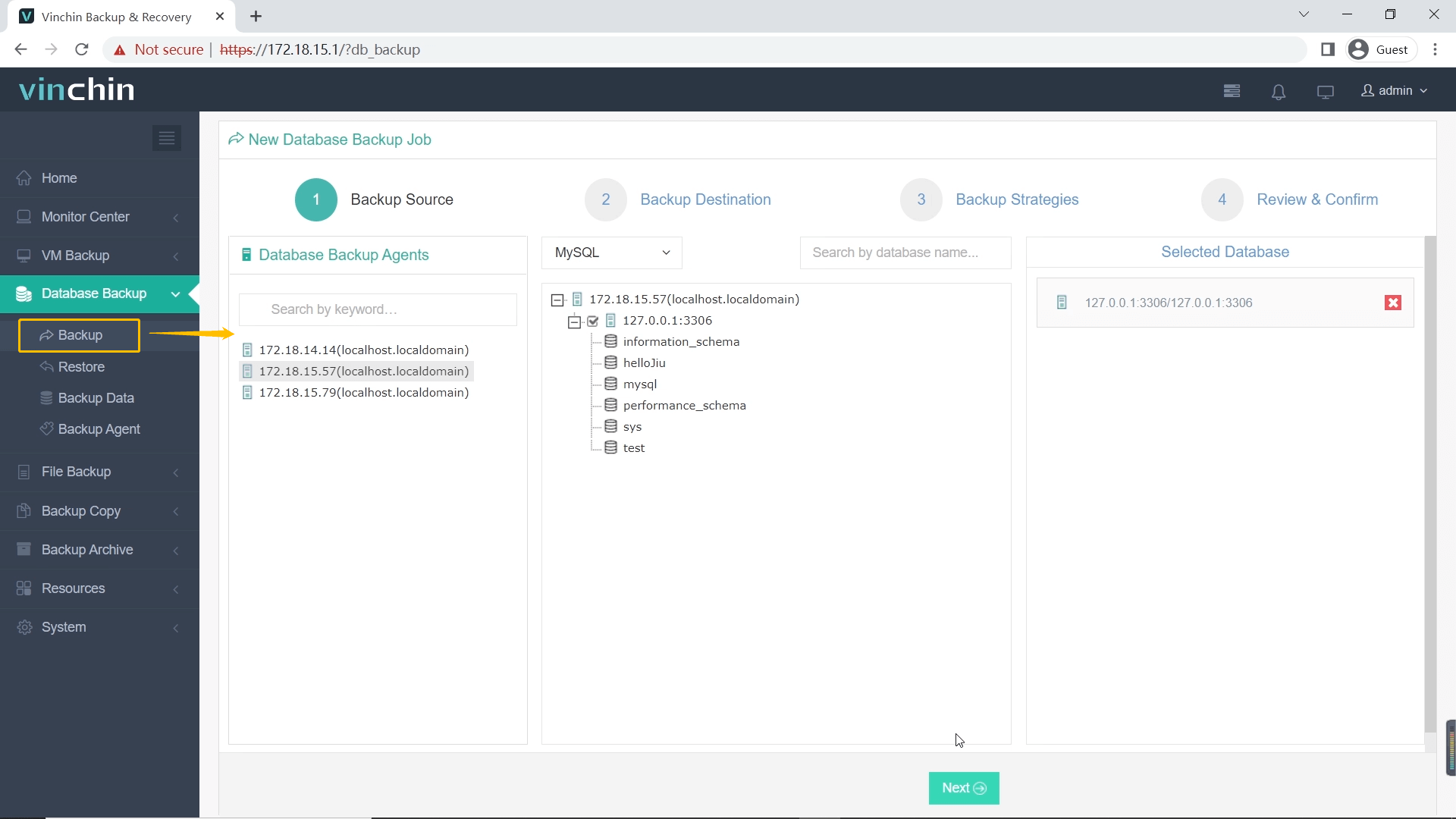
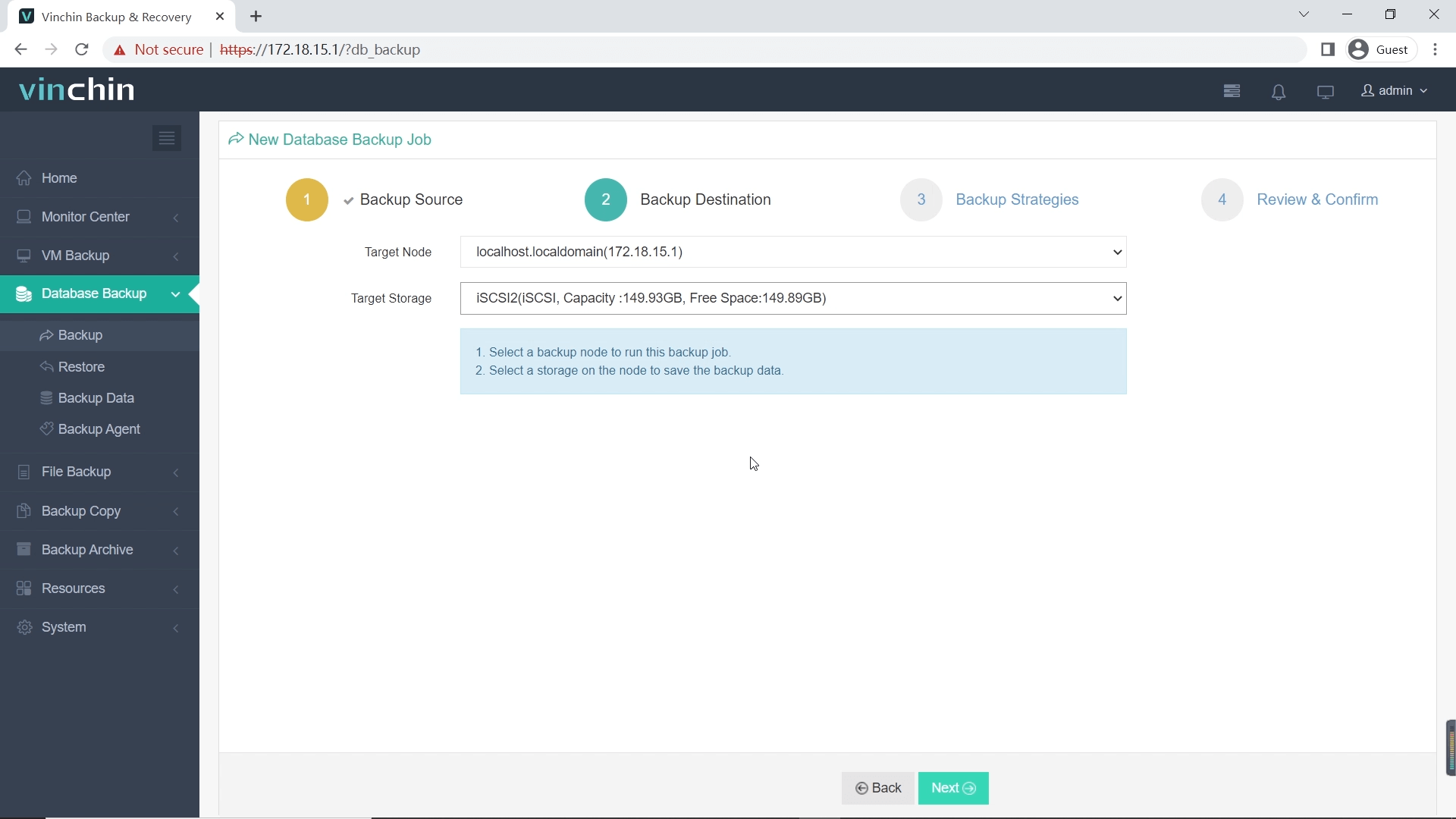
Vinchin simplifies MySQL backup to four steps:
Step 1: Select the MySQL database to backup
Step 2: Choose backup storage
Step 3: Define backup strategy

Step 4: Submit the job

Managing MySQL backups with scripts gets harder with every new instance. Try Vinchin Backup & Recovery free for 60 days, and see how scheduled backups and restores work on your own test database.
FAQ
Q1: Do I need to stop MySQL to restore a Percona XtraBackup backup?
A1: Yes. Percona documentation states: "The datadir must be empty before restoring the backup. Also, it's important to note that MySQL server needs to be shut down before restore is performed. You cannot restore to a datadir of a running mysqld instance."
Q2: Can I use mysqldump for terabyte-scale databases?
A2: No. MySQL 8.4 Reference Manual explicitly states mysqldump "is not intended as a fast or scalable solution for backing up substantial amounts of data" because "restoring the data can be very slow." For large databases, use physical backup tools like Percona XtraBackup or MySQL Enterprise Backup.
Q3: Should binary logs be stored on a separate disk?
A3: Yes. MySQL 8.4 documentation recommends: "You can use the --log-bin option to specify an alternative location, by adding a leading absolute path name to the base name to specify a different directory." Storing binary logs on a separate physical device improves I/O performance and ensures logs survive if the data directory disk fails.
Q4: Does mysqldump lock tables during backup?
A4: With --single-transaction, mysqldump does not lock InnoDB tables. MySQL 8.4 documentation confirms it "dumps the consistent state of the database at the time when START TRANSACTION was issued without blocking any applications." However, MyISAM and MEMORY tables may change state during the dump because they lack MVCC support.
Conclusion
A reliable MySQL hot backup keeps the database online and still restores cleanly. Choose the method that matches your size and recovery needs: mysqldump for smaller databases, XtraBackup or snapshots for larger ones, and a replica when production performance is at risk.
Then follow the MySQL backup best practices above: keep binary logs, store copies off the server and test restores regularly. Knowing how to back up a MySQL database matters less than knowing you can recover it.