Microsoft offers multiple Windows Server editions to meet different business requirements. While these editions share the same core operating system, they differ in areas such as virtualization, scalability, and advanced infrastructure features. Choosing the right edition is important because it can affect deployment flexibility, management efficiency, and overall costs.
Among them, Standard and Datacenter are the two most widely used editions. This article compares Windows Server Standard and Datacenter to help you understand their key differences and determine which edition best fits your business needs.
What Is Windows Server Standard?
Windows Server Standard Edition is designed for general-purpose server workloads and is the most commonly deployed Windows Server edition. It provides essential features for running services such as Active Directory domain controllers, file and print servers, DNS, DHCP, and application servers.
The Standard Edition is well suited for small and medium-sized businesses that need a reliable server platform without advanced datacenter features. It also includes Hyper-V virtualization capabilities for lightly virtualized environments. However, compared with Datacenter Edition, Standard has limitations in areas such as virtualization rights and certain advanced storage and networking features.
Limitations of Windows Server Standard Edition
Compared with Datacenter Edition, Windows Server Standard is better suited for small and medium-sized environments with moderate workloads. It has limitations in scalability, virtualization rights, and certain advanced features, making it less suitable for highly virtualized infrastructures or large-scale enterprise applications.
For basic services such as DNS, DHCP, file sharing, and domain controllers, Standard Edition is typically sufficient. However, organizations running resource-intensive workloads, large databases, clustering environments, or highly virtualized platforms may benefit more from Datacenter Edition, which offers greater scalability and advanced infrastructure capabilities.
What Is Windows Server Datacenter?
Windows Server Datacenter Edition is designed for highly virtualized and enterprise-scale environments. It includes all the core capabilities of Standard Edition while providing additional features for advanced storage, networking, and virtualization scenarios. Datacenter Edition is commonly used in large data centers, private clouds, and Hyper-V infrastructures where high scalability, availability, and flexibility are required.
Compared with Standard Edition, Datacenter offers enhanced support for large workloads and software-defined infrastructure, making it a suitable choice for organizations running numerous virtual machines or resource-intensive business applications.
Windows Server Standard vs Datacenter Overview
The table below provides a quick comparison between Windows Server Standard and Datacenter editions:
| Feature | Windows Server Standard | Windows Server Datacenter |
| Virtualization Rights | Up to 2 virtual machines per license | Unlimited virtual machines |
| Target Environment | Small to medium-sized businesses | Large enterprise and cloud environments |
| Core Features | Includes essential server roles | Includes all Standard features + advanced capabilities |
| Advanced Features | Limited | Storage Spaces Direct, SDN, Shielded VMs |
| Scalability | Suitable for low to moderate workloads | Designed for high-scale workloads |
| Cost | Lower initial cost | Higher upfront cost but better for high VM density |
| Best Use Case | Physical or lightly virtualized servers | Highly virtualized data centers and private cloud |
Key Differences Between Windows Server Standard and Datacenter
Although Windows Server Standard and Datacenter share the same core operating system, they are designed for different deployment scenarios. The main differences lie in virtualization rights, scalability, and advanced infrastructure features.
1. Virtualization Rights
One of the most important differences is virtualization capability. Windows Server Standard allows up to two virtual operating system environments (OSEs) per licensed server. If more virtual machines are required, additional licenses must be purchased.
In contrast, Windows Server Datacenter provides unlimited virtualization rights, making it ideal for heavily virtualized environments such as private clouds and large Hyper-V deployments.
2. Advanced Features
Both editions support core server roles such as Active Directory, DNS, and file services. However, Datacenter includes additional advanced features that are not available in Standard Edition, such as Storage Spaces Direct (S2D), Software-Defined Networking (SDN), and Shielded Virtual Machines.
These features make Datacenter more suitable for modern software-defined data center architectures.
3. Scalability and Workload Suitability
Windows Server Standard is suitable for physical or lightly virtualized environments with a limited number of workloads. It is commonly used in small and medium-sized businesses.
Datacenter, on the other hand, is designed for large-scale enterprise environments that require high scalability, high availability, and flexible resource allocation across many virtual machines and applications.
4. Cost and Licensing Model
Standard Edition has a lower upfront cost but becomes more expensive as the number of virtual machines increases due to additional licensing requirements.
Datacenter Edition has a higher initial cost, but it becomes more cost-effective in environments with high virtualization density.
5. Typical Use Cases
Windows Server Standard:
Small to medium-sized businesses
Low-density virtualization
Basic infrastructure services (DNS, DHCP, file sharing)
Windows Server Datacenter:
Highly virtualized environments
Private cloud and hybrid cloud deployments
Enterprise data centers with high workload density
Comprehensive Windows Server Protection Solution
Regardless of whether you deploy Windows Server Standard or Datacenter, protecting business-critical workloads remains essential. Backup and disaster recovery become even more important in highly virtualized environments where a single server may host multiple applications or virtual machines.
Vinchin Backup & Recovery provides comprehensive protection for modern Windows Server environments, including Windows Server 2012/2012 R2, 2016, 2019, 2022, and later versions. It supports automated full, incremental, and differential backups with flexible scheduling, helping organizations efficiently protect critical Windows workloads with minimal manual effort.
Additionally, Vinchin supports agentless backups for Hyper-V on Windows servers, allowing easy integration of virtual machines into the backup system without requiring agents in each guest OS. It also provides fast recovery capabilities for both physical servers and virtual machines, helping reduce downtime and ensure business continuity in case of system failure or data loss.
To backup the Windows Server with Vinchin, just follow the steps below:
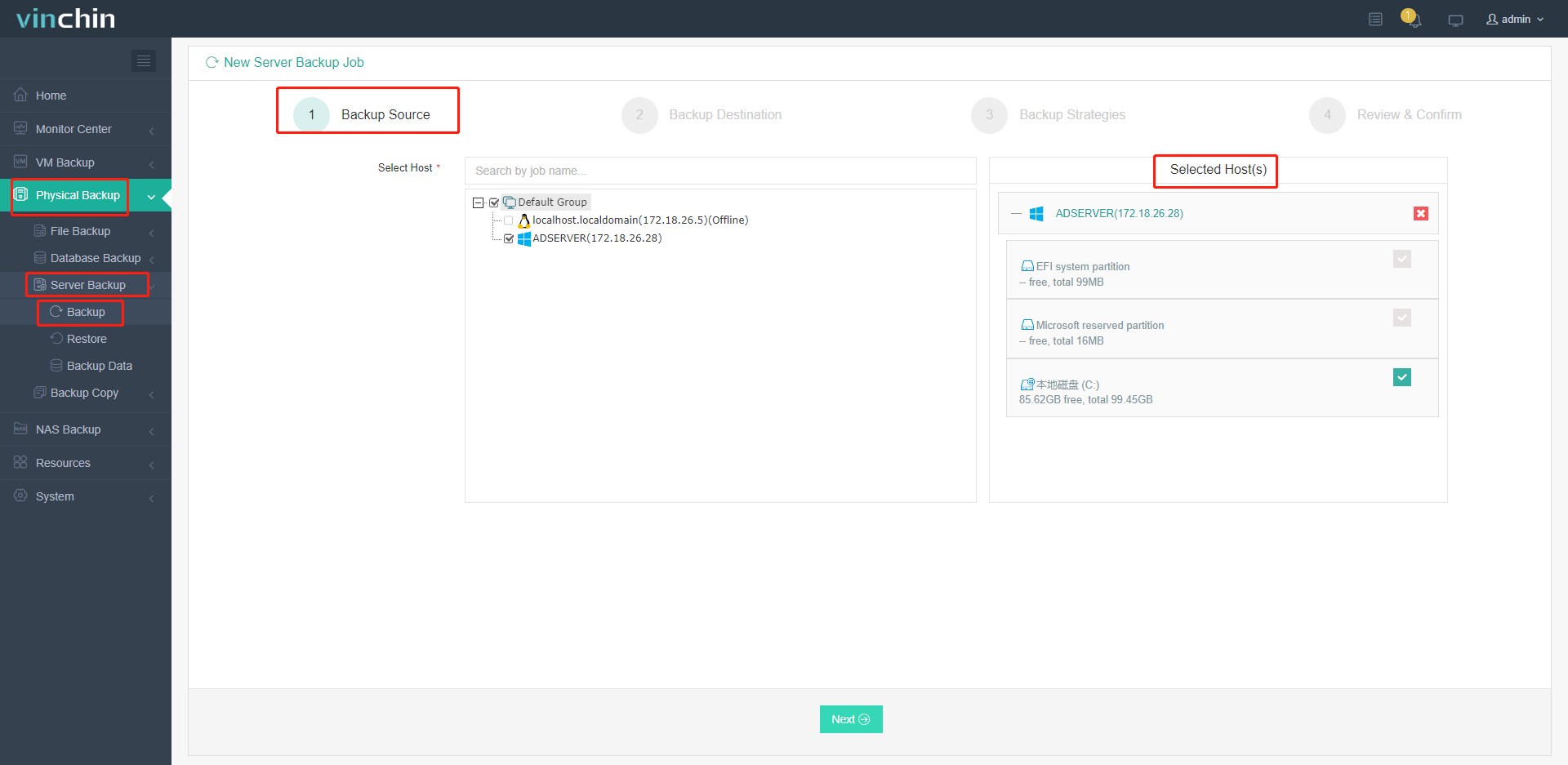
1. Go to Physical Backup > Server Backup > Backup, select the Windows server host as the backup source. Just checkmark it from the expanded list.
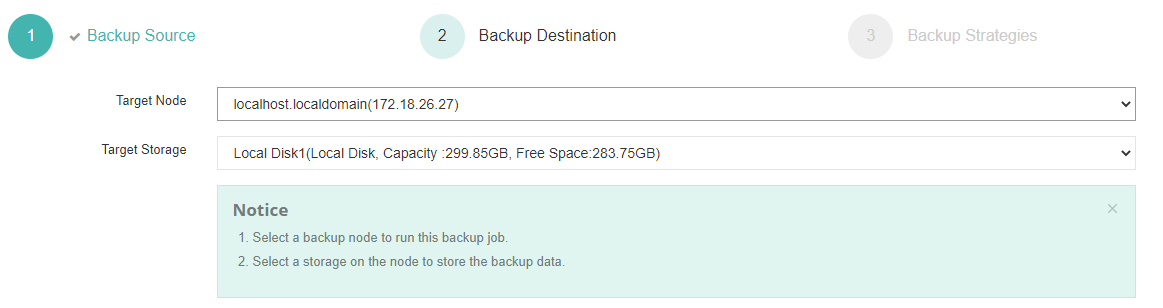
2. Choose the target node and storage device to specify the backup destination.
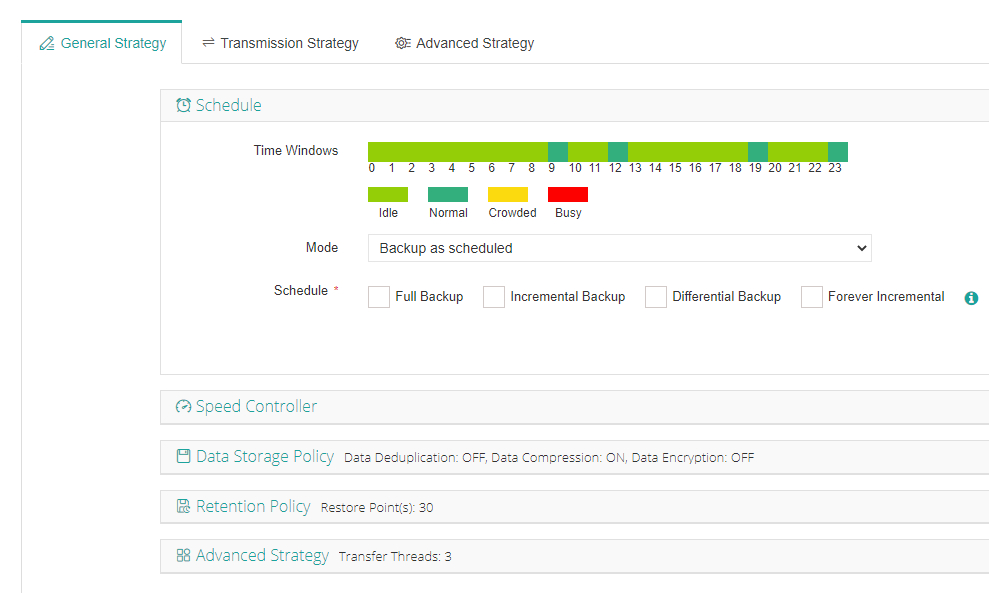
3. Customize backup strategies, run the job right away or schedule it daily, weekly, or monthly combined with incremental, full, or differential backup plans.
4.Review the backup details and click Submit to let the task begin.
Try the 60-day full featured free trail of Vinchin Backup & Recovery now. Or, you can contact Vinchin directly for more information.
Windows Server Standard vs Datacenter FAQs
Q1: Which edition is better for a cloud or hybrid environment?
Datacenter is typically better for large cloud or hybrid deployments due to its unlimited virtualization and advanced features.
Q2: Can I upgrade from Windows Server Standard to Datacenter?
Yes, you can upgrade from Standard to Datacenter through a license upgrade, without reinstalling the operating system.
Q3: Does Datacenter provide better performance than Standard?
Not necessarily. Both editions use the same Windows Server core. Datacenter's advantage lies in its advanced virtualization, storage, networking, and scalability features.
Q4: How many virtual machines can I run with Windows Server Standard?
A properly licensed Standard Edition server allows up to two virtual operating system environments (OSEs). Additional licenses are required if more virtual machines are needed.
Conclusion
Choosing between the Windows Server Standard Edition and Datacenter Edition depends on the specific needs of your organization. The Standard Edition is suitable for small to medium-sized businesses and basic network services, offering general-purpose capabilities with limitations on processor support and data handling. In contrast, the Datacenter Edition is designed for large-scale enterprise environments that require extensive data processing, scalability, and high availability, particularly suited for data warehouse operations.