Sangfor HCI is a hyper-converged infrastructure platform that combines compute, storage, networking, and virtualization into one unified system. This integration streamlines management but also means a single vulnerability can impact your entire environment. When ransomware strikes such platforms, it can spread quickly across virtual machines and shared storage pools. For organizations using Sangfor HCI, choosing the right backup tool is not just about routine data protection—it is essential for survival against modern cyber threats. A robust backup solution must deliver immutable backups that cannot be altered or deleted by attackers. It should provide air-gapped storage options to keep copies isolated from your main network. Rapid recovery features are vital so you can restore operations without delay if disaster hits. These capabilities help ensure business continuity even when facing sophisticated ransomware attacks that target both production systems and backup repositories.
Why Ransomware Protection Matters in Enterprise Environments
Ransomware attacks have evolved beyond simple file encryption—they now seek out backup files and snapshots stored within enterprise environments like Sangfor HCI. Attackers often exploit vulnerabilities in hypervisors or use compromised credentials to access management consoles and delete or encrypt backups before launching their main attack payload. This tactic leaves organizations unable to recover unless they pay a ransom.
● Business Disruption
A successful ransomware attack can halt all business operations by locking critical applications and databases hosted on your virtual infrastructure. Downtime not only leads to lost revenue but also damages customer trust.
● Data Loss Risk
If attackers manage to corrupt or erase both primary data and backups stored within the same environment, recovery becomes nearly impossible without external protected copies.
● Regulatory Compliance Pressure
Many industries must comply with strict regulations like GDPR or HIPAA that require data integrity and availability at all times. Failure to maintain accessible backups during an incident may result in hefty fines or legal action.
● Reputational Damage
Public knowledge of a breach—especially one where sensitive data is lost—can erode stakeholder confidence for years.
● Financial Impact
The cost of paying ransoms pales compared to expenses related to forensic investigations, system rebuilds, regulatory penalties, lost contracts, and increased insurance premiums.
These risks make it clear: strong ransomware protection through advanced backup strategies is not optional for enterprises running mission-critical workloads on Sangfor HCI.
How To Choose The Best Sangfor HCI Backup Solution for Ransomware Protection?
Selecting an effective backup tool for Sangfor HCI requires more than basic file copying—it demands layered security features designed specifically for today’s threat landscape. Each feature below plays a unique role in defending against ransomware:
● Immutable Storage
Immutability ensures once a backup is written it cannot be changed or deleted—even by users with administrative rights or malware with elevated privileges. This typically uses Write Once Read Many (WORM) technology at the storage layer combined with strict retention policies configured within your backup software. Implementing immutability prevents attackers from tampering with recovery points even if they gain access to your management interface.
● Air-Gapped or Isolated Backups
Air-gapping involves storing backups on systems physically disconnected from your production network—or at least logically isolated via separate VLANs with tight firewall rules. Logical isolation might mean using dedicated storage appliances unreachable from regular user accounts; physical air-gap could involve removable media rotated offsite regularly. Both methods reduce risk that malware spreading through your environment can reach protected copies.
● Encryption of Data at Rest & In Transit
Encrypting backups using strong algorithms like AES-256 ensures even if someone gains unauthorized access they cannot read sensitive information without decryption keys managed outside the compromised environment.
● Rapid Restore Capabilities
Fast recovery matters because every minute of downtime costs money—and prolonged outages increase pressure to pay ransoms. Evaluate whether the solution supports instant VM recovery (booting VMs directly from compressed backups), granular file-level restores for targeted fixes, as well as full-system rollback options so you can resume normal operations quickly after an incident.
● Comprehensive Monitoring & Alerting
Early detection of suspicious activity helps stop attacks before they escalate. Look for solutions offering real-time monitoring of backup job integrity checksums; alerts when unexpected deletions occur; audit logs tracking user actions; integration with SIEM tools; plus automated notifications sent via email/SMS/webhooks so IT teams respond fast if something goes wrong.
● Scalability & Performance Under Load
Backup solutions must scale seamlessly as your organization grows—without slowing down daily operations or extending Recovery Time Objectives (RTO) beyond acceptable limits. Check whether deduplication/compression are available; confirm support for parallel processing across multiple nodes; verify performance benchmarks under heavy load scenarios typical of large-scale virtualized environments like Sangfor HCI clusters.
By focusing on these core features—immutability through WORM technology; true air-gap isolation; robust encryption standards; rapid restore workflows; proactive monitoring/alerting integrations; scalable architecture—you build resilience against evolving ransomware tactics targeting both production workloads and their associated backups.
Vinchin Backup & Recovery: Enterprise-Class Backup Solution for Sangfor HCI
For organizations seeking comprehensive protection on Sangfor HCI, Vinchin Backup & Recovery delivers enterprise-level VM backup across over 15 mainstream virtualization platforms—including VMware, Hyper-V, Proxmox, oVirt, OLVM, RHV, XCP-ng, XenServer, OpenStack, ZStack—and notably supports Sangfor HCI environments directly. Key features include immutable storage options ensuring unalterable backups even if admin credentials are compromised; encrypted transmission/storage safeguarding sensitive data throughout its lifecycle; flexible air-gapped/offsite repository configuration for enhanced isolation against threats; granular restore capabilities enabling precise file-level recoveries alongside full VM restoration; and scheduled automated backups minimizing manual intervention while maximizing reliability—all engineered to streamline compliance and operational continuity under ransomware pressure.
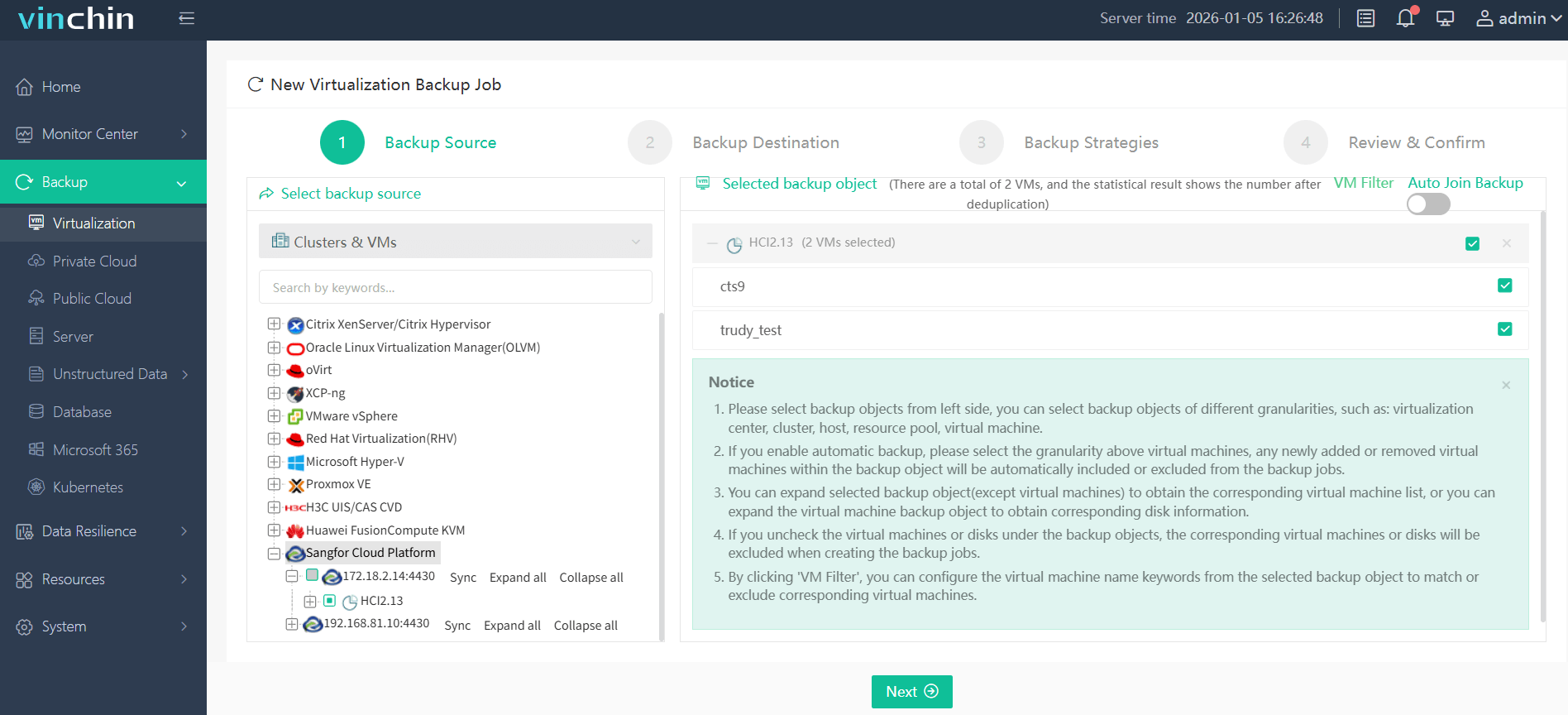
Vinchin Backup & Recovery offers an intuitive web console making setup straightforward:
Step 1: Select the Sangfor HCI VM to back up.
Step 2: Choose the desired backup storage location (local/offsite/cloud).

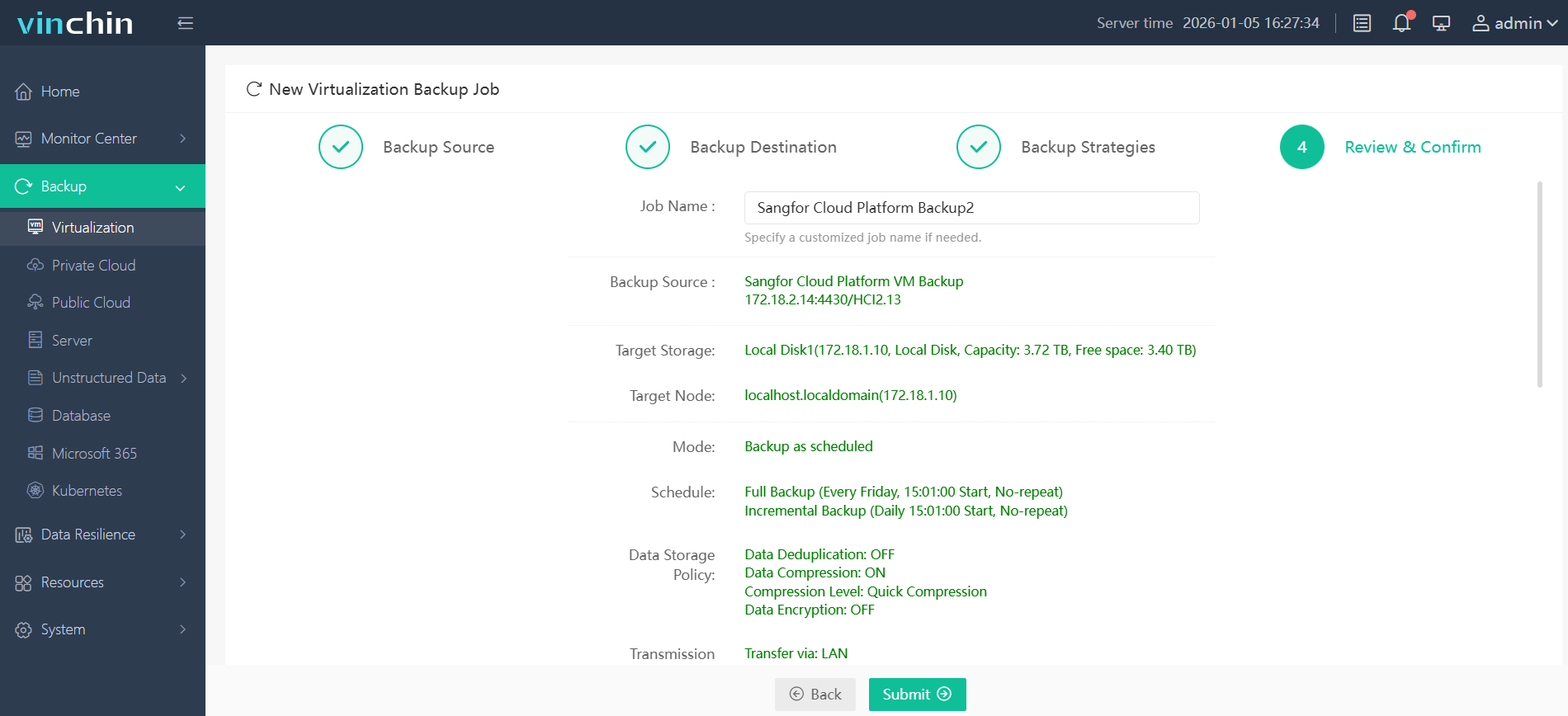
Step 3: Configure scheduling policies including retention rules and encryption settings tailored to business needs.

Step 4: Submit the job—protection begins immediately.
Trusted globally by thousands of enterprises—with top ratings for reliability—Vinchin Backup & Recovery provides a fully featured 60-day free trial so you can experience industry-leading defense firsthand before committing.
Best Sangfor HCI Backup Software FAQs
Q1: What makes a backup solution effective against ransomware on Sangfor HCI?
A1: The most effective solutions combine immutability (often via WORM technology), air-gapped storage (physical/logical isolation), strong encryption standards like AES-256 at rest/in transit, comprehensive monitoring tools that detect tampering attempts early—and rapid restore workflows supporting instant VM/file-level recovery even under pressure after an attack has occurred.
Q2: How does immutability help with ransomware resilience?
A2: Immutable backups cannot be altered or deleted by malware—even if attackers compromise admin credentials—because retention policies enforced at hardware/software levels prevent changes until expiration dates pass.
Q3: Can scalable backup solutions maintain RTO/RPO performance as data grows?
A3: Yes—solutions built around distributed architectures allow horizontal scaling across nodes/storage pools while maintaining low Recovery Time Objectives (RTO) / Recovery Point Objectives (RPO). Features like deduplication/compression optimize resource usage so growth does not degrade speed/reliability.
Q4: Is compliance maintained during ransomware incidents?
A4: Strong tools help meet requirements set by regulations such as GDPR Article 32 or HIPAA Security Rule—which mandate ongoing availability/integrity/audit trails—even during cyber events disrupting normal operations.
Conclusion
Choosing wisely protects business continuity against modern threats targeting hyper-converged platforms like Sangfor HCI. Vinchin delivers proven defense through immutable storage options plus rapid restoration—all essential safeguards when facing relentless ransomware risks.










