Encryption stands at the core of modern data protection. For organizations running Sangfor HCI environments, robust backup encryption is essential—not optional. The strongest solutions rely on end-to-end AES-256 encryption both in transit and at rest. This approach keeps sensitive business information confidential even if backups are intercepted or storage is compromised. Strong encryption supports compliance and risk management across industries.
A single breach can trigger regulatory fines, erode customer trust, and inflict lasting reputational harm. Organizations must understand why strong encryption matters so much for Sangfor HCI backups and how to select a solution that delivers enterprise-grade security without compromise.
Why Strong Encryption Matters in Enterprise Environments
Strong encryption shields backup data from cybercriminals and insider threats alike. Enterprises face constant risks—data theft, interception during transfer, or unauthorized access to stored backups can lead directly to financial loss or legal trouble.
● Backup data is a prime target for attackers
Cybercriminals often target backup files because they may contain unprotected copies of critical business information. If attackers steal unencrypted backups—whether from lost tapes or breached cloud storage—they can exfiltrate sensitive records or demand ransom payments.
● AES-256 provides proven protection
Industry-standard AES-256 encryption ensures that even if someone gains physical access to your backup files, they cannot read them without the correct key. According to NIST guidelines, AES-256 remains one of the most secure symmetric algorithms available today.
● Compliance requirements mandate encrypted backups
Many regulations—including GDPR (EU), HIPAA (US healthcare), SOX (US finance), and others—explicitly require organizations to encrypt sensitive data at rest and in transit. Failing to comply can result in steep penalties or lawsuits.
● Encryption reduces risk exposure
By encrypting all backup data before it leaves production systems—and keeping it encrypted until authorized restore—organizations minimize their attack surface. Even if a breach occurs elsewhere in your infrastructure, encrypted backups remain unreadable without keys.
In summary, strong encryption acts as your last line of defense against both external attacks and internal mishandling while supporting regulatory compliance across sectors.
How To Choose The Best Sangfor HCI Backup Solution for Strong Encryption?
Choosing a backup solution for Sangfor HCI involves more than checking off features—it requires careful evaluation of security capabilities that match enterprise needs. Here are key factors you should consider when prioritizing strong encryption:
● End-to-end AES-256 encryption at rest and in transit
Look for solutions that implement AES-256 consistently throughout the entire workflow—from initial backup transmission over networks to long-term storage on disk or cloud repositories. This dual-layer approach protects data whether moving between sites or sitting idle on servers.
● Centralized key management with audit trails
Effective key management means storing keys securely away from encrypted data itself while providing clear logs of every access attempt or change. Centralized systems simplify administration and support compliance audits by tracking who accessed which keys—and when.
● Scalability without performance loss
As workloads grow into thousands of VMs or petabytes of storage, your chosen solution must maintain high throughput—even with full-time encryption enabled. Some vendors leverage hardware acceleration (such as Intel AES-NI) to speed up cryptographic operations without bottlenecking large-scale environments.
● Compliance certifications aligned with industry standards
Solutions should provide documentation showing alignment with major frameworks like ISO/IEC 27001 or SOC 2 Type II alongside GDPR/HIPAA readiness. This helps IT teams pass audits efficiently while demonstrating due diligence to regulators.
● Automated policy enforcement and seamless integration
Features such as automated retention policies, detailed audit logging, immutable storage options (to block ransomware tampering), and native API integration streamline daily operations while reducing manual errors during setup or recovery tasks.
Selecting a solution based on these criteria ensures not just technical strength but also operational simplicity—a must-have for busy IT teams managing complex hybrid infrastructures.
Vinchin Backup & Recovery: Advanced Backup Security for Sangfor HCI
For enterprises seeking robust protection for Sangfor HCI environments, Vinchin Backup & Recovery offers an enterprise-level virtual machine backup solution supporting over 15 mainstream virtualization platforms—including VMware, Hyper-V, Proxmox, oVirt, OLVM, RHV, XCP-ng, XenServer, OpenStack, ZStack—and notably Sangfor HCI among others. With comprehensive compatibility across diverse infrastructures, Vinchin Backup & Recovery delivers advanced features tailored for demanding business needs.
Key advantages include flexible scheduling strategies ensuring timely protection cycles; efficient incremental forever-backup minimizing storage use; granular file-level restores accelerating recovery times; built-in deduplication/compression optimizing resource consumption; and robust end-to-end AES‑256 encryption safeguarding sensitive assets against unauthorized access—all designed to maximize reliability while simplifying administration.
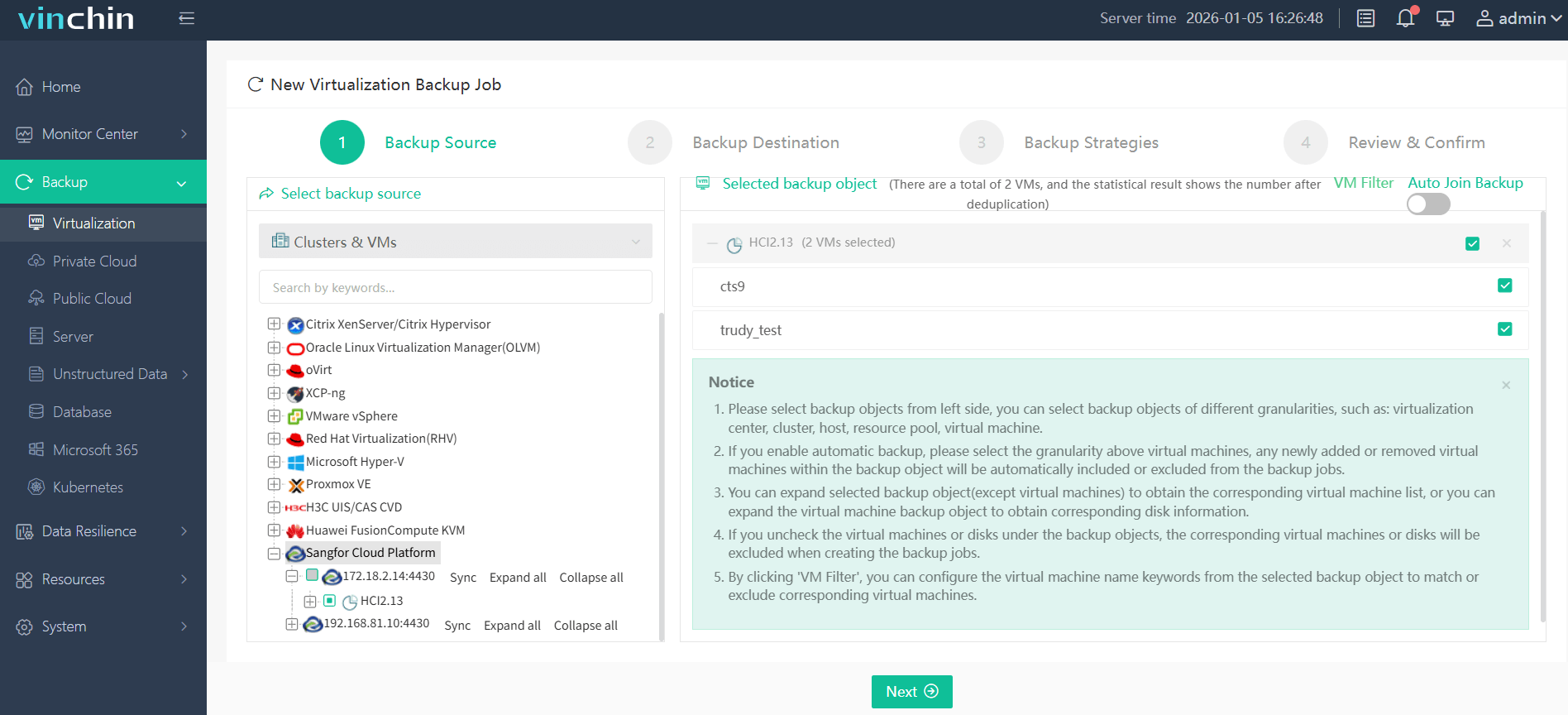
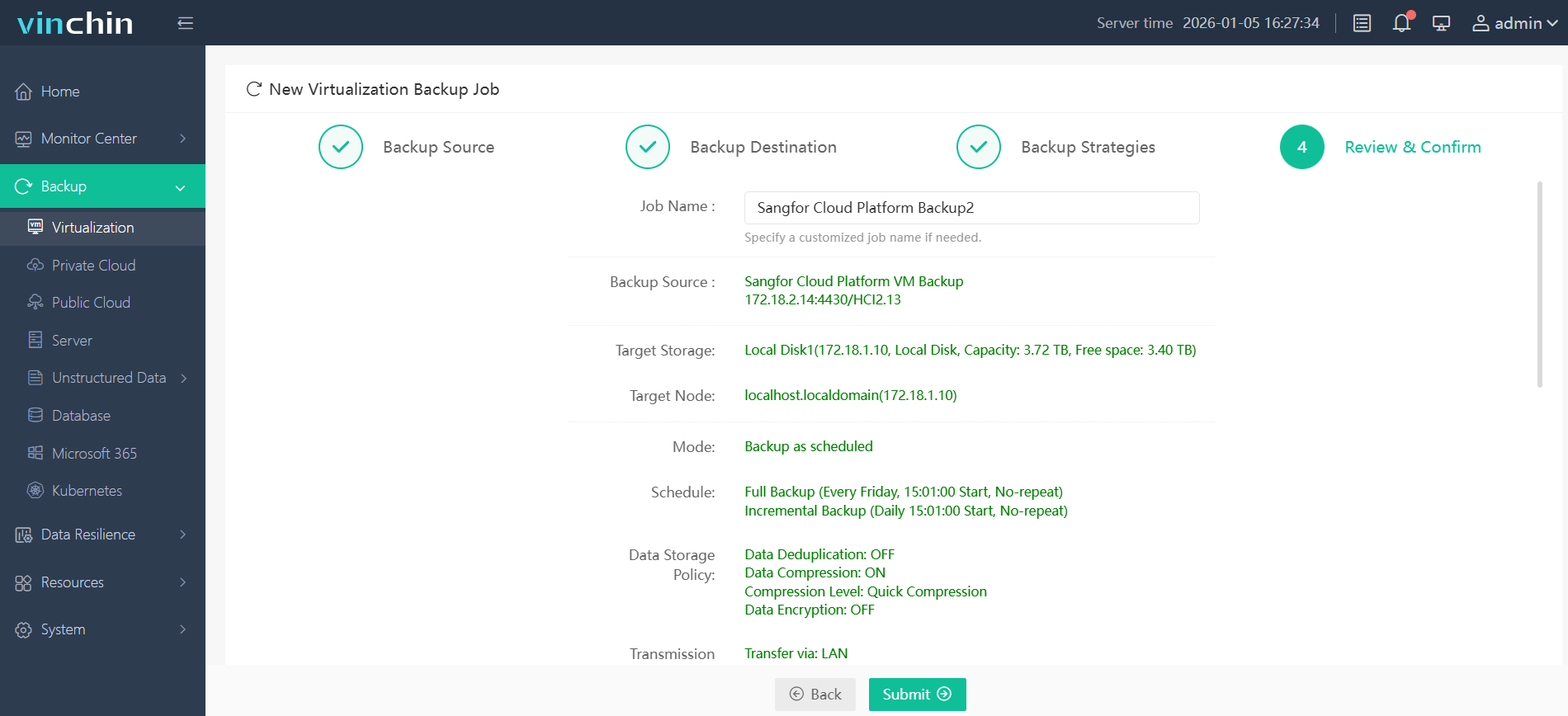
The intuitive Vinchin web console streamlines operation:
Step 1: Select the Sangfor HCI VM(s) you wish to back up;
Step 2: Choose appropriate backup storage location(s);

Step 3: Configure desired strategy including schedule/policy settings;

Step 4: Submit job for automated execution.
Recognized globally by thousands of customers with top ratings in enterprise data protection software reviews—Vinchin Backup & Recovery offers a fully featured 60-day free trial so you can experience its capabilities firsthand—click below to get started!
Best Sangfor HCI Backup Software FAQs
Q1: Does strong encryption impact backup performance?
Modern solutions like Vinchin use optimization techniques such as hardware acceleration (e.g., Intel AES-NI) that reduce processing overhead from AES-256 encryption so most workloads see minimal slowdown compared to unencrypted operations.
Q2: Is key management included in enterprise-grade solutions?
Yes; centralized key management comes standard in leading solutions like Vinchin Backup & Recovery—providing secure administration plus detailed audit trails documenting every action involving cryptographic keys for accountability during audits.
Q3: Can encrypted backups be restored without exposing sensitive data?
Absolutely; decryption occurs only during authorized restores using secured keys within controlled environments so sensitive information stays protected throughout storage/transit phases until needed by approved users/applications alone.
Q4: Are encrypted backups compliant with global regulations?
Properly configured enterprise solutions align closely with major standards such as GDPR Article 32/HIPAA Security Rule—helping organizations pass regulatory audits while avoiding costly legal penalties tied directly back toward inadequate protection measures around stored/transferred personal/business-critical datasets worldwide.
Q5: How does strong encryption handle cross-platform/cloud restores?
When restoring across platforms—or migrating between clouds—the best solutions maintain end-to-end AES-encrypted workflows throughout export/import processes; decryption happens only after successful authentication within destination environments so no plaintext ever traverses insecure channels regardless of underlying infrastructure changes/migrations involved.
Conclusion
Choose proven end-to-end encrypted backup software like Vinchin Backup & Recovery for reliable business continuity while meeting strict security requirements—protecting assets efficiently without added risk exposure across evolving hybrid infrastructures everywhere.










