Modern enterprises depend on Microsoft Hyper-V to run vital workloads. The right backup software is not just a technical tool—it safeguards business operations. Reliable Hyper-V backup ensures that data remains safe and recoverable even as environments grow larger and more complex. At scale, performance bottlenecks or unreliable restores can lead to costly downtime and compliance failures.
Selecting backup software that maximizes reliability and performance at scale means looking beyond basic functionality. Enterprises need solutions that deliver fast backups, consistent recovery results, automation, granular restore options, and seamless scalability. These features help organizations avoid disruptions while meeting regulatory requirements.
Backup reliability is essential for maintaining business continuity. According to the Ponemon Institute’s Cost of Data Breach Report, average downtime costs can reach thousands of dollars per minute for large enterprises. This makes robust backup strategies a top priority for IT leaders who want to protect their bottom line.
Why Hyper-V Backup Reliability & Performance Matters in Enterprise Environments
Reliable Hyper-V backup protects against data loss and reduces recovery time objectives (RTOs), which are critical for business continuity planning. High-performance solutions ensure backups complete quickly without straining production systems—a must when managing hundreds or thousands of virtual machines.
● Downtime Costs Are Substantial: Unplanned outages can cost businesses over $5,600 per minute according to Gartner. Failed backups or slow restores extend these outages, impacting productivity and revenue streams.
● Compliance Risks Increase: Regulatory frameworks like GDPR or HIPAA require strict data protection measures. Inadequate backup solutions may result in non-compliance fines if you cannot prove timely recoverability or retention of sensitive information.
● Business Reputation Is On The Line: Customers expect uninterrupted service availability. Extended downtime from failed restores damages trust and brand reputation—sometimes irreparably.
● Operational Complexity Grows With Scale: As environments expand across multiple sites or clouds, manual processes become error-prone. Automated, scalable backup tools reduce human error while keeping pace with infrastructure growth.
These risks highlight why enterprises must invest in reliable Hyper-V backup software that delivers both speed and consistency at scale.
How To Choose The Best Hyper-V Backup Solution for Reliability & Performance at Scale?
Choosing effective Hyper-V backup software requires evaluating several key factors that impact reliability and performance as your environment grows. Each feature below plays a crucial role in ensuring smooth operations across large-scale deployments:
Proven scalability under heavy workloads
The solution should handle hundreds or thousands of VMs without bottlenecks or degraded performance. Look for evidence such as real-world case studies from large organizations or independent reviews confirming high throughput during peak loads.
Automated scheduling and policy management
Automation minimizes manual intervention by allowing you to set up recurring jobs based on policies tailored to different workloads. This reduces errors caused by missed schedules—especially important when managing dynamic environments where VMs are frequently added or changed.
Rapid incremental backups
Efficient incremental (or forever-incremental) backups capture only changed data since the last job, reducing storage needs and minimizing impact on production systems during busy hours. This approach shortens backup windows so daily operations remain unaffected.
Comprehensive monitoring and alerting
Centralized dashboards provide visibility into all ongoing jobs across sites while proactive alerts notify administrators about issues before they escalate into disasters. Detailed logs support troubleshooting efforts when something goes wrong—critical for enterprise-scale oversight.
Flexible retention policies
Enterprises often need to retain backups for months—or even years—to meet legal requirements or internal governance standards. Customizable retention rules let you balance compliance needs with storage efficiency by applying different policies per workload type.
Seamless integration with existing infrastructure
The best solutions work smoothly alongside your current storage arrays (NAS/SAN), networking setups, authentication services (like Active Directory), and cloud platforms without requiring disruptive changes or complex reconfiguration steps.
Granular restore options
Sometimes only a single file—or specific application object—needs recovery rather than an entire VM image. Granular restore capabilities save time by targeting exactly what’s needed instead of restoring everything unnecessarily.
As your organization grows—adding new hosts, clusters, remote offices—the importance of these features increases dramatically because complexity multiplies risk if not managed proactively through robust technology choices.
Vinchin Backup & Recovery: Enterprise-Grade Protection for Hyper-V
For organizations seeking robust protection for Microsoft Hyper-V environments at scale, Vinchin Backup & Recovery stands out as an enterprise-level virtual machine backup solution supporting over 15 mainstream virtualization platforms—including VMware, Proxmox, oVirt, OLVM, RHV, XCP-ng, XenServer, OpenStack, ZStack—and notably Microsoft Hyper‑V itself among others used by modern businesses worldwide.
Vinchin Backup & Recovery offers agentless operation on Hyper‑V VMs along with advanced features such as SpeedKit acceleration technology (for rapid processing), full/incremental/forever-incremental/differential backups with deduplication/compression enabled by default; granular restore; scheduled policy-driven jobs; V2V migration; multi-thread transmission; GFS retention policy; throttling policy; encryption; cloud/tape archive support—all designed to maximize efficiency while minimizing resource usage.
Using the intuitive web console makes protecting your environment straightforward:
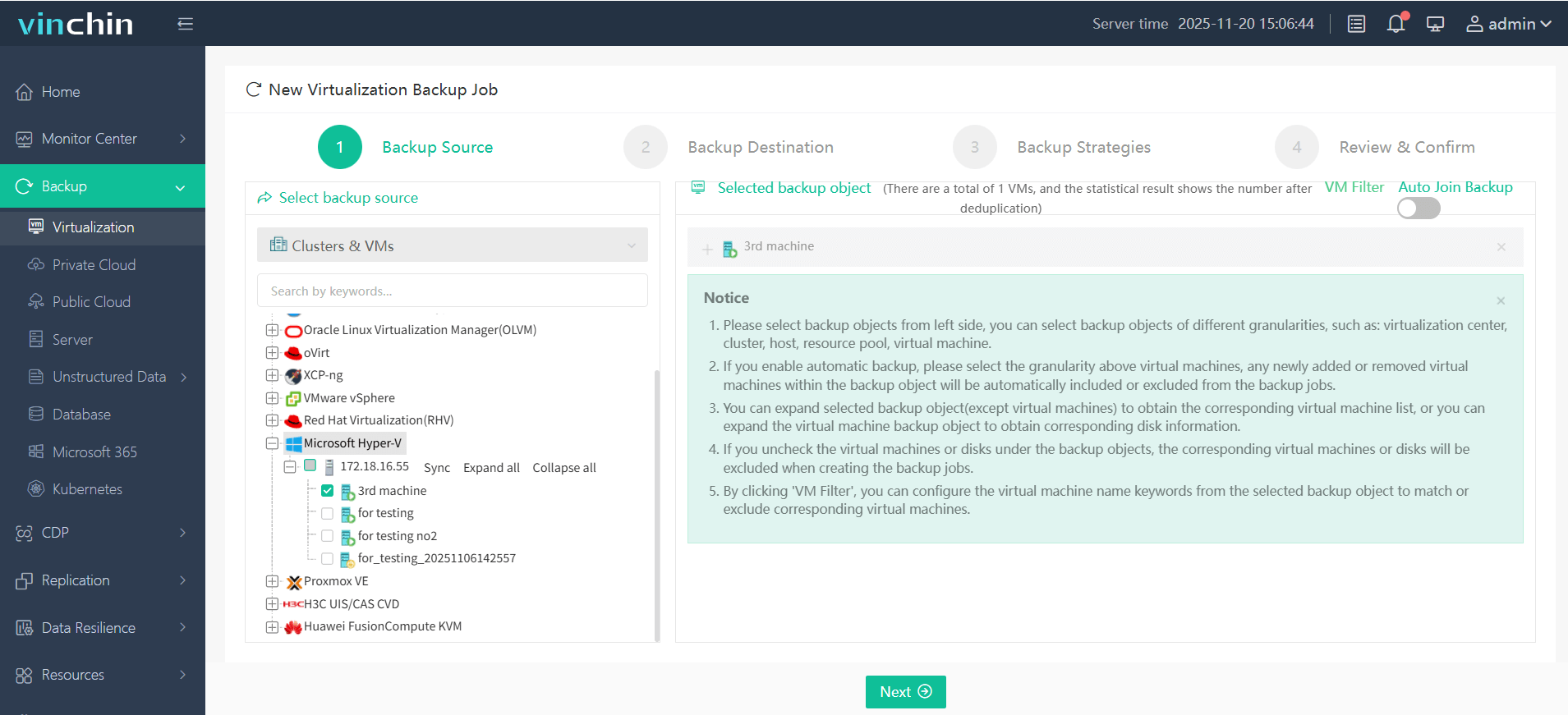
Step 1: Select the Hyper‑V VM to back up;
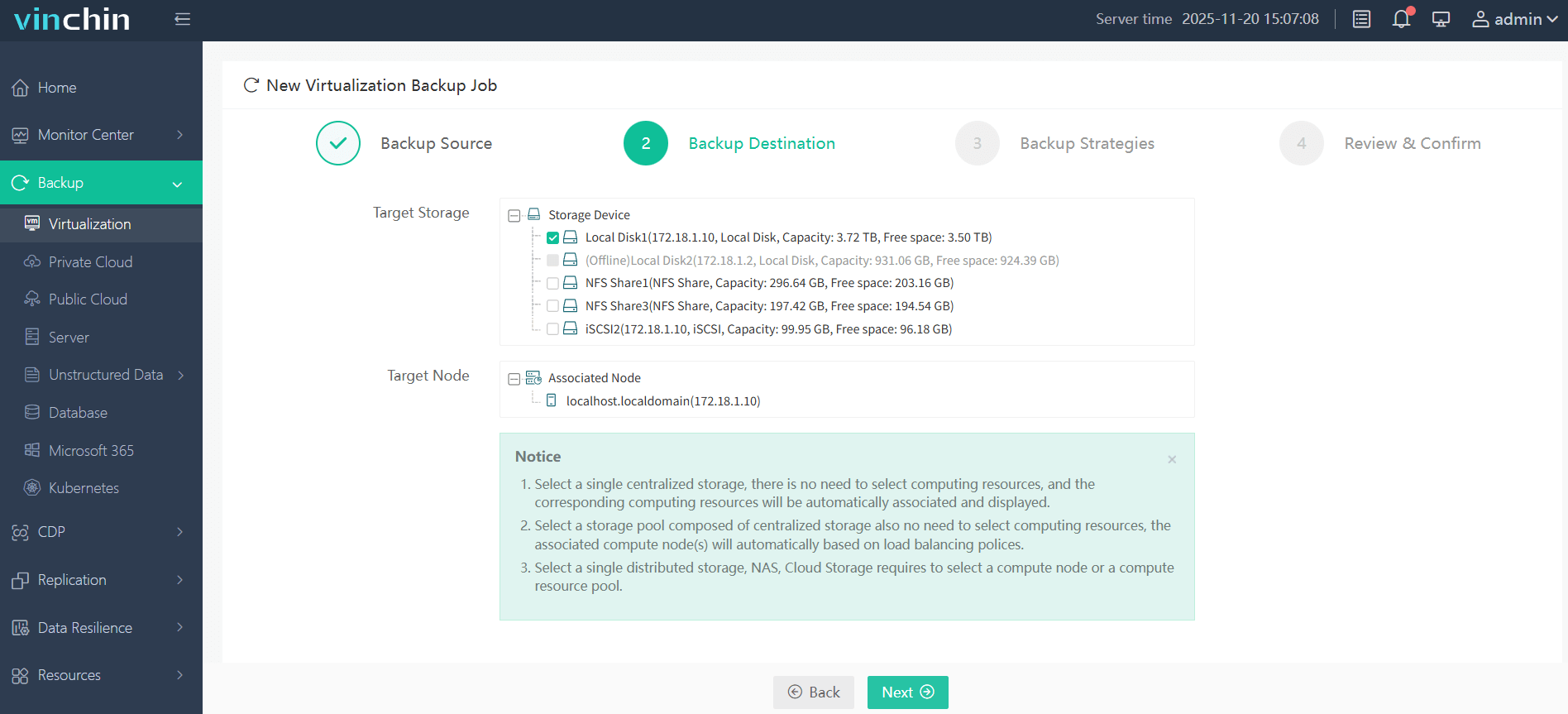
Step 2: Choose the target storage location;
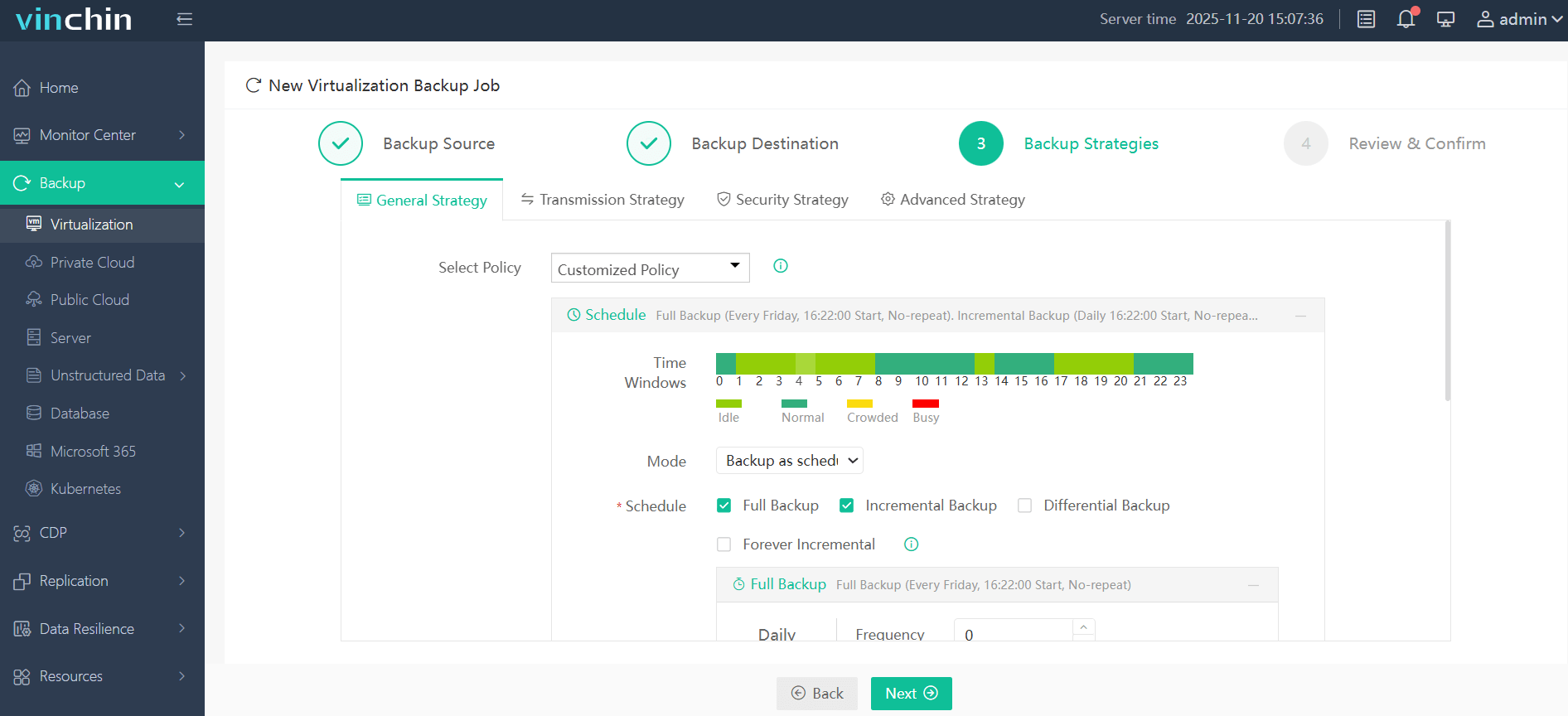
Step 3: Configure the desired strategy including schedule/frequency/retention settings;
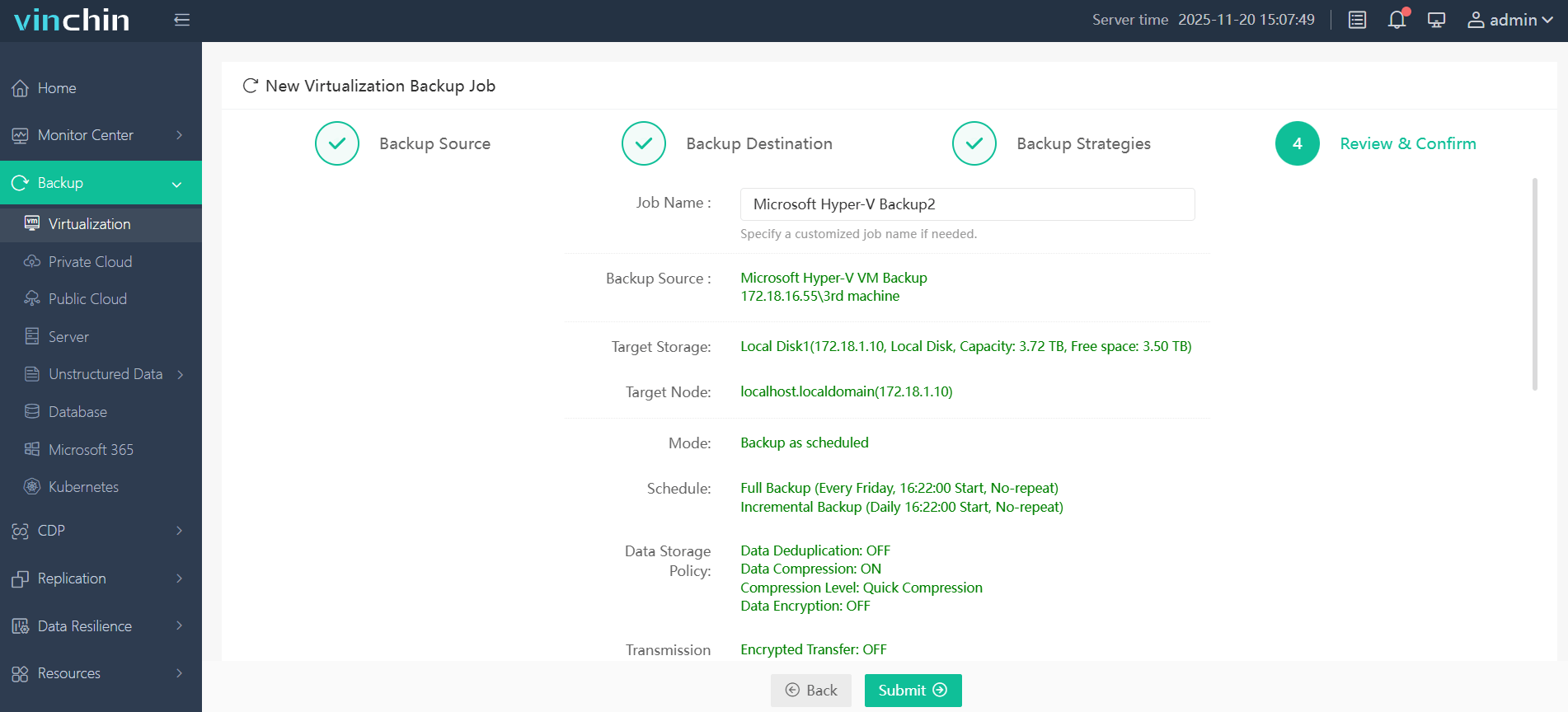
Step 4: Submit the job.
Recognized globally with strong customer adoption and top industry ratings,Vinchin Backup & Recovery offers a 60-day full-featured free trial—click below to experience enterprise-grade data protection firsthand!
Best Hyper-V Backup Software FAQs
Q1: How does enterprise-grade backup ensure reliable Hyper-V restores?
A1: It uses automated verification methods like checksums during each job cycle plus integration with Volume Shadow Copy Service (VSS) where supported by Windows Server editions. Granular recovery lets you restore individual files quickly so users experience minimal disruption after incidents occur—for example using instant VM recovery features built into modern platforms like Vinchin’s web console interface.
Q2: What risks arise from poor scalability in backup solutions?
A2: Poor scalability leads to missed scheduled jobs during periods of rapid growth—which exposes critical data sets stored on new VMs left unprotected until manual intervention occurs later on down the line; this gap increases chances of permanent loss following hardware failure events while also risking compliance violations due lack proper retention coverage across all assets under management.
Q3: Can advanced backup features impact system performance?
A3: Yes—but efficient designs use incremental snapshots combined with deduplication/compression algorithms so resource consumption stays low even as protected volumes increase over time; agentless architectures further minimize CPU/memory overhead within guest OS instances themselves which helps keep production workloads running smoothly throughout regular maintenance cycles.
Q4: Is centralized management important for large-scale deployments?
A4: Absolutely—it streamlines oversight across multi-site/multi-cluster environments via unified dashboards showing live status updates plus historical reporting metrics; this reduces administrative burden significantly compared traditional siloed approaches where each host required separate configuration steps leading higher error rates overall especially during disaster recovery scenarios involving dozens locations simultaneously restored back online after major outage event has occurred.
Conclusion
The right Hyper-V backup solution strengthens operational resilience at scale—helping prevent costly outages while supporting compliance goals through reliable automation.










