Broachcom ended perpetual VMware licensing and now sells subscription-only, per-core bundles. That turns every renewal date into a migration deadline. Most enterprises are not leaving all at once: they are sorting workloads into “stay, move, retire” groups and moving them in phases, often ending up with more than one hypervisor.
Key Takeaways
Perpetual licensing is over for new purchases. Broadcom announced on December 11, 2023 that VMware would be sold only as subscriptions or term licenses, and stopped selling support renewals for perpetual products.
Cost is driven by physical cores, with a floor. Most products consume at least 16 cores per physical CPU, so small hosts are billed for cores they do not have.
Version support and license terms are separate clocks. vSphere 7 general support ended October 2, 2025; vSphere 8 is supported until October 2027 (Broadcom VMware blog).
Evaluation is widespread; full exit is not. A Rimini Street-sponsored survey found about 90% of respondents considering alternatives, and 60% considering multiple hypervisors (CIO).
Savings only arrive when whole hosts are retired. Because licensing counts host cores, moving a few VMs off a host does not reduce the bill.
What Exactly Changed?
Four things changed: the sales model (perpetual to subscription), the portfolio (many products to a few bundles), the metric (per CPU to per core with a minimum), and the channel (fewer partners).
Change | What Broadcom did | Date/Source |
Perpetual licenses | End of sale of perpetual licenses and of SnS renewals for perpetual offerings; existing licenses remain usable under existing support terms | Dec 11, 2023 |
Portfolio | Consolidated around VMware Cloud Foundation (VCF) and vSphere Foundation (VVF) | Dec 2023 |
Metric | Primary licenses are per core; most products consume a minimum of 16 cores per physical CPU | Broadcom TechDocs |
Version 9 model | VCF and vSphere Foundation share one licensing model; licenses are assigned to vCenter instances, and connected ESX hosts are licensed automatically | Same source |
Service-provider channel | VMware Cloud Service Provider program in Europe terminated in January 2026, according to CISPE | CISPE press release |
What happens to existing perpetual licenses? They keep working, but once the support contract ends, it cannot be renewed on a perpetual basis. Staying current then means moving to a subscription (Redmond/RCPmag report).
How are VMware Licenses Counted Now?
Count the physical cores of each CPU on every ESX host, rounding down any CPU with fewer than 16 cores to 16.
Broadcom’s own documentation gives this worked example (Broadcom TechDocs):
ESX hosts | CPUs per host | Cores per CPU | Required license capacity |
1 | 1 | 8 | 16 |
2 | 2 | 8 | 64 |
2 | 2 | 16 | 64 |
2 | 2 | 24 | 96 |
Two further mechanics matter for migration planning:
Capacity is pooled per product. Multiple subscriptions for the same product are combined into a single default license, but the pool shrinks on each subscription’s end date.
Expired evaluation or missing licenses have operational impact. After a 90-day evaluation period without a license, hosts disconnect from vCenter, and you cannot start workloads; existing workloads are not proactively stopped.
Is there a 72-core minimum order?
It was widely reported, but it does not appear in Broadcom's current public documentation.
This depends on your contract and channel. Several resellers and advisers state that a 72-core minimum per order applies from April 2025. Broadcom's public licensing model page documents only the 16-core-per-CPU floor. Confirm the order minimum in writing with your Broadcom representative or partner before building a budget on either number.
Why are These Changes Reshaping Migration Plans?
The renewal is now a recurring commercial event with a real cost step, and the support lifecycle of older versions is running out at the same time.
Evidence
A survey of nearly 300 VMware users by Unisphere Research, sponsored by Rimini Street, reported that about 90% were considering alternatives and 54% cited the end of perpetual-license support as a reason (Computing). Rimini Street sells third-party support, so treat the sample as indicative, not neutral.
Customer-reported bill increases in the same coverage range from 100–300% to 1,500%. They are anecdotal and not uniform across customers.
Gartner research VP Julia Palmer predicted that VMware will lose 35% of its current workloads by 2028 and cautioned against planning to move everything, saying a full migration can take three or more years (as summarized from the Register).
Practical implication: the realistic plan is partial and phased, timed to renewal dates.
The support clocks you must track separately
Clock | What it governs | Key date |
License/subscription term | Cost, entitlement to update | Your renewal date |
vSphere 7 lifecycle | Patches and standard support | General support ended Oct 2, 2025 |
vSphere 8 lifecycle | Same | Supported until Oct 2027, with optional two-year extended support (Broadcom) |
Hardware and skills readiness | Whether a target platform can be adopted | Your refresh cycle |
Migration savings follow hosts, not VMs
Question most teams don't ask
If we migrate 30% of our VMs this year, will our VMware bill fall by 30%?
Answer
Not unless those VMs free up whole hosts and the freed cores are removed at a renewal date.
Why
Broadcom's licensing consumes capacity from ESX hosts' physical CPU cores, with a 16-core floor per CPU. It does not count VMs. Subscription capacity then pools and only reduces when a subscription ends. Three facts combine: (1) cost scales with host cores; (2) a half-empty host costs the same as a full one; (3) the licensed quantity can only change at term boundaries.
Decision value
Sequence migrations by cluster or host retirement, and finish a wave before the renewal where you intend to reduce core count. A migration that completes one month after renewal can cost a full extra term. Consolidating partially emptied hosts before migration can bring a retirement forward. Term length is a trade-off: a longer term may lock pricing and cores while a migration is still running, so quantify both against your own quote. This is analysis built from Broadcom's documented counting rules, not a published industry finding.
Which Path Should We Choose?
Choose per workload class, not per company. The table is qualitative; no pricing or performance figures are implied.
Path | Best fit | Main constraint (per vendor docs) |
Renew VCF/VVF | Estates deeply integrated with vSAN, NSX, VMware tooling; short runway | Cost and bundle scope |
Proxmox VE | Linux/Windows general-purpose VMs, cost-sensitive, KVM skills available | Import cannot handle vSAN-backed disks or encrypted VM disks; vTPM state does not migrate |
Microsoft Hyper-V/Azure Local | Windows-centric estates | Azure Migrate path to Azure Local was labeled preview in the documentation reviewed; check current status |
Red Hat OpenShift Virtualization | Teams already on Kubernetes/OpenShift | Needs compatible OpenShift versions; warm migration depends on VMware changed block tracking |
Nutanix AHV | Existing HCI users | Test migration is available before cutover; the source article does not cover rollback (Nutanix blog) |
XCP-ng/XenServer | Open-source or Xen-ecosystem users | XCP-ng warm migration needs a snapshot and does not support ESXi 6.x (XCP-ng docs) |
Public cloud and others | Case by case | Not assessed here; verify with each vendor's documentation |
Scenario recommendations
Short runway, complex SDDC (NSX, vSAN): renew for the shortest term that covers your pilot, then migrate in waves.
Mid-size, mostly stateless or Linux VMs: pilot 10–20 non-critical VMs on the target before committing.
Mixed estates: plan for two hypervisors from the start; the survey above suggests many organizations expect this.
Decision Matrix: Which Platform Fits Which Constraint?
No single option wins every row. Pick the two or three dimensions that are hard constraints for your estate, drop any option that fails them, then pilot the survivors.
Path-level matrix
Ratings are directional and relative to each other, not price quotes or benchmarks. "Backup/rollback requirement" means how much recovery preparation the path demands: higher means more preparation before cutover. All ratings are the author's editorial judgment; the evidence list under the table gives the documented facts behind each row.
Migration path | Cost impact | Migration complexity | Enterprise support maturity | VMware feature compatibility risk | Backup/rollback requirement | Best-fit scenario |
VMware VCF/VVF | High | Low | High | Low | Medium | Staying in the VMware ecosystem |
Proxmox VE | Low | Medium-High | Medium | Medium-High | High | Cost-sensitive teams with strong technical skills |
Hyper-V/Azure | Medium | Medium | High | Medium | High | Microsoft-ecosystem enterprises |
OpenShift Virtualization | Medium-high | High | High | High | High | Kubernetes and Red Hat ecosystems |
Nutanix AHV | Medium-High | Medium | High | Medium | High | Existing HCI users |
XCP-ng/XenServer | Low-Medium | Medium | Medium | Medium | High | Open-source or Xen-ecosystem users |
Evidence behind each row
VCF / VVF: cost follows physical cores with a 16-core floor per CPU, and capacity changes only at term end. Customer-reported increases are anecdotal.
Proxmox VE: the software is AGPLv3, with an optional per-node subscription. Import cannot handle vSAN-backed or encrypted disks, vTPM state does not migrate, and a failed live-import loses data written since it started, which is why the backup requirement is high.
Hyper-V / Azure Local: the Azure Migrate path needs appliances and an Azure Arc resource bridge, and was labeled preview in the version reviewed. Azure Local does not support DNS server infrastructure as a VM.
OpenShift Virtualization: the platform and OpenShift Virtualization must be installed first; the toolkit needs VMware's VDDK, and warm migration needs CBT.
Nutanix AHV: Nutanix's article on Move 3.5 lists ESXi as a source and AHV as a target. It describes a test migration that leaves the source untouched, while cutover powers off the source VM and disables its NIC. It does not cover rollback, so recovery planning stays with you. Check the current Move version before relying on this.
XCP-ng: Xen Orchestra's warm V2V migration reads disks from the ESXi API and needs at least one snapshot; ESXi 6.x and raw disks are not supported, and VMware tools must be removed first.
XenServer: Conversion Manager is a free, appliance-based tool run from XenCenter that converts VMs in groups of 10. The article reviewed does not document downtime or host load (XenServer blog).
Dimension Detail for Four Platforms
The link beside each cell shows the vendor document the reasoning rests on. A cell marked judgment is analysis without a direct source, and not assessed means this article did not review that vendor's documentation for the row. Public cloud is not assessed.
Dimension | Renew VCF/VVF | Proxmox VE | Hyper-V/Azure Local | OpenShift Virtualization |
Cost controllability | Lower Per-core subscription with a 16-core floor per CPU; licensed capacity only changes at term end. | Higher Software is AGPLv3 and free; an optional per-node subscription adds the enterprise repository and support. | Depends Turns on your Windows Server and Azure licensing; get a quote. | Depends Turns on Red Hat subscription terms; get a quote. |
Migration complexity | Lowest No platform move, but the renewal itself needs negotiation and a core count. | Moderate to high Built-in ESXi import wizard and live-import; VirtIO drivers and snapshot clean-up add work. | Moderate Azure Migrate path needs source and target appliances and an Azure Arc resource bridge; labeled preview in the version reviewed. | Higher OpenShift and OpenShift Virtualization must exist first; the toolkit needs VMware's VDDK, and warm migration needs CBT. |
VMware feature compatibility | Full Native; vSAN, NSX, and vSphere tooling stay as they are. | Partial vSAN-backed and encrypted disks cannot be imported until remediated; vTPM state does not migrate. | Check per workload Inventory vSAN, NSX, and encryption use before choosing. | Partial Guest OS must be certified for OpenShift Virtualization. |
Windows workload fit | Strong Incumbent platform. | Good with prep Windows boot disks need VirtIO drivers, or must be attached as IDE/SATA first. | Strong, with exceptions Microsoft-native, but Azure Local does not support running DNS server infrastructure as a VM. | Depends Each guest OS must be certified and supported. |
Linux workload fit | Strong Incumbent platform. | Strong Linux guests may need VirtIO drivers added to the initramfs before migration. | Check per workload | Depends Certified guest OS only; release notes mention installing the QEMU guest agent after migration. |
Kubernetes readiness | Included in VCF VCF 9 documentation covers a vSphere Kubernetes Service; bundle scope applies. | Limited The guide describes VMs and LXC containers; Kubernetes would run in guest VMs. | Check | Strongest VMs run on OpenShift, and the migration toolkit is an OpenShift operator. |
Backup and rollback maturity | Broad ecosystem Long-established third-party backup support. | Good vzdump and Proxmox Backup Server give deduplication, incremental backups of running VMs, and live restore. | Check | Check |
Skill requirement | Existing vSphere skills Version 9 adds a VCF Operations licensing workflow. | Linux and KVM Clusters, Corosync networking, Ceph or ZFS storage. | Windows Server and Azure Azure Arc and Azure Migrate for the Azure Local path. | Kubernetes operations Installed and managed as an OpenShift operator. |
Best-fit organization | Large estates with deep vSAN or NSX dependence and a short runway, able to budget the subscription. | Mid-size, cost-sensitive teams with Linux and KVM skills and mostly general-purpose VMs. | Windows-centric organizations already on Microsoft licensing or Azure. | Organizations already standardizing on Kubernetes or OpenShift. |
How to read it
If cost timing is the constraint, weigh cost controllability and migration complexity together with Insight 1: the cheapest target still costs a full extra term if the wave lands after the renewal.
If workloads are tightly coupled to VMware, weigh feature compatibility first (see Insight 2) and consider renewing VCF or VVF for those clusters only.
If rollback is the worry, take a backup before cutover on every option, and keep the source VM powered off, not deleted, until validation passes.
VMware Migration with Vinchin
Use Vinchin Backup & Recovery to migrate VMware to another hypervisor; you just need a few simple steps:
Tip: Make sure you have already backed up your VMware in Vinchin.
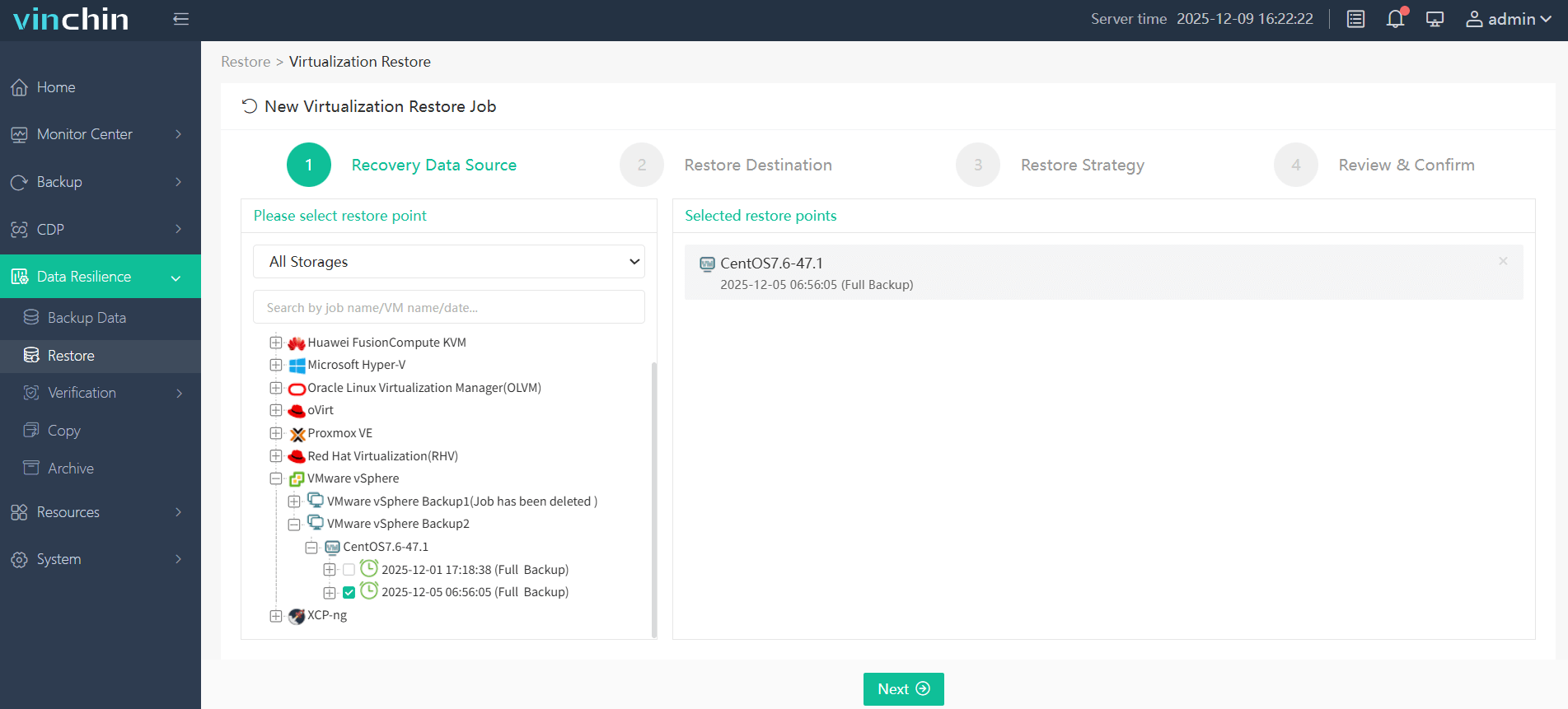
Step 1. Go to Resilience > Restore and choose VMware VM as the recovery data source.
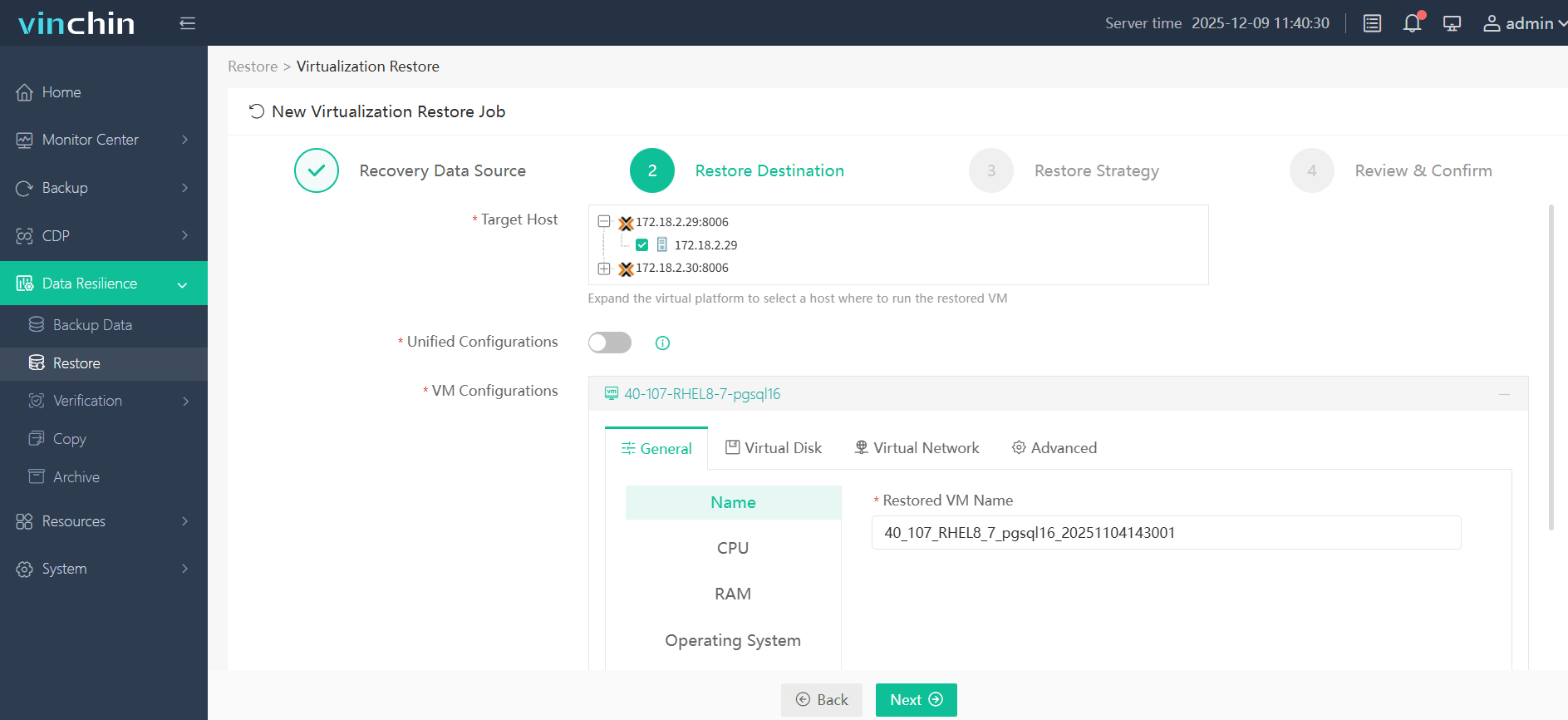
Step 2. Select the hypervisor you need to migrate to. Here I take Proxmox as an example.
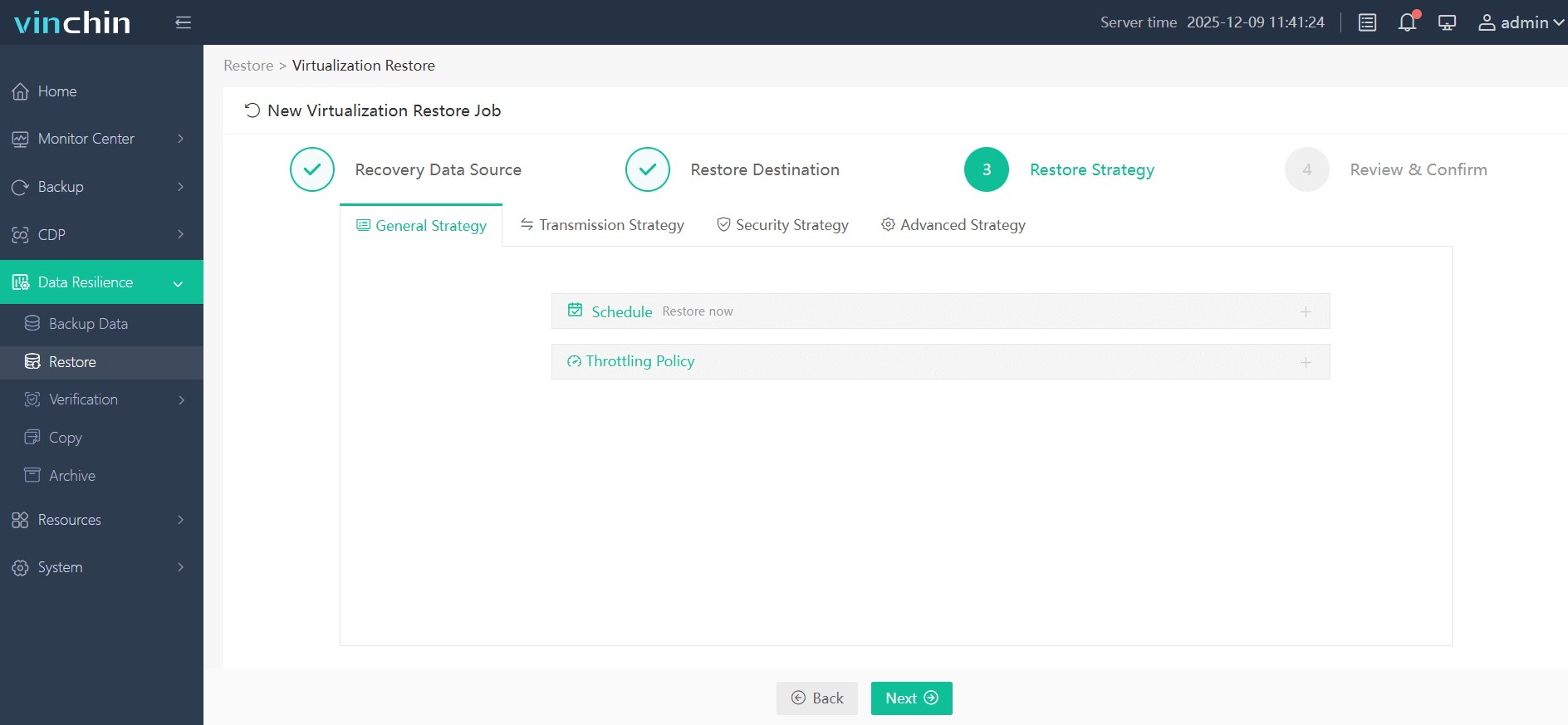
Step 3. Configure the restore strategies you desire.
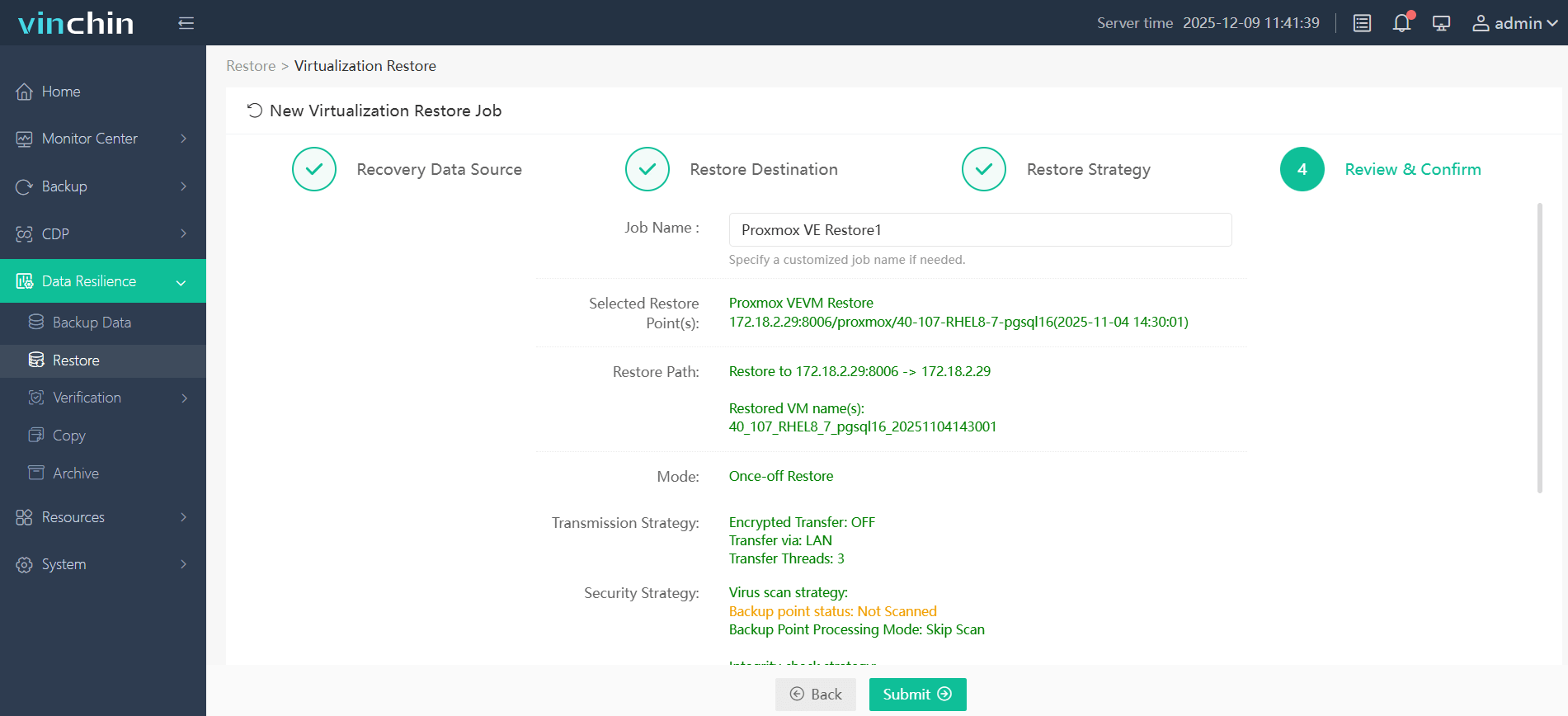
Step 4. Review and confirm the set is correct, then click Submit.
How Vinchin Differs from Native Import Tools
Native tools read a live VMware environment and write straight to one target. Vinchin restores from a stored backup, which adds a backup step but leaves a recoverable copy independent of the source.
FAQs
Q1: Does using VMware after perpetual support expires stop my VMs?
No. Licensed software keeps running; you lose support and updates. Evaluation-mode expiry on version 9 is different: it blocks creating or starting workloads.
Q2: Can I mix VCF and vSphere Foundation cores to hit a minimum?
Capacity pooling requires the same product, unit, and site ID. Whether any order minimum applies is a contract question.
Q3: Is moving to the cloud a licensing escape?
Not automatically. Broadcom requires customers to buy direct and use license portability for VMware infrastructure hosted in hyperscale clouds, as summarized in the Gartner coverage above.
Q4: Do I need to install an agent inside each VMware VM?
Vinchin's tutorial describes backing up VMware VMs agentlessly after the host or vCenter is added. Application-level consistency options may have their own requirements, which the pages reviewed do not detail.
Q5: Can I migrate a VM that has snapshots?
On Proxmox, yes, but slower; consolidating first is advisable.
Conclusion
Broadcom's changes did not make migration mandatory; they made delay measurable. Plan around hosts, not VMs, and around renewal dates, not project enthusiasm. Pilot early, find VMware-coupled workloads before choosing a target, and keep a recoverable backup throughout. Many estates will end up running two platforms by design.