What Is a VM Migration Readiness Checklist?
A VM migration readiness checklist is a structured set of checks that confirms, before the first virtual machine moves, that the inventory, compatibility, data, network, security, backup and people involved are ready. It answers one question: can this VM migration start with acceptable risk?
Enterprises use it for hypervisor changes, cloud moves and data center relocations. It matters most in large VMware migration projects, where hundreds of VMs, shared storage and licensing dependencies can hide problems until cutover day. This guide explains what the checklist is, gives a seven-area VM migration checklist with VMware examples, and shows how to turn it into a go or no-go decision.
Where Readiness Fits in the VM Migration Lifecycle
Most VM migration projects move through six phases: discover, assess, prepare, pilot, cutover and validate. The readiness checklist sits at the end of preparation. Everything before it gathers facts. Everything after it moves production workloads, so this is the last cheap place to stop.
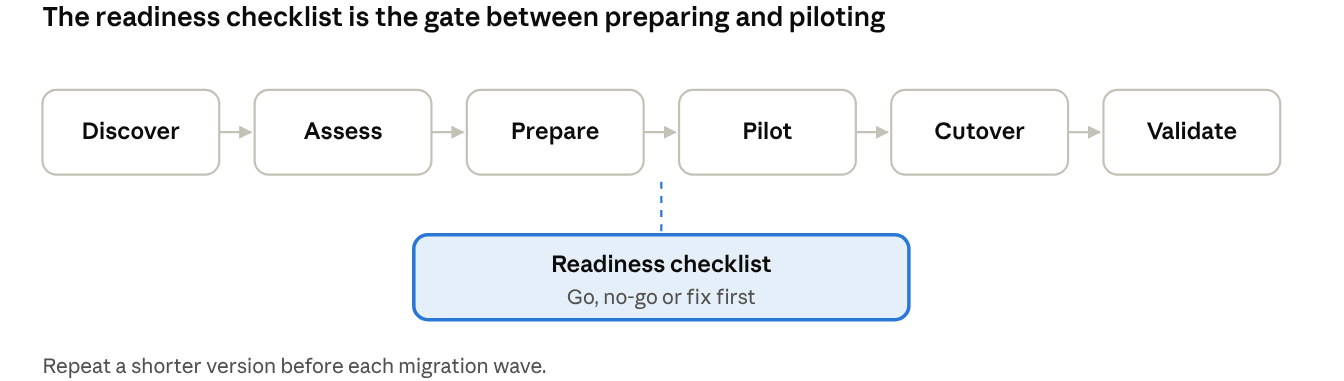
VM migration lifecycle: 6 phases & 1 readiness gate
The gate is a decision point, not a phase of work. If the answer is no-go, the team returns to assessment or preparation with a short list of named gaps.
The VM Migration Checklist: Seven Areas to Confirm Before You Move
The examples below use a VMware migration out to another platform, but the same seven areas apply to any VM migration.
1. Inventory and Dependencies
List every VM, its owner, business criticality and allowed downtime.
Map dependencies between VMs, databases, storage and external services, so related VMs move in the same wave.
Flag VMs that should be retired or consolidated rather than migrated.
2. Compatibility
Confirm the guest OS is supported on the target platform. For example, Microsoft publishes a support matrix for VMware VM migration to Azure that lists supported systems and limits.
Check firmware (BIOS or UEFI) and boot disk layout, because a mismatch can leave a converted VM unable to boot.
Look for features that do not travel well: raw device mappings or passthrough disks, shared or independent disks, encrypted disks, existing snapshots and hardware-bound licenses.
Check guest tools and drivers. VMware Tools usually needs to be replaced by the target platform's guest tools.
3. Data and Migration Method
Choose a method per VM: cold (power off and move), warm (sync, then a short cutover) or live.
Estimate data size, daily change rate and available bandwidth, then compare them with the cutover window.
Set a recovery point and recovery time target for the move itself, not only for normal operations.
Live migration is not the same as cross-hypervisor migration. Live migration, such as VMware vMotion or Hyper-V Live Migration, moves a running VM between hosts of the same platform. Microsoft describes Hyper-V live migration as moving running VMs between Hyper-V hosts, and vMotion works the same way inside VMware. Even within one platform, CPU compatibility can block a move, so cold migration is the usual fallback. Moving from VMware to a different hypervisor needs a V2V conversion, a backup-and-restore method or a vendor migration tool. If you want a refresher on how vMotion works, see this explanation of VMware vMotion.
4. Network and Identity
Decide whether IP addresses, VLANs and DNS names stay the same or change.
Lower DNS TTL values ahead of cutover so name changes propagate quickly.
Review firewall rules, load balancers, certificates and any service tied to a MAC address.
Confirm directory, license and monitoring agents will still work after the move.
5. Security and Compliance
Define who may access source and target environments during the project, and remove temporary access afterwards.
Check that data stays encrypted in transit and that regulated data stays in an approved location.
Record the approvals your compliance team requires before production data moves.
6. Backup and Rollback
Take a backup of every VM before migration, and test that it restores.
Keep the source VM intact until validation is signed off.
Write down the rollback trigger and the steps. If nobody can say what makes the team roll back, the plan is not ready.
Plan to set up backup jobs on the target platform before the first production VM goes live there.
7. People and Process
Name an owner for each wave, a cutover lead and an approver for go or no-go.
Confirm the team knows the target platform, or has training or vendor support lined up.
Agree on a communication plan and a freeze period for changes on migrating VMs.
VM Migration Checklist at a Glance
Use this table as a one-page version for reviews. Each row names the question that must have an answer before the pilot.
| Area | Key question | Evidence to collect | VMware migration example |
|---|
| Inventory and dependencies | Do we know what moves, and in what order? | VM list, owners, dependency map | Group VMs that share a database into one wave |
| Compatibility | Will each VM boot and run on the target? | OS, firmware, disk and tools review | Flag RDM disks, UEFI VMs and VMware Tools dependencies |
| Data and method | Does the data fit the cutover window? | Data size, change rate, bandwidth | Choose cold, warm or V2V conversion per VM |
| Network and identity | Will users and services still find the VM? | IP, DNS, VLAN, firewall and certificate plan | Lower DNS TTL before cutover |
| Security and compliance | Is access controlled and approved? | Access list, encryption check, sign-offs | Remove temporary vCenter access after the project |
| Backup and rollback | Can we go back if cutover fails? | Tested restore, rollback trigger and steps | Keep the source VM until validation ends |
| People and process | Who decides, and who does what? | Wave owners, runbook, approver | Name a go or no-go approver per wave |
How to Score the Checklist and Decide Go or No-Go
A checklist without a decision rule gets ticked and ignored. Score each of the seven areas with a simple red, amber or green rating:
| Rating | Meaning | Action |
|---|
| Green | Evidence is complete and the owner has signed off | Proceed |
| Amber | A gap exists, but it has a named owner, a fix and a date | Proceed only if the gap does not affect the pilot |
| Red | A gap is unowned, unknown or blocks migration or rollback | No-go until fixed |
Two rules keep the scoring honest. First, backup and rollback cannot be amber for a production wave: either a restore has been tested or it has not. Second, the approver should not be the person who did the assessment, so that the decision has a second pair of eyes.
Common Readiness Gaps in Enterprise VM Migration
These gaps appear often when teams start a VMware migration or any large VM migration:
Assuming live migration will cover the move. It works inside one platform. A change of hypervisor needs a different method.
Counting on a backup that was never restored. A backup job that reports success is not proof of recovery.
Missing hidden dependencies. A VM moves cleanly, but the license server, batch job or firewall rule it relied on does not.
Ignoring special disks. Passthrough, shared or encrypted disks often need manual handling.
Leaving the target unprotected. The VM runs on the new platform for weeks without a backup job.
No owner for the go or no-go call. Everyone assumes someone else approved the cutover.
How Vinchin Supports VM Migration and Migration Backup
Vinchin Backup & Recovery is a backup product, and it can also take part in a VM migration. It helps in three ways.
Migrate VMs with Vinchin
You can use Vinchin to migrate VMs. Because it works from backups, the migration starts from a restorable copy of the source VM rather than from the production VM itself. The source stays untouched until you are ready to cut over. See Vinchin's guide to three ways to realize V2V migration.
Cross-Platform Migration
Vinchin supports cross-platform recovery, so a VM backed up on one platform can be restored on another, such as from VMware to Hyper-V. This fits a VMware migration where the target is a different hypervisor, which live migration cannot cover. Vinchin describes the process in its cross-platform recovery feature page and in a step-by-step tutorial for migrating a VM from VMware to Hyper-V. Check the supported platform list for your exact source and target before planning.
Back Up Before and After Migration
Backup covers both ends of the checklist. Before the move, a verified backup gives you the rollback point that area 6 requires. After the move, adding the VM to a backup job on the new platform closes the gap where migrated VMs run unprotected. Vinchin's 3-2-1 backup rule guide is a good baseline for those jobs.
Ready to test your VM migration plan? Start a 60-day free trial of Vinchin Backup & Recovery and verify your rollback backup before cutover.
FAQ
Q1: What high-risk items should the checklist cover first?
A1: Application dependencies, boot compatibility, cutover window limits and rollback readiness are top priorities. Missed dependencies often break migration waves.
Q2: What compatibility checks must be included for VMware VM migration?
A2: It validates RDM disks, UEFI firmware, VMware Tools and OS support on the target platform. These items commonly cause boot failures.
Q3: Why is network and identity validation a mandatory checklist section?
A3: Incorrect DNS, VLAN or firewall rules can make migrated VMs unreachable even if they boot normally. Certificate planning must also be reviewed in advance.
Q4: Should the checklist be reused for every enterprise VM migration?
A4: Use it as a baseline template, then adjust for hypervisor, compliance and workload differences. One static checklist cannot fit all migration scenarios.
Conclusion
A VM migration readiness checklist turns "we think we are ready" into evidence. Check the seven areas, score them, and let one named approver decide go or no-go. Remember that live migration stays within a platform, so a VMware migration to a new hypervisor needs a planned method and a tested rollback. Start with a pilot wave, and add backup before and after each move.