The Trends of Virtual Machine Migration
Virtualization technology is a core component of modern IT infrastructure, allowing businesses to run multiple virtual machines on a single physical server, thereby improving resource utilization and flexibility. As an industry leader, VMware has long been synonymous with providing advanced virtualization solutions, with products like VMware vSphere helping countless small and medium-sized enterprises (SMEs) simplify their IT operations, reduce costs, and provide scalable virtual environments.
Recently, with Broadcom's acquisition of VMware and the push for a shift from licensing models to subscription and core-based billing, many SMEs find themselves needing to reassess their virtualization platforms. This change could mean increased costs for some businesses and a reconsideration of licensing strategies.
As a result, these enterprises have begun exploring new options on the market to find solutions that better fit their financial and technical requirements. These new options include open-source virtualization platforms like KVM or other commercial solutions such as Microsoft Hyper-V, which offer more flexible or cost-effective alternatives, leading to a wave of users migrating away from VMware's ecosystem.
What Is V2V Converter and Why Is It Important??
A V2V converter is a tool or service that is used to convert a virtual machine from one format or hypervisor to another. Hypervisors are the software, firmware, or hardware that create and run virtual machines.
Different hypervisors have their own proprietary formats for VMs, so when you need to move a VM from one environment to another—for example, from VMware to Hyper-V or from Citrix XenServer to KVM—you need a way to convert the VM to the format required by the target hypervisor.
V2V converters handle the complex process of translating the VM’s configuration files, disk files, and other associated data from the source format to the target format. This process includes:
Converting the virtual disk file (e.g., from VMDK in VMware to VHD/VHDX in Hyper-V).
Adjusting configuration settings to match the capabilities and requirements of the target hypervisor.
Ensuring that the virtual hardware presented to the VM is compatible with the target environment
As we all known, manually migrating large numbers of virtual machines is both time-consuming and insecure, you require a viable method to migrate existing virtual machines to the new environment. Just read on and find the best V2V converter for your needs.
5 Most Commonly Used V2V Converters
Currently, the common practice is to migrate VMware to other virtualization platforms such as Microsoft Hyper-V, Proxmox VE, XenServer or OLVM. So, we introduce 5 useful V2V migration tools with its own unique features and benefits.
VMware to Hyper-V
1. Microsoft Virtual Machine Converter (MVMC): This free tool provided by Microsoft can convert VMware host and virtual hard disk files (VMDK) to Hyper-V compatible format (VHDX). MVMC supports a command line interface, which allows it to be integrated into scripts to automate batch conversion tasks.
2. System Center Virtual Machine Manager (SCVMM): SCVMM is a comprehensive management solution that not only supports Hyper-V, but also supports the management of VMware and XenServer. During the migration process from VMware to Hyper-V, SCVMM can provide an integrated migration path, simplify the migration process through a graphical interface, and make it easier to manage multiple virtualization platforms.
VMware to Proxmox
qemu-img tool: It is part of the QEMU virtualization package and is a very powerful tool for creating, converting and managing virtual disk images. It supports a variety of disk image formats, including VMDK, QCOW2, and VHD or VHDX. With it, you can easily convert VMware's VMDK files to QCOW2 or other formats used by Proxmox VE.
VMware to XenServer
XenServer Conversion Manager: It’s a tool designed to simplify the process of converting and migrating virtual machines to the Citrix Hypervisor environment, which can convert VMware virtual machines into Citrix Hypervisor-compatible formats, simplifying migration from VMware to Citrix XenServer.
VMware to OLVM
Virt-v2v: This is a powerful conversion tool that can process virtual machines from VMware and convert them to oVirt or Oracle Linux Virtualization Manager (OLVM) supported formats. It handles complex transformations including network and storage configuration, and is often used with the libguestfs toolset to manage and modify virtual machine disk images.
VMware to Multiple Virtualization Platforms
Vinchin Backup & Recovery: It supportis V2V migration on multiple virtualization platforms, including VMware, Hyper-V, Citrix XenServer, Proxmox, Red Hat Virtualization, Oracle Linux Virtualization Manager, etc., up to 10+ mainstream platforms, while many other converters support just 2 or 3 platforms.
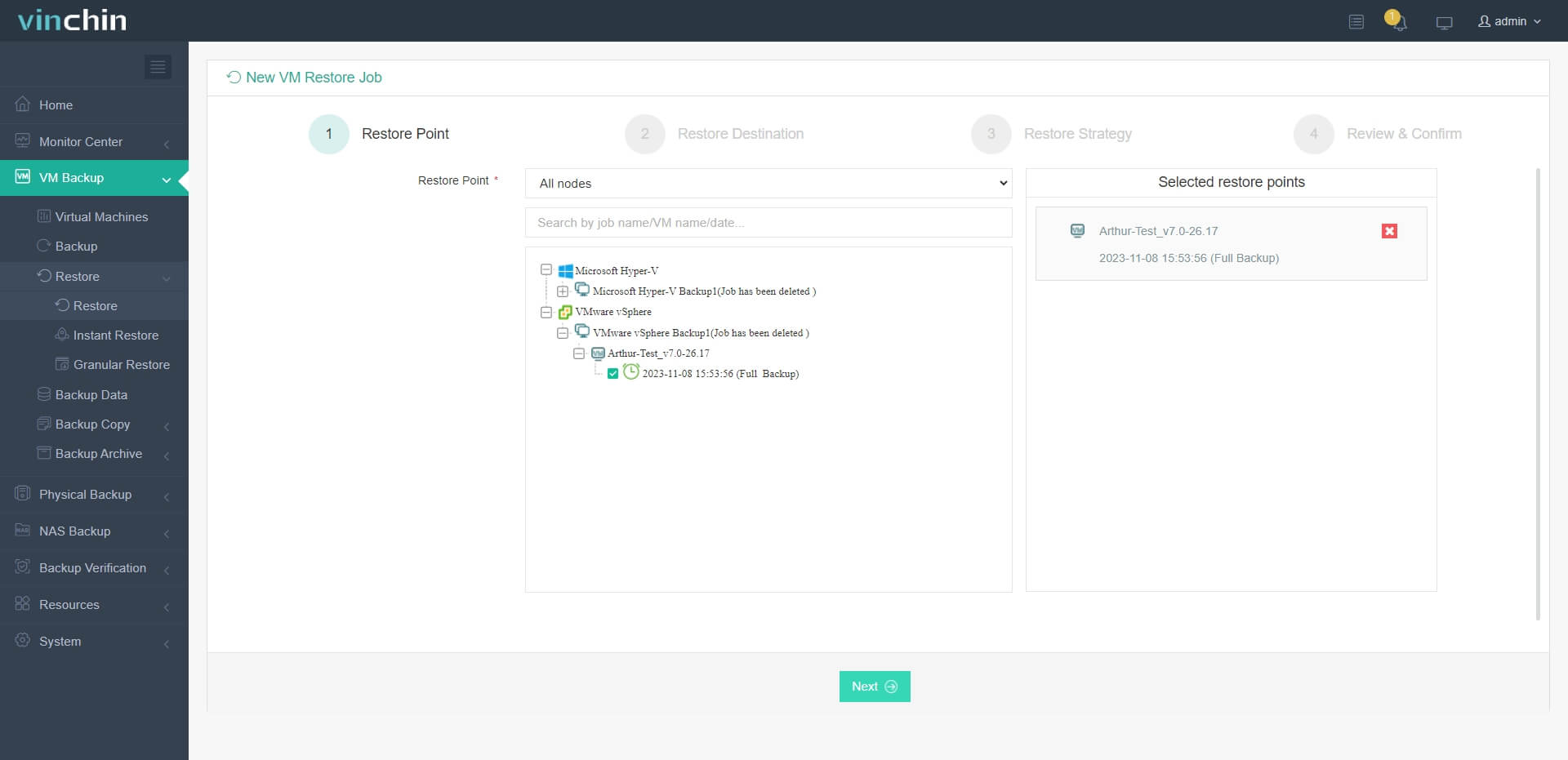
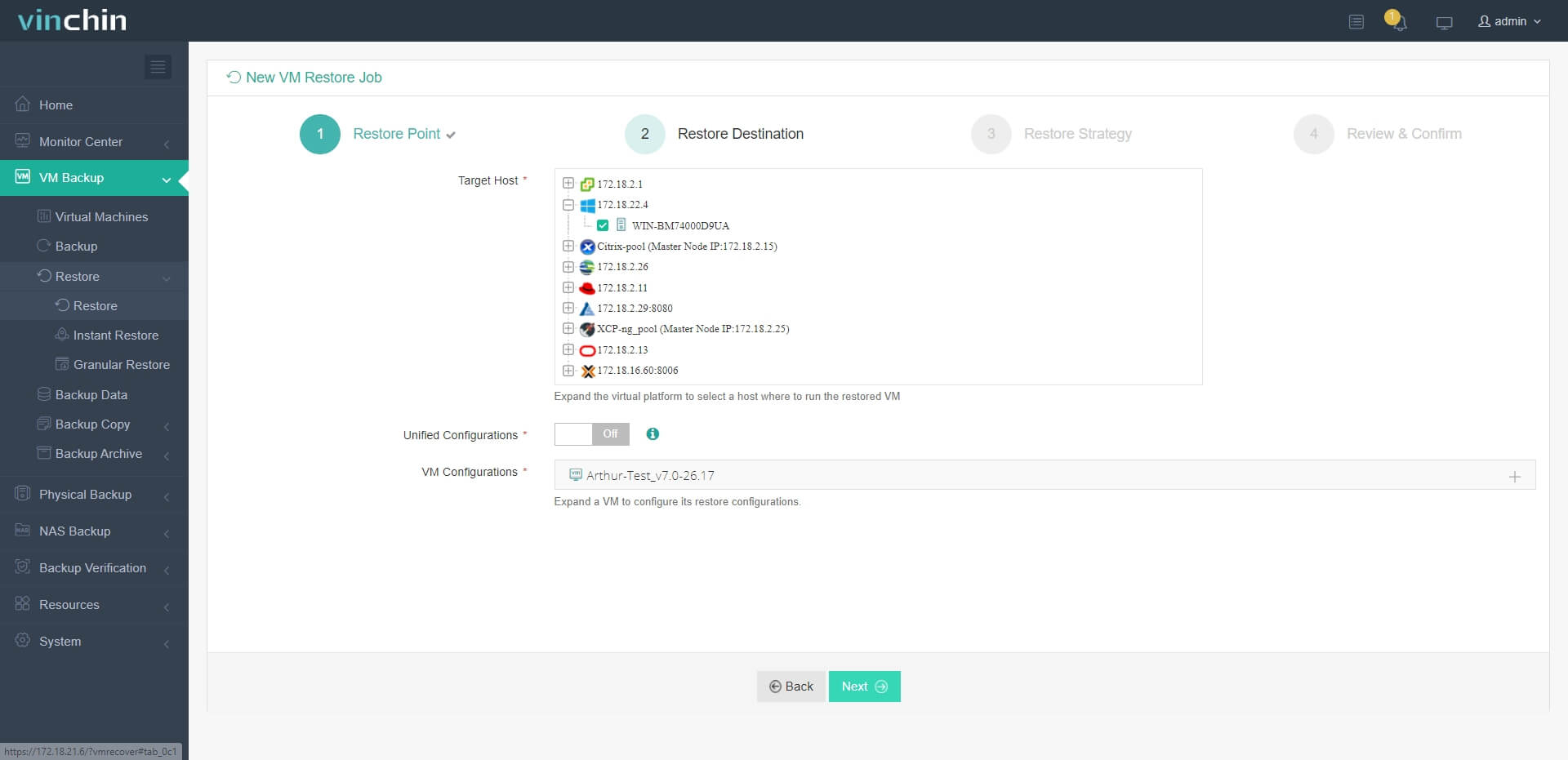
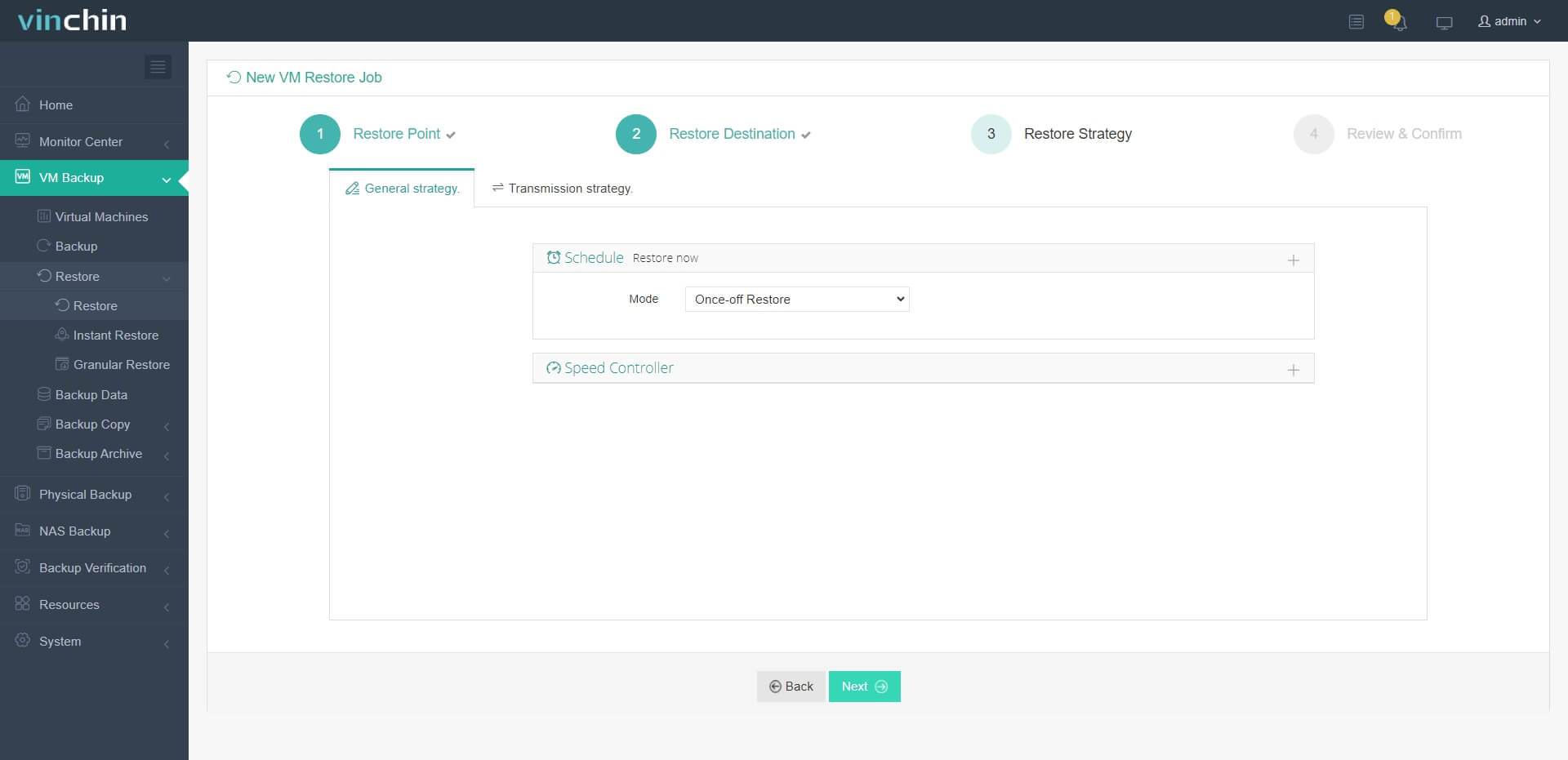
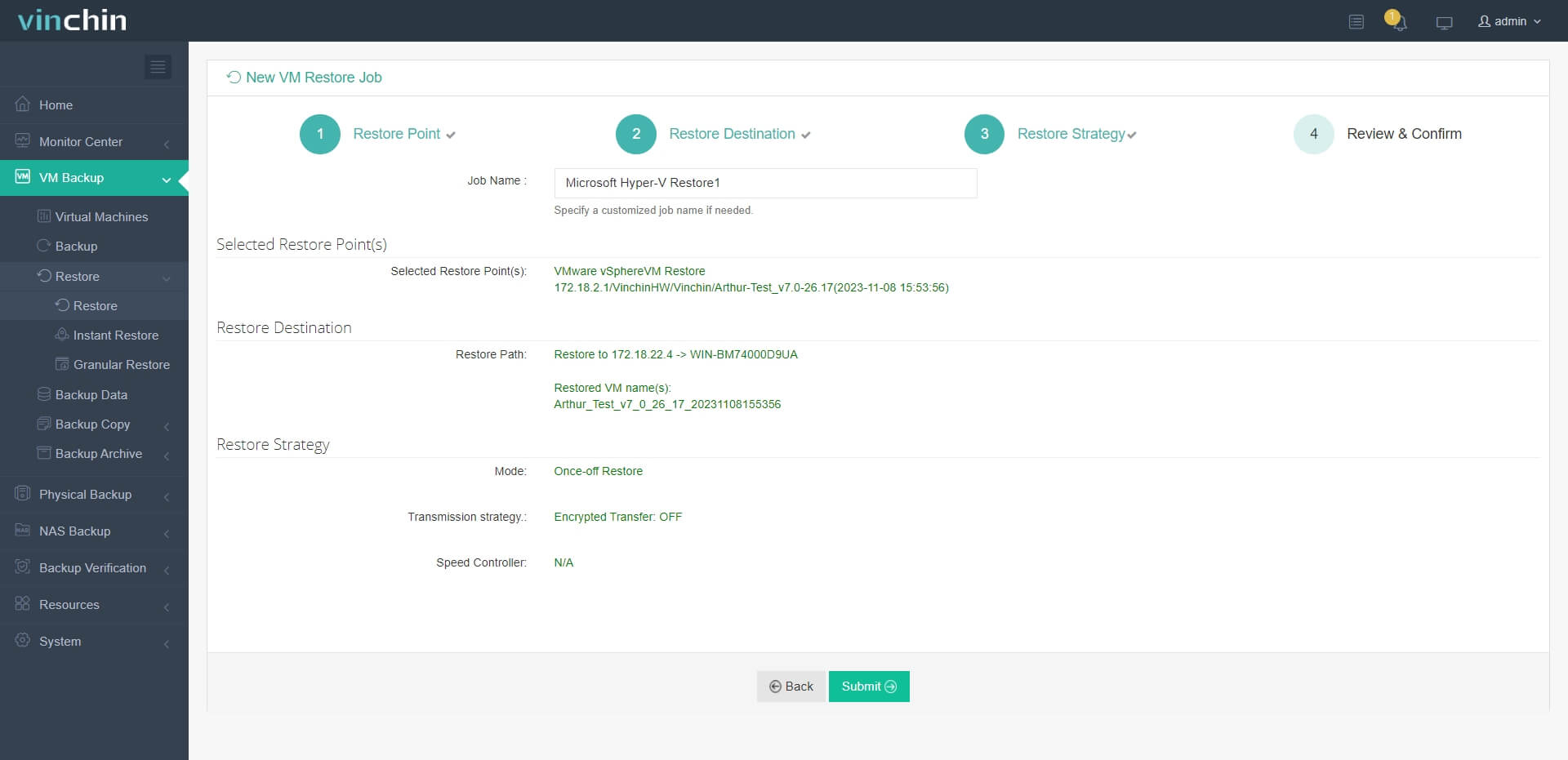
Besides, a user-friendly web console will facilitate an easy VM migration, especially for beginners or users who need to manage multiple platforms and devices. With only 3 steps, you can easily achieve For instance, here are steps to convert VMware to Hyper-V:
1. Select the VMware VM backup
2. Select the target Hyper-V host
3. Simply set up restore strategies or directly skip this step
4. Just submit the job and then the VMware VM will be quickly restored on the Hyper-V host
Thousands of businesses have chosen Vinchin Backup & Recovery, and you can explore its comprehensive features with a 60-day free trial! Feel free to reach out to us with your specific needs, and we will provide you with a customized solution.
V2V Migration FAQs
Q1: How to handle driver and tool compatibility issues during the migration process?
A1: Some V2V converters provide driver injection functionality to replace or add necessary drivers during the migration process. In addition, integration services or tools for the target platform may need to be installed or updated after migration.
Q2: Can I migrate multiple VMs at the same time?
A2: Yes. You can choose a enterprise migration solution like Vinchin Backup & Recovery to reduces project timelines for large environments.
Q3: Does Vinchin V2V set restrictions on Linux VM migration?
A3: No. You can easily restore any Windows/Linux VM from one virtual platform to another without a difference, as long as you have available restore points saved in the backup system.
Final Words
A V2V converter enables the adaptation of a VM for compatibility with a different virtualization platform. This tool is instrumental in transitioning from an outdated virtual environment to a more current one, optimizing application performance by identifying the most suitable environment, and enhancing the use of hardware resources.
The above content introduces five most commonly used tools. However, Vinchin Backup & Recovery stands out as a versatile V2V converter, offering support for VM migration across a variety of virtualization platforms. Be sure to take advantage of the available 60-day free trial.