Introduction
Unplanned outages, cyberattacks, and data corruption can halt business operations without warning. Enterprises running mission-critical workloads on Oracle Linux Virtualization Manager (OLVM) face high stakes when it comes to protecting their virtual environments. A single incident can cause significant financial loss, reputational damage, or even regulatory penalties that threaten long-term viability.
Industry standards such as ISO/IEC 27001 Section A.12.3 emphasize the necessity of reliable backup strategies for operational resilience and compliance (ISO/IEC 27001 Backup Requirements). Backing up Oracle OLVM is not just a recommended practice, it is essential for maintaining business continuity in today’s threat landscape.
The Importance of Enterprise Business Continuity
Business continuity ensures organizations maintain essential functions during disruptions caused by technical failures, natural disasters, or human error. In modern enterprises, uninterrupted access to applications and data, often hosted on platforms like Oracle OLVM, is critical for daily operations.
A robust business continuity plan reduces operational risk by enabling rapid recovery from unexpected incidents. This approach keeps vital services available to customers and stakeholders even during adverse events. Effective planning includes risk assessments, emergency response procedures, communication plans, and most importantly, backup and recovery strategies.
Without these elements in place, organizations are exposed to prolonged downtime that can lead to lost revenue or regulatory violations.
Why This Matters for Enterprise Operations
A short disruption in your Oracle OLVM environment can have far-reaching consequences across your organization's core processes.
● Prolonged Outages Increase Financial Losses
Downtime from hardware failures or software errors interrupts workflows that generate revenue or support customers. Each hour offline compounds losses through missed transactions or delayed projects.
● Data Loss Jeopardizes Compliance
Regulations like GDPR Article 32 (GDPR text) and HIPAA §164.308(a)(7) (HIPAA Security Rule) require timely restoration of sensitive information after incidents. Failing to recover regulated data within mandated timelines may result in fines or legal action.
● Ransomware Threats Are Escalating
Cybercriminals increasingly target virtualized environments with ransomware attacks designed to encrypt both production data and backups stored online. Clean offline backups are often the only way to restore systems without paying ransoms or suffering extended outages.
● Native Snapshots May Not Be Enough
While Oracle OLVM provides snapshot capabilities for VMs, these do not always guarantee crash-consistent restores, especially for active databases or transactional workloads. Dedicated backup solutions provide more reliable protection against complex failure scenarios.
Reliable backups serve as a safety net that allows IT teams to restore VMs quickly while minimizing operational impact across departments.
What Makes a Good Oracle OLVM Backup Strategy?
A strong backup strategy protects all aspects of your virtual infrastructure while supporting compliance needs and future growth requirements.
A comprehensive approach should address several pillars:
Consistency: Backups must cover every critical workload running on Oracle OLVM so no essential data is left unprotected at any time, even as new VMs are deployed or existing ones change roles within the environment.
Recoverability: The ability to restore both individual files and entire VMs under any scenario, from accidental deletions to full-site disasters, is crucial for meeting Recovery Time Objectives (RTO) and Recovery Point Objectives (RPO).
Compliance: Alignment with internal policies as well as external regulations supports audit readiness while reducing legal exposure during investigations into breaches or outages.
Reliability: Automated verification routines confirm backup integrity after each job completes so IT staff can trust their recovery points when disaster strikes unexpectedly.
Security: Encryption at rest/in transit combined with role-based access controls prevents unauthorized users from accessing sensitive backup data, even if storage devices are lost or stolen during transport between sites.
Scalability: As enterprise environments grow over time, with more VMs added across multiple clusters, the chosen solution must scale seamlessly without introducing complexity that slows down routine operations or increases costs unnecessarily.
Centralized Management: Unified consoles enable administrators to monitor job status across all protected assets while generating reports needed for compliance audits or executive oversight reviews, a key requirement in large-scale deployments spanning multiple locations worldwide.
Decision-makers should weigh these factors carefully when designing their enterprise backup plan, balancing technology investments against evolving threats facing their industry sector.
Vinchin Backup & Recovery: Enterprise-Grade Protection for Oracle OLVM
To meet the demands of safeguarding complex virtual infrastructures like Oracle Linux Virtualization Manager (OLVM), organizations require an advanced VM backup solution built for scalability and reliability. Vinchin Backup & Recovery stands out as an enterprise-level platform supporting over 15 mainstream virtualization environments, including VMware, Hyper-V, Proxmox, oVirt, RHV, XCP-ng, XenServer, OpenStack, ZStack, and offers robust compatibility with Oracle OLVM specifically.
Vinchin Backup & Recovery delivers agentless protection along with features such as CBT-based incremental backups, LAN-free backup options for efficient data transfer within OLVM clusters, granular restore capabilities down to file level inside VM disks, scheduled automated jobs tailored per policy requirements, and secure encryption mechanisms throughout the process. These features collectively ensure fast recovery times while optimizing storage use and maintaining strict security standards.
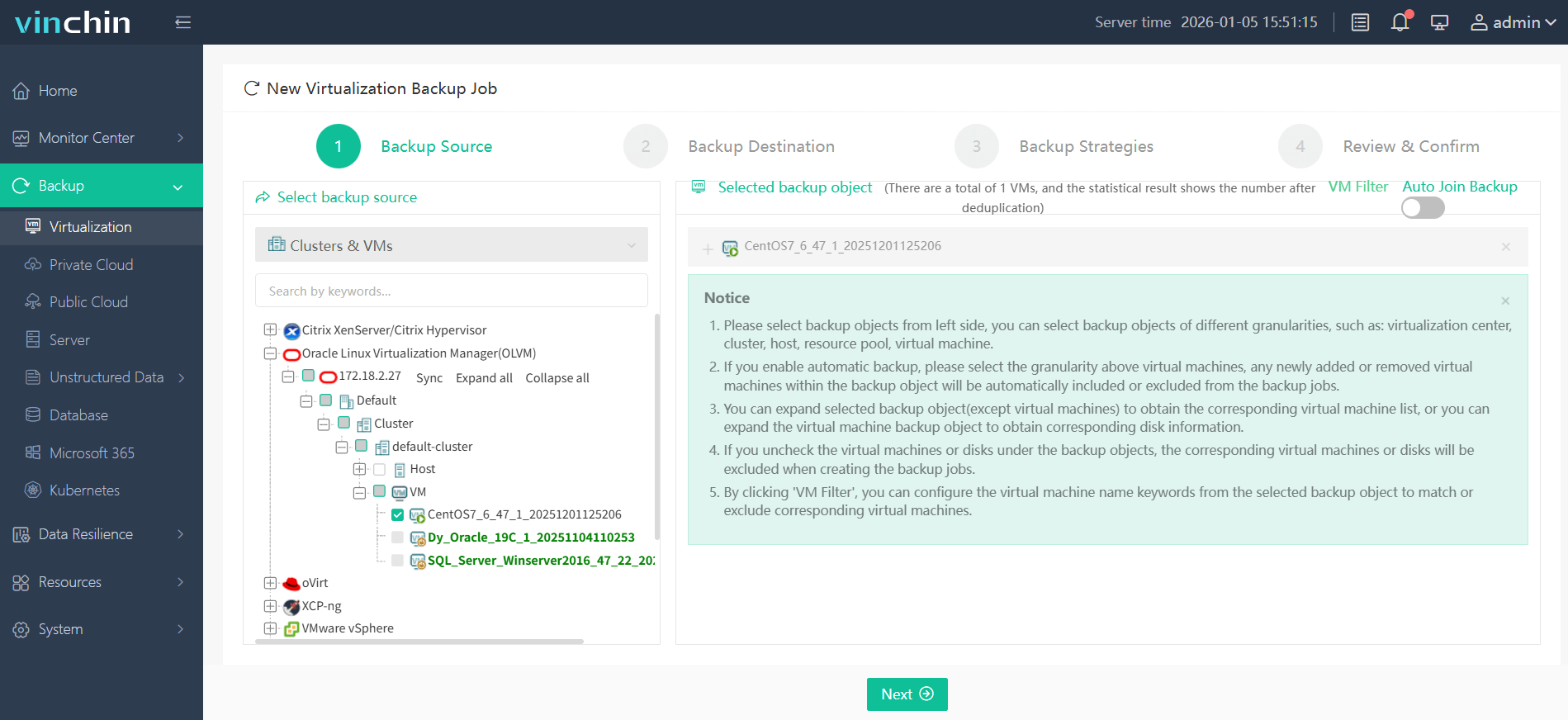
The intuitive web console makes protecting an Oracle OLVM VM straightforward:
Step 1: Select the Oracle OLVM VM you wish to back up
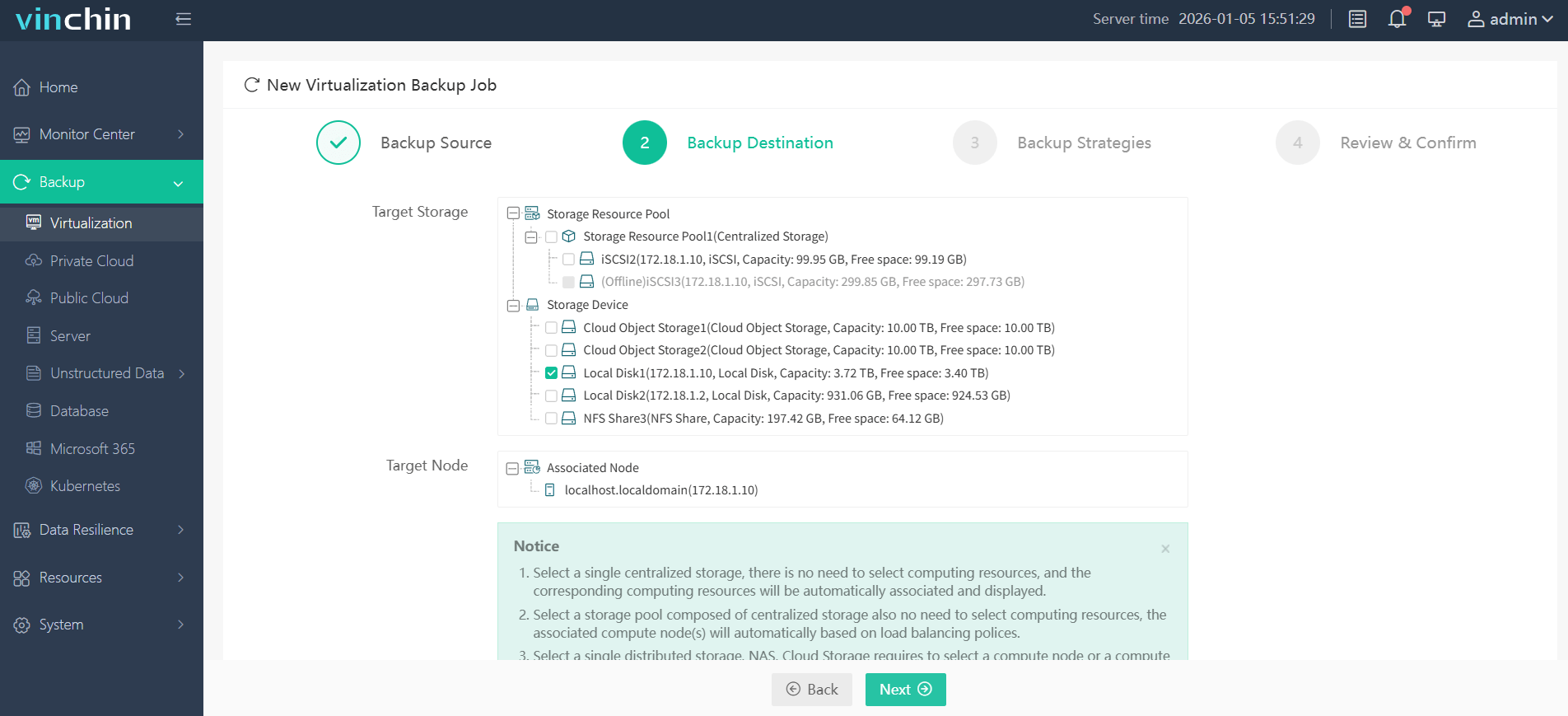
Step 2: Choose your preferred backup storage location
Step 3: Configure a suitable backup strategy based on scheduling and retention needs

Step 4: Submit the job, Vinchin Backup & Recovery automates execution with real-time monitoring

Recognized globally by thousands of enterprises for its reliability and top-rated performance, try Vinchin Backup & Recovery free for 60 days with full features by clicking below.
Best Oracle OLVM Backup Software FAQs
Q1. How does regular backup support compliance requirements?
Regular backups ensure you can quickly restore regulated data after incidents. They also help demonstrate due diligence during audits by providing documented evidence of ongoing protection measures aligned with ISO standards.
Q2.Can backups protect against ransomware in OLVM environments?
Yes, secure backups allow fast restoration after attacks without paying ransoms or suffering extended outages, especially when using immutable storage targets that prevent tampering by malware actors. Following best practices such as keeping at least one copy offline (the 3-2-1 rule) further strengthens defenses against sophisticated threats targeting both production systems and online repositories.
Q3. What should be prioritized when designing an enterprise backup plan?
Prioritize reliability through automated verification routines, rapid RTO/RPO settings tailored per workload, scalability across growing clusters; encryption at rest/in transit, centralized control via unified dashboards, plus regular testing of restores under real-world conditions, all supported by clear documentation aligned with regulatory mandates.
Q4. Is it possible to automate backups for large-scale deployments?
Yes; automation ensures consistency across hundreds, or thousands of VMs while reducing manual errors common in complex environments. Policy-driven scheduling lets administrators define rules once then apply them globally so protection scales effortlessly alongside expanding infrastructure footprints.
Conclusion
Backing up Oracle OLVM safeguards enterprise operations against cyberattacks and system failures while supporting strict compliance demands. Evaluate your current posture now, and ensure resilience before disruption strikes.