Choose VM backup software whose recovery points cannot be deleted, altered, or encrypted by an attacker who already controls your production environment. It must also let you prove, before an incident, that a clean copy exists and can be restored. Check five things: who can remove a backup lock, how long restore points stay locked, whether backup credentials are isolated from production identity, whether restore points are verified, and whether restores work in a clean environment.
Key Takeaways
The CISA #StopRansomware Guide advises keeping offline, encrypted backups and regularly testing their availability and integrity, because many ransomware variants look for accessible backups to delete or encrypt.
“Immutable” is not one guarantee. What matters is which identities can still shorten or remove the lock.
A lock shorter than the gap between compromise and detection leaves you with locked but already-infected restore points.
Encryption protects confidentiality, not availability. Only lock enforcement and isolation stop deletion.
Selection is not finished until you have tried to delete your own backups with backup-admin and domain-admin credentials, then restored into an isolated network.
What “Ransomware-Resilient” Means for VM Backup
A ransomware-resilient VM backup solution keeps recovery points available, unaltered, and restorable after an attacker gains administrative access to hypervisors, management servers, or identity systems. That breaks into three properties:
Survivability: the copies cannot be destroyed.
Cleanliness: you can tell which restore point predates the compromise.
Recoverability: you can restore to clean infrastructure within your RTO.
Joint government guidance, such as the CISA #StopRansomware advisory on Akira, recommends that backup data be encrypted, immutable (unable to be altered or deleted), and cover the whole data infrastructure.
Why VM Backups Are a Specific Target
The CISA #StopRansomware Guide notes that ransomware strategies have begun targeting VMware ESXi servers, hypervisors, and other centralized tools, which allows fast encryption of infrastructure at scale. Microsoft’s backup and restore guidance observes that attackers invest heavily in neutralizing backup applications and OS features such as volume shadow copy.
A Documented Case (2024)
Microsoft reported that a North American engineering firm was hit by Black Basta ransomware deployed by the actor Storm-0506. The actor got in through a Qakbot infection, escalated privileges, stole the credentials of two domain administrators, and moved to four domain controllers. It then used CVE-2024-37085 by creating an “ESX Admins” group in Active Directory and adding an attacker-controlled account to it. SecurityWeek’s coverage, quoting Microsoft, reports that the attack encrypted the ESXi file system and left the hosted virtual machines non-functional.
The lesson for selection is that the attack path ran through identity. Any backup system that trusts the same Active Directory domain is inside the blast radius. Affected ESXi versions and patch status matter here, so verify against Broadcom’s advisory for your build.
Evaluation Criteria at a Glance
Here are eight checks for shortlisting VM backup software.
Criterion
| What to verify
| Why it matters
|
Lock enforcement | Who or what can shorten or remove the lock, and at which layer (storage, OS, application) | Determines whether a compromised admin can delete recovery points |
Identity isolation | Backup console and storage credentials are separate from production AD and vCenter | The 2024 case above ran through domain admin credentials |
Retention depth | Sparse older points (weekly, monthly) kept and locked beyond the short-term window | Ransomware can stay dormant before detonating |
Encryption | In transit and at rest, with key handling documented | Protects against data exposure; does not stop deletion |
Verification | Integrity checks and malware scanning on restore points; automated test restores | Proves a point is usable and clean |
Clean-environment restore | Restore to an isolated network or rebuilt hosts, including cross-platform if needed | Avoids reinfection from in-place restore |
Offsite or offline copy | At least one copy outside the primary site’s administrative domain | Survives full site and credential compromise |
Backup server hardening | Patch cadence, minimal exposed services, MFA on the console | The backup server is itself a target |
How Immutable Differs by Mechanism
Vendors use the word for very different enforcement models. The useful comparison is who can still remove the protection early.
Mechanism
| Who can remove the lock before expiry?
| Notes
|
S3 Object Lock, compliance mode | No user, including the AWS account root user. The mode cannot be changed and the period cannot be shortened, per AWS documentation. | AWS states that the only way to delete before the retain-until date is to delete the AWS account. |
S3 Object Lock, governance mode | Users with the special bypass permission. According to AWS, the Amazon S3 console includes the bypass header by default, so such a delete succeeds. | Suitable for testing retention settings; weaker against a compromised privileged identity. |
Software-enforced storage protection | Depends on the enforcement layer and on the integrity of the backup server. | Verify what an attacker with root on the backup host can do. |
Proxmox Backup Server datastore | The Proxmox Backup Server documentation says PBS does not rewrite existing blocks, so a compromised client or PVE host cannot modify existing backups. Deletion is controlled by prune permissions and jobs. | Proxmox recommends not granting delete permissions and pruning on the PBS server itself. |
Offline or air-gapped copy | Whoever can physically or logically reconnect the media. | The CISA guide recommends offline copies. |
Retention Depth and Clean Restore Points
Immutability answer: “Can the copy be deleted?” It does not answer “is the copy clean?” The Proxmox documentation warns that some ransomware lies dormant for days or weeks before encrypting, so older backups may already be compromised, and advises keeping some backups over longer periods. NIST’s data integrity guide (SP 1800-11) treats identifying the last known good state as an essential part of the recovery process.
Size the Lock Against Detection Time, not Against RPO
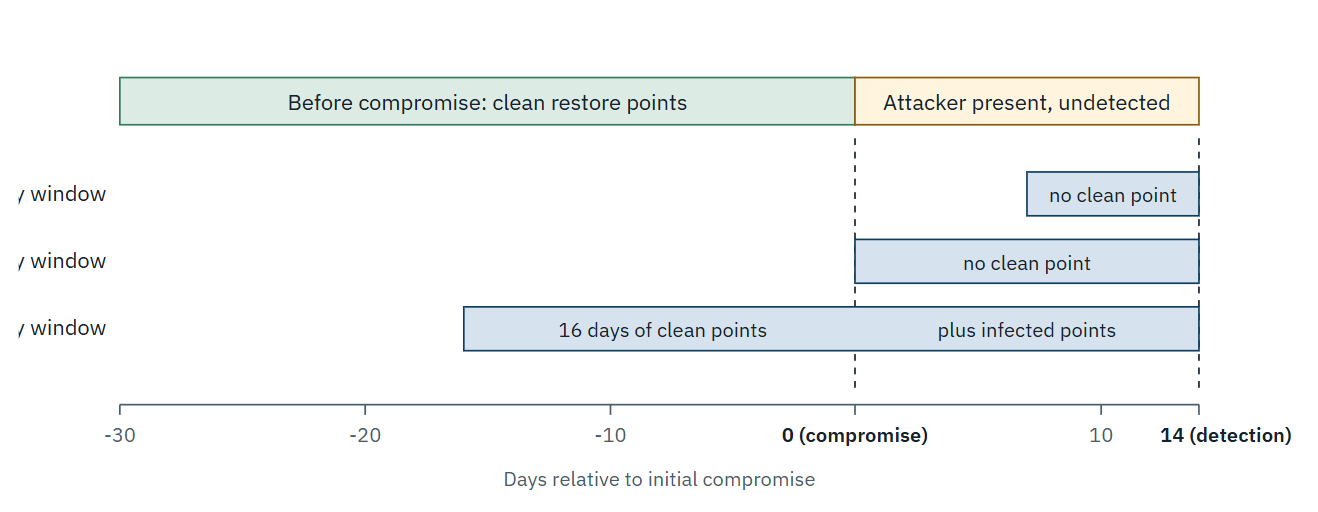
Backup frequency and lock length are usually set from RPO: how much data you can afford to lose. The clean restore point, however, is set by a different clock: the time between compromise and detection. If the lock and retention window is 7 days and the attacker was present for 14, every locked point is compromised, and the clean ones have already aged out. Shorter windows also keep the newest points, which are the most likely to be infected.
That is why retention depth (sparse older points) and verification matter as much as the lock itself. There is a cost trade-off: CISA cautions that immutable storage may not meet compliance criteria for certain regulations and that misconfiguration can impose high cost. A locked copy cannot be pruned early, so a mistaken retention setting becomes a storage bill you cannot cancel.
Isolate Backup Identity and Control Plane
Selection should confirm that backup administration does not depend on production identity. Microsoft’s ransomware-resilient backup architecture for Azure Backup uses dedicated backup subscriptions and locked, immutable vaults so a compromised administrator cannot purge recovery points within the retention window. The Azure product differs from VM backup software, but the same design principle applies to any platform. Check for:
a separate admin account store, or local accounts with MFA, for the backup console
no domain-joined backup server unless you can justify it
least-privilege service accounts on hypervisor and vCenter connections
write-only credentials for backup targets, without delete rights
The CISA guide also directs organizations to keep hypervisors, network and storage components updated and hardened.
Restore into a Clean Environment
Microsoft’s architecture guidance notes that restoring into a compromised environment risks reinfection from remaining malware, persistence or stolen credentials, and that for ransomware events a clean environment is preferred unless a forensic sweep shows production is uncompromised. This depends on the platform and your incident response process. Software worth shortlisting should support:
restoring to an isolated network
restoring to a different host or hypervisor
verifying integrity after restore
NIST SP 1800-11 stresses that recovered data must be trusted as accurate and safe.
Decision matrix
Scenario
| Priority control
| Watch out for
|
Small team, few hosts | One offsite copy in compliance-mode object storage, backup credentials separate from AD | Test with short governance-mode retention first; compliance locks cannot be undone |
Regulated retention (finance, health) | WORM aligned with specific regulation | Confirm the rule actually accepts your lock mode; do not assume |
Heavy VMware estate | Backup identity outside AD and vCenter trust, hardened backup server | Domain-joined ESXi and shared admin groups |
Multi-hypervisor | Same criteria per platform, checked in the compatibility documentation | Feature parity varies by platform and version |
No cloud allowed | On-premises WORM or hardened repository plus offline media | Physical process for rotation and restore testing |
Vinchin Backup & Recovery supports immutable backup through job-level WORM protection and storage protection feature that restricts write and modify permissions on backup-server storage to authorized Vinchin applications. Vinchin’s immutable backup storage guide covers the storage options in more detail. As with any product, confirm which storage types and platform versions each control covers in the current documentation.
Proof-of-concept Workflow
Run this before purchase. Steps 3 to 5 are where most weak configurations show up.
1. Back up a test VM to the target with all protections enabled.
2. Record the lock mode and retention period for that recovery point.
3. Using the highest backup-admin account, try to delete the recovery point, shorten retention, and disable the lock.
4. Try the same with production domain admin credentials and, separately, with root on the backup server or repository host.
5. Attempt deletion directly at the storage layer, bypassing the backup application.
6. Restore the point into an isolated network and verify application health.
7. Confirm alerts fired for every attempted deletion.
Do not use production compliance-mode locks for this test. Under S3 compliance mode, the lock cannot be shortened, and only deleting the account removes the object early. Use short-retention test buckets.
Platform Notes
Where platform differences change the evaluation.
Platform
| Relevant difference
| Note
|
VMware vSphere/ESXi | ESXi and vCenter are common ransomware targets per CISA; AD integration was abused in the 2024 case. | Verify hardening and patch levels per Broadcom guidance for your version. |
Proxmox VE with PBS | Existing chunks are not rewritten, S3-compatible datastore backends are supported, and delete rights are the main exposure, per the PBS documentation. | See Proxmox docs for your PBS version. |
Other hypervisors | Capabilities vary by platform and version. | Check vendor documentation before assuming parity. |
Common Mistakes
Treating encryption as ransomware protection. It controls who can read data, not who can delete it.
Enabling governance-mode locks and calling them immutable.
Keeping only recent restore points, so the clean ones expire first.
Joining the backup server to the production domain.
Never testing a restore, or testing only in place.
Relying on hypervisor snapshots alone, which typically sit on the same datastore as the VM (behavior depends on platform).
FAQs
Q1: Does encrypting backups stop attackers from deleting them?
No. The Proxmox Backup Server FAQ describes client-side encryption as preventing an attacker who reaches the server or network from reading data. Deletion is a separate risk that requires locking or permission design.
Q2: Are immutable backups accepted for regulatory retention?
Not automatically. The CISA guide notes that immutable storage does not meet the criteria of certain regulations. AWS states that S3 Object Lock was assessed for SEC Rule 17a-4(f), FINRA Rule 4511, and CFTC Regulation 1.31. Check the specific rule and lock mode with your auditor.
Q3: Can I safely test a compliance-mode lock?
Only in a disposal environment. Compliance-mode retention cannot be shortened, so use governance mode or a short retention on a test bucket first.
Q4: Does agentless VM backup remove the credential risk?
It moves it. Agentless designs need hypervisor or management-plane credentials, so restrict them and keep them out of production identity. The exact model depends on the software.
Q5: Will locks increase storage cost?
Usually yes. Locked data cannot be pruned before expiry, so retention settings translate directly into capacity. This depends on deduplication, change rate, and retention tiers.
Conclusion
Ransomware resilience is less a feature checklist than a question of trust boundaries: which identities can still touch your recovery points once production is fully compromised, and how long the clean ones survive. Choose software that answers both in writing, then confirm with a destructive test before an attacker runs one for you.














