When searching for what is the best Red Hat Virtualization disaster recovery solution for large enterprises, IT leaders face a complex landscape. As organizations grow, so do their data volumes, workloads, and the risks they face from outages, cyberattacks, and human error. Red Hat Virtualization (RHV) has become a core platform for many enterprises, powering mission-critical applications and services. In this article, we explore why large enterprises choose RHV, why disaster recovery (DR) is essential, and how to select the most effective DR solution for enterprise-scale environments.
Why Large Enterprises Choose Red Hat Virtualization?
Red Hat Virtualization is trusted by large enterprises worldwide for several compelling reasons. Its open-source foundation, robust management tools, and proven scalability make it a top choice for organizations with demanding workloads.
One key reason is Scalability. RHV is designed to handle hundreds of hosts and thousands of virtual machines, making it ideal for enterprises that need to grow their infrastructure without hitting artificial limits. This scalability ensures that as business needs expand, the virtualization platform can keep pace.
Another important factor is Security. RHV leverages Security-Enhanced Linux (SELinux) and sVirt to harden both the hypervisor and virtual machines. This layered approach helps protect sensitive data and workloads from evolving threats, which is critical for organizations in regulated industries.
Integration is also a major advantage. RHV works seamlessly with other Red Hat products, such as Red Hat Enterprise Linux and Red Hat Ansible Automation Platform. This integration streamlines operations, reduces complexity, and enables automation at scale.
Enterprises also value High Availability. RHV includes features like self-hosted engine deployment and built-in failover, ensuring that management and workloads remain available even during hardware or software failures.
Finally, Cost Efficiency plays a role. By using open-source technologies and offering flexible subscription models, RHV helps large organizations control costs while delivering enterprise-grade performance and support.
Importance of Red Hat Virtualization Disaster Recovery for Large Enterprises
For large enterprises, the stakes of downtime or data loss are high. A single outage can disrupt operations, impact revenue, and damage reputation. That’s why Business Continuity is a top priority. With robust disaster recovery in place, organizations can restore services quickly after hardware failures, cyberattacks, or natural disasters.
Regulatory Compliance is another driver. Many industries require strict data protection and retention policies. Effective DR solutions help enterprises meet these requirements by ensuring that backups are consistent, secure, and easily restorable.
In the face of Ransomware Attacks, having a reliable DR plan is essential. Attackers often target virtualized environments, encrypting data and demanding payment. With regular, verified backups, organizations can recover clean copies of their systems and avoid paying ransoms.
Rapid Data Restoration is crucial for minimizing downtime. Enterprises need solutions that can restore entire VMs, applications, or even individual files in minutes, not hours. This speed is vital for meeting service-level agreements and keeping critical business functions running.
Finally, Testing and Validation of DR plans is important. Enterprises must regularly test their recovery processes to ensure they work as expected. Automated verification features in modern DR solutions help organizations maintain confidence in their ability to recover from any scenario.
The Best Red Hat Virtualization Disaster Recovery Solution for Large Enterprises: Vinchin Backup & Recovery
To address the unique demands of enterprise-scale disaster recovery on platforms like Red Hat Virtualization (RHV), Vinchin Backup & Recovery provides an advanced enterprise-level backup solution supporting over 15 mainstream virtualization environments—including prominent support for RHV alongside VMware vSphere/ESXi/vCenter; Hyper-V; Proxmox; oVirt; OLVM; XCP-ng; XenServer; OpenStack; ZStack; among others—making it highly versatile across diverse infrastructures.
Among its extensive feature set tailored to large-scale deployments are Change Block Tracking (CBT), LAN-free backup capabilities on supported platforms such as RHV itself; instant recovery options (excluding Hyper-V); deduplication/compression; granular restore functionality; plus full/incremental/differential/forever-incremental backup—all designed to maximize efficiency while minimizing risk through rapid restoration timescales or optimized storage utilization.
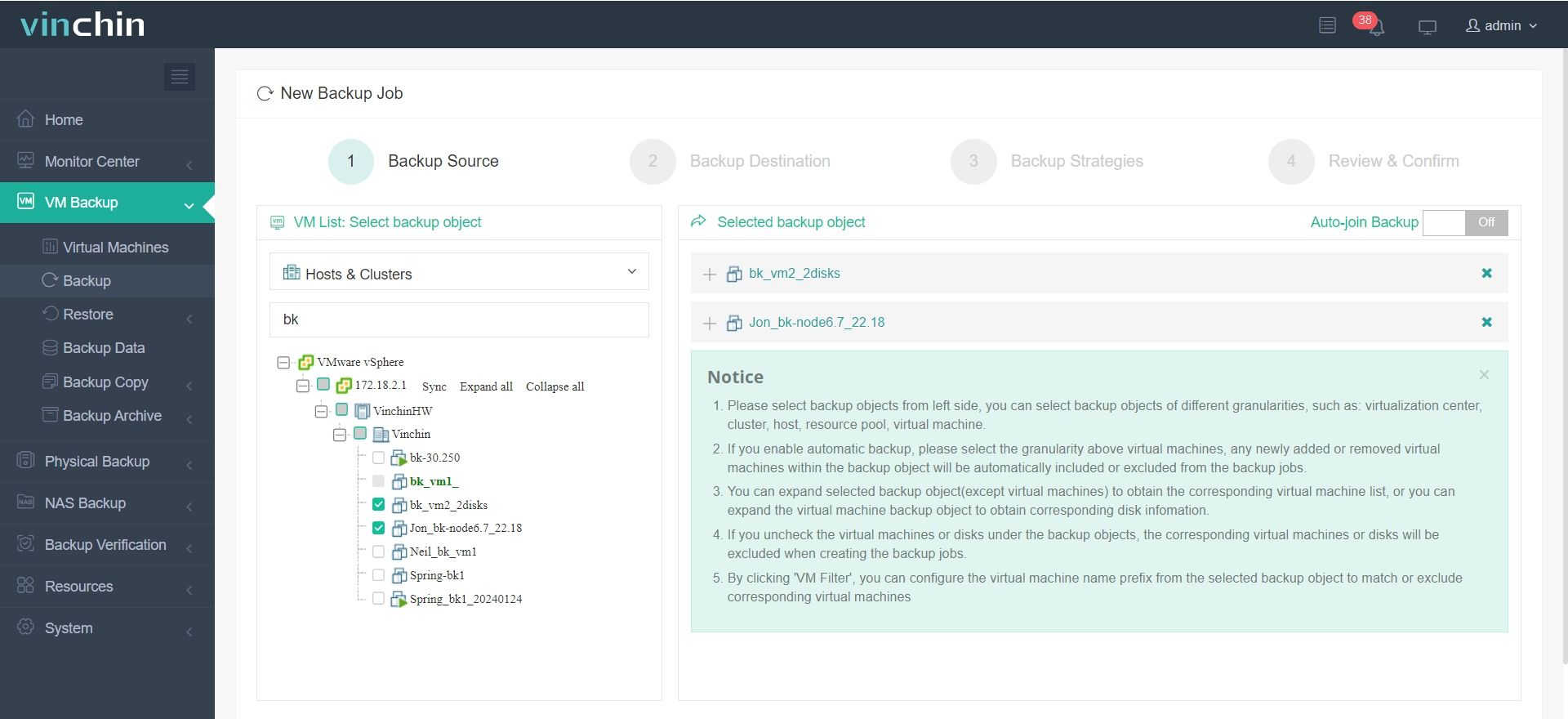
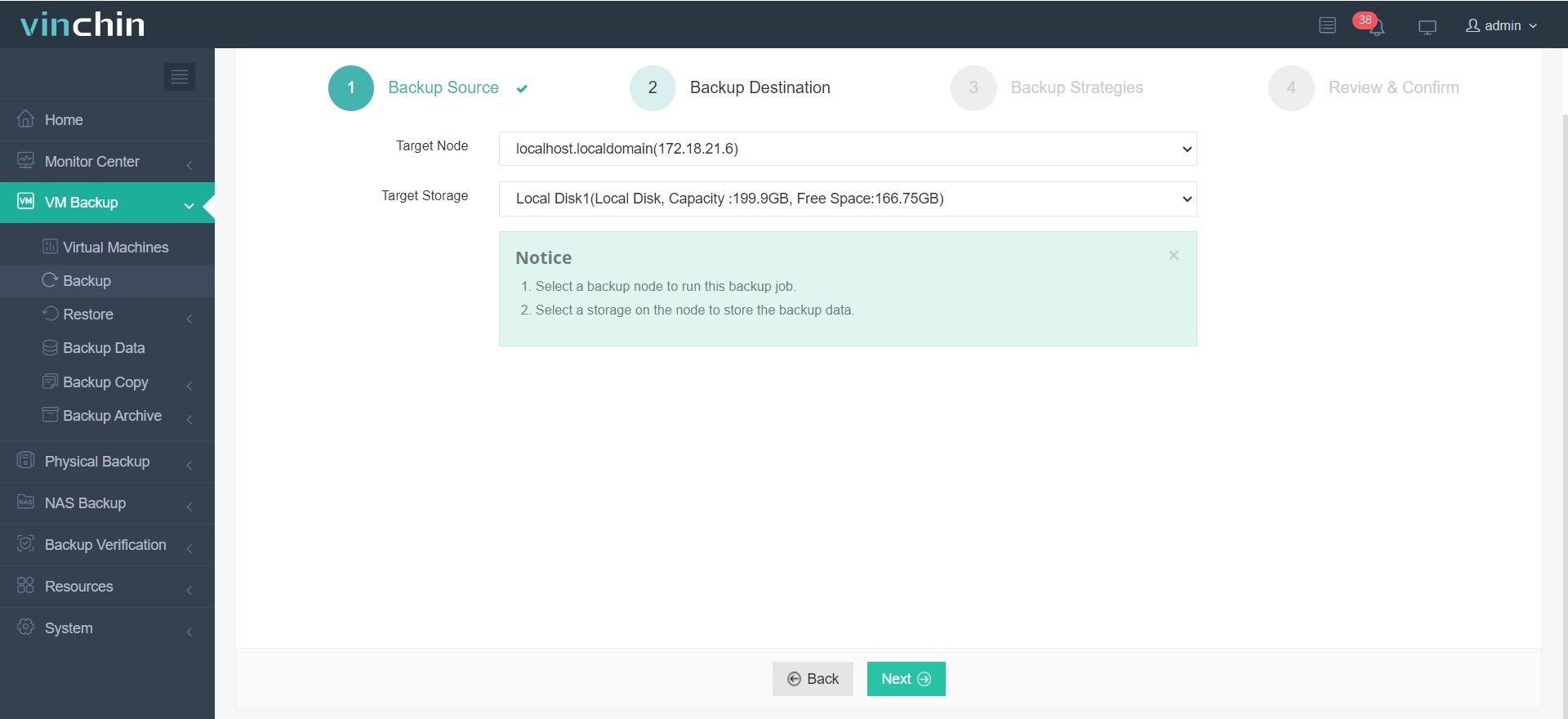
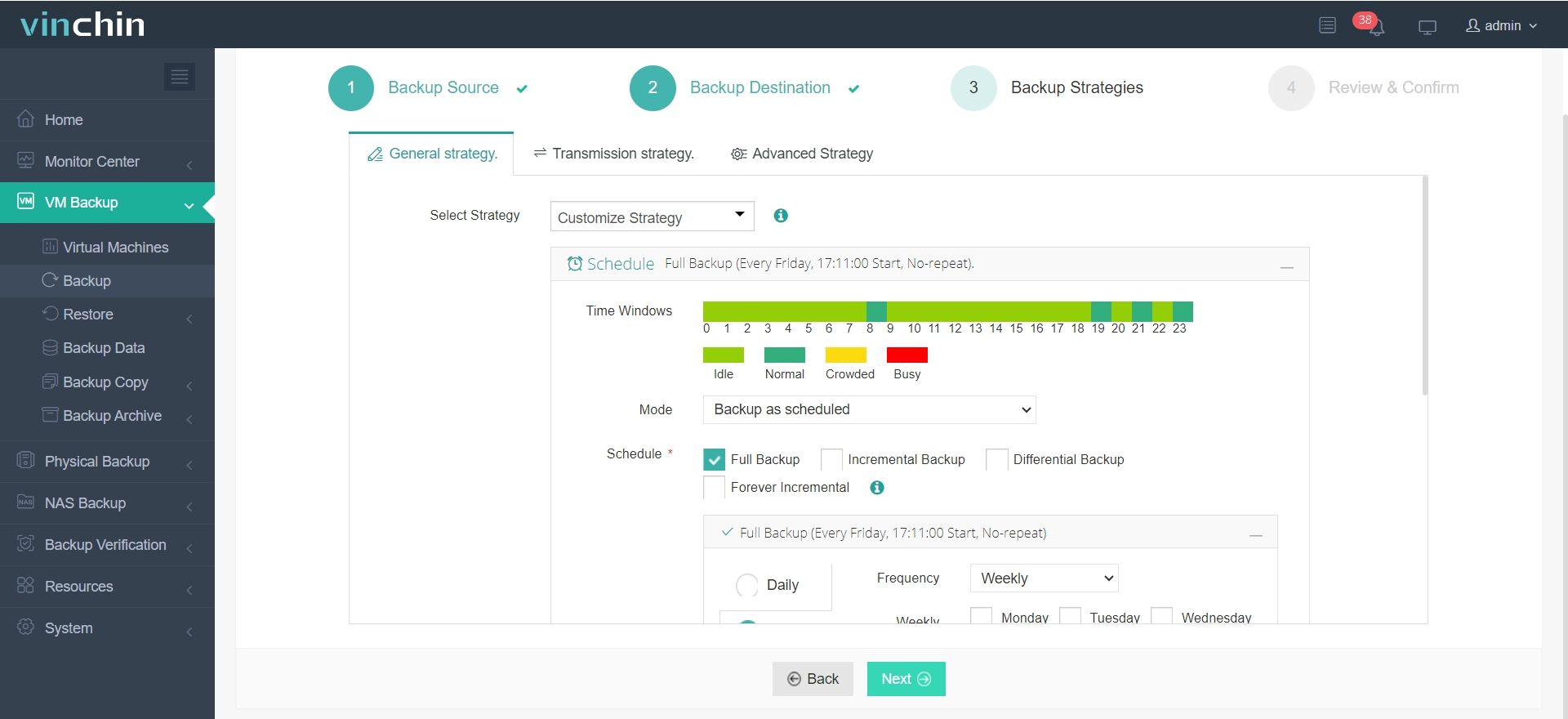
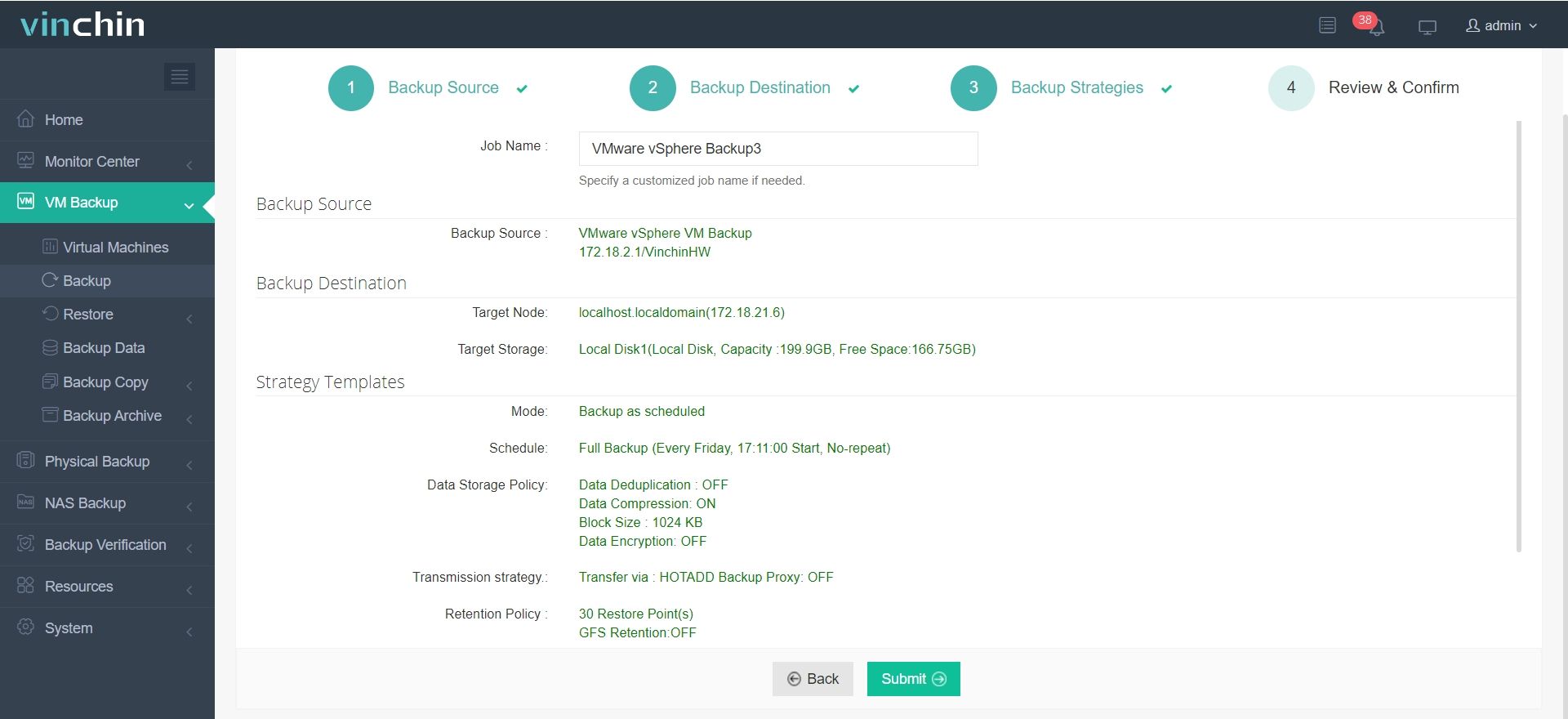
Backing up your Red Hat Virtualization VM with Vinchin Backup & Recovery involves just four intuitive steps via its user-friendly web console:
Step 1: Select the VMware VM to back up.
Step 2: Choose the backup storage.
Step 3: Configure the backup strategy.
Step 4: Submit the job.
Recognized globally with strong customer adoption across industries—and consistently rated among top enterprise data-protection solutions—Vinchin Backup & Recovery offers a 60-day full-featured free trial so you can experience its benefits firsthand—click below to get started!
Red Hat Virtualization Disaster Recovery FAQs for Large Enterprises
Q1: How often should large enterprises back up their RHV virtual machines?
A1: Backup frequency depends on business needs, but daily or more frequent backups are recommended for critical workloads.
Q2: Can Vinchin Backup & Recovery restore individual files from a VM backup?
A2: Yes, it supports granular restore, allowing recovery of specific files or folders without restoring the entire VM.
Q3: What storage options are supported for RHV backups?
A3: Vinchin Backup & Recovery supports a wide range of storage options including local disk, NAS/SAN devices cloud storage providers—and tape libraries—for maximum flexibility in deployment scenarios!
Q4: How does Vinchin Backup & Recovery help with ransomware protection?
A4: By providing immutable backups plus rapid point-in-time restores—it enables organizations to recover clean data after an attack without paying ransom demands!
Q5: Is it possible to automate backup/recovery tasks at scale?
A5: Yes! Vinchin Backup & Recovery offers scheduling/policy-based management along with integration into automation frameworks—ideal even within very large environments!
Q6: What’s typical full-VM recovery time on RHV?
A6: Actual times vary—but instant recovery features allow bringing VMs online within minutes rather than hours!
Conclusion
Selecting the best disaster recovery solution for Red Hat Virtualization in large enterprises means balancing scalability, security,and ease-of-use.Vinchin Backup&Recovery delivers comprehensive protection—rapid recovery—and proven reliability,making it an excellent choice where enterprise-grade DR capabilities are required!