Quick Answer
Recovery speed depends on the recovery method. With instant recovery, a virtual machine is powered on in as little as 15 seconds to a few minutes by booting directly from backup storage. A traditional full restore typically takes 30 minutes to several hours because all data must be copied back before boot. File-level recovery takes minutes for individual files, and bare-metal recovery takes hours on new hardware.
For business-critical workloads, instant recovery is the fastest path: it separates "getting operations back online" from "moving all the data back," which is what compresses RTO from hours to minutes.
How Fast Can a Virtual Machine Be Recovered?
The honest answer: anywhere from 15 seconds to several hours, depending on the recovery method, the size of the VM, and the infrastructure it runs on. RTO (Recovery Time Objective) is the metric that captures this — the clock runs from the moment the VM fails until business operations are usable again.
Recovery Method | Typical RTO | What Comes Back Online | Runs From | Best For |
Instant VM Recovery | 15 sec – 5 min | Entire VM, powered on | Backup storage (temporarily) | Host/storage failure, ransomware, VM corruption |
Full VM Restore | 30 min – hours | Entire VM, powered on | Production storage (after full copy) | Non-urgent recovery, small VMs, full I/O performance |
File-Level Recovery | 2 – 15 min | Individual files / folders | N/A — files copied out, VM stays off | Accidental deletion, single-file corruption |
Bare Metal Recovery | 1 – 4+ hours | Whole system incl. OS | Dissimilar hardware / new host | Physical server failure, hardware migration |
VM Recovery Methods Comparison
Four recovery methods cover nearly every failure scenario. They differ in what they bring back online, how fast, and what they cost to operate. Each method below is explained with four dimensions: how it works, why it is fast, the best use cases, and its limitations.
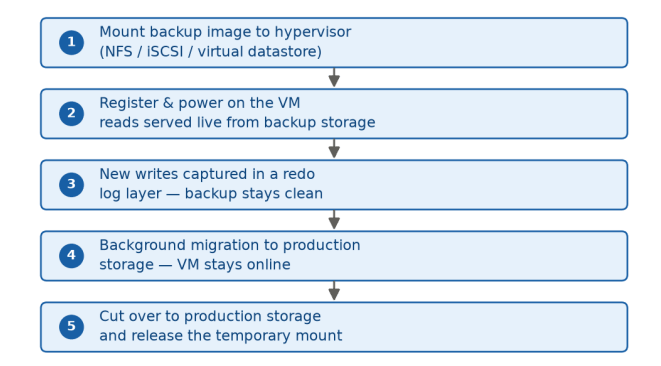
Instant VM Recovery
Typical RTO: 15 seconds – 5 minutes
How it works
⏱️Why it is fast:
The VM starts right away — no waiting for a full copy first
The long data copy happens later in the background, while the VM is already up and running
The VM stays online the whole time — no downtime during the move
Best use cases
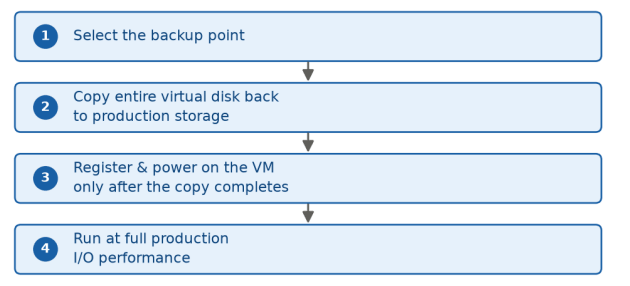
Full VM Restore
Typical RTO: 30 minutes – hours
How it works
⏱️Why it is fast:
No temporary setup; the VM is complete and runs at full speed from the very first boot
Simple and predictable: copy all the data, then power on
Best for small VMs, or when you have a maintenance window and do not need instant availability
Best use cases
non-urgent recovery
small VMs, scheduled maintenance windows
environments where backup storage cannot sustain production-grade I/O
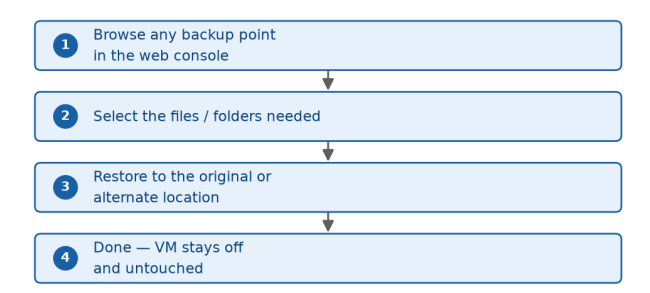
File-Level Recovery
Typical RTO: 2 – 15 minutes
How it works
⏱️Why it is fast:
Only the files you need are pulled out; not the whole machine
No need to start the VM or reserve extra storage space
Done in minutes, and the production VM is never touched
Best use cases
LIMITATIONS
restores data only; it cannot bring an OS, application, or the whole server back. If the VM itself is damaged, you still need a full-level method.
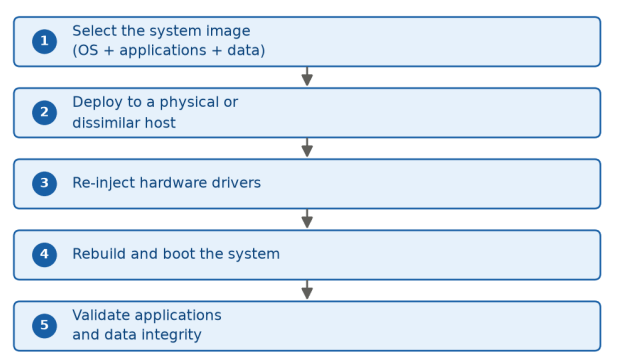
Bare Metal Recovery
Typical RTO: 1 – 4+ hours
How it works
⏱️Why it is fast:
Rebuilds the whole server in one go — system, apps, and data together
Works on any available hardware — no need to find the exact same machine
Much faster than manual setup — drivers and settings are restored automatically
Best use cases
VM Replication / Failover: The Near-Zero RTO Layer
Replication is not a recovery method in the same family as the four above; it is a separate technology layer that prevents downtime altogether. Replication continuously synchronizes VM data to a standby host or site, so when a failure occurs, the workload fails over to the replica within seconds. Vendors such as Zerto, VMware SRM, and Datto, plus continuous data protection (CDP) platforms, are built on this model.
Dimension | Instant Recovery | Replication / Failover |
RTO | Minutes (15 sec – 5 min) | Near-zero (seconds) |
RPO | Determined by backup frequency | Near-zero (continuous sync) |
Recovery source | Existing backup repository | Standby replica (second copy) |
Infrastructure cost | Single backup repository | Double: standby host/site required |
Historical restore points | Any backup point in the chain | Usually the latest state only |
Best for | Critical business workloads | Tier-0 systems with sub-minute RTO |
How to combine them: use replication for the handful of tier-0 systems where even minutes of downtime are unacceptable (payment processing, real-time trading), and instant recovery for the rest of the critical tier. This delivers near-zero RTO exactly where it pays off while keeping cost under control everywhere else.
Factors That Affect VM Recovery Speed
Two environments with the same backup software can see very different recovery times. These are the variables that matter most; check them before you need them.
Infrastructure factors
The #1 cause of disappointing instant recovery. Repositories sized for backup ingest (sequential writes) often choke on the random read/write I/O of a running application. Flash or hybrid repositories clearly outperform pure HDD arrays.
A 1 GbE link moves roughly 100 MB/s; 10 GbE moves 10x more. LAN-free backup over SAN avoids production network consumption entirely and speeds both backup and recovery.
A repository that comfortably serves 5 VMs can degrade badly under 15 simultaneous restores. Site-wide incidents rarely affect a single VM.
Local backup storage is fastest; cloud or offsite copies add transfer time and latency before the VM can even boot.
Data & backup factors
Full restore time scales with virtual disk size. Smaller incremental chains (forever-incremental) recover faster than a full backup of the same VM.
They save storage but must be rehydrated before or during recovery, consuming CPU and adding time.
An application-consistent (quiesced) recovery point lets transactional apps start cleanly; crash-consistent points may need manual consistency checks, adding minutes.
Deduplicated, compressed, incremental, or differential backup points are all recoverable, but the recovery engine’s ability to read them efficiently varies by platform.
Operational factors
Deciding who may trigger recovery, which backup copy to use, and how to validate success often takes longer than the technical recovery itself.
Background migration depends on each hypervisor’s live-storage-migration capability — VMware, Hyper-V, Proxmox, XCP-ng, RHV, and Oracle OLVM each handle it differently.
A database or mail server may need 2–8 minutes to initialize even after the OS is up.
Best Practices to Reduce VM Recovery Time
Low RTO is a design decision, not luck. Teams that consistently recover in minutes follow the same playbook:
1. Use instant recovery for business-critical VMs
Reserve it for workloads where 15–60 minutes of downtime has measurable revenue or compliance impact. For tier-0 systems (payment processing, real-time trading), go one step further with real-time replication or failover.
2. Size backup storage for production-like I/O, not just capacity
Benchmark IOPS and latency under a realistic application load. NVMe-backed repositories make instant recovery feel like production; HDD-only arrays make it feel like a step backward.
3. Isolate the recovery network
Boot recovered VMs on a dedicated sandboxed segment first — essential after ransomware — and only re-attach to production traffic after validation.
4. Pre-define the failback plan
Decide in advance whether migration is automatic or manual, which storage tier the VM lands on, and who approves the cutover. Document it as a runbook.
5. Test recovery regularly — not just backups
A successful backup job does not guarantee a successful recovery. Run monthly or quarterly drills that actually power VMs on and validate applications.
6. Align backup frequency with your RPO
Instant recovery fixes how fast you are back online; backup frequency fixes how much data you lose. Map each critical VM’s RPO to a real schedule.
7. Use application-consistent backups for transactional workloads
VSS integration on Windows and equivalent quiescing on Linux ensure databases and mail servers start cleanly from the recovered VM.
8. Plan for concurrent recoveries
Verify how many VMs the repository and network can serve simultaneously, and prioritize recovery order by business criticality.
9. Monitor performance during the recovery window
While VMs run from backup storage, watch latency and responsiveness — especially for I/O-sensitive workloads.
10. Keep security checks in the recovery path
For ransomware, recover from immutable or air-gapped copies, scan the recovered VM, and only then attach it to the network. Also track achieved RTO after every drill.
How Vinchin Backup & Recovery Helps Speed Up VM Recovery
Vinchin Backup & Recovery protects VMs on more than 15 hypervisors, including VMware, Hyper-V, Proxmox VE, XCP-ng, and oVirt. Its recovery-related capabilities are managed from a single web console and map directly to the methods described above:
Instant VM Recovery
Starts VMs directly from backup storage before full restoration completes, helping critical workloads become available faster.
Cross-platform recovery & migration
Enables agentless VM recovery and migration across multiple virtualization platforms, providing flexible restore options without vendor lock-in.
CBT & SpeedKit acceleration
Tracks changed data blocks and optimizes data transfer to improve incremental backup and recovery efficiency.
LAN-Free backup & recovery
Transfers backup data through storage networks to reduce production network impact and improve large-scale recovery performance.
Verified, ransomware-safe recovery
Validates backup recoverability and protects recovery points with security features such as ransomware protection and malware scanning.
All of these capabilities work with full, incremental, and differential backup points and are available through the same web console on every supported platform.
FAQs
Q1: What is the fastest way to recover a virtual machine?
Instant VM recovery. It boots the VM directly from backup storage without copying data first, bringing a VM online in as little as 15 seconds to a few minutes. Full data migration to production storage then runs in the background while the VM stays operational.
Q2: What is the difference between RTO and RPO?
RTO (Recovery Time Objective) is the maximum acceptable time to get systems back online — it measures downtime. RPO (Recovery Point Objective) is the maximum acceptable data loss, measured by how recent the recovery point is. Recovery method drives RTO; backup frequency drives RPO.
Q3: Why does a full VM restore take hours?
A full restore can take significantly longer because the entire virtual disk must be copied back to production storage before the VM becomes available. Recovery time depends on factors such as VM size, storage performance, available bandwidth, and the amount of data that needs to be restored.
Q4: Can I recover a single file without restoring the whole VM?
Yes. File-level recovery lets you browse any backup point and restore individual files or folders in 2–15 minutes, without powering on the VM or copying the entire disk. Ideal for accidental deletions and single-file corruption.
Q5: Is it safe to run a VM directly from backup storage?
It works, but backup storage is not designed for sustained production I/O, so performance may be limited for databases and other I/O-intensive workloads. The recommended pattern: instant recovery for availability → background migration → cutover to production storage.
Q6: What storage do I need for fast VM recovery?
Flash or NVMe-backed repositories deliver the low latency and high random I/O that running applications need, clearly outperforming HDD arrays. Use at least 10 GbE networking, or LAN-free transport over SAN. Benchmark IOPS under a realistic load before relying on instant recovery for tier-1 workloads.
Q7: How often should I test VM recovery?
Run recovery drills monthly or quarterly depending on criticality — actually powering VMs on from backup and validating applications, not just boot. Measure achieved RTO after every drill and real incident, because storage, VM count, and network conditions change over time.