In most cases, you can recover virtual machines (VMs) from a ransomware attack if you have a clean backup that was not compromised by attackers. The recovery process involves 5 key steps: containing the infection, verifying backups, restoring workloads to a secure environment, and validating recovery success.
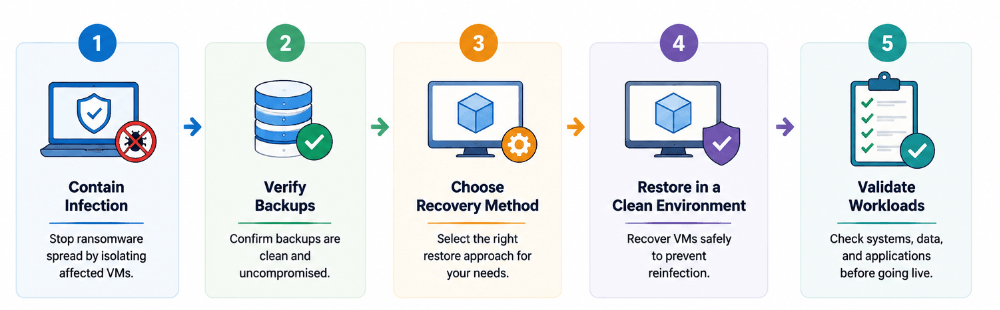
However, having backups alone is not enough. According to Sophos's 2026 State of Ransomware report, backup-based recovery was used by 66% of organizations whose data was encrypted in 2026, up 12 percentage points from the previous year. Since attackers increasingly target backup repositories, backup isolation, verification, and recovery testing are critical to ensure successful recovery.
What Should I Do First After a Ransomware Attack?
The first hours after detecting ransomware determine how much you can recover. Do not start restoring VMs immediately, as that can spread the infection or overwrite evidence. Follow this order:
1. Isolate the affected VMs
Disconnect the infected VMs from the network, or power them off if disconnecting is not possible. This prevents the ransomware from spreading to other workloads and, importantly, to your backup infrastructure.
2. Determine the scope of the attack
Identify which VMs are affected, whether the infection is still active, and whether any backup repositories were reached by the attacker. Do not assume the attack is limited to the systems you have noticed.
3. Preserve evidence
Keep the ransom note, encryption logs, lock screens, and any malware samples. These are useful for incident response, law enforcement, and understanding which data may have been exfiltrated. Only after the infection is contained should you begin evaluating your backup and recovery options.
How Do I Identify Which Ransomware Family Infected My Environment?
Before restoring a VM, identify the ransomware strain when possible. Some ransomware families have known vulnerabilities or publicly available decryptors, which may allow data recovery without restoring the entire VM.
Identify the strain: Check the ransom note, encrypted file extensions, and other indicators. Security vendors may also provide ransomware identification services.
Check for a known decryptor: The No More Ransom project provides free ransomware identification and decryption resources for supported ransomware families.
Do not delay containment: Most ransomware variants do not have a public decryptor. Run ransomware identification in parallel with VM isolation and backup verification, rather than waiting for identification before taking containment measures.
Can I Restore a VM From Backup After Ransomware?
In most cases, yes. If your backup software captured the VM before the encryption event, and the backup itself was not encrypted, you can restore the workload to a pre-attack state. Three conditions determine success:
A clean backup exists. The restore point must predate the infection and must not have been modified or encrypted by the attacker.
The backup is accessible. If ransomware encrypted your backup repository or your storage was disconnected, you need an alternative copy: an immutable backup, an offsite replica, or a cloud copy.The restore environment is safe. Restoring into an infected or unpatched environment can re-infect the recovered VM. The target platform should be cleaned or rebuilt before recovery.
If these conditions are met, VM recovery after ransomware is a standard restore workflow. If they are not, see the section on compromised backups below.
How to Identify a Clean, Uncompromised Recovery Point?
Before you restore anything, confirm that the backup you plan to use was not encrypted or tampered with. Ransomware operators increasingly target backup repositories specifically, so a backup that looks fine may still be unusable. Check three things:
Is the backup repository intact? Verify that backup files have not been renamed, appended to, or encrypted. Many backup products can run integrity checks against the repository to flag tampering.
Is the recovery point from before the infection? Choose the newest restore point that clearly predates the attack. If you are unsure when the encryption started, pick the most recent point you are confident is clean, even if it means some data loss.
Is the backup immutable or offline? Immutable backups cannot be modified or deleted by anyone, including an attacker with admin rights. Offline or air-gapped copies are similarly safe. If your clean point lives on immutable or offline storage, you can trust it; if it lives on the same storage the attacker reached, treat it as suspect and validate it before use.
When in doubt, perform a test restore into an isolated environment and confirm the recovered data is usable before committing to a production recovery.
Also record which recovery point you used and why. In a post-incident review, knowing exactly which backup point was trusted, and what data it contained, tells you the real recovery point objective you achieved and where the gaps are for next time.
Ransomware Recovery Methods for VMs
Once you have a clean recovery point, choose the recovery method that fits the situation. The table below summarizes the most common options for ransomware-affected VMs.
| Method | Best For | Speed | Notes |
| Full VM restore | VM is fully encrypted or unbootable | Slowest (hours) | Restores the complete VM to a pre-attack state |
| Granular recovery | Only specific files or app items were lost | Fast (minutes) | Restores selected data without rebuilding the whole VM |
| Instant recovery | Workload must be online immediately | Very fast (minutes) | Runs the VM directly from backup while data copies in the background |
| Offsite or cloud replica | On-premises infrastructure is compromised | Varies | Recovers to a clean secondary site or cloud environment |
In practice, ransomware recovery rarely relies on a single method. Organizations typically use instant recovery or full VM restore to bring critical workloads back online as quickly as possible, then perform granular recovery to retrieve specific files, databases, or application data that may have been missed or corrupted.
A ransomware-resilient backup solution should support these recovery scenarios while ensuring that recovery points remain secure and usable. Vinchin Backup & Recovery helps organizations prepare for ransomware incidents with features such as immutable backups, encryption, malware scanning, and backup verification. When an attack occurs, it enables full VM restore, granular recovery, and instant recovery from verified backup points, helping businesses restore critical workloads faster and reduce downtime.
If your clean backup lives on a different platform than your production environment, see our guide on cross-platform restore for the additional considerations involved.
Whichever method you choose, verify that the target environment can actually run the recovered workload before you commit to it in production. A full restore is not finished when the backup software reports success; it is finished when the application serves users correctly.
How to Recover a Ransomware-Affected VM Safely?
The safe recovery workflow is a sequence, and each step protects the ones after it. Working through it in order reduces the chance that you restore an infected VM or re-infect your environment.
1. Contain and clean the environment first. Ensure the infected VMs are isolated and that your hypervisor and storage are clean or rebuilt before you restore into them.
2. Confirm your recovery point. Use the clean, uncompromised recovery point identified earlier. If possible, test-restore it into an isolated network first.
3. Restore to a clean target. Create the recovered VM on a clean host, ideally on isolated networking. Do not attach it to your production network until it has been validated.
4. Patch and harden before going live. Apply the latest OS and application patches, reset all credentials and service accounts, rotate keys, and re-enable security controls before the VM rejoins production.
5. Validate the workload. Confirm the OS boots, data is intact, applications start, and the business service is fully functional before declaring recovery complete.
Restoring to a clean environment is the step that is most often skipped, and it is also the one that causes re-infection. Ransomware frequently waits on the network for restored VMs to come back online, so never reconnect a recovered VM to a network that has not been cleaned and scanned.
How to Verify a Recovered VM Is Safe?
Recovery is not complete when the VM boots. A restored VM can look healthy while still carrying malware or corrupted data. Run a verification checklist before putting the workload back into production:
Boot and OS integrity. Confirm the operating system starts cleanly and that system files are intact.
Malware scan. Run a full anti-malware scan on the recovered VM, ideally with a different engine than the one in production, to catch anything that survived.
Data integrity. Verify that databases, files, and application data match expectations. Check checksums or application-level integrity where available.
Application functionality. Test the critical workflows the VM serves. A database that mounts but cannot serve queries is not recovered.
Network and security posture. Confirm the VM has the correct firewall rules, security agents, and monitoring agents installed and active before it rejoins the network.
Document the verification results for each recovered VM. If the same ransomware returns, this baseline tells you immediately whether a restore is clean or suspicious.
It is also worth verifying the recovery point itself after the restore completes. Compare the recovered data against known reference points, confirm that backup job reports show no errors, and spot-check critical files. If a backup has been silently corrupted for months, the restore is when you find out, which is exactly why periodic recovery testing before an incident is so important.
What If My Backups Were Also Compromised?
This is the scenario every administrator fears: the ransomware reached the backup repository as well. Recovery is still possible in some cases, depending on what survived.
Immutable backups survive. Backups stored on immutable storage, or on object storage with retention locks, cannot be modified or deleted even by an attacker with administrator access. If any of your clean recovery points sit on immutable or air-gapped storage, they remain your path to recovery.
Offsite and cloud replicas may survive. Copies stored at a secondary site or in the cloud, especially those with versioning enabled, are frequently outside the attacker's reach. Check these before assuming everything is lost.
If nothing usable remains. When every backup is encrypted and no offsite copy exists, recovery options are limited to data-recovery services that attempt to decrypt the files, or rebuilding workloads from scratch.
The honest boundary is this: without a clean backup, VM recovery after ransomware may be partial or impossible. This is why the prevention measures in the next section matter as much as the recovery steps above.
If you find yourself in this position, treat the incident as a learning investment: the cost of a recovery service or a rebuild is often far less than the cost of being unprotected again. Immediately implement immutable backups, offsite copies, and access controls so that the next attack which will come finds a prepared environment.
Ransomware Recovery Challenges and Limitations
Ransomware recovery is rarely a clean, one-click operation. Expect these challenges:
Data loss between the last clean backup and the attack. Whatever changed after your last clean recovery point is lost, unless it was replicated elsewhere.
Recovery time is significant. Full restores of large VMs take hours, and recovering many VMs at once can saturate storage and network. Set expectations with stakeholders and prioritize critical workloads.
Application consistency is not guaranteed. A crash-consistent backup of a database may restore to a state that requires log replay or manual repair.
Verification costs time. Every recovered VM should be scanned, validated, and tested, which extends the overall recovery window.
Re-infection risk. If the environment was not fully cleaned, restored VMs can be re-encrypted within minutes of rejoining the network.
Because of these constraints, organizations should agree in advance on which workloads are restored first, what level of data loss is acceptable per workload, and who makes the call to fall back to older recovery points. Defining these decisions during an attack is a recipe for delay; defining them beforehand turns a crisis into an execution step.
How to Prevent Ransomware From Affecting VM Recovery?
Prevention is the most reliable recovery strategy. The measures below make sure that when an attack happens, you still have clean backups to restore from. These align closely with the backup-related recommendations in CISA's #StopRansomware Guide, developed jointly with the FBI and NSA.
Follow the 3-2-1-1-0 backup rule. Keep three copies of your data, on two different media, with one copy offsite, one copy immutable or offline, and zero errors after backup verification.
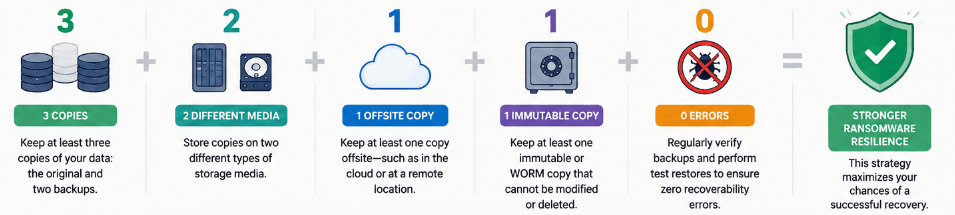
Use immutable and offline backups. Immutable storage prevents modification and deletion of backup data, and offline or air-gapped copies are physically unreachable by malware.
Segment the backup network. Keep backup repositories on a separate network from production, with strict access controls, so ransomware cannot reach them from compromised VMs.
Enforce least privilege and MFA. Restrict access to backup infrastructure and require multi-factor authentication for administrative accounts. Most ransomware enters through a single compromised credential.
Test recoveries regularly. A backup you have never restored is a guess. Run periodic restore tests to confirm your recovery points are clean, accessible, and fast enough to meet your recovery time objective.
Finally, review your recovery plan after every incident and after every test. Ransomware techniques evolve, and so should your defenses. Document what worked, what failed, and what you would do differently, then update your backup configuration, access controls, and recovery runbooks accordingly. A recovery capability that is continuously tested and improved is the strongest protection an organization can have against the next attack.
Frequently Asked Questions
Q1: Can I recover a VM from ransomware without a backup?
Not reliably. Without a clean, uncompromised backup or replica, your options are limited to data-recovery services or rebuilding workloads from scratch, both of which are expensive and may be partial. This is why immutable and offsite backups are the foundation of ransomware recovery.
Q2: Can ransomware encrypt my backups?
Yes. Ransomware operators frequently target backup repositories so that victims have nothing to restore. Backups that are immutable, offline, or stored in the cloud with versioning are much harder to encrypt and remain your best defense.
Q3: How long does VM recovery after ransomware take?
It depends on the VM size, the recovery method, storage and network performance, and how many VMs you restore at once. A single small VM restored with instant recovery can be online in minutes; a full restore of many large VMs can take hours or days. Set expectations and prioritize critical workloads.
Q4: Does restoring from backup remove ransomware completely?
Restoring from a clean backup removes the infection from that VM, but it does not clean your environment. Ransomware or other malware may remain on other systems or on the network. Clean and scan the whole environment before restoring, and scan each recovered VM before it rejoins production.
Q5: Should I pay the ransom?
CISA, the FBI, and international law-enforcement partners advise against paying: payment funds further attacks, there is no guarantee the decryption key will work, and paying does not prevent data from being sold or leaked. Recovering from clean backups is the safer path whenever one exists.
Q6: What is an immutable backup?
An immutable backup is stored in a way that cannot be modified, overwritten, or deleted even by an administrator for a set retention period. This protects it from ransomware, which needs to alter or delete backups to force victims to pay. Immutable storage is a core component of a ransomware-resilient backup strategy.
Q7: Where can I check if a free decryptor exists for my ransomware?
The No More Ransom project (nomoreransom.org), run by Europol, the Dutch police, and private security vendors, maintains a free public library of decryptors covering over 150 ransomware families. Identify your ransomware family from the ransom note or encrypted file extension, then search the tool library before assuming backup restore or payment are your only options.













