Introduction
A database disaster recovery plan decides how fast you get a database back after a failure and how much data you can afford to lose. Many teams have backups, yet fewer have a written plan with measurable targets, so the first real outage turns into improvisation.
This guide shows how to build a database disaster recovery plan around two numbers: RTO and RPO. You will learn how to define them, set targets for each database, choose an architecture that can meet them and test the result. A worked example for a fictional online retailer puts the numbers into practice, and later sections cover ransomware protection and keeping the plan current.
RTO and RPO Explained
RTO and RPO are the two numbers behind every database disaster recovery plan, and they answer different questions: how long can we be down, and how much data can we lose?
RTO: How Long You Can Be Down
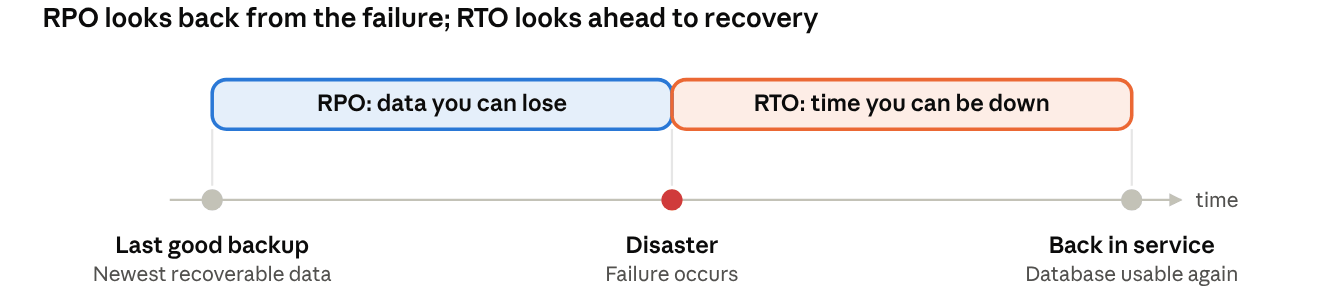
Recovery time objective (RTO) is the longest time the business accepts between a failure and a working database. If the orders database has an RTO of one hour, it must be back in service within sixty minutes of going down. The clock includes detection, decisions, restoring data and checking the result, not just the copy itself.
RPO: How Much Data You Can Lose
Recovery point objective (RPO) is the maximum age of the data you can restore. An RPO of five minutes means that, at worst, the last five minutes of transactions are lost. It is set by how often you capture changes, through backups, log backups or replication, rather than by how fast you restore.
RTO vs RPO and Actual Results
RTO vs RPO is not one dial, because each is met by different measures. A short RPO needs frequent log capture or replication, while a short RTO needs a ready standby or a fast restore, and each costs money. Targets are only wishes until tested, so record the actual recovery time and actual recovery point from every drill and compare them with the targets. The diagram below shows how the two measures sit on a timeline.
How to Set RTO and RPO Targets
Set targets from business impact, not from what your backup tool happens to deliver.
Run a Business Impact Analysis
For each database, estimate what an hour of downtime costs in lost revenue, idle staff and penalties, and what an hour of lost data costs to re-enter or recreate. Add compliance duties, such as retention or reporting rules, and list the systems that depend on the database. A payment database and a reporting database may share a server but not a target.
Tier Your Databases
Tiering keeps the plan affordable, because only the databases that truly need tight targets get expensive protection. The table below is a common starting model, with illustrative figures to adjust to your own business.
| Tier | Typical databases | Target RTO | Target RPO | Typical strategy |
|---|
| Tier 1 | Orders, payments, authentication | 1 hour or less | 5 minutes or less | Standby replica plus frequent log backups |
| Tier 2 | CRM, inventory, internal apps | 1 to 8 hours | Up to 1 hour | Backup restore with hourly log backups |
| Tier 3 | Reporting, test, archives | 24 hours or more | 24 hours | Nightly backup, rebuild if needed |
Balance Targets Against Cost
Cost rises sharply as targets tighten: moving from a one-day RPO to five minutes means log capture or replication, extra storage and often a second site. Compare the yearly cost of each option with the loss one outage would cause. If protection costs more than the loss it prevents, relax the target or move the database to a lower tier.
Choose an Architecture That Meets Your Targets
Pick the simplest architecture that still meets the RTO and RPO of each tier, because every extra layer adds cost and failure modes. The table compares the main options for a disaster recovery strategy, using typical ranges that vary with your setup.
| Option | Achievable RTO | Achievable RPO | Relative cost | Complexity |
|---|
| Backup and restore | Minutes to hours, grows with data size | Hours to a day | Low | Low |
| Log shipping or point-in-time recovery | Minutes to hours | Minutes | Medium | Medium |
| Asynchronous replication | Minutes | Seconds to minutes | Medium to high | Medium |
| Synchronous replication or multi-site failover | Seconds to minutes | Near zero | High | High |
Backup and Restore
This is the simplest option and the foundation of all the others. Restore time grows with data size, so measure it rather than guess. For a step-by-step primer, see our guide to database backup and recovery in DBMS.
Log Shipping and Point-in-Time Recovery
Frequent log backups let you replay changes on top of a full backup and stop at a chosen moment, which brings RPO down to minutes. PostgreSQL pairs a base backup with archived WAL files through continuous archiving, and MySQL replays binary logs after a full backup, as its point-in-time recovery documentation explains.
Replication and Failover
Asynchronous replication keeps a standby close to the primary without slowing commits, but a few seconds of data can be lost in a failure. Synchronous replication waits for the standby before confirming a commit, so RPO approaches zero at the price of latency and cost. Multi-site failover adds protection against losing a whole site. Replication also copies corruption and accidental deletes to the standby, so it never replaces backups.
Engine Notes for Common Databases
SQL Server log shipping copies transaction log backups to a warm standby, but failover is manual. Oracle pairs RMAN backups with Data Guard standby databases, which can run in synchronous or asynchronous protection modes.
Build the Plan in Six Steps
A workable database disaster recovery plan takes six steps, worked through in order. Steps 2 and 4 build on the two sections before this one, so this part stays short.
Step 1: Inventory and Classify Your Databases
List every production database with its owner, size, engine and dependencies such as application servers and DNS. Group the databases by business importance, which sets up the tiers described earlier.
Step 2: Set RTO and RPO Targets
Give each database or tier a target RTO and RPO, using the business impact analysis above. Ask the business owner to sign off, because these targets decide how much you will spend on protection.
Step 3: List Your Failure Scenarios
Write down the failures you plan for: hardware or site loss, human error such as a dropped table, logical corruption and ransomware. Each scenario needs its own recovery path, and a consistent backup taken without stopping the service, as described in this guide to MySQL hot backup best practices, is the base for most of them.
Step 4: Choose the Recovery Strategy
Match each tier to an architecture that can meet its RTO and RPO, using the options in the previous section. Document the choice and the reason, so a later reviewer can see why a database sits where it does.
Step 5: Assign Roles and Write Runbooks
Name an owner and a deputy for each recovery, and write the runbook as ordered steps a tired engineer can follow at 3 a.m.: who declares a disaster, who restores, who checks the data and who informs the business. Keep a printed or offline copy, because the wiki may be down too.
Step 6: Schedule Reviews and Tests
Put review and test dates in the calendar before you call the plan finished: at least a yearly review, plus a restore-test cadence for each tier. Later sections cover how to test the plan and how to keep it current.
Worked Example: A Fictional Online Retailer
To see the six steps in action, take a fictional mid-size online retailer with three databases. All figures here are illustrative.
The Scenario and Its Targets
The company runs an orders database of 2 TB, a customer records database of 400 GB and an analytics database of 5 TB. A business impact analysis gives the targets below.
| Database | Size | Business impact | Target RTO | Target RPO | Recovery approach |
|---|
| Orders | 2 TB | Checkout stops; direct revenue loss | 1 hour | 5 minutes | Standby replica in a second site, plus log backups every 5 minutes |
| Customer records | 400 GB | Support and marketing slow down | 4 hours | 1 hour | Restore from backup, hourly log backups |
| Analytics | 5 TB | Reports delayed | 24 hours | 24 hours | Nightly backup, restore or rebuild from source |
Check Targets Against Data Size
Restore time is roughly data size divided by restore throughput. Assume 500 MB/s, a figure you should replace with your own measurement. At that rate 2 TB takes about 67 minutes before any log replay, so the orders database cannot meet a one-hour RTO by restoring a backup alone. That is why it gets a standby replica in a second site, with log backups every five minutes to cover corruption. The 400 GB customer database restores in about 13 minutes and the 5 TB analytics database in about 2.8 hours, so plain backup and restore fits both targets. Restore time is only part of RTO, because detection, decisions and checks count too, so leave headroom.
The Resulting Plan
For orders, the plan is a weekly full backup, a daily incremental backup, log backups every five minutes and the replica. Customer records get a weekly full, a daily incremental and hourly log backups. Analytics gets a nightly backup, with a rebuild from source systems as the fallback. The team tests the orders restore monthly and the others each quarter, records the actual RTO and RPO each time, and adjusts the plan whenever the results drift from the targets.
Protect Recovery Points from Ransomware
A recovery point is only useful if it is clean, and attackers often try to tamper with or delete backups as well as production data.
Follow the 3-2-1 Rule
Keep three copies of your data on two different media, with one copy off site. A common extension adds one copy that is offline or immutable, and zero errors when you test the restore.
Use Immutable or Offline Copies
An immutable copy cannot be changed or deleted during its retention period, even by an administrator whose account has been compromised. Backup software can supply this layer, so check what your tool offers. Vinchin Backup & Recovery encrypts backup data with AES-256 and, from version 9.0, supports immutable storage (WORM), which keeps a protected copy out of an attacker's reach.
Choose a Clean Recovery Point
Work out when the compromise began, then pick the newest copy from before that moment. Restore it to an isolated environment and scan it before you reconnect anything to production. Frequent log or incremental points give you more choices than a single nightly backup, which is one more reason to keep RPO short.
Test the Plan and Measure Real RTO and RPO
An untested plan is a guess, so schedule tests and measure each result against your RTO and RPO.
Four Test Types, From Light to Full
Start with a tabletop review, where the team walks through a scenario on paper. Next restore a single database to a test server and time it. Then run a failover drill to the standby, and finally a full simulation that includes applications and users. Run the light tests often and the full one at least once a year.
Record Actual RTO and RPO
For every test, note when the failure was declared, when the database became usable and the age of the newest recovered transaction. Those are your actual RTO and RPO. If either misses its target, fix the cause, whether it is slow storage, a missing runbook step or a gap in log backups, and test again.
Verify Restores with Recovery Drills
Manual drills are easy to postpone. Vinchin Backup & Recovery includes automated database recovery drills that help verify backup effectiveness and improve recovery readiness. See the database protection page for details. Whatever tool you use, make drills regular and keep the results, because they are the evidence that your plan works.
Keep the Plan Current
A database disaster recovery plan decays as systems change, so build upkeep into routine work.
Monitor and Automate
Alert on failed backups and growing replication lag, because both quietly break RPO. Automate backup jobs so schedules never depend on someone remembering; Vinchin Backup & Recovery lets you configure automated backup jobs based on your protection requirements. For more on the basics, see this guide to database server backup.
Review When Things Change
Review the plan when schemas, data volume, applications or the business change, and at least once a year. A database that has doubled in size may no longer restore within its RTO.
Avoid Common Mistakes
Most failed recoveries trace back to targets set without business input, backups that were never restored, a single copy in one location, and forgotten dependencies such as DNS or application servers. Check each one against your plan.
FAQ
Q1: What Is the Difference Between RTO and RPO?
A1: RTO is how long a database can be down, and RPO is how much recent data you can lose. RTO is measured as time to recover, and RPO as the age of the newest recoverable data.
Q2: How Low Can RPO Go?
A2: Synchronous replication can bring RPO close to zero, at the cost of added latency and a second site. Log backups every few minutes give a practical RPO of minutes at much lower cost.
Q3: How Often Should I Test a Database Disaster Recovery Plan?
A3: Restore-test critical databases monthly or quarterly, and run a full failover exercise at least once a year. Test again after any major change to the database or infrastructure.
Q4: Does Replication Count as Disaster Recovery?
A4: Replication is part of a disaster recovery strategy, but it also copies corruption and accidental deletes to the standby. Keep independent backups alongside it.
Conclusion
A database disaster recovery plan works when it starts from business impact, sets an RTO and RPO for each database, uses an architecture that fits those numbers and proves them in regular tests. Begin with your most critical database: set its targets, measure how long a real restore takes and close any gap. To cut the manual work, you can try Vinchin Backup & Recovery with a 60-day free trial.