Direct Answer
Cross-platform restore is the process of restoring a VM backup from one virtualization platform to a different supported platform. For example, a VM backed up from VMware can be restored to Hyper-V or Proxmox when the backup and recovery solution supports that source-to-target combination.
Unlike a standard VM restore, which typically restores a workload to the same virtualization platform, cross-platform restore may require virtual disk conversion, hardware mapping, and driver or network adjustments.
Key Takeaways
Cross-platform restore recovers a VM backup onto a different virtualization platform than the source, such as VMware to Hyper-V or Proxmox.
It differs from standard restore and VM migration: it is recovery-oriented, backup-dependent, and requires disk conversion, hardware mapping, and driver or network adjustments.
Not every source-to-target combination is supported; always verify the vendor's compatibility matrix before planning a recovery.
A successfully restored VM is not necessarily a successfully recovered workload: validate OS, network, and applications after every cross-platform restore.
Cross-Platform Restore vs. Standard VM Restore
| Cross-Platform Restore | Standard VM Restore |
Restore path | VMware → Hyper-V | VMware → VMware |
Platform requirement | Source and target platforms must be supported | Usually the same platform |
Data conversion | May require disk or configuration conversion | Usually minimal conversion |
Typical use | DR, platform replacement, migration | Recover failed or deleted VMs |
The key difference is the target environment. Cross-platform restore moves a workload between different virtualization platforms during recovery, while standard VM restore generally keeps the workload on its original platform.
As a rule of thumb:
Choose standard restore when you only need to recover on the same platform you backed up from; choose cross-platform restore when the original platform is unavailable, being retired, or you are consolidating onto a new hypervisor.
How Does Cross-Platform Restore Work?
The exact workflow depends on the recovery solution and the platforms involved, but a typical cross-platform restore includes these steps:
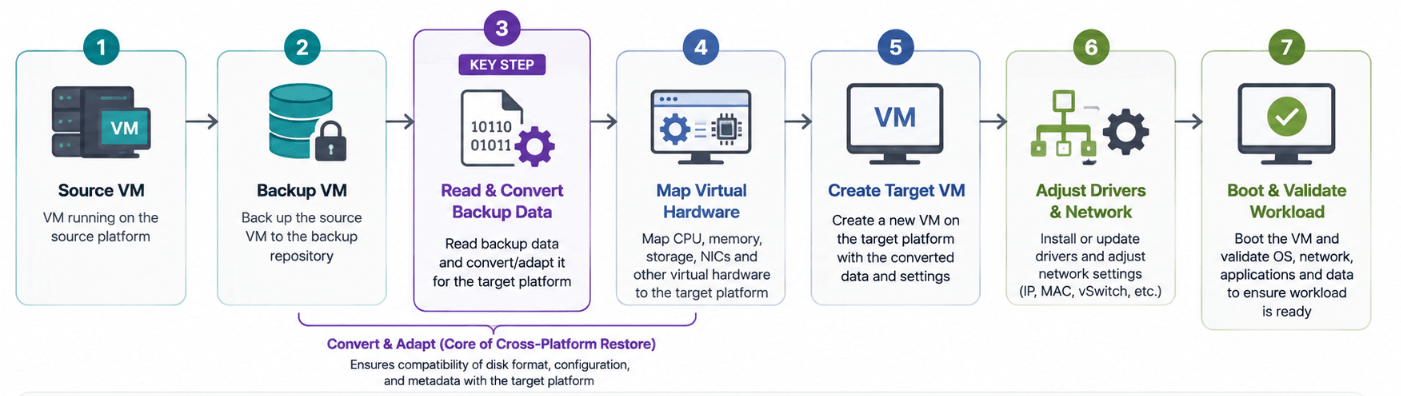
Step 1: Back Up the Source VM
The source VM is protected using a backup that contains the data required to rebuild the workload. For a full VM recovery, this generally includes the virtual disks and relevant VM configuration.
Step 2: Read and Convert Backup Data
The recovery software reads the backup and adapts the data for the target platform. This may include converting virtual disk formats or translating VM configuration information.
For example, VMware's native VMDK format must typically be converted to VHD or VHDX before it can be attached to a Hyper-V VM. The specific supported disk formats and conversion paths are documented in each hypervisor vendor's official documentation and should be confirmed there before planning a recovery.
Step 3: Map Virtual Hardware
Different hypervisors use different virtual hardware. The recovery process may therefore map CPU, memory, storage controllers, virtual disks, and network adapters to compatible target-platform configurations.
This mapping step is what "hardware mapping" refers to: it is the automated translation of one hypervisor's virtual device set (for example, a VMware paravirtual SCSI controller) into the closest equivalent device supported by the target hypervisor.
Step 4: Create the Target VM
The recovery software creates a VM on the destination platform and attaches the recovered virtual disks and configuration.
Step 5: Adjust Drivers and Network Settings
The guest OS may need different virtual hardware drivers. Network adapters, MAC addresses, IP settings, and virtual switches may also need to be adjusted.
In practice, this is one of the most common points where a cross-platform restore stalls: a Windows guest moved to Hyper-V typically needs Hyper-V integration services installed (or the built-in drivers to load correctly) before the network adapter is recognized, and the NIC's new MAC address often means static IP or firewall rules tied to the old MAC need to be reapplied manually.
Step 6: Boot and Validate the Workload
After the VM boots, administrators should verify the operating system, storage, network connectivity, applications, and data before putting the workload into production.
A successful VM boot is only the first validation point. The application and business workload should also be confirmed as operational.
Common Cross-Platform Restore Use Cases
Disaster Recovery
Cross-platform restore can provide an alternative recovery path when the original hypervisor or infrastructure is unavailable. For example, a workload running on VMware could potentially be recovered to another supported platform during a disaster.
Hypervisor Migration
Organizations may use backup-based cross-platform restore to move workloads from one hypervisor to another. This can be useful when replacing or consolidating virtualization infrastructure.
Platform Replacement
When an organization changes its virtualization platform, existing workloads may need to be rebuilt on the new environment. Cross-platform restore can provide one way to accomplish this using existing backups.
Test and Development
A VM can be restored to another supported platform or an isolated environment for testing without modifying the production VM.
Temporary Workload Recovery
If the primary virtualization platform is temporarily unavailable, critical workloads can potentially be restored to an alternative supported environment while the original infrastructure is repaired.
Supported Platforms and Compatibility
Cross-platform restore may involve a range of virtualization environments, including:
However, support for a platform does not automatically mean that every source-to-target combination is supported.
For example, support for both VMware and Hyper-V does not necessarily mean that a particular backup product supports VMware → Hyper-V recovery.
A source-to-target compatibility matrix should therefore be checked before planning a recovery. Vendors typically publish this matrix in their official product documentation or knowledge base. Check the specific version and guest OS support list there rather than assuming compatibility based on platform names alone.
Source | Target | What to Verify |
VMware | Hyper-V | VM configuration, disk, and guest OS support |
VMware | Proxmox | Disk, hardware, and guest OS compatibility |
Hyper-V | VMware | Disk and VM configuration conversion |
Hyper-V | Proxmox | Guest OS and virtual hardware support |
Proxmox | VMware | Disk and hardware compatibility |
The actual supported combinations depend on the recovery software, VM configuration, and guest operating system.
What Can Be Restored Across Platforms?
Depending on the recovery solution, cross-platform restore can recover different components of a VM workload.
VM Configuration
CPU, memory, virtual disks, network adapters, and other supported VM settings may be recreated on the target platform.
Virtual Disks
The operating system, applications, and data stored on the VM's virtual disks can be recovered. Disk conversion may be required when source and target platforms use different formats.
Guest OS
Windows and Linux workloads may be recoverable across platforms when the specific guest OS and target configuration are supported.
Files and Applications
Because the VM's operating system and virtual disks can be restored, the files and applications contained within them can also be recovered.
Databases and Other Workloads
Database servers, file servers, application servers, and other workloads can potentially be recovered. However, application consistency and post-restore validation are important, particularly for transactional workloads.
Application-consistent recovery means the backup captures the database or application in a transactionally coherent state (for example, using VSS on Windows) so that it does not require crash-recovery when it starts up on the target platform. This is worth confirming specifically for database and messaging workloads.
Cross-Platform Restore Requirements
Before starting a cross-platform restore, verify these requirements:
Valid and Complete Backup
The selected restore point must be readable and contain the data required to rebuild the workload.
Supported Source and Target Platforms
Both platforms must be supported for the specific source-to-target recovery path.
Sufficient Resources
The target environment needs enough:
CPU
Memory
Storage
Network bandwidth
Storage performance
OS and Driver Compatibility
The guest OS must be able to work with the virtual hardware presented by the target platform. Additional drivers or configuration changes may be required.
Network and Application Requirements
Plan for changes to:
Challenges and Limitations of Cross-Platform Restore
Cross-platform restore provides flexibility, but it introduces additional compatibility considerations.
Virtual Hardware and Driver Differences
Different hypervisors expose different virtual hardware. The guest OS may therefore require new drivers or hardware configuration changes before it operates normally.
Disk Format Conversion
Virtual disk formats and storage controllers may differ between platforms. The recovery software may need to convert or adapt the disks before the VM can boot.
Network Configuration Changes
The restored VM may see a different virtual network adapter, MAC address, virtual switch, or network interface name. IP configuration may therefore require manual adjustment.
Application Dependencies
Applications can depend on specific drivers, services, hardware configurations, or platform components. A VM that boots successfully may still require application-level troubleshooting.
Software Licensing
Some operating systems and applications may detect changes in virtual hardware and require reactivation or license verification.
Recovery Downtime
Cross-platform restore generally requires time to recover the VM before it becomes available on the target platform. Recovery time depends on factors such as backup size, storage performance, network bandwidth, conversion requirements, and target resources.
For planning purposes, teams commonly track this as part of their overall RTO (Recovery Time Objective); see our related guide on RTO and RPO for how cross-platform restore time budgets fit into a broader disaster recovery plan.
Cross-Platform Restore vs. VM Migration
Cross-platform restore and VM migration can both move workloads between platforms, but they serve different primary purposes.
| Cross-Platform Restore | VM Migration |
Primary purpose | Recover a workload | Move a workload |
Backup dependency | Typically uses a backup | May operate directly from the source VM |
Main focus | Recovery and business continuity | Infrastructure transition |
Typical trigger | Failure, disaster, or recovery requirement | Planned platform change |
Source availability | Source VM may be unavailable | Usually requires access to the source workload |
In simple terms, cross-platform restore is recovery-oriented, while VM migration is migration-oriented.
However, backup-based migration can use cross-platform restore capabilities. For example, an organization may back up a VMware VM and restore that backup to a new Proxmox environment as part of a planned platform transition.
Best Practices for Cross-Platform Restore
Follow these practices to make cross-platform recovery more predictable:
1. Verify source-to-target compatibility before an emergency occurs.
2. Test backups regularly to confirm that restore points are usable.
3. Prepare the target environment with sufficient compute, storage, networking, and permissions.
4. Validate the OS, network, and applications after recovery.
5. Test recovered workloads in an isolated environment when possible to avoid network conflicts or unintended production impact.
6. Document recovery procedures, including platform mappings, network changes, application checks, and validation steps.
The most important principle is:
A successfully restored VM is not necessarily a successfully recovered workload. Always verify the applications and services that the business depends on.
How to Choose a Cross-Platform Restore Solution
When evaluating backup and recovery software, focus on capabilities that directly affect cross-platform recovery:
Source-to-target platform support: Confirm the exact recovery combinations you need.
Automated hardware mapping: Look for automatic adaptation of CPU, storage, and network configurations.
Disk conversion: Verify support for the virtual disk formats used by your source and target platforms.
Driver handling: Check how the solution handles guest OS drivers after recovery.
Application-aware recovery: Important for databases and other transactional applications.
Point-in-time recovery: Allows you to select an appropriate recovery point.
Recovery testing: Helps verify that cross-platform recovery works before an actual disaster.
Recovery performance: Consider data transfer speed, storage performance, and conversion overhead when estimating RTO.
Licensing and cost model: Compare whether the solution licenses by socket, VM, or capacity, and whether cross-platform restore is included in the base license or requires an add-on module, as this materially affects total cost for organizations restoring across many VMs.
Rather than assuming that two platforms are compatible, always verify the vendor's documented source-to-target support matrix and test the actual recovery workflow.
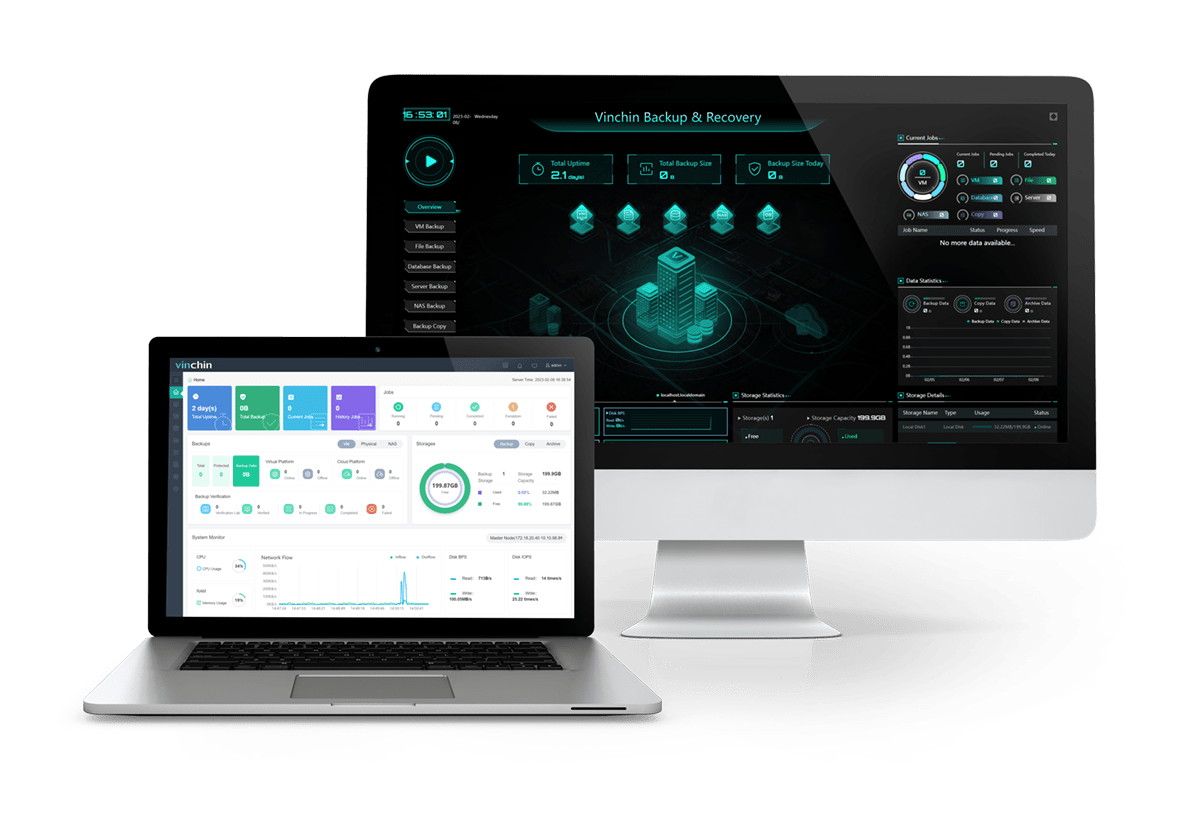
Vinchin Backup & Recovery supports backup and recovery across multiple virtualization platforms, including Proxmox, Hyper-V, VMware, OpenStack, XenServer, Red Hat and etc. and provides capabilities such as cross-platform recovery, VM hardware mapping, and recovery testing. Before choosing a solution, verify that your required source-to-target combinations are supported.
Frequently Asked Questions
Q1: Can I restore VMware VMs to Hyper-V?
Yes, if the backup and recovery solution supports VMware-to-Hyper-V recovery. The process may require virtual disk conversion, hardware mapping, and guest OS or driver adjustments.
Q2: Is cross-platform restore the same as VM migration?
No. Cross-platform restore is primarily backup-based recovery of a workload, used for DR, platform replacement, and testing, while VM migration moves a live or offline VM directly between platforms as part of a planned infrastructure change.
Q3: Does cross-platform restore require downtime?
Usually. The VM must be recovered and started on the target platform before it becomes available there. Recovery time depends on the backup size, storage, network, conversion process, and target infrastructure.
Q4: Can cross-platform restore be used for disaster recovery?
Yes. Cross-platform restore can provide an alternative recovery path when the original virtualization platform is unavailable, provided the target platform and recovery workflow are supported.
Q5: What happens to the source VM during cross-platform restore?
The source VM is not modified. Cross-platform restore reads the backup and creates a new VM on the target platform, so the original workload continues to run until you choose to decommission it. This also makes the process useful for testing and migration.













