Are you responsible for keeping your Oracle databases safe and recoverable? If so, you know that a solid backup strategy is essential. Oracle Recovery Manager (RMAN) is the built-in tool for this job, but with so many options, how do you choose the right approach? In this article, we’ll break down the key RMAN backup strategies, explain why they matter, and show you how to implement them step by step.
What Is Oracle RMAN Backup Strategy?
An Oracle RMAN backup strategy is a plan for how, when, and what you back up in your Oracle database using RMAN. It defines the types of backups (full or incremental), their frequency, retention policies, scheduling methods, and validation steps. The goal is to ensure you can restore your database quickly and with minimal data loss if disaster strikes.
A typical RMAN backup strategy includes regular full backups to capture all data blocks at a point in time. Frequent incremental backups save only changed blocks since the last backup. Archived redo log backups are also critical—they record every transaction since your last backup. These elements work together to protect your data and meet your business’s recovery objectives.
The right mix depends on several factors: database size, rate of change (how much data changes daily), available storage space, network bandwidth for offsite copies or cloud storage integration, compliance requirements such as GDPR or HIPAA mandates on retention periods—and most importantly—your organization’s tolerance for downtime.
Why Choose an Effective RMAN Approach?
A well-designed RMAN backup strategy is your insurance policy against data loss. Without it, you risk long outages or even unrecoverable databases after hardware failure or human error. According to Oracle’s official documentation, using RMAN allows administrators to automate complex tasks like block-level backups or compression while meeting strict recovery time objectives (RTO) and recovery point objectives (RPO).
But why not just run a full backup every night? For most production databases—especially large ones—that’s not practical. Full backups take significant time and consume lots of storage space. Incremental backups reduce these burdens by saving only what has changed since the last baseline image.
Your chosen strategy should balance speed of both backup creation and restoration; efficient use of disk; regulatory compliance; ease of management; plus flexibility in responding to unplanned events like ransomware attacks or accidental deletions.
Method 1. Full Backups
Full backups are the foundation of any robust RMAN strategy. A full backup copies every data block in your database at a specific moment—creating a complete snapshot that can be restored if needed later. In RMAN terms this is called a level 0 incremental backup.
To create an online full backup while users are active requires that your database runs in ARCHIVELOG mode—which means all changes are written out as archived redo logs so nothing gets lost during hot backups. You can check if ARCHIVELOG mode is enabled by running:
ARCHIVE LOG LIST;
If ARCHIVELOG mode isn’t enabled but downtime is possible during maintenance windows—you may perform an offline consistent full backup by shutting down cleanly first.
When running a full online backup with RMAN it’s best practice to specify where files should go:
BACKUP DATABASE FORMAT '/backup/%U';
This ensures files don’t end up in default locations that might fill up unexpectedly.
To include archived redo logs—which are crucial for point-in-time recovery—use:
BACKUP DATABASE PLUS ARCHIVELOG FORMAT '/backup/%U';
Most organizations schedule weekly full backups during low-activity periods such as weekends or overnight hours when system load drops off.
Fulls provide a reliable baseline but because they’re large and time-consuming it’s risky to rely solely on them without incrementals or log archiving.
Method 2. Incremental Backups
Incremental backups save only those blocks that have changed since previous backups—making them faster than repeated fulls while still capturing all new activity over time.
RMAN supports two main types:
Level 0: A complete copy of all data blocks—the same as a traditional full.
Level 1: Only backs up blocks changed since either the last level 0 (differential) or accumulates all changes since level 0 regardless of intervening incrementals (cumulative).
Differential level 1s are smaller but require applying multiple sets during restore; cumulative level 1s simplify restores at the cost of slightly larger daily files.
To create a differential incremental:
BACKUP INCREMENTAL LEVEL 1 DATABASE FORMAT '/backup/incr_%U';
For cumulative:
BACKUP INCREMENTAL LEVEL 1 CUMULATIVE DATABASE FORMAT '/backup/cum_%U';
A common pattern is one weekly level 0 followed by daily level 1 incrementals—a compromise between speed/storage efficiency versus restore complexity.
During disaster recovery:
1. Restore latest level 0
2. Apply all subsequent incrementals
3. Roll forward using archived redo logs until desired point-in-time
Want faster incrementals? Enable block change tracking—a feature that records which blocks have been modified so scans go quicker:
ALTER DATABASE ENABLE BLOCK CHANGE TRACKING USING FILE '/u01/oradata/bct.btf';
Note: Enabling this requires SYSDBA privileges; sometimes restarting the instance helps apply changes immediately depending on environment specifics.
If incremental sizes remain unexpectedly large after enabling block change tracking—it could indicate NOLOGGING operations occurred recently which bypass normal logging mechanisms; consider taking another baseline level 0 after major bulk loads or index rebuilds performed with NOLOGGING clauses.
Method 3. Scheduling RMAN Backups
Automation makes reliable protection possible—even when staff aren’t watching closely overnight or on weekends! While RMAN itself doesn’t include its own scheduler—you can use operating system tools like cron (Linux/Unix) or Task Scheduler (Windows) to run scripts at set times without manual intervention each day.
For example—to schedule regular jobs via cron edit crontab entries using:
crontab -e
Add lines such as:
0 2 * * 0 /path/to/scripts/rman_level0.sh > /path/to/logs/rman_level0.log 2>&1
0 2 * * 1-6 /path/to/scripts/rman_level1.sh > /path/to/logs/rman_level1.log 2>&1
This setup runs a weekly Sunday morning level 0 at 2 AM then daily Monday–Saturday incrementals at the same hour—all outputting logs for review later if issues arise.
Inside each shell script consider adding basic error handling—for example checking $? exit codes from rman commands—and sending alerts via email/SMS if failures occur.
Also remember log rotation! Over time old .log files pile up fast unless managed automatically using tools like logrotate on Linux systems—or scheduled cleanup scripts elsewhere.
Don’t forget frequent archived redo log copies too—especially after heavy batch jobs—to minimize potential data loss between scheduled incrementals/full images!
Method 4. Setting Retention Policies in RMAN
Retention policies control how long old backups stick around before being deleted automatically—a vital part of managing limited disk space safely over months/years.
RMAN supports two main approaches:
Set these policies globally within rman prompt:
To keep everything needed for seven days’ worth of rollbacks:
CONFIGURE RETENTION POLICY TO RECOVERY WINDOW OF 7 DAYS;
Or keep just two most recent sets per file:
CONFIGURE RETENTION POLICY TO REDUNDANCY 2;
After setting policies always test what would be deleted first:
REPORT OBSOLETE;
DELETE NOPROMPT OBSOLETE;
Regular cleanup prevents disks filling up silently behind-the-scenes—which could cause future jobs to fail unexpectedly!
With your core types/schedule/retention configured—you now have an automated cycle protecting business-critical information around-the-clock!
How to Back Up Oracle Databases with Vinchin Backup & Recovery
Beyond native tools like RMAN, organizations seeking streamlined enterprise-grade protection often turn to specialized solutions tailored for modern environments—including multi-database support and advanced automation capabilities designed specifically for platforms such as Oracle databases alongside MySQL, SQL Server, MariaDB, PostgreSQL, PostgresPro, and TiDB systems alike. Vinchin Backup & Recovery stands out as an enterprise-level solution supporting these mainstream databases with robust features including incremental backup options tailored for Oracle workloads, batch database operations across instances, flexible retention policy configuration including GFS schemes, comprehensive cloud/tape archiving integration, plus integrity checks ensuring recoverability under real-world conditions—all helping optimize storage usage while maintaining compliance-readiness and operational resilience throughout complex infrastructures.
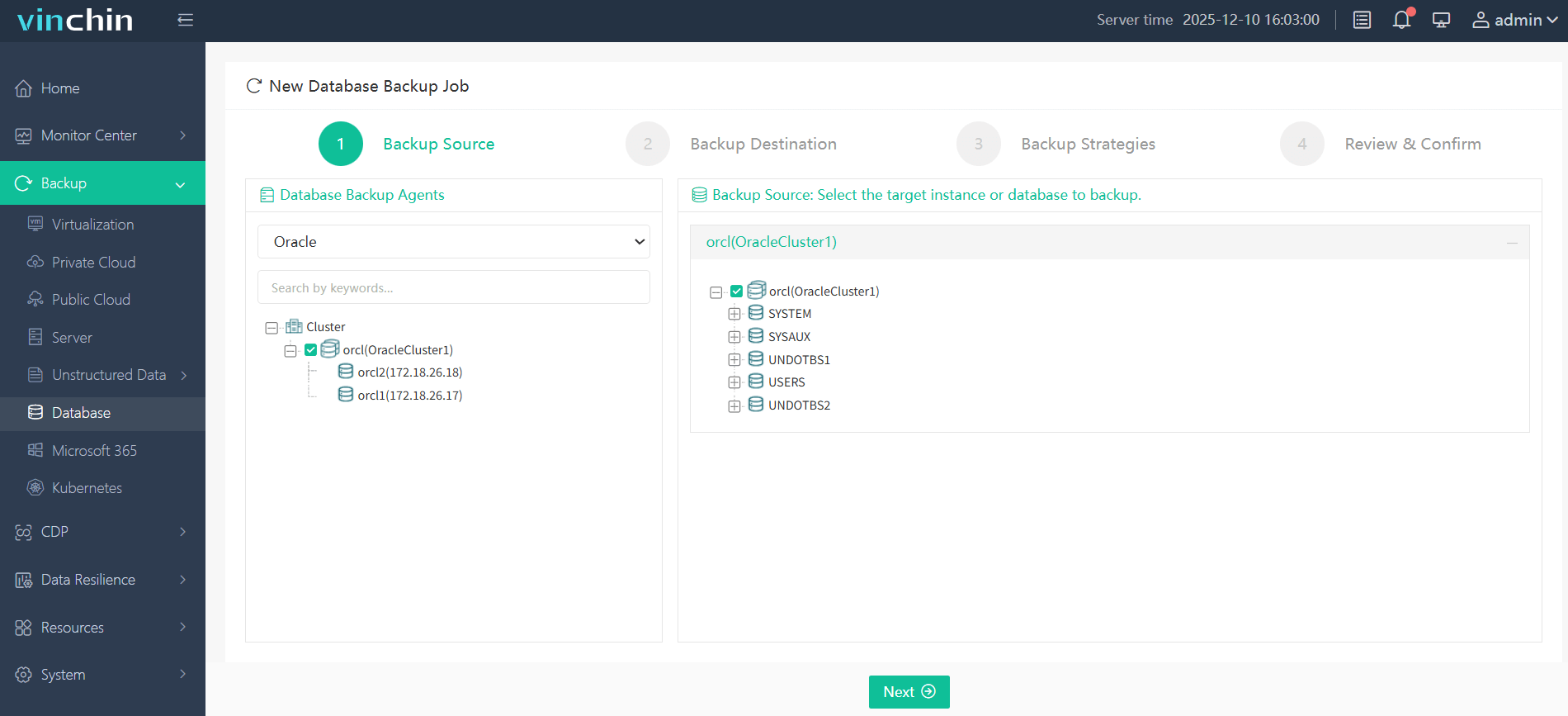
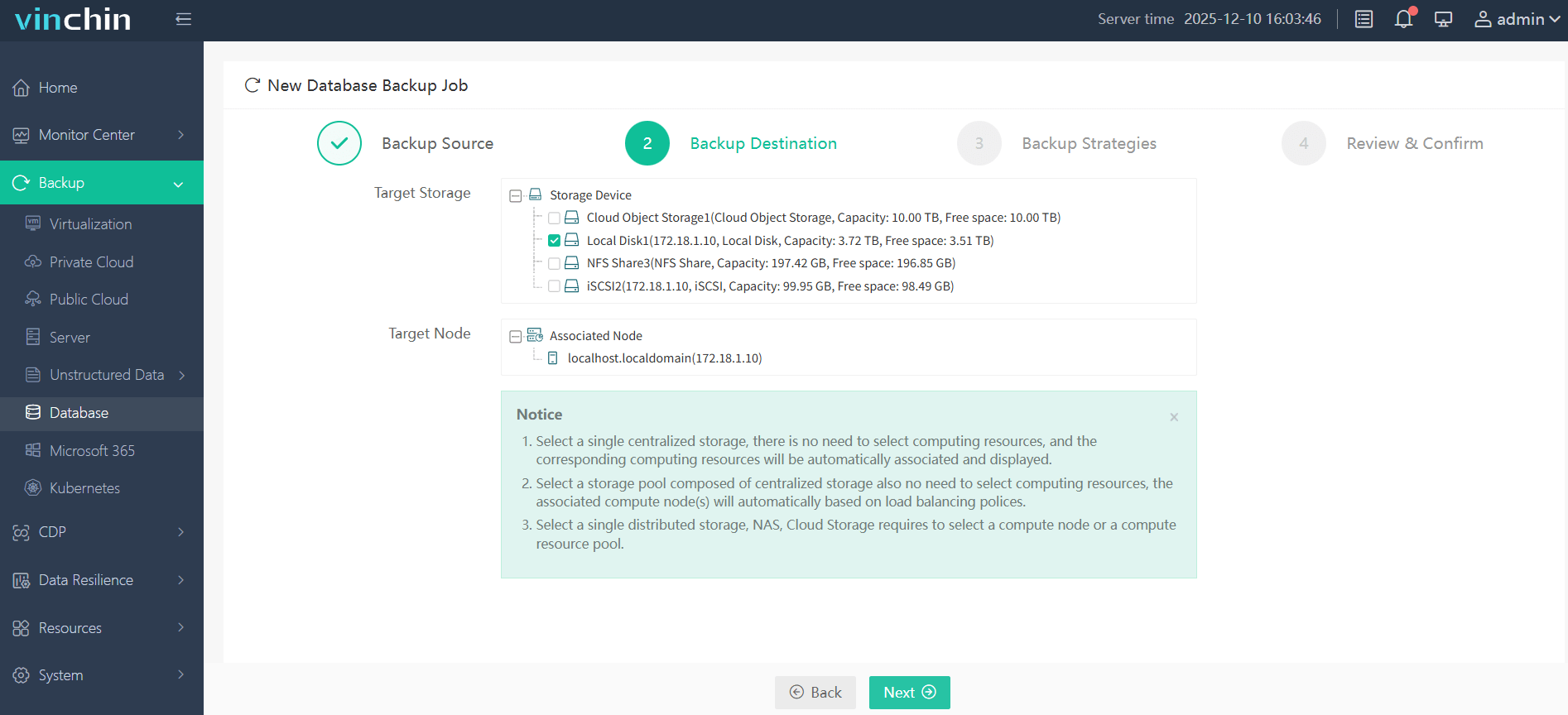
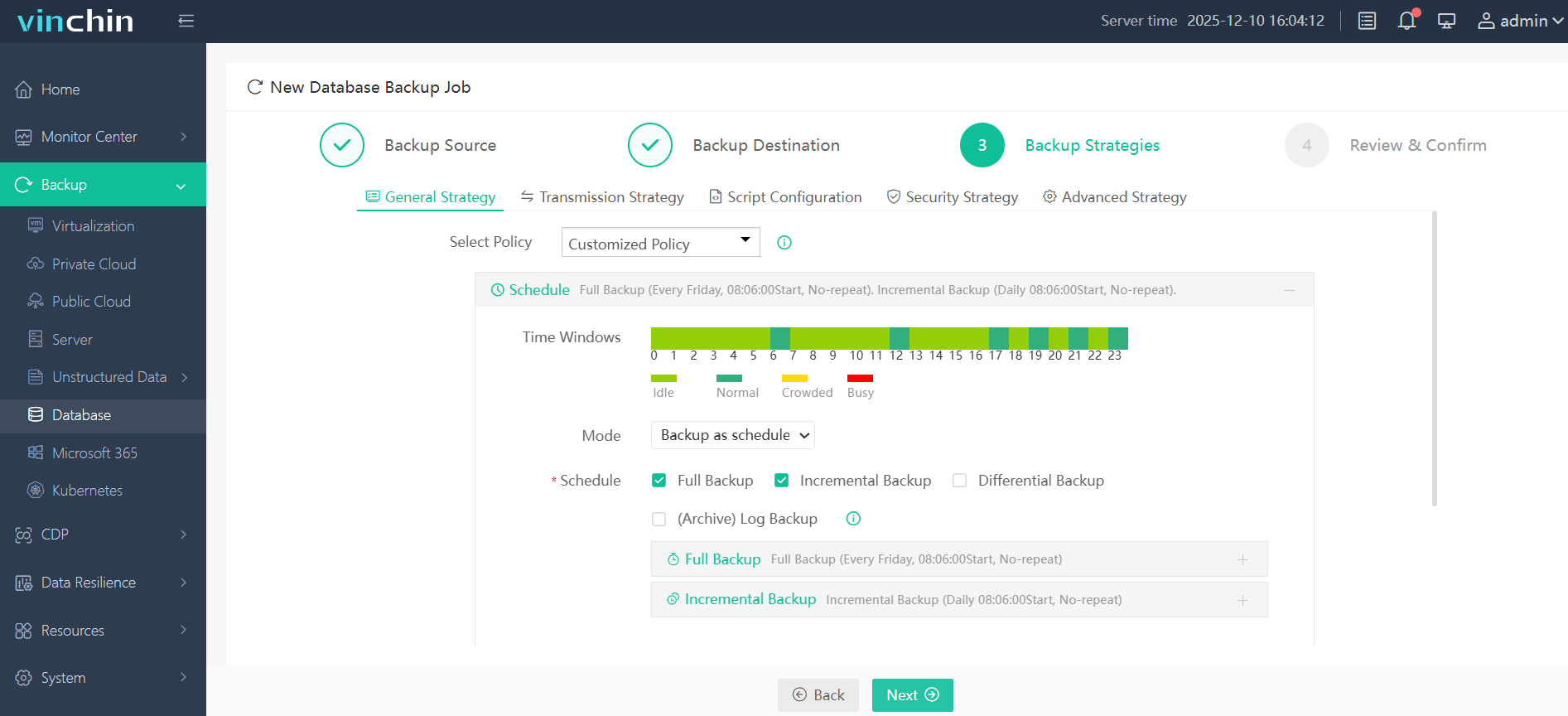
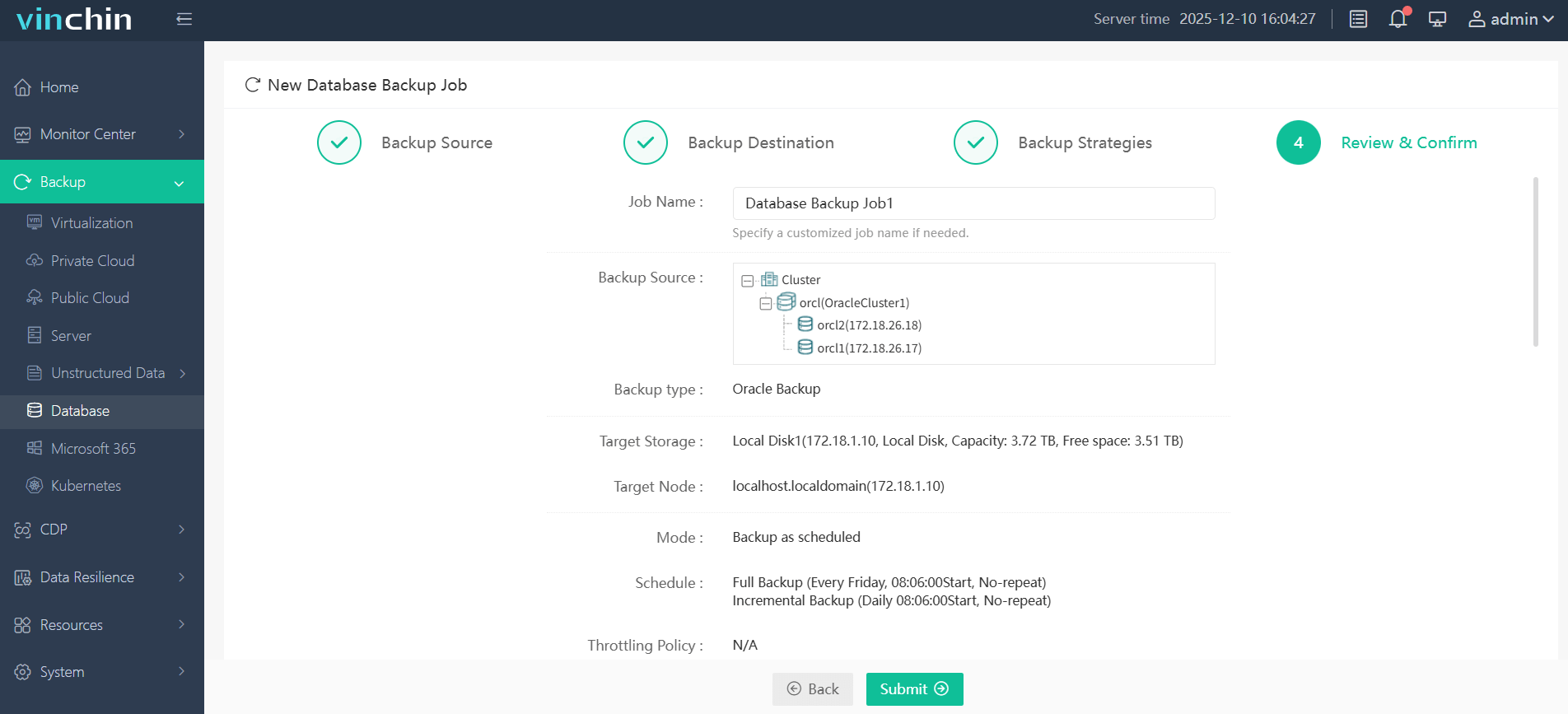
Vinchin Backup & Recovery features an intuitive web console that simplifies even advanced workflows into four clear steps:
Step 1. Select the Oracle database to back up
Step 2. Choose the backup storage
Step 3. Define the backup strategy
Step 4. Submit the job
Recognized worldwide with strong customer adoption and top industry ratings,Vinchin Backup & Recovery offers a fully featured free trial valid for sixty days—experience trusted enterprise protection firsthand by clicking download now!
Oracle RMAN Backup Strategy FAQs
Q1: How do I resolve “ORA-19502 write error” during an RMAN job?
A1: Check disk space where destination directory resides; verify permissions allow writes by oracle user account running rman process.
Q2: My incremental remains large despite block change tracking—is something wrong?
A2: Recent NOLOGGING operations force entire affected segments into next incremental set; take fresh baseline Level 0 after such activities finish.
Q3: What’s best way to automate alerting if my nightly script fails?
A3: Add logic checking rman exit code ($?) then trigger mail/SMS notification upon nonzero result inside shell wrapper script post-backup completion.
Conclusion
Building an effective oracle rman backup strategy means combining regular full/incremental images plus smart scheduling/retention controls—all validated/tested routinely under real-world conditions! By following these practices you’ll safeguard critical assets against almost any threat imaginable—and Vinchin makes managing enterprise-grade protection even easier than ever before!