Protecting your ZStack cloud environment demands both efficiency and reliability. Vinchin Backup & Recovery stands out as a leading ZStack backup software that supports agentless and incremental backups. This combination protects enterprise data while minimizing system impact. It also helps organizations meet compliance goals with less complexity.
Agentless incremental backup reduces setup time, lowers maintenance needs, and speeds up recovery. These benefits matter for any business running virtual infrastructure at scale. With fewer moving parts, you get faster restores and less risk of data loss during outages or cyberattacks.
Why Agentless and Incremental Backups Matter in Enterprise Environments
Modern enterprise IT environments are complex. Backup operations can strain resources if not managed well. Agentless incremental backups streamline deployment, reduce system overhead, and enable rapid recovery—key factors for any organization relying on virtualization.
● Reduced Administrative Overhead
Agentless backup eliminates the need to install or update agents inside every virtual machine (VM). Managing hundreds or thousands of VMs becomes easier because there is no guest OS dependency. This approach cuts down on manual work, reduces compatibility issues across different operating systems, and lowers maintenance costs over time.
● Lower System Impact
With agentless technology, backup software interacts directly with hypervisor APIs instead of running processes inside VMs. This means less CPU usage within production workloads during backups—a critical advantage when uptime matters most.
● Efficient Storage Usage
Incremental backups only save changes made since the last backup rather than copying all VM data every time. For example: If a 100GB VM only changes 2GB daily, only those 2GB are backed up after the initial full copy. This saves storage space and reduces network traffic.
● Faster Recovery Times
Incremental backups make restores quicker because there’s less data to process compared to full backups every cycle. Meeting strict recovery point objectives (RPOs) or recovery time objectives (RTOs) becomes more achievable for disaster recovery plans.
● Compliance Support
Many regulations require regular proof of data protection practices such as GDPR or HIPAA. Agentless incremental solutions simplify audit trails by centralizing logs without needing per-VM tracking.
While agentless methods offer clear advantages for most scenarios, some application-specific data—like live database transaction logs—may still need specialized integration or scripts for consistent protection during hot backups. Understanding these boundaries helps IT teams design comprehensive strategies that balance simplicity with thoroughness.
If your backup solution lacks these features, you may face longer downtimes or higher administrative burden after incidents occur. Incomplete restores can lead to lost productivity or even compliance failures—a risk few businesses can afford in today’s digital landscape.
How To Choose The Best ZStack Backup Solution for Agentless and Incremental Backups?
Selecting a ZStack backup solution goes beyond checking off basic requirements; it involves looking for capabilities that support current needs while allowing future growth without disruption.
The right solution should offer seamless integration with your existing infrastructure through true agentless architecture—meaning no software installation inside guest VMs is required at any stage. This simplifies management tasks like patching or troubleshooting across diverse workloads.
Robust incremental backup support is essential so you can optimize storage use as your environment grows larger over time. For instance: Instead of backing up entire VMs nightly—which strains bandwidth—you capture only what has changed since yesterday’s job finished.
Scalability must be built-in so performance remains stable even as new projects launch or user counts increase rapidly across multiple sites or clusters within your cloud platform.
Automation plays a big role too: Look for policy-based scheduling features that let you set rules such as “backup all production VMs daily at 2 AM” while retaining copies for 30 days before automatic deletion kicks in if space runs low.
Granular restore options are vital when you need to recover just one file from a VM rather than rolling back an entire server image—saving both time and reducing disruption during minor incidents like accidental deletions by users.
Comprehensive reporting tools help prove compliance during audits by generating detailed logs showing exactly when each VM was protected—and how often policies were enforced according to internal standards or external regulations like ISO 27001.
Finally, consider security measures such as ransomware protection using immutable storage snapshots that cannot be altered once written—or air-gapped repositories disconnected from production networks—to guard against evolving threats.
Vinchin Backup & Recovery: Enterprise-Grade Protection for ZStack
For organizations seeking robust protection of their ZStack environments, Vinchin Backup & Recovery offers an advanced enterprise-level virtual machine backup solution supporting over 15 mainstream virtualization platforms—including prioritized support for ZStack alongside VMware, Hyper-V, Proxmox, oVirt, OLVM, RHV, XCP-ng, XenServer, OpenStack and more. Vinchin Backup & Recovery provides extensive feature coverage tailored to modern hybrid infrastructures: LAN-free backup ensures efficient transfers; CBT enables fast change tracking; instant recovery minimizes downtime; granular restore allows precise file-level retrieval; while scheduled/incremental backups automate routine protection tasks—all designed to maximize operational resilience while reducing resource consumption.
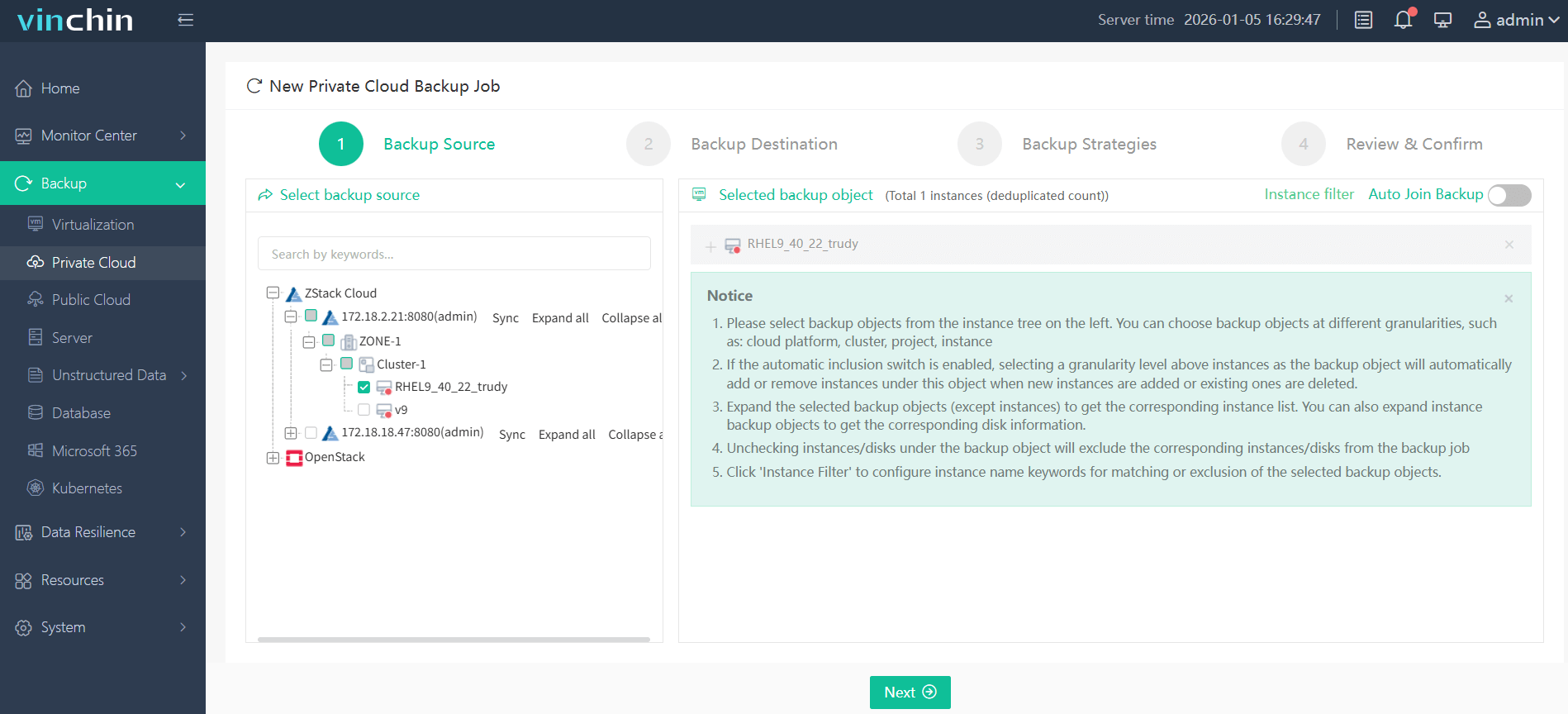
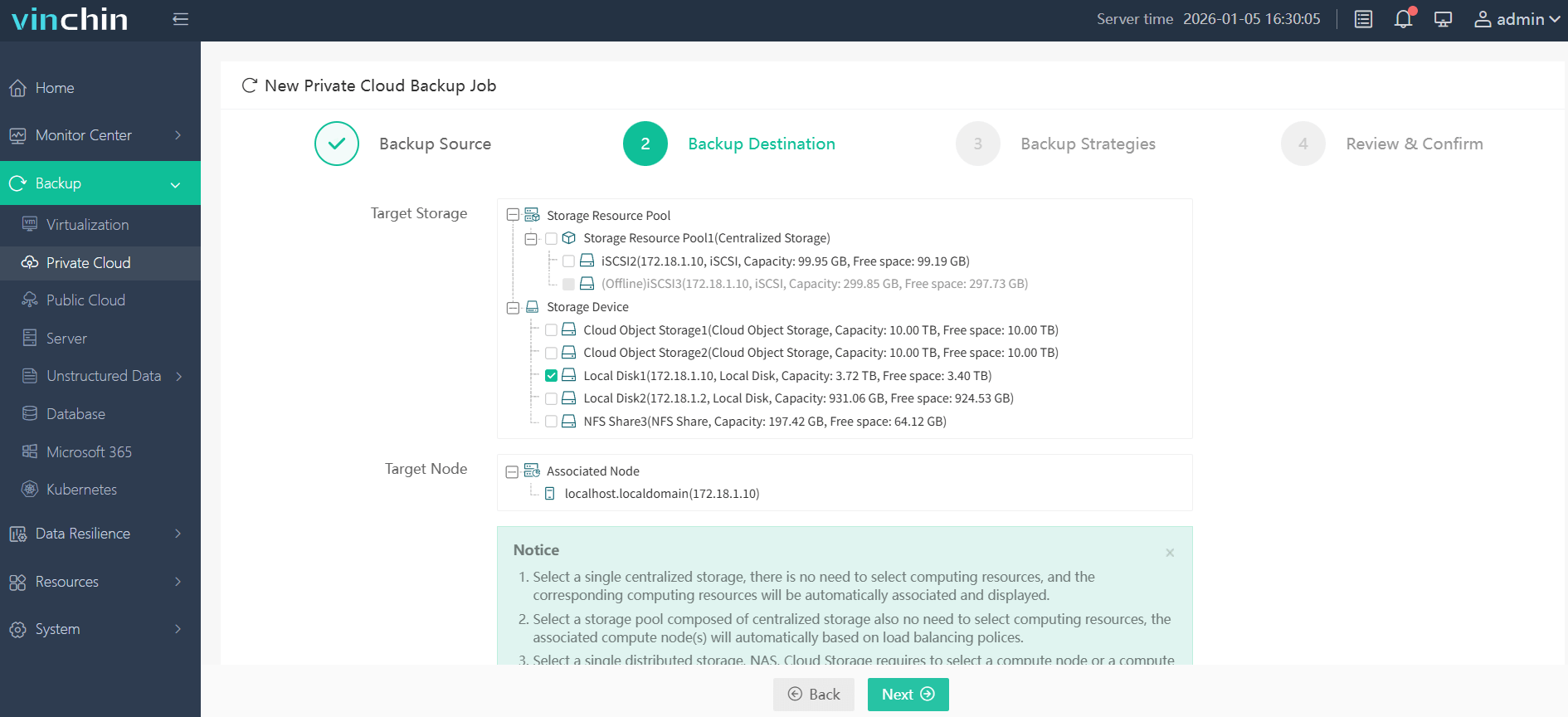
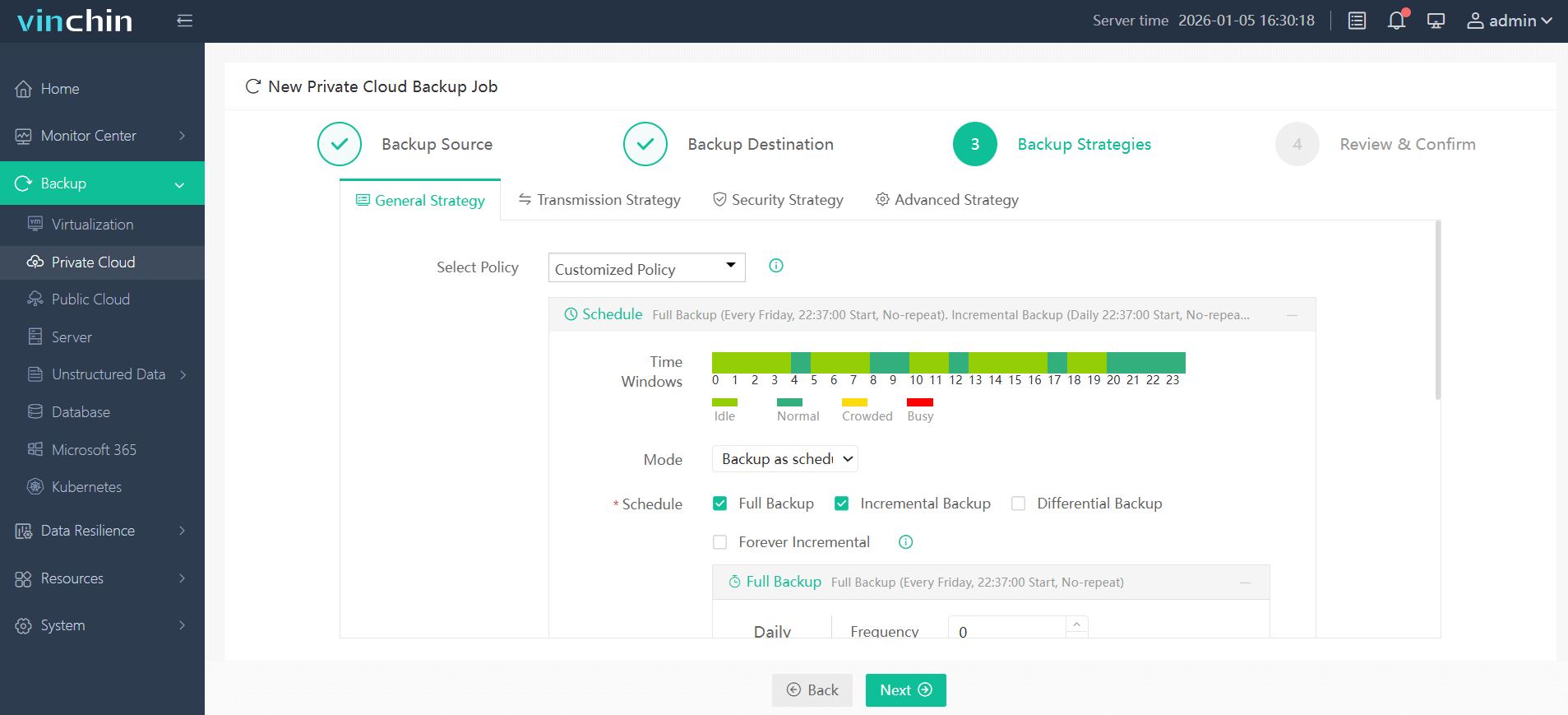
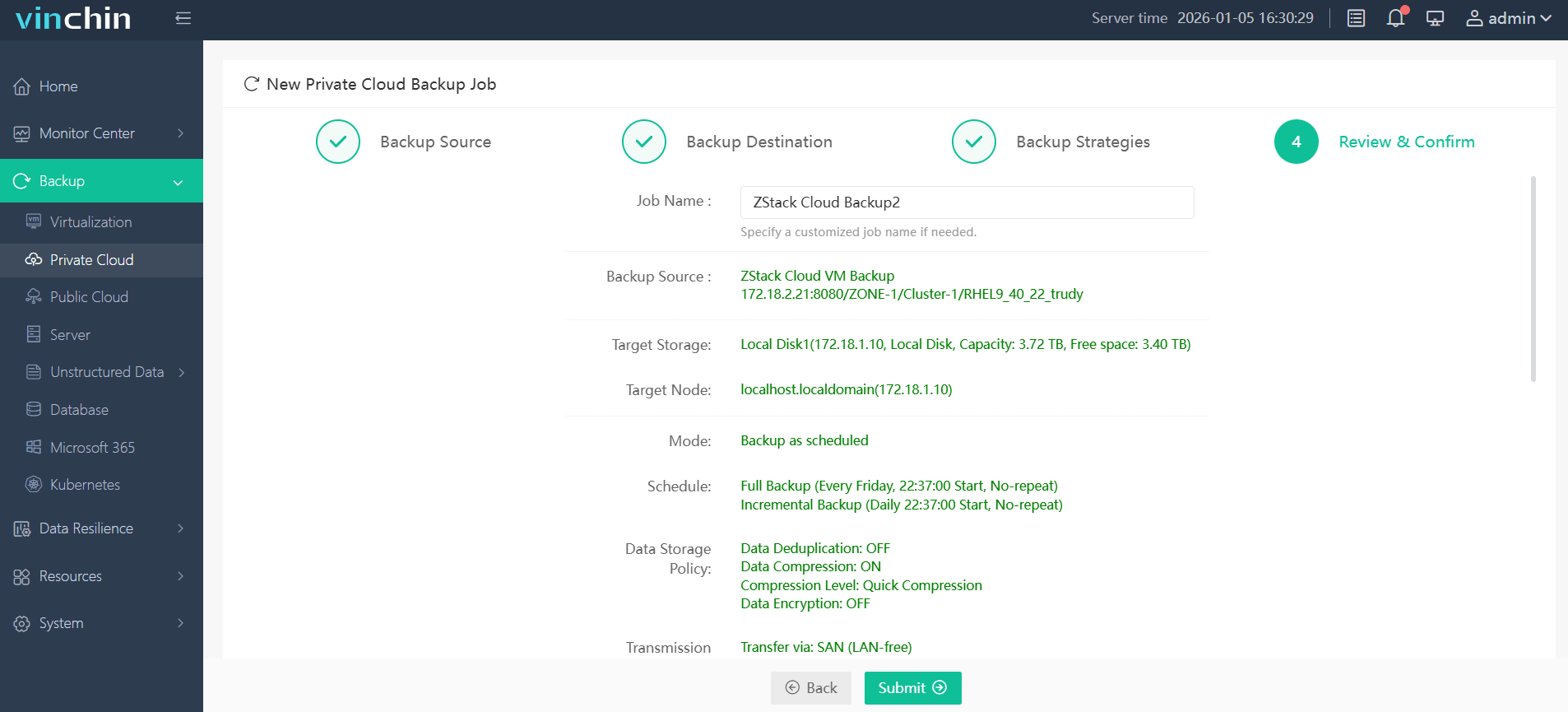
The intuitive web console makes operation straightforward:
Step 1: Select the ZStack VM to back up.
Step 2: Choose the backup storage.
Step 3: Configure the backup strategy.
Step 4: Submit the job.
Trusted globally by enterprises of all sizes—with top ratings in independent reviews—Vinchin Backup & Recovery offers a fully featured 60-day free trial so you can experience its power firsthand; click below to download now.
Best ZStack Backup Software FAQs
1. Does the solution require agents inside each VM?
No. Vinchin provides fully agentless backup for ZStack environments so there’s no need to install software inside individual virtual machines—everything runs outside via platform APIs.
2. Are all types of backups supported incrementally?
Yes. Both full VM-level images and ongoing incremental updates are available so you can choose whichever strategy fits best based on workload size or change rate requirements over time.
3. Can it scale with expanding cloud infrastructure?
Yes; Vinchin’s architecture supports seamless scaling across large deployments—even multi-site setups—with centralized control remaining easy regardless of how many nodes join later on as demand increases naturally within growing enterprises.
4. Is compliance reporting included?
Yes; detailed logs plus customizable reports help meet audit requirements quickly whenever regulators request proof-of-protection documentation covering everything from schedules run times through retention enforcement history records generated automatically behind-the-scenes daily if desired by administrators themselves too!
5. How does the solution handle backup verification and integrity checks?
Vinchin includes automated verification processes that check completed backups regularly for integrity errors before marking them ready-for-recovery status; this ensures reliable restores whenever needed without surprises due corrupted files lurking undetected until disaster strikes unexpectedly someday down road ahead.
Conclusion
Choosing strong ZStack backup impacts business continuity directly—affecting uptime resilience plus regulatory confidence alike long-term overall success depends upon robust solutions like Vinchin delivering scalable secure results every day reliably behind scenes always working quietly yet effectively nonstop round clock year after year guaranteed peace mind included standard!










