Downtime costs money. In fast-moving IT environments, every second counts. For organizations using XCP-ng virtualization, quick recovery after failure is vital. The best backup solutions for XCP-ng combine instant VM restore, granular file recovery, and efficient data transfer. These features help businesses recover fast and stay compliant with strict regulations such as GDPR, HIPAA, or SOX.
Regulatory frameworks often set specific Recovery Time Objectives (RTOs). For example, GDPR expects prompt restoration of access to personal data after incidents. HIPAA requires covered entities to have disaster recovery plans that minimize downtime. SOX mandates timely restoration of financial records. Meeting these requirements means choosing a backup solution that delivers not just reliable backups but also rapid restores.
Every minute systems are offline can mean lost revenue or even fines. A 10-minute recovery versus a two-hour delay could be the difference between a minor hiccup and major business loss—especially for e-commerce or healthcare platforms where service continuity is critical.
Why Fast Recovery Matters in Enterprise Environments
Fast recovery is essential because it protects both business operations and reputation. Many industries face strict rules on how quickly they must restore services after an outage.
● Minimize Financial Losses
Quick restores reduce direct revenue loss from halted transactions or services. Even short outages can lead to thousands of dollars lost per minute for online retailers or financial firms.
● Maintain Customer Trust
Fast system recovery helps keep customers happy. Extended downtime frustrates users and may drive them to competitors.
● Meet Regulatory Demands
Many laws require you to restore access within defined timeframes. Failing this can result in penalties or legal action under frameworks like GDPR or HIPAA.
● Reduce Risk of Data Loss
The longer it takes to recover systems, the greater the risk that recent changes are lost forever—especially if incremental backups cannot be restored quickly.
Slow recovery increases risks: extended outages disrupt operations; incomplete restores may leave critical data missing; legal trouble follows if you miss compliance targets. For example, if an e-commerce site cannot process orders for hours due to slow VM restores, customer trust erodes fast—and so does revenue.
How To Choose The Best XCP-ng Backup Solution for Fast Recovery?
Selecting an XCP-ng backup solution with rapid restore capabilities involves checking several key factors beyond simple backup speed. Each factor plays a role in minimizing downtime during real-world failures.
● Real-world Restore Speeds Under Load
Test how quickly VMs can be restored when many are down at once—not just single test cases. Some solutions slow down under heavy load due to bottlenecks in storage or network paths.
● Instant Recovery Technology
Solutions offering “instant VM boot” allow you to start VMs directly from backup storage without waiting for full data transfer back into production storage. This often uses snapshot technology combined with NFS/iSCSI mounts so VMs run from backup repositories while background migration completes seamlessly.
● Granular Restore Options
Look for tools that let you recover individual files or folders instead of restoring entire VMs every time something goes wrong. This saves time when only small pieces of data need retrieval—such as accidentally deleted documents inside large virtual machines.
● Scalability Across Large Deployments
Backup software should handle hundreds of VMs efficiently without slowing down as workloads grow—a common challenge in enterprise datacenters running mixed applications on XCP-ng clusters.
● Automation & Orchestration Features
Automated orchestration ensures quick, consistent restores during disasters by letting you predefine policies and schedules through unified management consoles like web dashboards (“Schedule Policy,” “Restore Now” buttons). This reduces manual errors during stressful incidents and speeds up response times across teams responsible for disaster recovery drills.
● Compliance Support & Audit Trails
Choose solutions providing detailed logs (audit trails) plus role-based access control so only authorized staff can initiate sensitive restores—important for passing audits under SOX/GDPR/HIPAA rules.
A good example: If your main database server fails at peak business hours but your backup tool supports instant boot from NFS/iSCSI-mounted snapshots plus file-level restore via web UI controls (“Restore File”), you can bring core services online within minutes while recovering only what’s needed—avoiding lengthy full-image transfers over busy networks.
Vinchin Backup & Recovery: Enterprise-Grade Protection for XCP-ng
For enterprises seeking robust protection across diverse virtual environments—including XCP-ng—Vinchin Backup & Recovery stands out as a professional-grade solution supporting more than 15 mainstream virtualization platforms such as VMware, Hyper-V, Proxmox, oVirt, OLVM, RHV, XenServer, OpenStack, ZStack and others alongside XCP-ng itself. It offers agentless backups tailored for each platform’s architecture and provides advanced features designed specifically to optimize performance in demanding enterprise settings.
Key capabilities include instant recovery (so failed VMs can be brought online rapidly), LAN-free backup (to maximize speed by bypassing congested production networks), CBT-based incremental backups (minimizing unnecessary data movement), deduplication/compression (reducing storage needs), and granular restore options (retrieving individual files without full VM rollback). Together these features ensure minimal downtime while maximizing efficiency.
Backing up an XCP-ng VM with Vinchin Backup & Recovery is straightforward thanks to its intuitive web console:
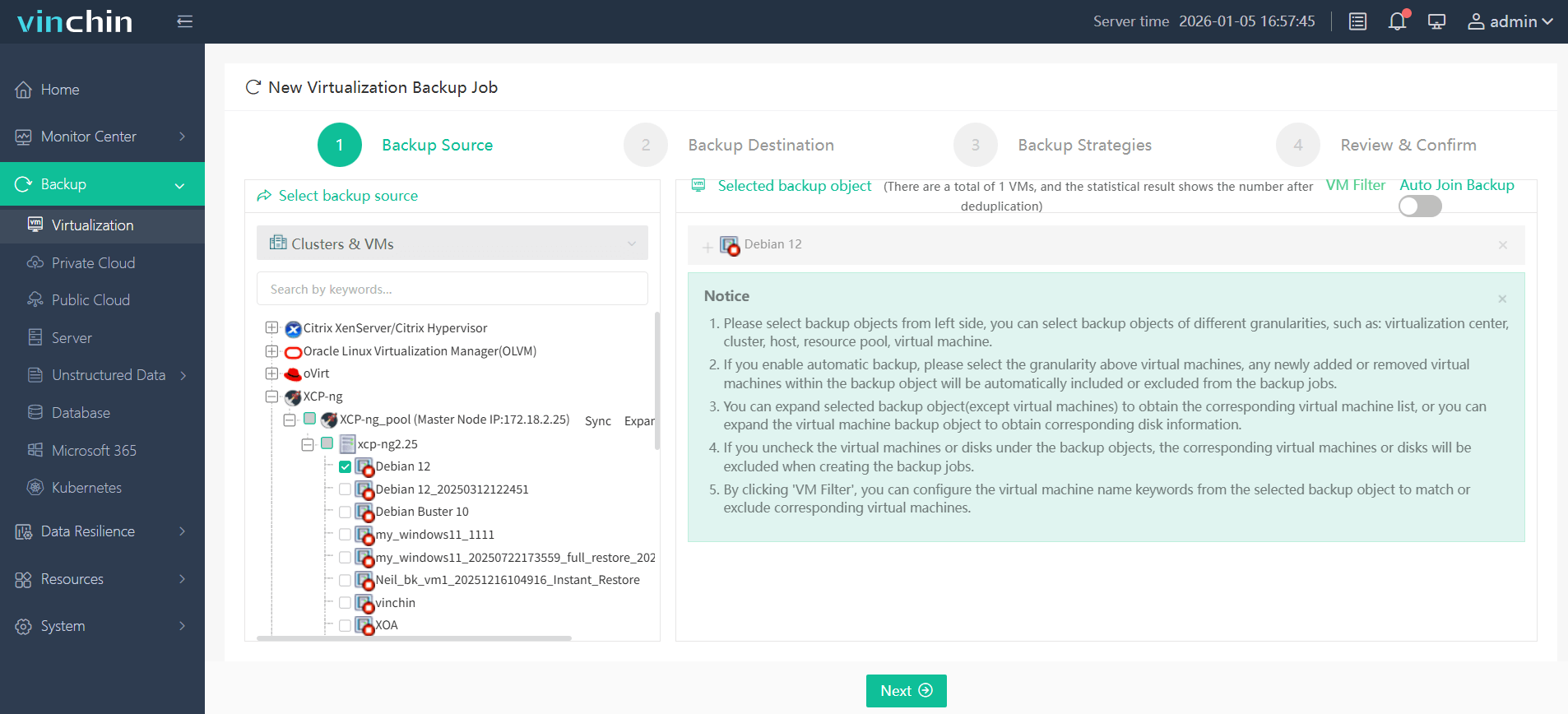
Step 1: Select the XCP-ng VM to back up.
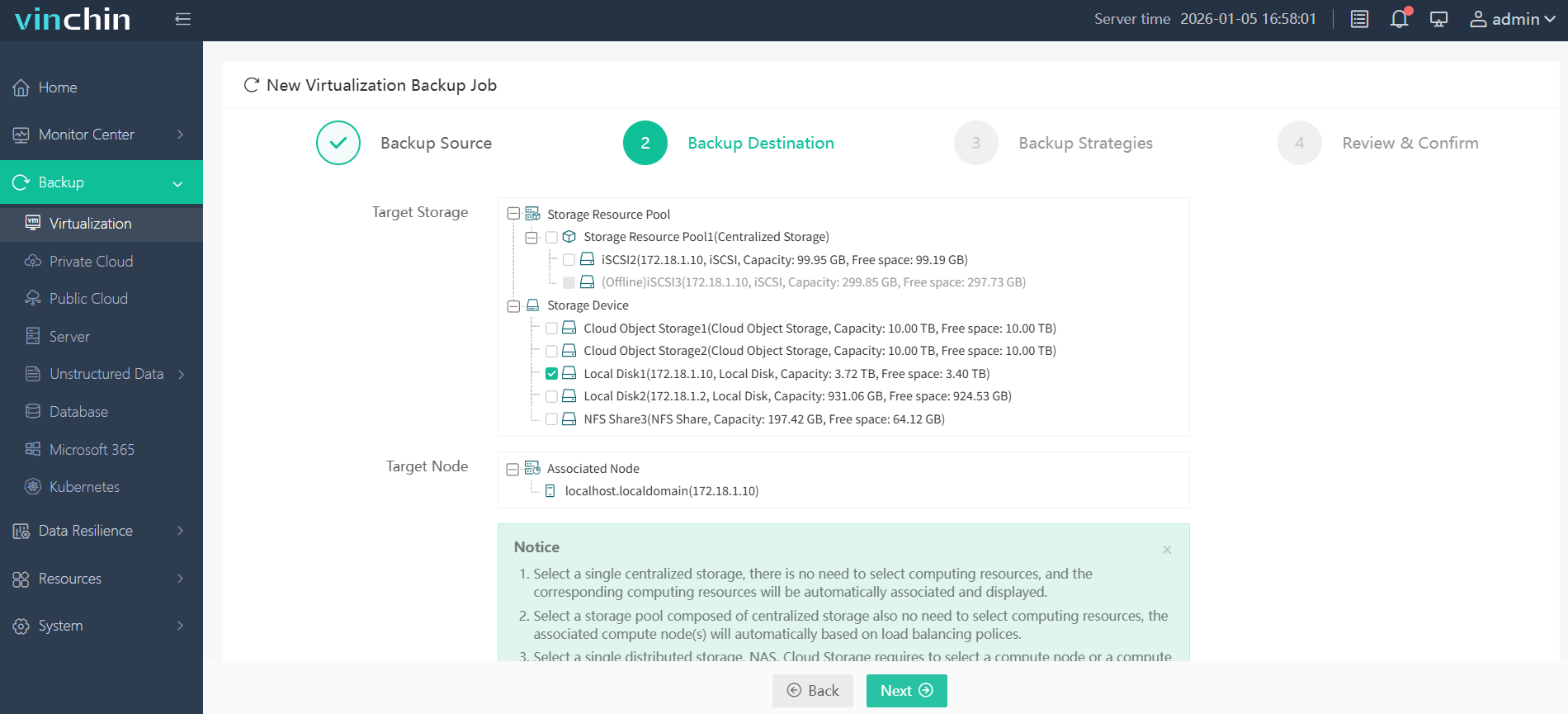
Step 2: Choose the backup storage.
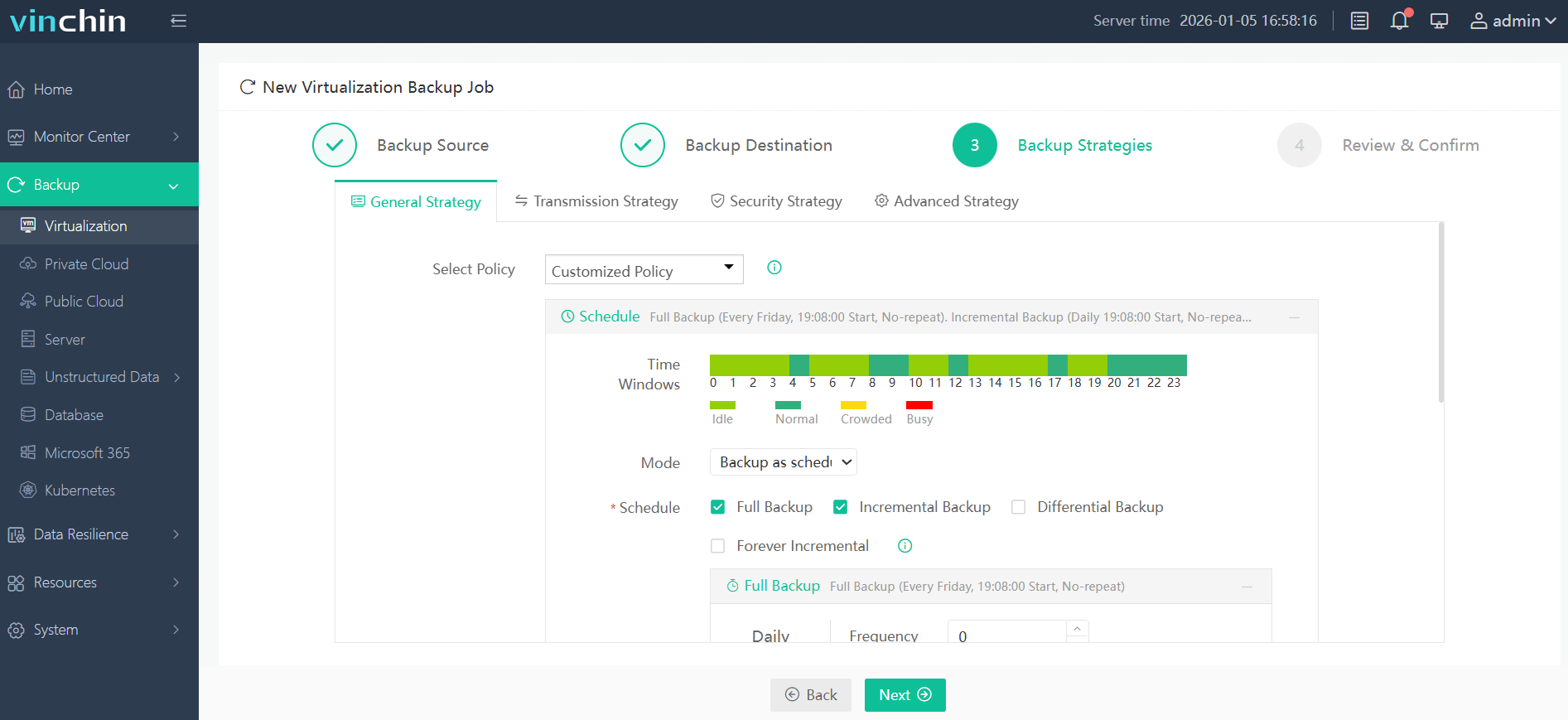
Step 3: Configure the backup strategy.
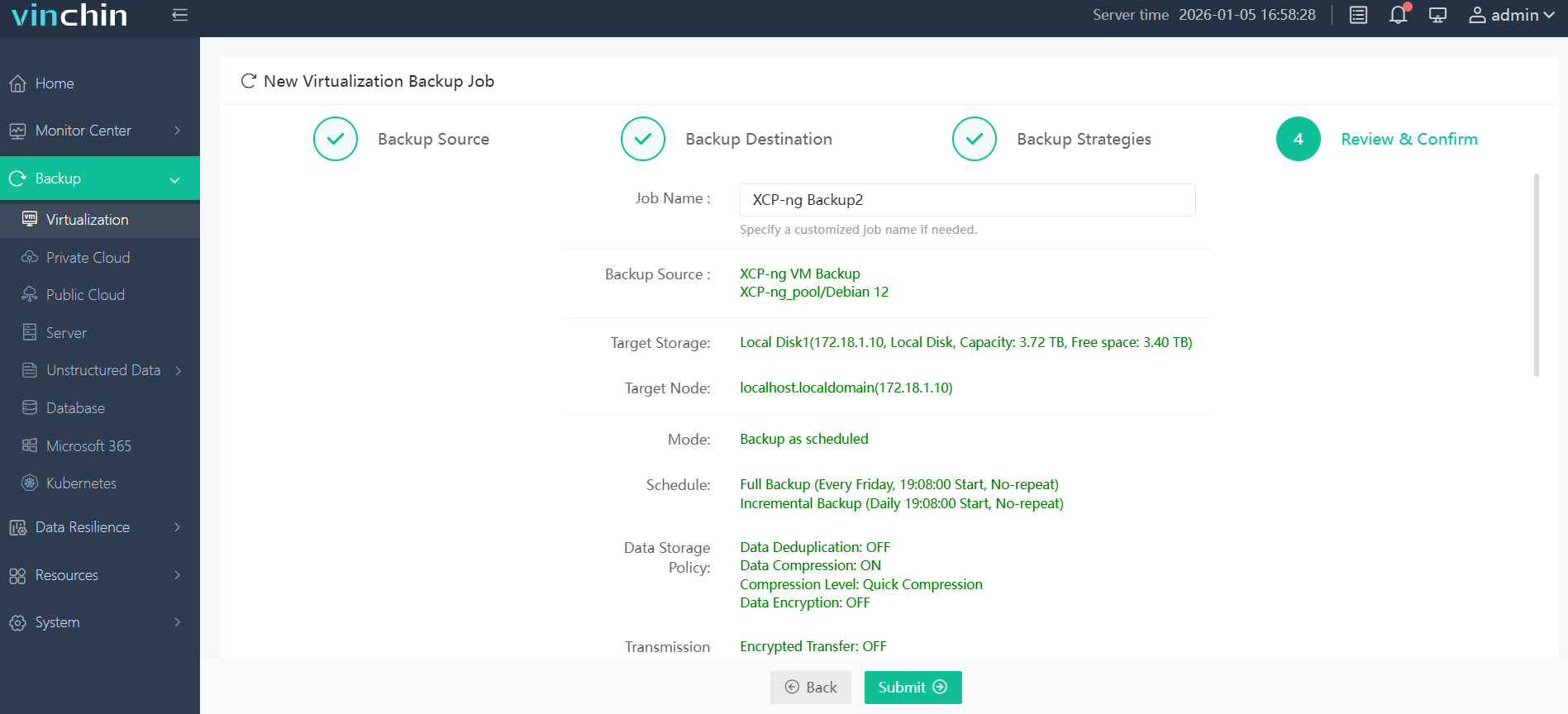
Step 4: Submit the job.
Recognized globally by thousands of enterprise users—with top ratings on leading review sites—Vinchin Backup & Recovery offers a 60-day full-featured free trial so you can experience its power firsthand; click below to get started.
Best XCP-ng Backup Software FAQs
Q1: What defines 'fastest' recovery in an enterprise context?
A1: The fastest recovery means minimal downtime achieved through instant VM boot technology combined with granular restores that avoid moving large amounts of data unnecessarily during emergencies.
Q2: How does backup architecture impact restore speed?
A2: Solutions featuring agentless design plus optimized transport modes such as Changed Block Tracking (CBT), SAN Transport Mode—or LAN-free architectures—restore faster by reducing overhead/bottlenecks inherent in traditional network-based copy methods.
Q3: Is fast recovery compatible with large-scale deployments?
A3: Yes; enterprise-grade solutions like Vinchin scale horizontally across clusters supporting hundreds/thousands VMs simultaneously while maintaining high-speed parallelized mass-restores regardless workload size/growth trajectory over time.
Q4: How can we test the claimed recovery speed of a backup solution before purchasing?
A4: Reputable vendors offer proof-of-concept trials or sandbox environments where you perform full-scale disaster drills measuring actual time required bringing critical VMs/services back online using real datasets/configurations matching production realities.
Conclusion
With instant VM booting and granular file-level restore powered by automation/scalability/security features built-in,Vinchin Backup & Recovery delivers true resilience demanded by modern enterprises running mission-critical workloads atop XCP-ng virtualization stacks.










