Enterprises depend on XCP-ng to run critical workloads that cannot afford long outages. When disaster hits—a hardware failure, ransomware attack, or accidental deletion—the speed of your recovery process determines how much damage your business suffers. Traditional backup methods often require rebuilding operating systems and restoring data piece by piece. This can stretch downtime from minutes into hours or even days.
Agentless, image-based backups paired with instant VM recovery change this equation. Instead of waiting for every file to copy back before you can resume operations, you boot entire virtual machines directly from backup images in minutes. This approach keeps your business running while full restoration continues in the background. For organizations bound by strict service level agreements (SLAs) or compliance rules, this method is essential for meeting Recovery Time Objectives (RTOs) and avoiding costly disruptions.
Why Minimizing Downtime Matters in Enterprise Environments
Downtime has far-reaching impacts beyond IT inconvenience; it threatens revenue streams, customer trust, and regulatory standing.
● Direct Financial Losses
Every minute of downtime costs money—sometimes thousands of dollars per minute for large enterprises. Gartner estimates average IT downtime costs exceed $5,600 per minute. These losses come from halted transactions, idle staff time, missed opportunities, and cascading effects across supply chains.
● Business Continuity Risks
Unplanned outages disrupt workflows across departments—from sales to manufacturing—and may halt mission-critical applications entirely. A slow or unreliable backup solution directly jeopardizes your ability to meet Recovery Time Objectives (RTOs) defined in SLAs and can lead to compliance violations if systems remain offline too long.
● Compliance Exposure
Regulatory frameworks like GDPR in Europe or HIPAA in healthcare demand rapid data availability after incidents. Failure to restore services quickly can result in legal penalties or loss of certification.
● Reputational Damage
Customers expect always-on digital experiences. Extended outages erode trust and drive clients toward competitors who promise higher reliability.
For these reasons—and because RTOs are now measured in minutes rather than hours—minimizing downtime is not just good practice; it’s a core requirement for modern enterprise resilience.
How To Choose The Best XCP-ng Backup Solution for Minimal Downtime?
Choosing an effective backup solution means focusing on features that enable fast recovery without adding complexity or overhead to daily operations.
Agentless Architecture
Select a platform that protects VMs without installing agents inside each machine. Agentless design reduces management burden by eliminating compatibility issues during upgrades or patch cycles while lowering resource consumption on production servers.
Instant VM Recovery
Prioritize solutions offering instant recovery capabilities that let you boot VMs straight from their backup images—often via NFS shares presented directly to the hypervisor. This allows users access within minutes while full restoration completes silently behind the scenes—a major advantage over legacy file-level restores that rebuild OSes sequentially.
Scalability
Ensure your solution supports horizontal scaling so performance remains consistent as workloads grow—for example by allowing you to add additional backup proxy servers or storage nodes when protecting hundreds of VMs across multiple sites.
Automation
Look for automated scheduling of backups, verification routines that check recoverability after each job finishes, and policy-driven management tools that reduce manual intervention—all helping ensure continuous protection even as environments evolve rapidly.
Security and Compliance Features
Strong encryption both during transfer (“in transit”) and when stored (“at rest”) is non-negotiable today; audit trails should log all actions so compliance teams can demonstrate adherence during audits or investigations.
Granular Restore Options
Sometimes only a single file needs restoring—not an entire server image—so granular restore saves time by letting admins retrieve specific folders instantly without interrupting other services running on the same VM image.
Data Reduction Technologies
Deduplication removes duplicate blocks across backups while compression shrinks files further; together they save significant storage space but may introduce some processing overhead during backup windows—a worthwhile trade-off when balanced against reduced infrastructure costs.
Evaluating your current solution against these criteria is essential for ensuring it supports business continuity objectives as your organization grows more dependent on digital infrastructure every year.
Vinchin Backup & Recovery: Enterprise-Grade Protection for XCP-ng
To address the unique challenges faced by businesses using XCP-ng virtualization platforms, Vinchin Backup & Recovery delivers professional-grade virtual machine protection tailored for enterprise environments. Supporting over 15 mainstream virtualization platforms—including XCP-ng as well as VMware, Hyper-V, Proxmox VE, oVirt, OLVM, RHV, XenServer, OpenStack and ZStack—it ensures broad compatibility across diverse infrastructures.
Vinchin Backup & Recovery offers agentless backups with forever-incremental strategy using Changed Block Tracking (CBT), instant VM recovery capability for rapid failover scenarios, LAN-free backup options to optimize network usage on supported platforms like XCP-ng and Proxmox VE, advanced deduplication/compression technologies for efficient storage utilization, plus granular restore functionality enabling precise data retrieval at file level—all designed to minimize downtime while maximizing operational efficiency.
The intuitive web console makes protecting XCP-ng VMs straightforward:
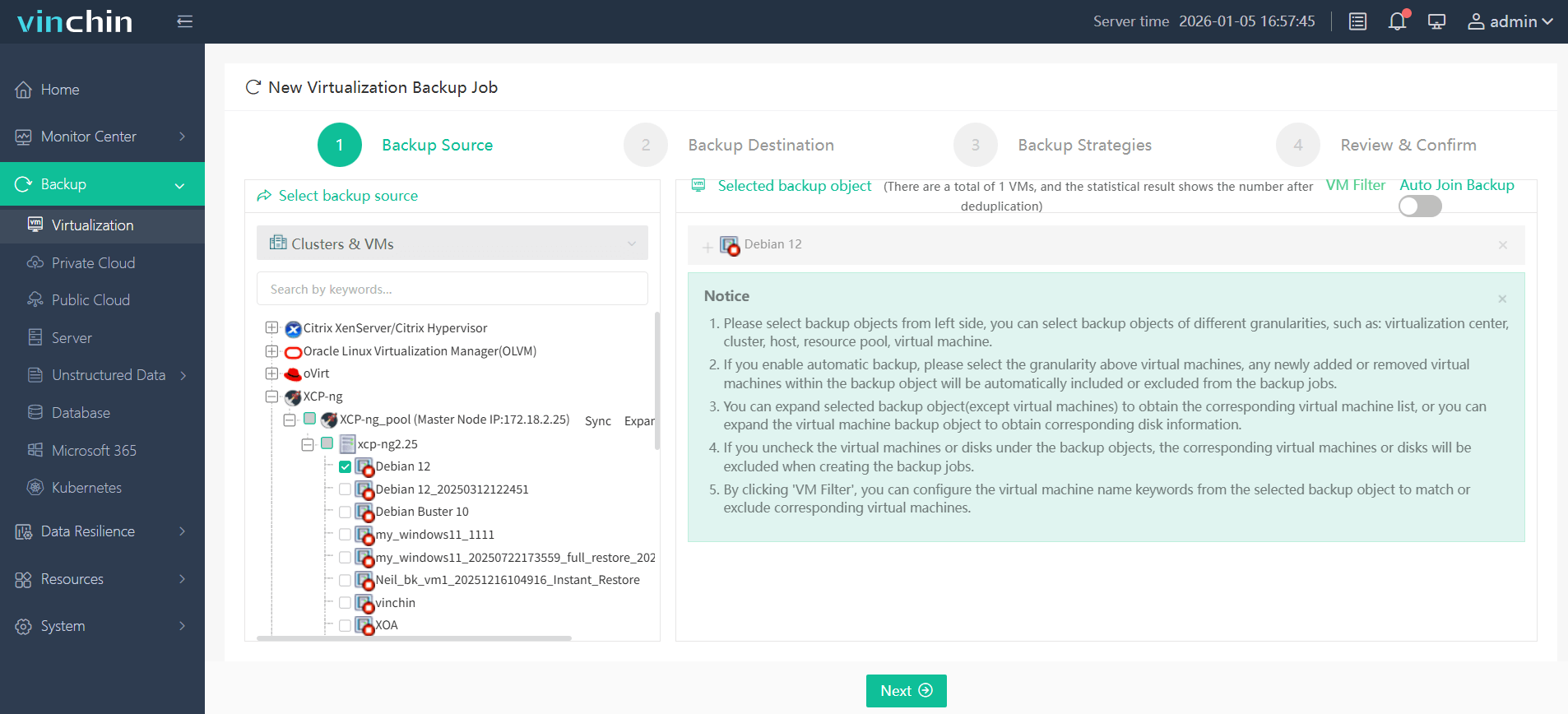
Step 1: Select the XCP-ng VM to back up;
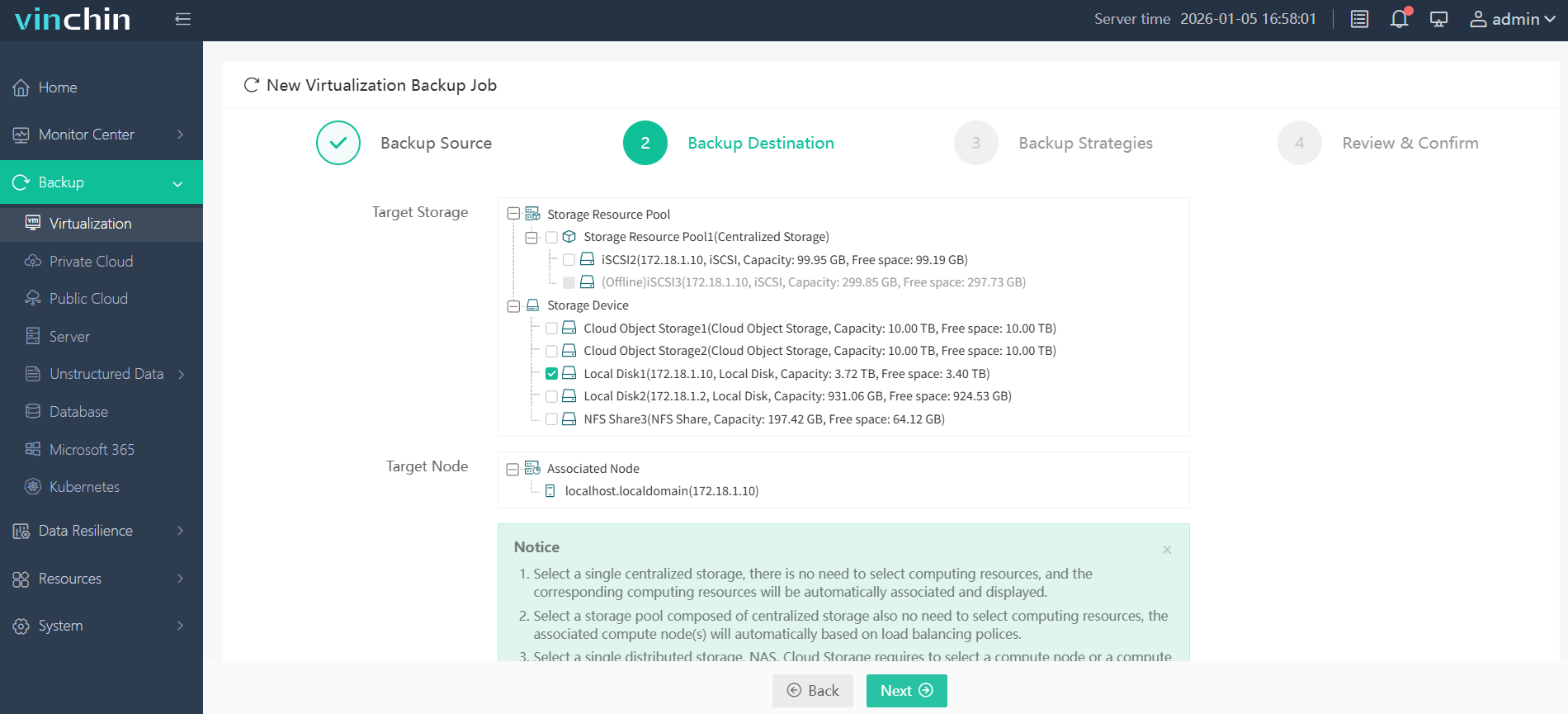
Step 2: Choose the backup storage;
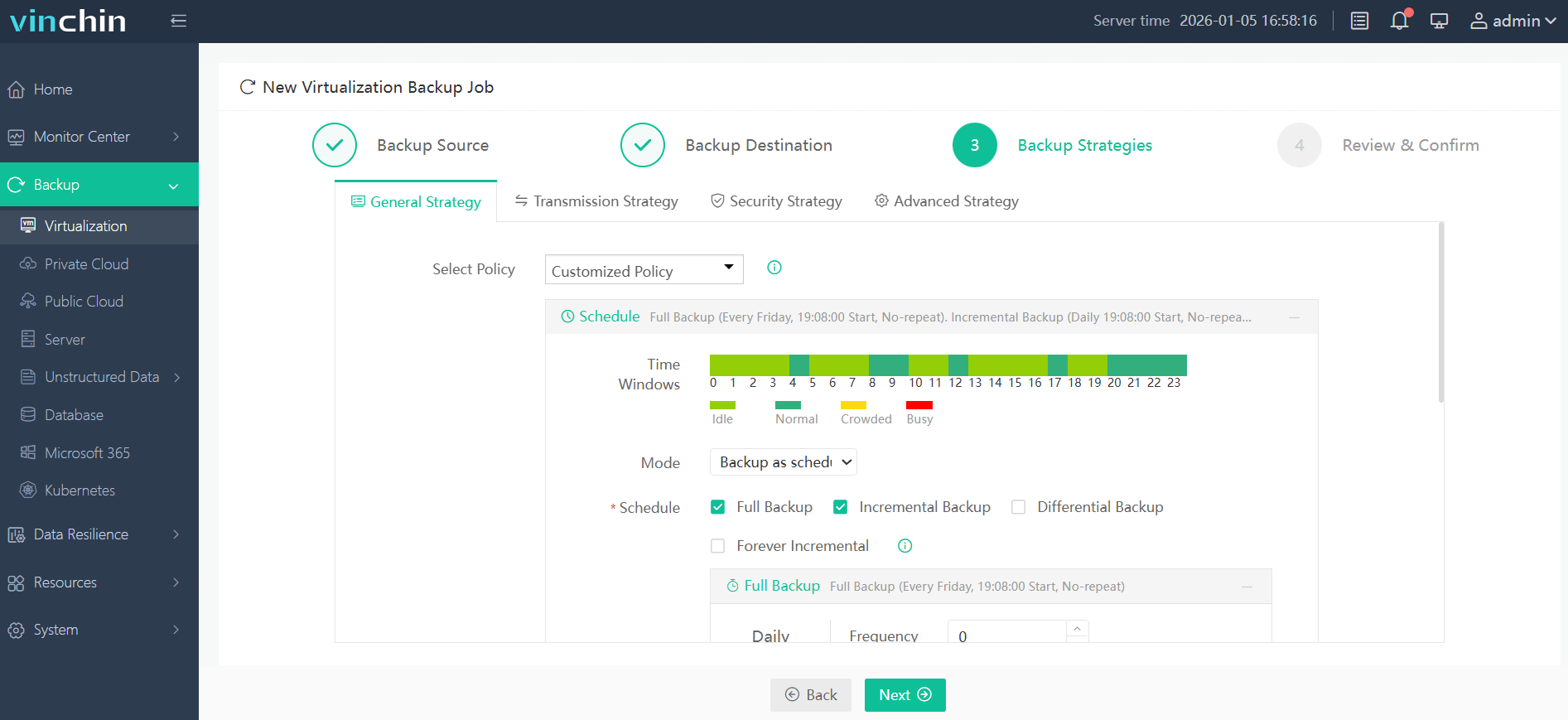
Step 3: Configure the backup strategy;
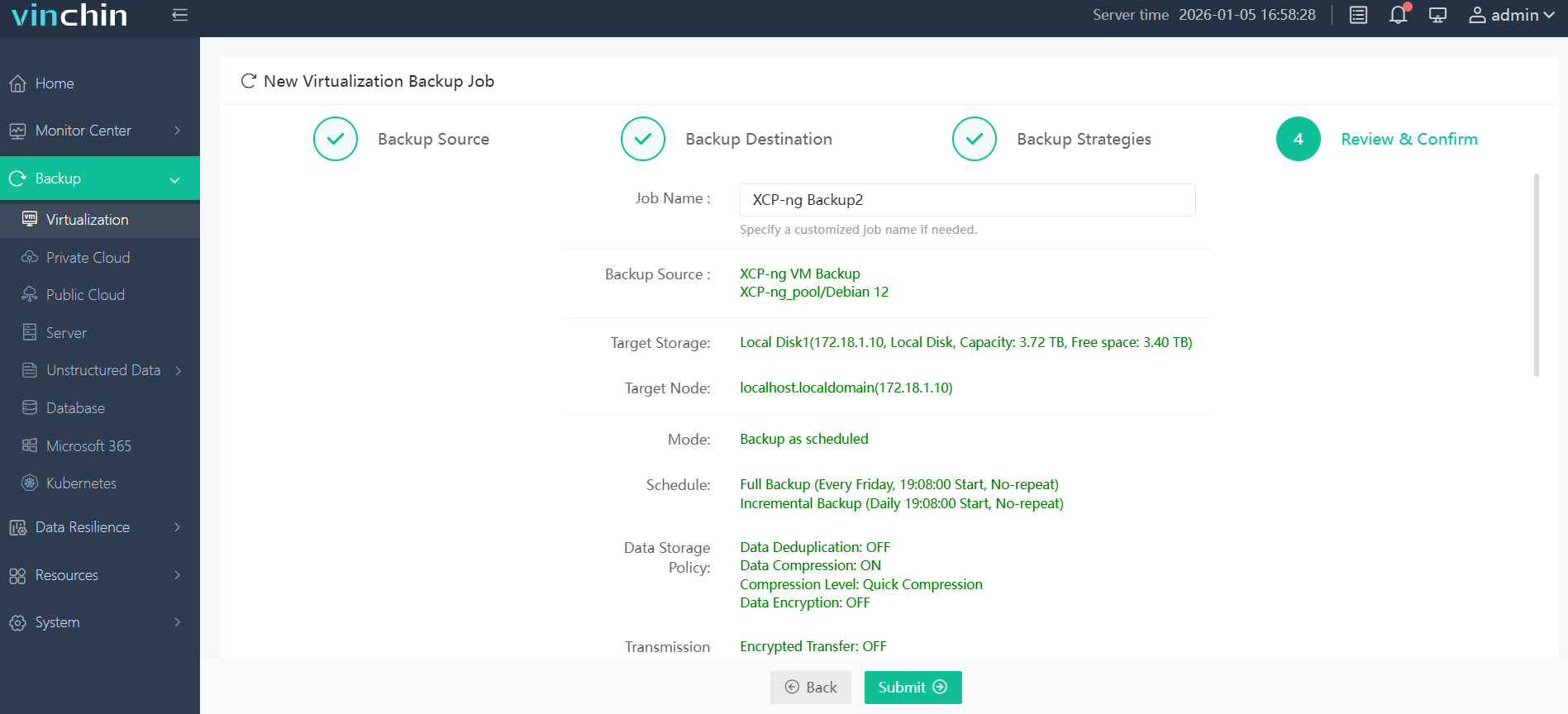
Step 4: Submit the job.
Recognized worldwide with top ratings from thousands of customers across industries, Vinchin Backup & Recovery offers a 60-day full-featured free trial—click below to get started today!
Best XCP-ng Backup Software FAQs
Q1: What backup method offers minimal downtime for enterprise workloads on XCP-ng?
A1: Agentless image-based backups combined with instant VM recovery provide minimal downtime because they allow virtual machines to boot directly from compressed deduplicated images stored on fast repositories such as NFS shares Users regain access within minutes even before full restoration completes.
Q2: How does Changed Block Tracking (CBT) improve performance?
A2: CBT enables incremental forever backups by tracking which disk blocks have changed since last job Only those changes get copied reducing both network load during backups storage consumption over time This speeds up regular protection cycles especially important at scale.
Q3: What are typical infrastructure requirements for instant recovery?
A3: Instant recovery requires high-performance storage capable of random reads such as NAS appliances supporting NFS The repository must have enough capacity equal at least provisioned size of protected VMs though advanced deduplication reduces actual usage Fast networking between repository hypervisor ensures smooth user experience during live boots.
Q4: Can granular restores be performed without affecting other services?
A4: Yes With granular restore features admins extract individual files folders from any point-in-time snapshot without needing revert whole system No disruption occurs elsewhere making this ideal when only partial data loss happens.
Q5: How do security features support compliance mandates?
A5: Strong encryption safeguards all data both while transferring over networks (“in transit”) storing at rest Audit trails record every operation providing evidence needed during regulatory reviews Meeting these standards helps organizations comply with laws like GDPR HIPAA SOX.
Conclusion
Choosing a backup solution with minimal downtime isn’t just about fast restores—it ensures operational resilience under pressure Vinchin Backup & Recovery gives enterprises confidence their critical workloads stay available.










