Sangfor Hyper-Converged Infrastructure (HCI) combines compute, storage, and networking into a single integrated platform. This unified approach streamlines IT operations but also creates unique challenges for data protection. Enterprise workloads running on Sangfor HCI demand backup solutions that can handle large-scale virtual environments while integrating seamlessly with APIs and supporting snapshot-based backups. The right software must deliver consistent protection across distributed clusters without slowing down production systems.
Choosing purpose-built backup software is critical in these environments. Enterprises need robust data protection that scales easily as workloads grow. Fast recovery times are essential to minimize business disruption after incidents. Solutions designed specifically for hyper-converged platforms ensure compatibility with advanced features like VM snapshots or policy-driven automation. By focusing on proven tools tailored to enterprise needs, organizations can maintain operational resilience even during rapid growth or unexpected outages.
Reliable backups are not just an IT checkbox—they are a cornerstone of business continuity planning. As digital transformation accelerates across industries, companies face increasing risks from cyber threats, hardware failures, and regulatory scrutiny. Selecting software that maximizes reliability and performance at scale helps safeguard sensitive information while supporting ongoing innovation.
Why Reliable & High-Performance Backup Matters in Enterprise Environments
Reliable backup protects against costly downtime and ensures fast recovery when problems strike. High-performance solutions keep pace with demanding workloads so businesses avoid bottlenecks during both routine operations and disaster scenarios.
● Downtime costs escalate rapidly
Unplanned outages disrupt every department—from sales to finance—and can halt manufacturing lines or digital services entirely. According to Gartner research, average downtime costs reach $5,600 per minute. Even brief interruptions threaten revenue streams and customer trust.
● Data loss puts sensitive information at risk
Lost files impact daily work but also expose organizations to compliance violations if personal or regulated data cannot be recovered promptly. Ransomware attacks have surged globally; IDC reports that over 70% of organizations suffered ransomware-related disruptions in 2023. Without reliable backups, restoring encrypted or deleted data may be impossible.
● Regulatory compliance demands strict controls
Laws such as GDPR or HIPAA require detailed retention policies and documented recovery processes. Failure to meet these standards can result in hefty fines or legal action from regulators[^3]. Audit trails must prove that all critical data is protected according to policy.
● Brand reputation depends on seamless service
A single incident of prolonged unavailability can damage brand perception permanently. Customers expect uninterrupted access—even during disasters—so enterprises must demonstrate their ability to recover quickly from any event.
● Industry frameworks highlight disaster recovery as essential
The National Institute of Standards and Technology (NIST) Cybersecurity Framework identifies robust disaster recovery capabilities as a core element of business continuity planning. Organizations following best practices prioritize high-reliability backups alongside other security measures.
By investing in reliable high-performance backup solutions tailored for Sangfor HCI environments, enterprises reduce risk exposure while supporting long-term growth objectives.
How To Choose The Best Sangfor HCI Backup Solution for Reliability & Performance?
Selecting effective backup software means matching technology capabilities with real-world enterprise requirements—not just checking off features on a list. For maximum reliability and performance at scale, several key criteria should guide your evaluation process:
● Consistent backup success rates under heavy workloads
Backup jobs must complete reliably even when protecting hundreds of large VMs or operating during peak I/O periods typical in production clusters. Automated scheduling reduces human error by ensuring regular execution without manual intervention—keeping copies current no matter how busy your environment becomes.
● Rapid restore times minimize disruption
Instant VM recovery enables entire virtual machines to be restored within minutes after failure or attack—critical for maintaining user productivity and application uptime. Look for solutions offering near-instant boot from backup storage so you can resume operations quickly after an incident.
● Seamless scalability supports growth across sites
As your organization expands—adding new clusters or remote offices—the chosen solution should maintain high performance without introducing complexity. Scalable architectures allow you to protect everything from small test labs up through petabyte-scale production deployments using one unified management interface.
● Integration with existing security controls strengthens defense
Features like immutable storage prevent tampering with backup files while encryption safeguards against unauthorized access—even if physical media is stolen or compromised by malware actors targeting infrastructure-level vulnerabilities common in hyper-converged setups.
● Audit-ready reporting tools simplify compliance management
Centralized dashboards provide visibility into job status across all protected assets while flexible retention policies help enforce regulatory requirements automatically—ensuring records are kept only as long as necessary according to law or internal policy guidelines.
Evaluating existing solutions against these criteria is a critical step in ensuring robust data protection throughout your organization’s digital transformation journey.
Vinchin Backup & Recovery: Enterprise-Grade Protection for Sangfor HCI
For enterprises seeking comprehensive protection on Sangfor HCI, Vinchin Backup & Recovery stands out as an enterprise-level virtual machine backup solution supporting more than 15 mainstream virtualization platforms—including VMware, Hyper-V, Proxmox, oVirt, OLVM, RHV, XCP-ng, XenServer, OpenStack, ZStack—and notably provides dedicated support for Sangfor HCI environments used by many financial institutions and large organizations worldwide. Vinchin Backup & Recovery offers agentless operation along with broad compatibility across diverse infrastructures so businesses can unify their data protection strategy regardless of underlying hypervisor technologies.
Key features include instant recovery, forever-incremental backup modes for efficient storage use, granular restore options enabling file-level retrievals within VMs, advanced deduplication/compression technologies reducing overall capacity needs at scale, plus centralized management through an intuitive web console—all designed to maximize reliability without sacrificing speed even under demanding workloads.
To back up a Sangfor HCI VM using Vinchin Backup & Recovery’s easy-to-use web console:
Step 1: Select the Sangfor HCI VM you wish to back up.
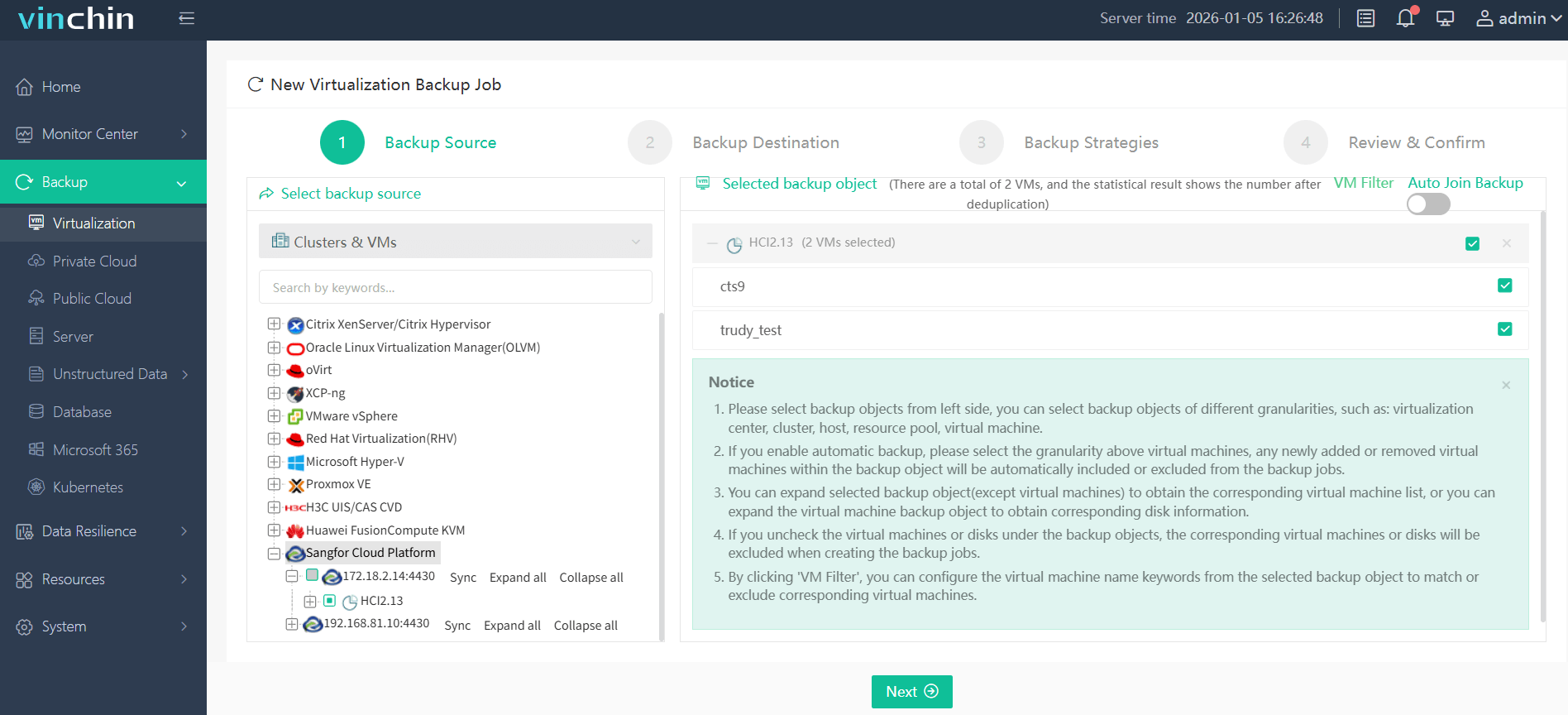
Step 2: Choose the appropriate backup storage destination.

Step 3: Configure your preferred backup strategy including schedule and retention settings.

Step 4: Submit the job for automated execution.
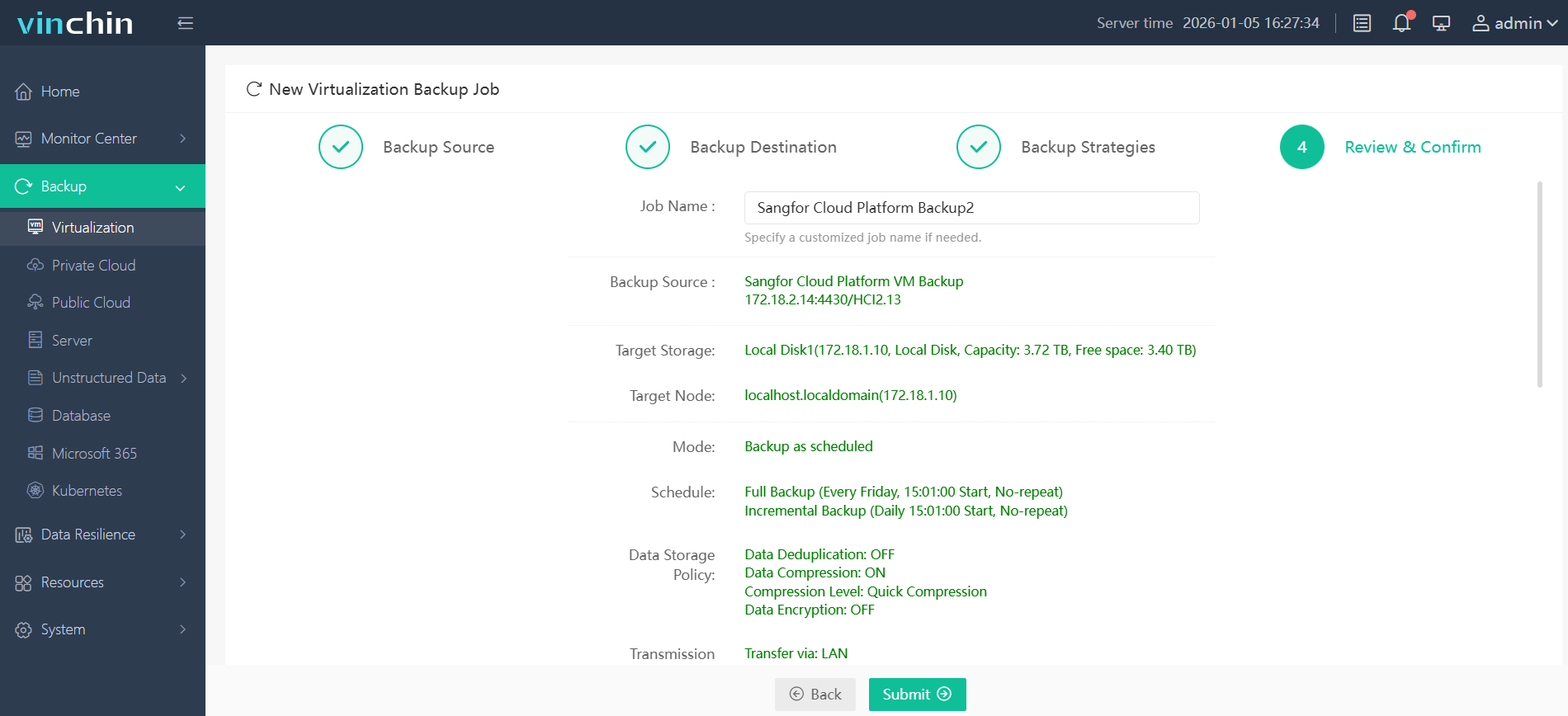
Recognized globally by thousands of customers with top ratings for enterprise data-protection software—Vinchin Backup & Recovery offers a 60-day full-featured free trial; click below to get started today!
Best Sangfor HCI Backup Software FAQs
Q1: How does enterprise-grade backup improve reliability on Sangfor HCI?
It ensures consistent backups without manual intervention while supporting automated verification processes that reduce human error risks even under heavy workload conditions typical in large-scale environments.
Q2: What features are essential for performance at scale?
Essential features include instant VM recovery (such as running virtual machines directly from backups), efficient use of storage through deduplication/compression technologies that lower capacity needs over time; plus centralized management tools that orchestrate jobs seamlessly across multiple clusters.
Q3: Can the solution adapt as our environment grows?
Yes scalable architecture allows seamless expansion whether adding more nodes sites or managing larger datasets—all without sacrificing speed simplicity or overall system reliability.
Q4: Does it help meet compliance requirements?
Comprehensive reporting functions combined with flexible retention policy controls support audit readiness making it easier to prove regulatory adherence whenever required by law industry standards—or internal governance mandates.
Q5: What are key considerations for balancing backup storage performance versus cost at scale?
Balancing performance requires evaluating repository throughput support tiered-storage strategies (like SSDs for recent restores object/cloud targets for archives) plus leveraging built-in deduplication/compression features which control long-term costs while maintaining fast access when needed most.
Conclusion
Selecting the right Sangfor HCI backup solution is pivotal for operational resilience Vinchin Backup & Recovery provides scalable enterprise-grade protection needed to ensure business continuity as environments grow.










