Ransomware attacks threaten every business that relies on virtualized infrastructure. The best Oracle OLVM backup tool for ransomware protection must deliver immutable backups, granular recovery options, and automated threat detection. These features keep data safe and ensure fast restoration after an attack. Ransomware resilience is now a core requirement for enterprise IT. It reduces downtime, prevents data loss, and supports regulatory compliance. Strong protection safeguards business continuity while reducing both financial losses and reputational damage.
Why Ransomware Protection Matters in Enterprise Environments
Ransomware can cripple enterprise operations by encrypting critical systems and demanding payment for decryption keys. Attackers often target not only production data but also backup repositories to block recovery efforts. If backups are compromised or deleted during an attack, organizations may face permanent data loss or be forced to pay ransoms—often without guarantee of full restoration.
● Business Continuity Risks
A single ransomware incident can halt operations across departments. This disruption leads to missed deadlines, lost revenue opportunities, and customer dissatisfaction. For example, a manufacturing company hit by ransomware may see its supply chain grind to a stop until systems are restored.
● Backup Corruption Threats
Attackers increasingly seek out backup files stored on accessible network shares or unsecured storage devices. By corrupting these backups or deleting them outright using stolen admin credentials or malware scripts, they make it impossible for businesses to recover without paying ransom demands.
● Compliance Violations
Many industries require strict controls over sensitive information such as customer records or intellectual property. If ransomware leads to unauthorized disclosure or destruction of regulated data—such as healthcare records under HIPAA—organizations may face fines and legal action from regulators.
● Prolonged Downtime Costs
Extended outages caused by slow recovery processes can cost millions in lost productivity and remediation expenses. According to IBM’s Cost of a Data Breach Report 2023, average breach costs continue rising year-over-year due to increased complexity of attacks like ransomware.
Robust ransomware protection within your backup solution ensures you can restore clean copies—even if production environments are compromised—helping avoid catastrophic losses.
How To Choose The Best Oracle OLVM Backup Solution for Ransomware Protection
Selecting an effective Oracle OLVM backup tool requires careful evaluation of key security features that address modern threats. Each capability plays a vital role in defending against sophisticated attacks targeting virtualized workloads.
● Immutable Storage
Immutability means backup files cannot be altered or deleted before their retention period expires—even by administrators with high-level access rights. This blocks attackers from erasing evidence of their intrusion or destroying all recovery points during an attack window.
For example: A bank using immutable storage can confidently restore clean copies even if attackers compromise domain controllers because previous backups remain untouched until scheduled expiration.
● Integrated Malware Scanning
Modern solutions scan both new backups and restored files for known malware signatures before allowing access or reintroduction into production environments. This step helps prevent reinfection when recovering from older snapshots that might contain dormant threats overlooked during initial infection periods.
Example: An e-commerce firm restores only verified-clean VM images after detecting suspicious activity rather than risking another outbreak through unscanned archives.
● Rapid Granular Recovery
Granular recovery allows administrators to restore individual files, folders, databases—or even application objects—instead of rolling back entire VMs or clusters. This minimizes downtime since only affected components need replacement rather than full system rebuilds.
Scenario: After a targeted attack encrypts shared drives but leaves most applications intact, IT staff use granular restore tools to recover just those encrypted directories instead of reverting whole servers.
● Scalability Across Large Environments
As enterprises grow their virtual infrastructure footprint across multiple sites or clouds, backup solutions must scale seamlessly without sacrificing speed or reliability. Centralized management consoles help automate policy enforcement while distributed architectures support rapid expansion as needs evolve over time.
Example: A global retailer adds hundreds of new VMs monthly; scalable backup ensures consistent coverage regardless of environment size changes without manual intervention each time resources increase.
● Ease of Management & Reporting
Clear dashboards provide real-time visibility into job status while automated alerts notify teams about failed jobs or unusual activity patterns indicative of ongoing attacks. Detailed reporting supports audits required by internal policies or external regulators—critical when proving compliance after incidents occur.
Case study: An insurance provider uses built-in reporting tools to demonstrate regular testing/restoration drills during annual cybersecurity reviews mandated by industry standards bodies.
Vinchin Backup & Recovery: Enterprise-Grade Protection for Oracle OLVM
To address the advanced requirements for protecting Oracle OLVM environments against ransomware threats, Vinchin Backup & Recovery stands out as a professional enterprise-level VM backup solution supporting more than 15 mainstream virtualization platforms—including prioritized support for Oracle OLVM alongside VMware, Hyper-V, Proxmox VE, oVirt/RHV, XCP-ng/XenServer, OpenStack, ZStack and others. For Oracle OLVM users specifically, Vinchin Backup & Recovery delivers robust features such as CBT tracking for efficient incremental backups; LAN-free backup options; instant recovery capabilities; plus comprehensive strategies like scheduled/differential/incremental backups and granular restore—all managed through one unified platform.
Among its many strengths are CBT-based incremental backup (for fast change tracking), LAN-free transfer (to reduce network load), instant recovery (for minimal downtime), granular restore (to retrieve specific files quickly), and advanced deduplication/compression (to optimize storage). Together these features ensure secure data retention with rapid disaster response while minimizing resource consumption.
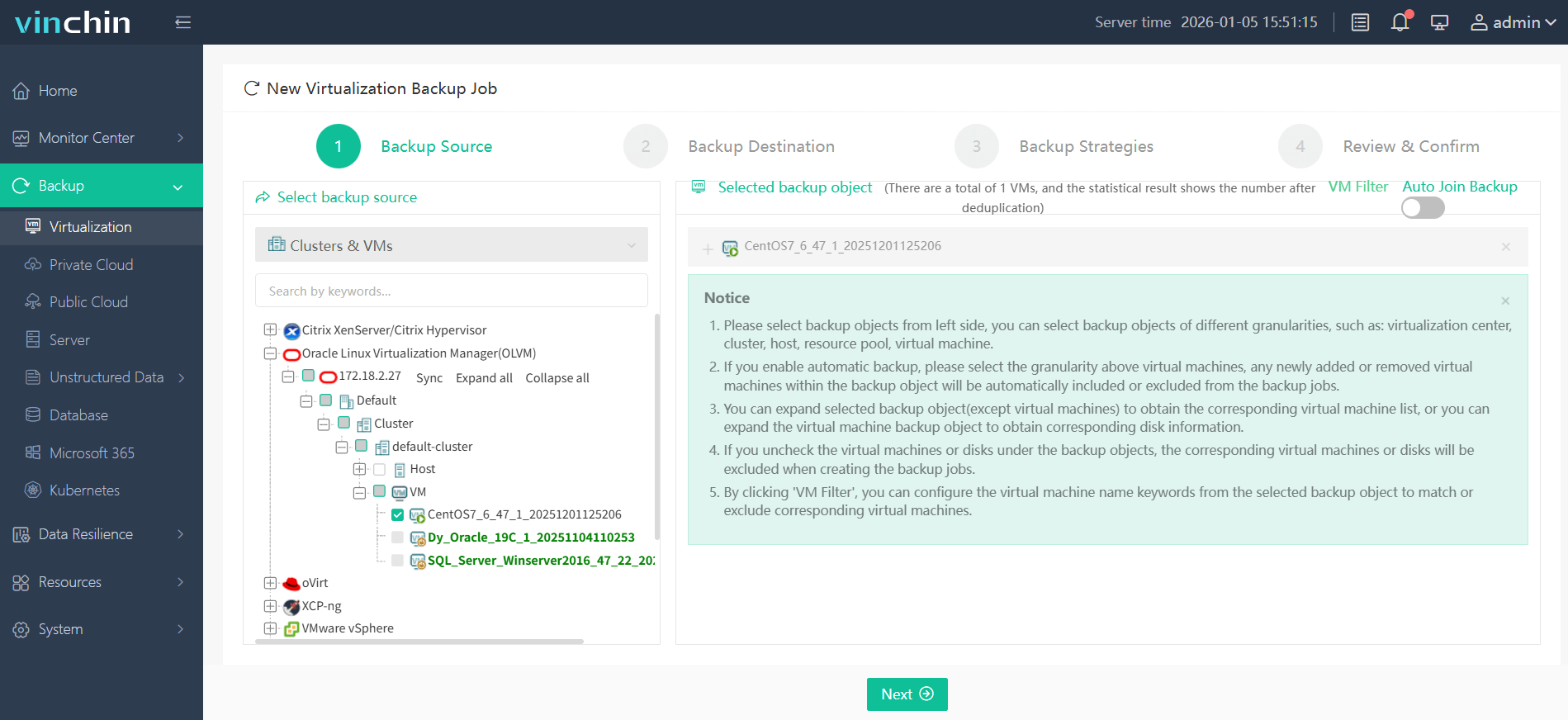
The intuitive web console makes protecting your Oracle OLVM VM simple:
Step 1: Select the Oracle OLVM VM to back up.
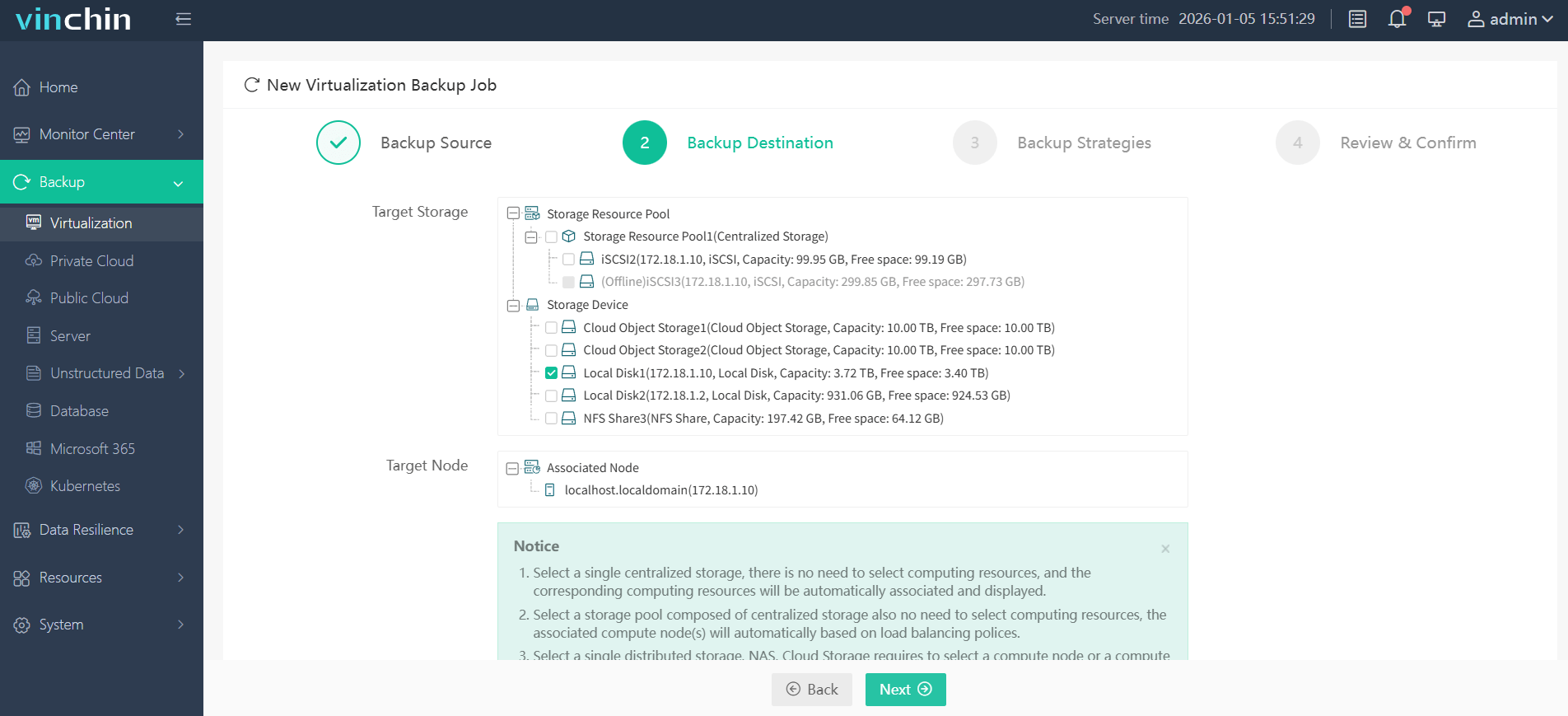
Step 2: Choose the desired backup storage.
Step 3: Configure your preferred backup strategy.

Step 4: Submit the job.

Recognized globally with top ratings from thousands of customers,Vinchin Backup & Recovery offers a fully featured 60-day free trial—click below to experience trusted enterprise-grade protection firsthand.
Best Oracle OLVM Backup Software FAQs
Q1: What makes a backup solution effective against ransomware?
A1: Immutable storage prevents unauthorized changes while integrated threat detection stops infected restores.
Q2: How does immutability reduce ransomware risks?
A2: Immutability locks backup files against modification or deletion by malware or attackers ensuring your recovery points remain safe throughout their retention period even if admin credentials are compromised.
Q3: Can I recover individual files after a ransomware attack?
A3: Yes—granular recovery enables restoring specific files without rolling back entire VMs saving time reducing disruption especially when only certain directories are affected by encryption events.
Q4: Is scalability important in ransomware defense?
A4: Yes—scalable solutions ensure consistent protection as your environment grows so you never outgrow your backup defenses regardless of how many VMs you add over time.
Q5: What is the difference between true immutability versus WORM (Write Once Read Many) storage?
A5: True immutability enforces retention policies at software level preventing any change—including deletion—until expiry; WORM hardware alone may still allow privileged users limited override actions depending on vendor implementation making software-enforced immutability more reliable against insider threats.
Conclusion
Strong anti-ransomware features like immutability and granular recovery keep operations resilient under attack. Vinchin delivers robust protection tailored for modern enterprise needs minimizing risk exposure every day.










