








Product: Vinchin Backup & Recovery
Version: V9.0
KB Number: 200230
Last Modified: 2026-09-24 17:15:03
Question
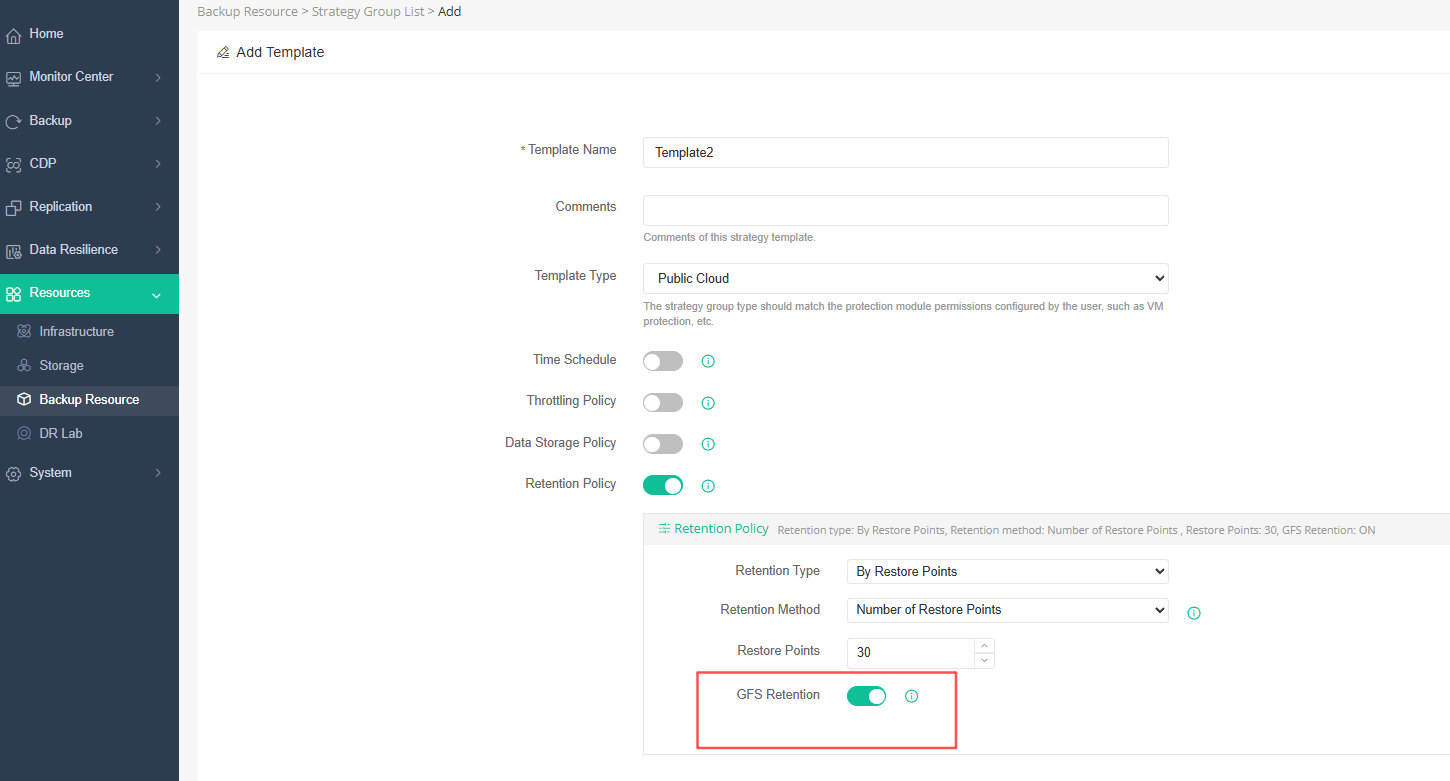
When creating a backup strategy template for a private cloud or public cloud, I enable the GFS retention switch, but the GFS configuration options are not displayed, and clicking OK fails to create the template.

Answer
This is a known issue in the current version: for private cloud and public cloud strategy templates, the GFS retention configuration does not render properly after the GFS switch is enabled, which blocks template creation. A permanent fix is planned for a later version.
Resolution
Temporary workaround:
- Create the strategy template with the GFS switch turned OFF, then submit (click OK) — the template is created successfully.
- After the template has been created, edit the strategy, enable the GFS switch, and set the retention policy.
Note This is a known limitation of the current version and is expected to be fixed in a subsequent release; the workaround above avoids the failure without losing the GFS retention function.
60-DAY FULL-FEATURED FREE TRIAL
No credit card required
Get started in 10 minutes