Direct Answer
Disaster recovery is a planned approach for restoring IT systems, applications, and data after an outage, cyberattack, hardware failure, or site-level disaster. It is important because it reduces downtime, limits data loss, supports business continuity, and helps organizations recover faster from ransomware and other disruptions — and having backups alone does not guarantee you can recover.
What Is Disaster Recovery?
Disaster recovery (DR) is the process of restoring an organization’s IT systems, applications, and data after a disruptive event, with the goal of resuming normal business operations within a defined timeframe.
DR is not simply about getting data back. It is about restoring critical services quickly enough and with acceptable data loss to keep the business running. Two key metrics define these requirements:
DR also goes beyond backup. A backup provides a copy of data; DR defines how that data and the systems that depend on it will be recovered. A practical DR plan should answer four questions:
What should be restored first?
Where should it be restored?
Who is responsible for each step?
How do we verify that recovery is successful?
A complete DR strategy covers four connected areas: IT infrastructure, applications, data, and business operations. Protecting data alone is not enough if the systems, dependencies, and people needed to restore and operate the business are not prepared.
In short, backup preserves data; disaster recovery restores services and keeps the business running.
Why Is Disaster Recovery Important?
Technology fails, humans make mistakes, and attacks arrive without warning. Disaster recovery matters because it converts an unpredictable, potentially business-ending event into a managed, measurable process. Here is what a solid DR capability delivers:
Minimize downtime. Every minute a revenue-critical system is offline costs money — in lost sales, idle staff, missed SLAs, and damaged customer trust. DR shortens outages from days to hours, or from hours to minutes.
Reduce data loss. Without a defined recovery point, an outage can wipe out hours or days of transactions. DR limits data loss to an acceptable, pre-agreed window.
Maintain business continuity. Customers and partners expect services to stay available. With ISO 22301 business continuity practices in place, organizations can keep critical operations running or restore them quickly, so a bad day does not become a bad month.
Recover from cyberattacks and ransomware. Ransomware has turned disaster recovery into a security control as much as an IT discipline. When encryption strikes, a clean, protected, regularly tested recovery path is often the fastest way back to business.
Reduce financial and operational impact. Emergency recovery without a plan means ad-hoc decisions, overtime, and costly mistakes. DR replaces panic with a procedure.
Meet compliance and business requirements. Regulations such as GDPR, HIPAA, and PCI DSS, as well as customer SLAs, often require demonstrable data protection and recovery capabilities.
There is a useful way to frame all of this: the question is not whether a disaster will happen, but whether your business is prepared to recover from one. Hardware will eventually fail; attackers only need to be lucky once. Preparedness is the variable you control.
What Can Cause a Disaster?
"Disaster" sounds like floods and earthquakes, but in most organizations the IT disasters that actually happen are far more mundane. Four categories cover nearly everything:
Natural disasters
IT failures
Hardware failure: disks, RAID controllers, servers, and storage arrays have finite lifespans
Storage and network failures: corrupted volumes, failing switches, broken links
Power outages: grid failures and unstable power that bring down everything at once
Cyber threats
Ransomware that encrypts production data — and often backup repositories too
Malware, data breaches, and destructive attacks
Accidental deletion by users with access to critical data
Human and operational errors
Misconfiguration of storage, virtualization, or backup systems
Failed updates and patches that break production
Administrator mistakes during routine maintenance
The practical takeaway: a credible disaster recovery plan addresses all four categories, not just the dramatic ones. In most real incidents, the "disaster" is a failed storage controller, a bad update, or a ransomware payload — not a hurricane.
How Does Disaster Recovery Work?
At a high level, every disaster recovery process follows the same lifecycle:
Disruption → Detect → Assess → Recover → Validate → Resume Operations
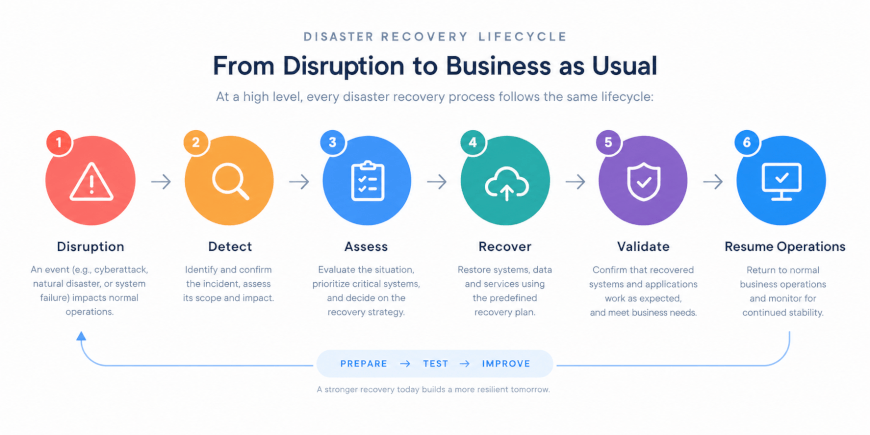
1. Disruption. Something takes systems down: hardware failure, ransomware, power loss, or a site-level event.
2. Detect. Monitoring, alerts, or users discover the incident. Fast detection matters because recovery objectives start ticking at the moment of impact.
3. Assess. The team determines what is affected, how badly, and which recovery path to use. This is where the DR plan earns its keep — the decisions about what to restore first should already be documented, not debated.
4. Recover. Systems, applications, and data are restored from the chosen sources: backups, replicas, or failover to a standby environment.
5. Validate. Recovered systems are checked: Is the data consistent? Do applications start? Are integrations working? Is the recovered data clean — an essential step after ransomware?
6. Resume Operations. Business traffic is cut back to the recovered systems. Later, if a secondary site or cloud environment was used, failback returns workloads to the original environment in a controlled way.
Behind that lifecycle, a DR capability typically involves six building blocks:
Backup and replication — copies of data and, ideally, ready-to-run copies of whole virtual machines
Recovery infrastructure — spare or cloud-based compute, storage, and networking to recover onto
Recovery procedures — documented, ordered runbooks that anyone qualified can follow under pressure
Application dependencies — knowledge of what must come back in what order (a database without its application is of limited use, and vice versa)
Data validation — integrity checks that confirm recovered data is complete and uncorrupted
Failover and failback — the mechanics of moving operations to a standby environment and back
When people say DR "works," what they really mean is that all six blocks were designed, documented, and rehearsed before the incident.
What Are RTO and RPO?
RTO and RPO are the two numbers around which every disaster recovery decision revolves.
RTO — Recovery Time Objective. The maximum amount of time a system can be down before the damage becomes unacceptable to the business. RTO answers: How quickly must we be back?
RPO — Recovery Point Objective. The maximum amount of data the business can afford to lose, measured backward from the moment of disruption. RPO answers: How much data can we lose?
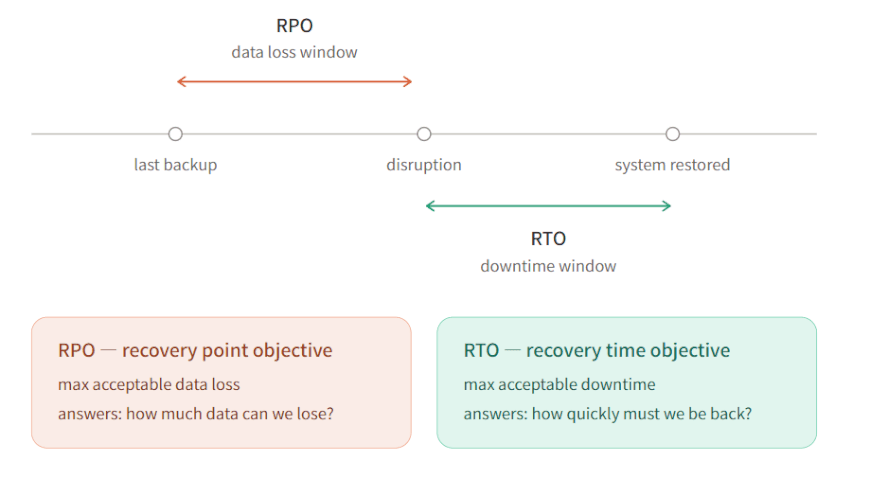
A simple example makes both concrete. Suppose a critical database has RTO = 1 hour and RPO = 15 minutes. That means:
After a failure, the system must be restored and operational within one hour.
The business can tolerate losing at most about 15 minutes of data — so backups or replication must capture changes at least that frequently.
These two numbers are not academic. RTO and RPO directly drive:
DR strategy — an RPO of minutes usually requires replication or continuous data protection, not nightly backups
Backup frequency — you cannot meet a 15-minute RPO with a 24-hour backup cycle
Recovery technology — instant VM recovery, replication, and failover exist to hit aggressive RTOs
Cost — tighter objectives demand more infrastructure and more redundancy; that is why RTO/RPO should be set per workload, by the business, not assumed by IT
A good rule of thumb: the faster you need to recover and the less data you can afford to lose, the more the solution costs. Tier your workloads — mission-critical, important, deferrable — and assign each tier its own RTO/RPO and budget.
What Does a Disaster Recovery Plan Include?
A disaster recovery plan (DRP) is the document — and more importantly, the rehearsed process — that turns strategy into executable steps. A complete plan covers:
Critical systems and workloads — the inventory of what must be protected, based on business impact
Recovery priorities — the order in which systems come back; not everything can be restored at once
RTO and RPO — defined per workload, agreed with business owners
Backup and recovery methods — which technology and which copies are used for each system
Recovery locations — primary site, secondary site, cloud, or a combination
Infrastructure requirements — the compute, storage, network capacity, and licenses recovery targets will need
Application dependencies — startup order and integration requirements, so a recovered application actually works
Roles and responsibilities — who declares a disaster, who executes recovery, who communicates, who makes decisions when people are unavailable
Recovery procedures — step-by-step runbooks detailed enough to execute under stress
Communication procedures — how staff, executives, customers, and regulators are informed
Testing and validation — the schedule and method for proving the plan works
One mindset shift ties these together: a disaster recovery plan is not just a document. It is a documented process for restoring critical operations — something the team has walked through, measured, and improved, not something written once for an audit and left on a shelf.
What Are the Common Disaster Recovery Strategies?
There is no single DR strategy; there is a spectrum from low-cost/slow-recovery to high-cost/near-instant-recovery. Most organizations combine several:
| Strategy | Recovery Speed | Cost | Typical Use |
Backup and Restore | Hours to days | Low | Cost-sensitive workloads; data that can tolerate longer downtime; long-term retention |
VM Replication | Minutes to <1 hour | Medium | Critical virtualized workloads that need fast failover to a standby site or cloud |
High Availability (HA) | Seconds to minutes | Medium–High | Reducing single points of failure and unplanned downtime for core services |
Cloud Disaster Recovery | Minutes to hours | Medium | Using cloud infrastructure as the recovery environment; pay-as-you-grow capacity |
Hybrid Disaster Recovery | Minutes to <1 hour | Medium–High | Combining on-premises infrastructure with cloud resources for flexible recovery |
A few notes on when each fits:
Backup and restore is the foundation — every strategy still relies on recoverable copies — but on its own it suits workloads where hours (or days) of downtime are tolerable.
VM replication keeps a near-synced copy of virtual machines on another host, site, or cloud, dramatically shortening recovery time for virtualized environments.
High availability is not DR in the strict sense — it prevents many small outages rather than recovering from a big one — but it removes the most common failure modes and is often the first investment.
Cloud disaster recovery turns the cloud into a recovery site without paying for a second data center, which is why it has become the default choice for small and mid-sized businesses.
Hybrid disaster recovery keeps the fastest recovery paths on-premises while using the cloud for capacity, long-term retention, and site-level failover.
Disaster Recovery vs. Backup: What Is the Difference?
This is one of the most common points of confusion, and the distinction matters when budgets are allocated:
Backup | Disaster Recovery |
Protects data | Restores IT operations |
Focuses on making copies | Focuses on the recovery process |
Usually one part of DR | The broader strategy that includes backup |
Backup frequency matters | RTO/RPO matter |
In one sentence: backup is data protection; disaster recovery is restoring IT operations. A backup guarantees you have a copy. It does not guarantee you have somewhere to run it, a documented order of operations, the credentials and network config to bring applications online, or a team that has practiced the procedure.
Backup is an important part of disaster recovery, but backup alone does not guarantee recoverability. If you remember one line from this article, that is a good candidate.
How to Build a Disaster Recovery Plan
Building a plan is a project, but a manageable one. A practical seven-step framework:
1. Identify critical workloads. Work with business owners to rank systems by impact: what stops revenue, what stops operations, what can wait.
2. Map dependencies. For each critical application, document what it needs — databases, authentication, DNS, storage, other applications. Recovery order comes from this map.
3. Define RTO and RPO. Set recovery objectives per workload tier, agreed with the business, and validated against what technology and budget can actually deliver.
4. Select recovery strategies. Match each tier to the right mix of backup, replication, HA, cloud, or hybrid approaches from the previous section.
5. Prepare recovery infrastructure. Ensure the recovery target — secondary site, cloud tenancy, or spare hosts — has sufficient compute, storage, network, and licensing ready before it is needed.
6. Document recovery procedures. Write runbooks specific enough that a qualified engineer who did not build the system can execute them at 2 a.m.
7. Assign responsibilities. Name the decision-makers and executors, including deputies, and make sure contact paths work when normal communication is down.
Note that step 6 is where most organizations underestimate effort, and step 7 is where most plans quietly fail — a runbook nobody owns is a runbook that will not be followed.
How to Test a Disaster Recovery Plan
A disaster recovery plan is only reliable if it has been tested. An untested plan is an assumption—not evidence that the organization can recover when a real disruption occurs.
A mature testing program should include:
Recovery drills — Run scheduled exercises in which the team walks through or executes recovery procedures. Start with tabletop exercises and progress to more realistic simulations as the program matures.
Backup restore tests — Regularly restore real backups to verify that data can actually be recovered and used, rather than simply confirming that backup jobs completed successfully.
Failover tests — Switch critical workloads to the standby site, alternate infrastructure, or cloud environment and operate them there long enough to validate the recovery process.
Application validation — Test critical user journeys and dependencies after recovery, including authentication, database connections, integrations, and other services that users rely on.
RTO/RPO measurement — Capture actual recovery time and data-loss results during each exercise so they can be compared with the business's recovery objectives.
Documentation updates — Record failures, missing dependencies, outdated procedures, and other findings, then update the plan and runbooks before the next test.
Regularly running this test-and-improve cycle reduces the risk of discovering critical recovery gaps for the first time during a real incident.
How Do You Measure Disaster Recovery Success?
Testing shows whether a recovery plan works; measurement shows how well it works. The most useful approach is to compare actual recovery performance against the objectives the business has defined.
Four core indicators provide a practical baseline:
Metric | What It Measures | Example Target |
Recovery success rate | The share of recovery attempts, in tests and real incidents, that complete successfully | 95% or more of recovery tests pass |
Actual RTO | Measured time from incident declaration to restored service | 1 hour or less for tier-1 systems |
Actual RPO | The data-loss window between the last recoverable point and the incident | 15 minutes or less for tier-1 systems |
Application validation result | Whether recovered applications start, connect to dependencies, and serve users | All tier-1 applications pass validation |
How to use each indicator:
Recovery success rate shows whether the recovery process is reliable in practice. Track it per workload tier and overall; a rate below 100% means at least one workload cannot be recovered on demand.
Actual RTO is the measured recovery time, not the promised one. Compare it with the target RTO and record the gap; a consistent gap is direct evidence that more recovery capacity or automation is needed.
Actual RPO is the measured data loss. If actual RPO exceeds the target, replication or backup frequency must increase for that workload.
Application validation result is the business-facing test. A virtual machine that powers on but cannot authenticate users or reach its database has not been recovered.
Supporting indicators worth tracking alongside the four core metrics:
Percentage of critical workloads covered by a tested recovery plan
Recovery test frequency, and time since the last successful full test
Mean time to detect (MTTD) an incident
Failback success rate after a failover exercise
Percentage of runbooks reviewed and updated after each test
Reporting these metrics to business owners on a regular schedule keeps recovery objectives honest. The gap between target and actual is the clearest signal of where to invest next.
Common Disaster Recovery Mistakes
Avoid these, and you are ahead of most organizations:
Treating backup as disaster recovery. Copies of data are not a recovery process. (See the difference above.)
Setting unrealistic RTO/RPO. Promising 15-minute recovery on a nightly-backup budget guarantees disappointment; align objectives with technology and spend.
Ignoring application dependencies. Restoring a database without its application server — or in the wrong order — produces systems that boot but do not work.
Keeping all backups in one location. One site, one array, one repository: one disaster away from losing production and backups together.
Not protecting backups from ransomware. Modern ransomware actively deletes or encrypts backups. Immutable, offsite, or air-gapped copies are now standard practice.
Failing to test recovery. The most common mistake of all — assuming the plan works because the backup jobs show green.
Not updating the recovery plan. New servers, new applications, changed networks: if the plan has not been revised recently, it is describing an infrastructure that no longer exists.
Disaster Recovery Best Practices
As a quick reference checklist:
Prioritize critical workloads before buying any technology
Define business-driven RTO and RPO per workload tier
Follow the 3-2-1 backup principle (3 copies, 2 media, 1 offsite)
Keep offsite copies — a second location or the cloud
Use immutable protection where appropriate, especially against ransomware
Document recovery procedures at runbook depth
Test regularly, including full failover where feasible
Measure actual recovery performance against your RTO/RPO, not assumptions
Update the plan after every infrastructure or application change
How Vinchin Helps with Disaster Recovery
As a VM backup and disaster recovery provider, Vinchin Backup & Recovery addresses several of the building blocks described above. Its published capabilities map to the strategies in this article as follows:
Broad platform support. Agentless backup for 15+ virtualization platforms including VMware vSphere, Microsoft Hyper-V, Citrix XenServer, XCP-ng, oVirt/RHV, and Sangfor HCI, helping protect multi-platform environments.
Instant VM recovery. Boot a recovered VM directly from backup storage to cut effective RTO from hours to minutes.
Backup Copy for offsite protection. Copy backups to a second site or remote storage so recovery remains possible after site-level incidents — supporting the 3-2-1 rule.
Built-in ransomware protection. Real-time I/O monitoring intercepts unauthorized modification of backup data, addressing the “protect the backups themselves” mistake in Section 11.
Storage efficiency. Deduplication and compression (plus BitDetector) reduce the storage footprint of long-term retention, which is also published as a customer-verified TCO lever.
V2V migration and flexibility. Migrate VMs between platforms, useful in VMware-alternative projects and cross-cloud moves.
A free 60-day full-featured trial is available so you can test recovery scenarios in your own environment before committing.
FAQs
Q1: What is disaster recovery in simple terms?
Disaster recovery is the process of restoring IT systems, applications, and data after a disruptive event so the business can keep running.
Q2: Is backup the same as disaster recovery?
No. Backup protects copies of data; disaster recovery is the broader process of restoring operations, of which backup is one part.
Q3: What is a good RTO/RPO?
There is no universal number; each workload’s RTO and RPO should be set by business impact and balanced against cost. Mission-critical systems may need minutes; deferrable ones can tolerate days.
Q4: How often should a disaster recovery plan be tested?
Most organizations test at least annually, with more frequent restore tests; any major infrastructure or application change should trigger a new test.
Q5: Do small businesses need disaster recovery?
Yes; downtime and ransomware affect businesses of every size, and cloud-based DR makes enterprise-grade recovery affordable for smaller IT teams.
Conclusion
Disaster recovery is not simply about having backups. It is about having a reliable, tested process to restore critical systems and keep the business running — with clear objectives, documented procedures, prepared infrastructure, and a team that has practiced.
If you are starting from scratch, or suspect your current setup would not survive contact with a real incident, start small and concrete: identify your most critical workloads, define their RTO and RPO with the business, and test whether your current recovery strategy can actually meet those requirements. The results of that first test will tell you exactly where to invest next.













